 Muna Idriss
Learn how AI‑assisted rendering in Fusion brings visualization into the flow of design, using natural language, embedded AI, and scalable cloud platforms to accelerate iteration.

Elevate your design and manufacturing processes with Autodesk Fusion
AI rendering is beginning to change how designers visualize and iterate on concepts, removing friction between idea, model, and presentation. AI‑assisted rendering in Fusion that lets users generate visual renderings directly from their designs using conversational prompts, without manual scene setup or configuration. The result – faster iteration, earlier visualization, and fewer context switches during the design process.
The shift from manual rendering to AI‑assisted workflows
Traditional rendering workflows often require designers to:
- Finalize geometry earlier than ideal
- Configure materials, lighting, and environments manually
- Move between modeling tools and external visualization software
AI‑assisted rendering introduces a different model. Instead of treating rendering as a downstream task, AI enables early‑stage visualization directly from design intent, making rendering part of exploration, not just presentation.
Rendering through natural language
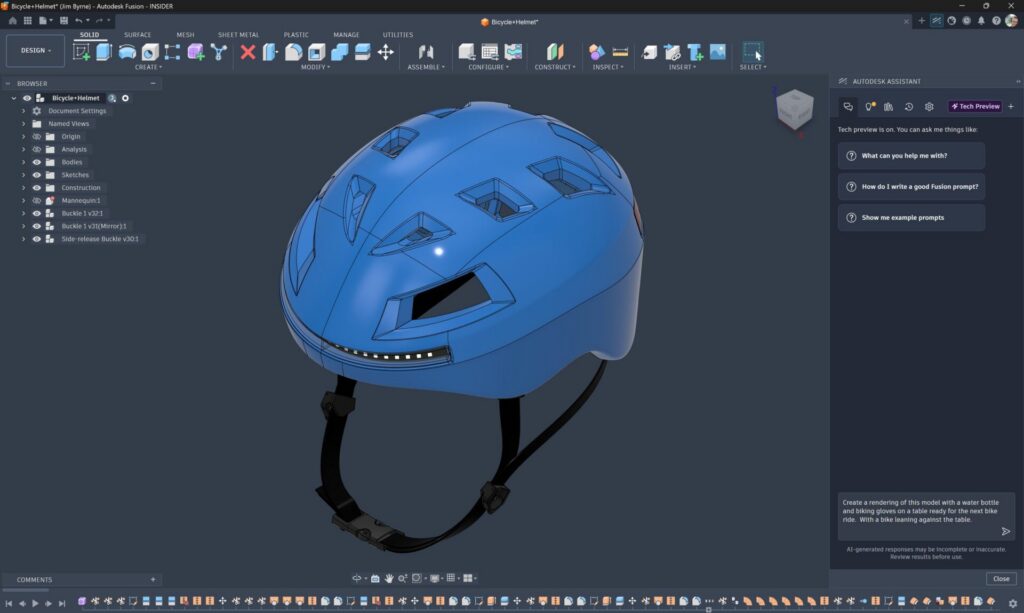
Autodesk Fusion uses natural language prompts to drive AI‑assisted rendering outcomes. Instead of manually adjusting dozens of rendering controls, designers can describe what they want to see—such as material qualities, lighting conditions, or visual style—and let AI interpret and generate the result.
This approach:
- Lowers the learning curve for rendering
- Speeds up early design ideation
- Makes visualization more accessible to non‑specialists
It also aligns with how designers already think and communicate about form, appearance, and intent.
AI-assisted rendering in the Fusion design environment
AI-assisted rendering in Fusion is embedded directly within the design workspace, rather than relying on exports or disconnected tools. Designers are able to stay in context while working, receive visual feedback earlier in the process, and reduce handoffs between tools or teams. As a result, rendering becomes a continuous part of the design workflow instead of a final, downstream task.
Faster iteration without over‑engineering
One of the biggest advantages of AI‑assisted rendering in Fusion is speed without over‑commitment. Designers can generate visual variants quickly without:
- Locking down materials too early
- Building production‑ready scenes
- Spending hours fine‑tuning lighting setups
Ultimately, teams are able to make better, more informed design decisions by gaining the ability to compare ideas visually before investing time in detailed refinement.
How Microsoft helps enable context-aware design visualization
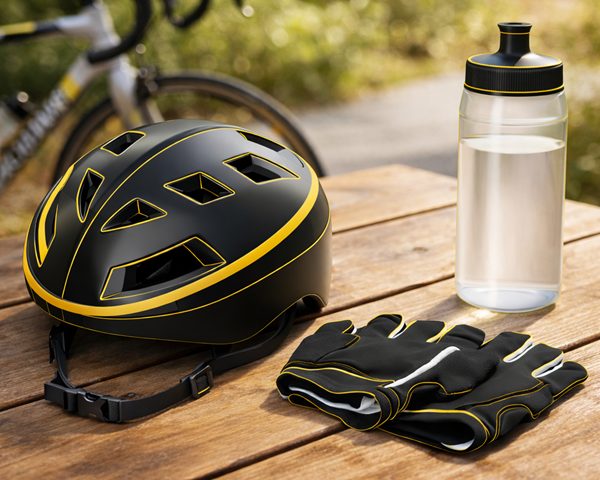
AI‑driven design assistance relies on enterprise‑grade cloud and AI platforms, including those from Microsoft, to support reliability, performance, and scalability at production scale. In Fusion, users can take their 3D designs and generate context‑aware, photorealistic environments, such as placing a designed object on a desk, without leaving the design application.
By combining design‑level geometry from Fusion with large‑scale AI infrastructure from Microsoft, users can produce realistic visual scenes directly from their models, while meeting enterprise requirements for security and operational stability.
What this means for designers and teams
AI‑assisted rendering isn’t about replacing design expertise. It’s about:
- Reducing setup time
- Making visualization part of everyday design thinking
- Allowing teams to explore more options with less effort
As these capabilities mature, rendering becomes less of a specialized task and more of a natural extension of modeling and ideation.
AI assisted rendering in Fusion turns visualization into a natural, everyday part of design, helping teams move faster from ideas to informed decisions without breaking their flow.