 Krystina Docil
The updated Avnet App introduces Public Components, bringing Avnet’s catalog into your Autodesk Fusion electronics design workflow.
Picking a component shouldn’t mean leaving your design. Yet it often does: you check a datasheet, compare pricing elsewhere, look up lead times, then build a library part by hand before you place anything.
With the Avnet App for Autodesk Fusion, that research happens where your design lives, from first search to final placement.
Where design and supply chain meet
Autodesk Fusion brings design, engineering, and electronics workflows together in a connected, cloud-based platform. Avnet contributes component sourcing expertise and supply chain information to help engineers evaluate parts as they design.
Together, Autodesk and Avnet help connect two important parts of electronics development: selecting components that meet design requirements and understanding the implications of sourcing them.
This gives engineers greater visibility into component information earlier in the process, when design decisions are still being made.
What’s new: Public Components in the Place panel
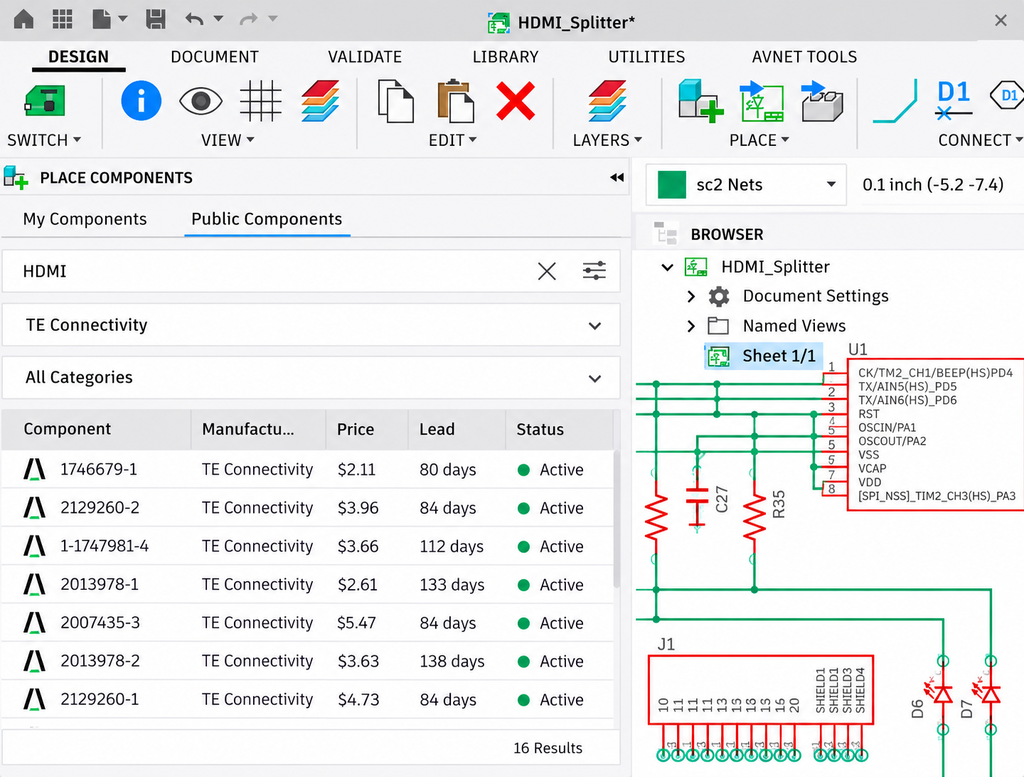
The updated Avnet App for Autodesk Fusion introduces Public Components, offering Avnet’s catalog of 40,000 parts (and counting) into your electronics design environment.
Once the add-in is installed, engineers can access the new Public Components tab in the Place panel to search by manufacturer part name or number, filter by manufacturer or category, and view pricing, lead time, and component status directly within their design workflow.
Make sourcing decisions while you design, not after
The free Avnet App for Autodesk Fusion extends the electronics workflow beyond initial component search, also supporting design development, component evaluation, and bill of materials (BOM) preparation.
Three capabilities help connect these activities:
- Start from reference designs: Access reference schematics and block diagrams from Avnet’s library and bring them into your projects. These resources provide a starting point for new designs or a reference when refining existing ones.
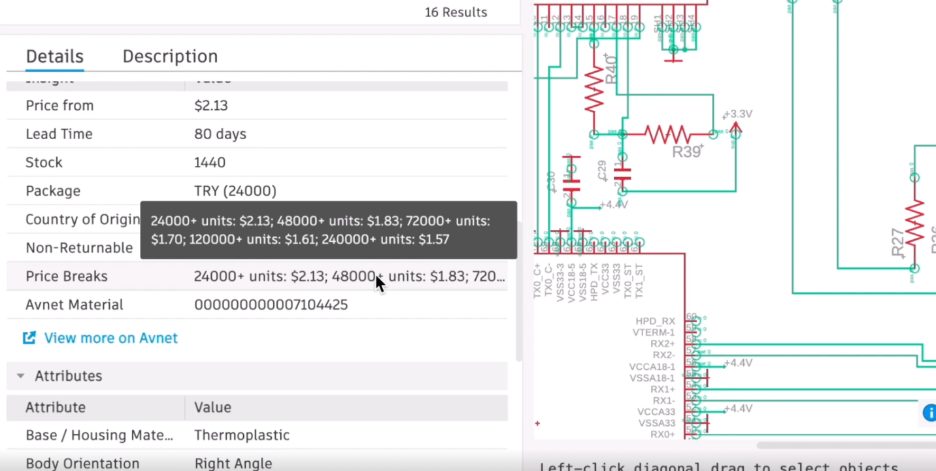
- Source with the data in front of you: Review component pricing and availability while developing your design. BOM optimization capabilities help evaluate price, lead time, and lifecycle considerations. Export your BOM in XLSX or CSV format, share it by email, or contact an Avnet representative to discuss pricing options.
- Find and swap alternatives: Search for components by parameter, compare pricing, availability, and lead times, and swap alternatives into your schematic. Access datasheets, symbols, and footprints to support component evaluation.
Together, these capabilities help engineers consider sourcing requirements throughout electronics development rather than waiting until the BOM is complete.
Get started today
To explore the add-in:
- Download the Avnet App from the Autodesk Design and Make Marketplace.
- Run the Avnet App installer. The app uses a custom installer rather than the standard Marketplace installer. Running it installs the Avnet App directly into Autodesk Fusion
- Find the Avnet tools. Open an electronics design. The Avnet tools tab in the toolbar includes a design library, parts search, and cost and availability analysis.
- Start sourcing. Open a schematic, go to the Place panel, and select Public Components to search Avnet’s catalog and begin evaluating parts.
Download the Avnet App today and make component selection a more seamless part of your design workflow.,