 Sualp Ozel
Turn repeatable design and manufacturing processes into visual workflows you can build, run, share, and reuse in Autodesk Fusion.

Elevate your design and manufacturing processes with Autodesk Fusion
Think about the manufacturing jobs you’ve programmed in Fusion over the years.
How many times have you created a setup, selected geometry, chosen tools and operations, generated toolpaths, and then done it all again for the next part?
When you’re programming jobs in Fusion, the hard part usually isn’t knowing which buttons to click. It’s knowing which steps to take, in what order, and which decisions to make along the way.
And in many organizations, that kind of knowledge still lives in the heads of experienced engineers and programmers.
System Modeler gives you a way to capture that knowledge and turn it into automation your team can reuse.
Coming with the October 2026 Fusion release, System Modeler brings visual workflow automation directly into Fusion.
Automation you can see
System Modeler lets you build automation by connecting nodes on a canvas, instead of writing code.
Each node performs an action in Fusion. Connect nodes together, and you create a graph that shows what should happen, in what order, and how information moves from one step to the next.
- Need to find components in an assembly, create flat patterns, export them, and arrange them onto sheets? Build the workflow once, then run it whenever you need it.
- Need to recognize features, choose the right tool, create a machining setup, and generate operations? That can be a graph too.
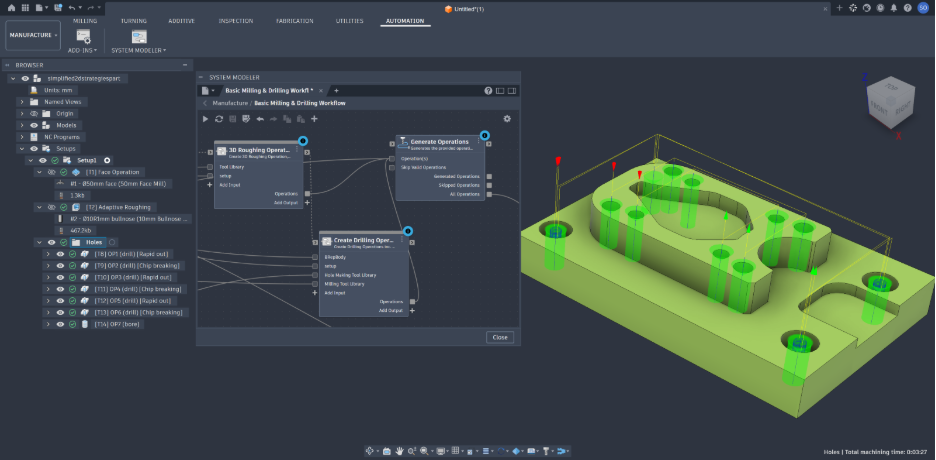
You’ll find System Modeler in the new Automation tab in the Design and Manufacture workspaces.
The library gives you the available building blocks. The canvas is where you connect them into workflows. When you select a node, the Details panel lets you configure it or understand what happened after it ran.
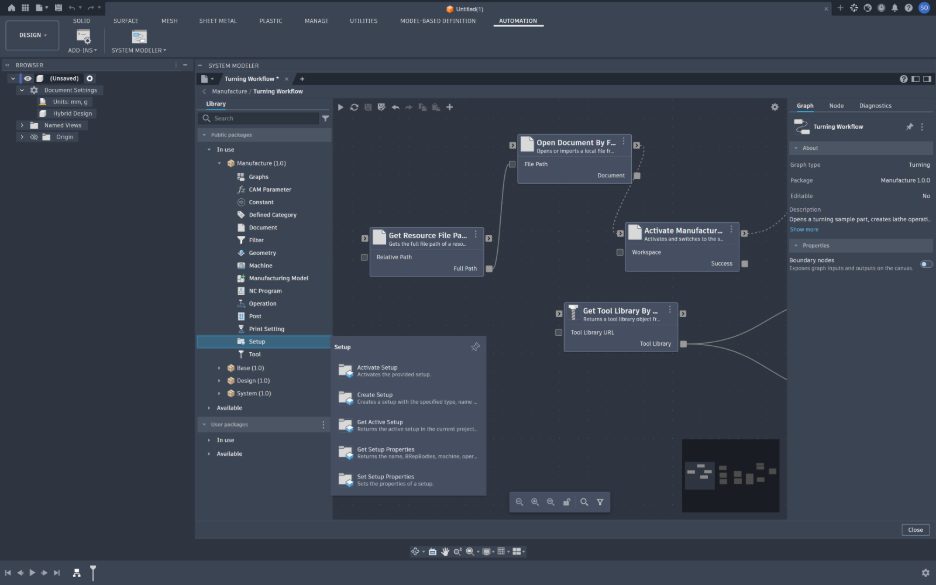
Because the workflow is visual, you don’t have to reverse-engineer a script to understand what it does. The automation becomes its own documentation.
Automate the workflow, not just the command
This is where System Modeler becomes especially useful.
Automation is not especially helpful if it only replaces one click with one node. The real opportunity is connecting many steps into a repeatable engineering process.
Take machining, for example.
We built a graph that can find the body to manufacture, create a milling setup, choose an appropriate face mill from a tool library, create a facing operation, and generate the toolpath.
The tool selection is not hard-coded. The graph can search the library using criteria like diameter, flute count, flute length, or tool name, then keep the workflow moving.
Fusion’s feature recognition can identify holes in the part. The graph can then filter those results to find counterbores, collect the matching faces, and run additional operations on them.
One graph. Multiple decisions. A repeatable workflow.
And it is not limited to manufacturing. A System Modeler graph can also find all the sheet metal components in an assembly, create their flat patterns, export them, bring them into a new Fusion document, and arrange them onto sheets.
The results are still created as native Fusion features and appear in the parametric timeline.
That is the idea behind System Modeler:
Capture the process once, then apply it again when the next job comes along.
Build once. Reuse everywhere.
Engineering workflows often reuse the same logic. System Modeler is designed for that. When part of a graph does something useful, you do not have to rebuild it every time. You can turn that section into a subgraph and reuse it as a single node in other workflows. Think of it as creating your own building block.
Maybe you have a reliable sequence for selecting a tool and creating a facing operation. Or identifying a particular type of geometry. Or preparing a part for additive manufacturing. Build that logic once and use it wherever you need it. Entire graphs can also be reused inside other graphs, so simple automations can become building blocks for more advanced workflows.
System Modeler also includes the logic you need for real engineering processes, including:
- For-Each and While loops
- Conditional execution
- List filtering and manipulation
- Reusable subgraphs
- Typed inputs and outputs
That means workflows can respond to the design they are working on, rather than simply replaying a fixed sequence of commands.
Share the way your team works
Reuse becomes even more powerful when it goes beyond one person. In System Modeler, nodes and graphs are organized into packages.
The first release includes packages for:
- Base – common functions such as math, logic and list operations
- System – Fusion-level operations including documents and workspaces
- Design – design and geometry workflows
- Manufacture – manufacturing workflows including setups, tooling and NC programs
These packages include nodes and example graphs to help you get started.
Your own workflows live in packages you create. You can export and share those packages, so your team can build its own automation library.
An experienced engineer can capture a proven process once and make it available to everyone who needs it.
Instead of explaining the same workflow again, or maintaining multiple copies of the same script, you can share the workflow itself.
Know what happened
Making automation easier to create does not mean turning it into a black box. When a graph runs, System Modeler shows you what happened at each step. You can inspect values flowing between nodes, see execution times, and review diagnostics when something does not work as expected.
Required inputs are also validated before execution, which helps catch incomplete workflows before they run. That matters because engineering automation needs to be understandable, not just executable.
You don’t have to be a developer
Fusion has supported powerful automation through its APIs for years. But using those APIs has traditionally meant knowing Python, C++, or another development environment. System Modeler gives designers, manufacturing engineers, and other Fusion users another way in.
If you can understand the engineering process, you can start turning it into automation.
You can start with an existing example, change a few nodes, and see what happens. Or you can build a small workflow around something you do every day. Developers can still extend the experience and create more advanced building blocks, but everyone on the team does not need to become a developer to use the automation they create.
This is just the beginning
The first release focuses on the workflows where we see the most immediate opportunities. Manufacturing content is strongest around milling, with initial capabilities for turning and additive workflows. Design content focuses primarily on parametric solid modeling. But System Modeler was built to grow.
It is built on the Autodesk Libraries platform, which means we can deliver new nodes, packages, and example workflows without waiting for a full Fusion product release. We are also exploring workflows that go beyond a single Autodesk product.
At Autodesk University 2026, we demonstrated Inventor as a connected client, allowing a graph to coordinate work between Fusion and Inventor.
What will you automate first?
Your organization probably has processes that someone already knows by heart.
Preparing similar parts for manufacturing. Creating setups from established rules. Organizing sheet metal components. Identifying geometry. Applying standards. Preparing additive builds. Moving information from one stage of a process to the next.
Those are good places to start. Build a few nodes. Run them. Turn the part that works into a reusable subgraph. Then build from there.
Autodesk System Modeler will be \available with the October 2026 Fusion release for users with access to the Fusion Manufacturing Extension.
You’ll find it in the Automation tab of the Design and Manufacture workspaces.
We are excited to see what you build, and what you decide you never want to do manually again.
For documentation, examples, feedback and support, visit the Autodesk System Modeler documentation.