 Krystina Docil
Autodesk Fusion provides an integrated environment where design and manufacturing workflows can co-exist, helping teams move from idea to production faster with OSH Cut Metal IQ.

Elevate your design and manufacturing processes with Autodesk Fusion
Sheel metal fabrication comes with practical requirements that can slow down product development: which material and bend radius should you use? Will the geometry work with the fabricator’s equipment? And how can you identify manufacturability issues before sending a part to production?
The partnership with Autodesk Fusion and OSH Cut brings fabrication-specific insights directly into the design process, giving engineers and designers greater clarity and faster feedback while they work. The result is an easier path to designing manufacturable parts and less time spent correcting issues later.
Autodesk Fusion and OSH Cut: from design to fabrication
OSH Cut complements the Fusion workflow with design-checking capabilities, pre-production modeling, integrated material catalogs, online quoting, and an easy path to on-demand sheet metal fabrication.
The OSH Cut Metal IQ add-in for Autodesk Fusion brings fabrication-specific guidance into the design environment, helping you validate designs against real manufacturing requirements as you work. Whether you have experience in sheet metal fabrication or still learning its nuances, Metal IQ provides feedback that can help you make informed design decisions earlier and get to manufacturable parts faster.
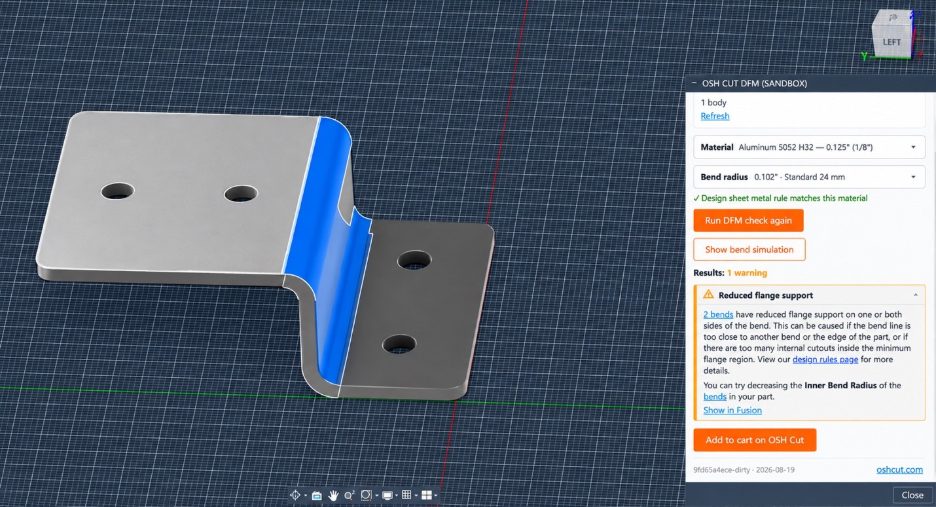
Design with fabrication in mind
With OSH Cut Metal IQ for Autodesk Fusion, fabrication feedback becomes part of the design process. Instead of waiting until quoting or production to identify potential issues, you can validate and refine your sheet metal design as you work.
- Design around available materials: browse the OSH Cut material catalog and apply material and bend radius to your design.
- Check manufacturability: run DFM checks to identify bend-related warnings and errors.
- Visualize potential collisions: simulate bends to see where geometry could interfere with OSH Cut’s press brake tooling.
- Refine and check again: modify the design in Fusion and rerun the DFM check.
For example, when a flange is shortened, the add-in identifies a press brake collision and highlights the interference in the bend simulation. The designer can then lengthen the flange in Fusion and rerun the DFM check—addressing the manufacturing constraint before the part leaves the design environment.
Once the design is ready, add the part to the OSH Cut cart to continue toward quoting and ordering.
This instant feedback can reduce the back-and-forth required to resolve fabrication issues, helping designers get to manufacturable part faster and with greater confidence.
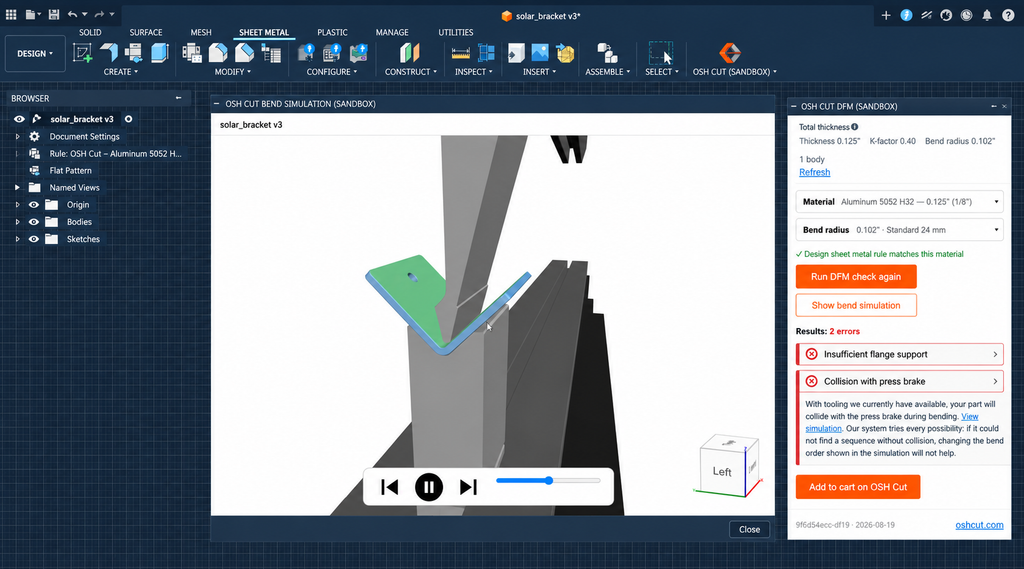
From design checks to ordering
Ordering availability: OSH Cut quoting and ordering is currently available in the United States and select parts of Canada.
Once your design is ready the OSH Cut add-in for Autodesk Fusion provides a direct handoff to OSH Cut. Select Add to cart on OSH Cut to send the part to the OSH Cut website, where you can review the flat pattern and additional manufacturability information.
From there, continue through OSH Cut’s quoting and ordering workflow to review pricing, select a lead time, and complete your order. The engineering and manufacturability work happens in Fusion, while quoting and purchasing continue through OSH Cut, creating a streamlined path from design validation to production.
Get started with the OSH Cut add-in for Autodesk Fusion
Ready to design with OSH Cut manufacturing requirements in your Autodesk Fusion sheet metal workflow? Download the OSH Cut add-in from the Autodesk Design and Make Marketplace, and install it for Fusion.
With the OSH Cut Metal IQ add-in for Autodesk Fusion, designers can get fabrication feedback earlier, resolve potential manufacturing issues while they’re still designing, and move from sheet metal design toward production with greater clarity and speed.