 James Krenisky
At AU 26, new Fusion announcements point to a more connected, automated way for teams to get more work done with the people, tools, and processes they already trust.

Elevate your design and manufacturing processes with Autodesk Fusion
Many manufacturers have already moved beyond experimentation and have started adopting AI and automation tools in their daily workflows.
But even as interest turns into adoption, many teams are still asking practical questions: How do we increase output without adding risk? How do we help experienced people move faster without replacing the judgment they bring? And how do we connect work across engineering and manufacturing without disrupting the tools teams already rely on? The latest Fusion announcements coming from AU 2026 are designed around that reality, pointing toward a practical model for extending capacity by capturing repeatable expertise, connecting decisions to product data, and helping teams move work forward with greater consistency.
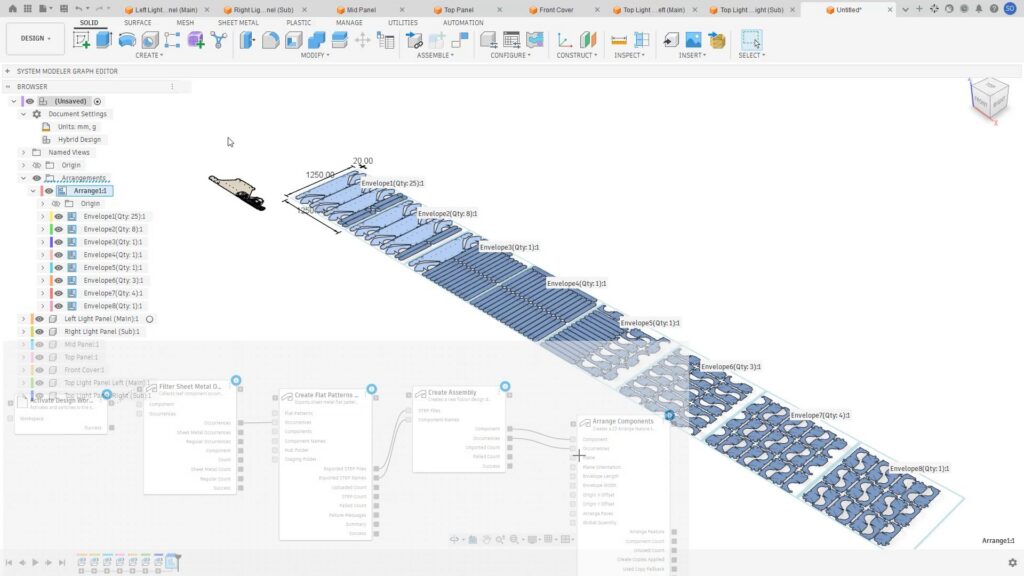
Visual workflow automation for manufacturing
Autodesk System Modeler introduces a new visual environment for creating reusable, graph-based automations across manufacturing processes. That includes workflows for identifying components, reading and authoring of Product Manufacturing Information (PMI), creating setups, generating toolpaths, and preparing parts.
The value is not simply automation for automation’s sake. It is the ability to turn proven steps into repeatable workflows that can support experienced teams, reduce manual rework, and make capacity less dependent on individual handoffs.
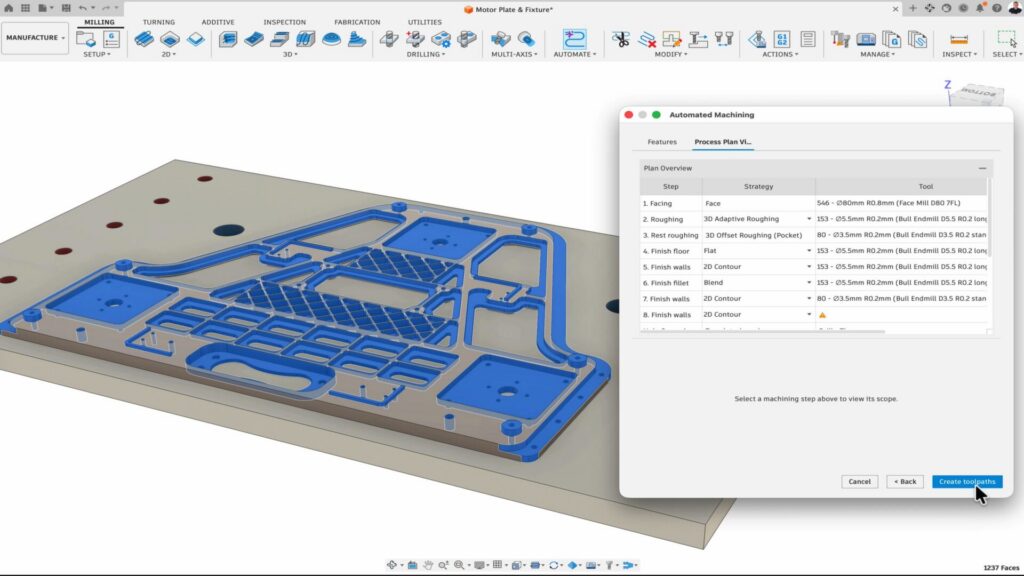
Professional-grade manufacturing expands in Fusion
New Fusion manufacturing capabilities continue to expand what teams can do in a single connected environment. These include new turn/mill simulation capabilities, GPU-powered simulation, and new sheet-metal tools including Corner Closure, Join by Bend, and dedicated Fillet and Chamfer tools.
Together, these additions support the same theme: helping manufacturing teams take on more complex work with tools that feel increasingly complete inside Fusion. For organizations evaluating how and when to modernize, expanded manufacturing depth can make adoption feel less like a separate initiative and more like an extension of work already underway.
Connecting engineering work, decisions, and product data
Fusion’s digital thread and integrated task management connect engineering work directly to the designs, requirements, BOMs, decisions, and changes that shape a product. Tasks are not isolated reminders; they are tied to the product context teams need to make informed progress.
With Autodesk Assistant helping teams reuse existing designs and resolve engineering changes, Fusion can support a more connected way of working—one where decisions, data, and action stay closer together.
Beyond task management, AI is beginning to help teams work more effectively with the engineering knowledge they already have. By surfacing relevant designs, identifying similar parts, assisting with engineering changes, and helping users find trusted information faster, AI can reduce the time spent searching, recreating work, or manually connecting data across systems. The result is not less human expertise, but better access to it across the organization.
As manufacturers look for ways to extend capacity, this type of AI assistance can help experienced teams focus more of their time on engineering and manufacturing decisions while reducing repetitive administrative work. When paired with connected product data, AI becomes a practical tool for helping teams move work forward with greater speed and consistency.
Connecting Inventor workflows to Fusion
Inventor becoming the first Fusion Connected Client marks a significant platform step: connecting desktop Inventor engineering workflows to cloud-based Fusion processes. This includes cross-product automation such as automatically nesting Inventor designs for manufacturing in Fusion.
For teams that rely on Inventor today, this connection helps bridge familiar desktop workflows with the broader Fusion platform. It gives organizations a path to expand what they can do without treating modernization as an all-or-nothing shift.
A practical path to extended capacity
These announcements point to a practical direction for Fusion manufacturing: not replacing the expertise teams depend on but extending it. By making automation more visual and reusable, expanding professional-grade manufacturing capabilities, connecting work to product data, and linking Inventor workflows into Fusion, we’re helping our community build confidence in a more connected manufacturing future.
DISCLAIMER:The capabilities described here are forward-looking and currently in development. Features, functionality, and timing are subject to change. These statements are not intended to be a promise or guarantee of future delivery of products, services, or features but merely reflect our current plans, which may change. Purchasing decisions should not be made based on reliance on these statements.