 Shannon McGarry
This post is also available in:
Discover the 3D modeling tools in Fusion, including parametric, direct, surface, freeform, and mesh modeling. Learn when to use each approach and how Fusion supports professional product development from concept through manufacturing.

Elevate your design and manufacturing processes with Autodesk Fusion
When evaluating professional CAD software, one question comes up repeatedly: What types of 3D modeling does it support?
The answer matters because different design challenges require different modeling approaches. A machined bracket, a consumer electronics enclosure, an ergonomic handheld product, and a reverse-engineered scan all demand different tools and workflows.
Autodesk Fusion includes professional 3D design capabilities, such as parametric, direct, surface, freeform, and mesh modeling. With these capabilities, teams can move between engineering precision, industrial design exploration, and manufacturing preparation without switching software.
Let’s take a look at what each modeling method is, when to use it, and how Autodesk Fusion supports modern product development workflows from concept through manufacturing.
Why supporting multiple modeling approaches matters
Not every product is designed the same way.
A precision-machined flange may require tightly controlled dimensions and engineering relationships. A wearable device may require an organic shape optimized for comfort. A consumer product enclosure may need highly refined exterior surfaces. A reverse-engineering project may begin with a 3D scan rather than a CAD model.
Historically, teams often needed separate software packages for these different workflows. One application for engineering, another for industrial design, and another for working with scan data.
Modern product development moves faster when these workflows are connected, like in Autodesk Fusion. Instead of forcing users into a single modeling methodology, Fusion allows designers and engineers to use the modeling approach that best fits the design problem while continuing to work within the same project environment.
Parametric modeling
For most mechanical engineering projects, parametric modeling remains the foundation of product development.
What is parametric modeling?
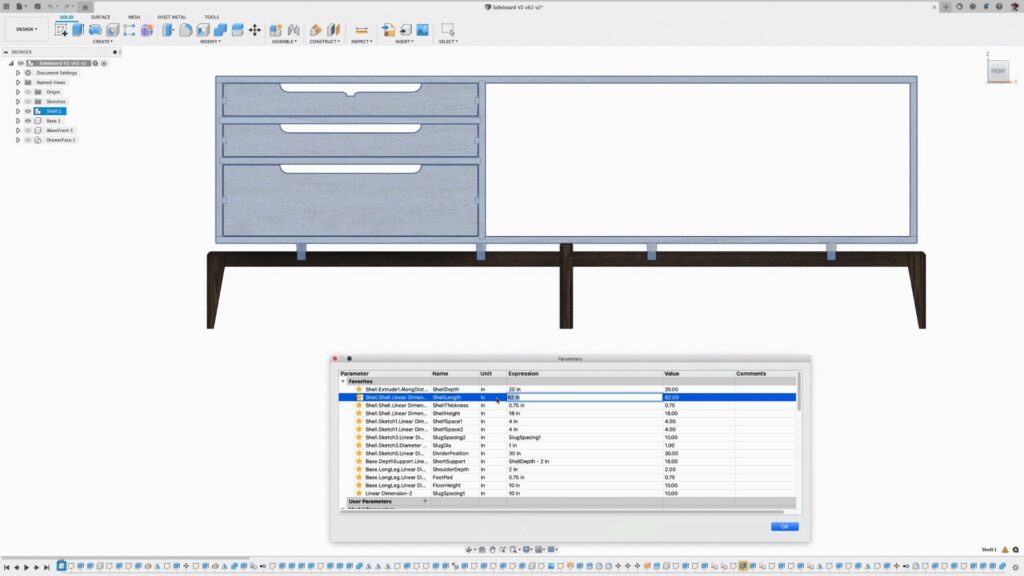
Parametric modeling is a history-based, constraint-driven approach to CAD design. Dimensions, relationships, and design intent are captured as features. When a parameter changes, the model updates automatically.
Think of it as creating a set of design rules rather than simply drawing geometry. Change a hole diameter, wall thickness, or mounting location, and related features update accordingly.
When is parametric modeling best?
Parametric modeling excels when:
- Parts require precise dimensions
- Assemblies contain interdependent components
- Designs undergo frequent revisions
- Engineering changes must be tracked and managed
- Manufacturing tolerances are critical
Mechanical components, fixtures, tooling, sheet metal parts, and production-ready products often rely heavily on parametric workflows.
Parametric capabilities in Fusion
Fusion provides numerous parametric design tools, including:
- Sketch constraints
- Dimensional relationships
- History-based feature modeling
- Feature timeline management
- Pattern and mirror operations
- Design configurations and variations
These tools help engineering teams maintain design intent throughout development while enabling rapid iteration as requirements evolve.
Direct modeling
Not every design change requires rebuilding feature history. Sometimes you simply need to modify geometry quickly.
What is direct modeling?
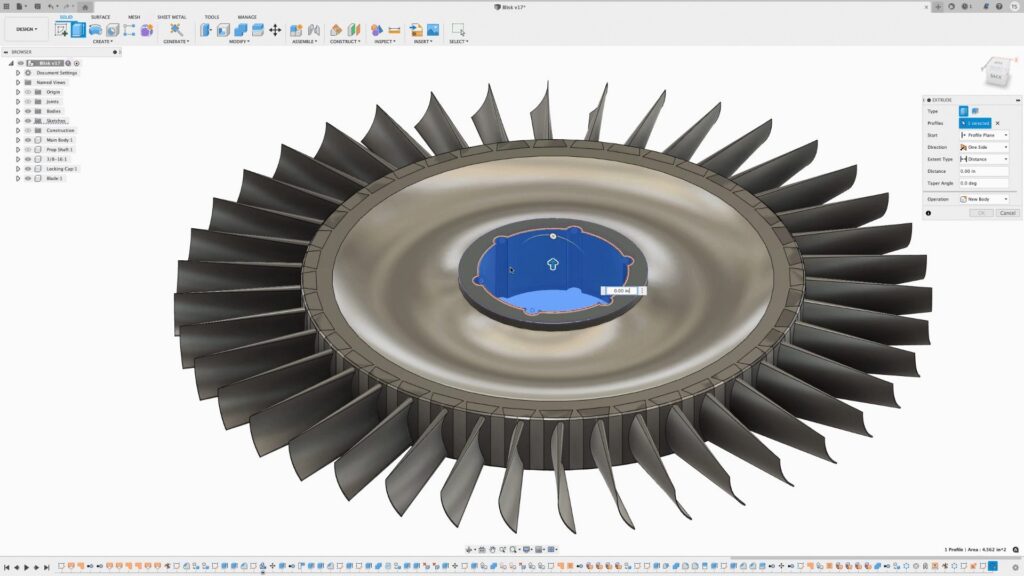
Direct modeling allows users to edit geometry directly without relying on a feature-history workflow.
Faces can be moved, resized, deleted, offset, or manipulated directly within the model. Rather than changing a series of upstream features, you interact directly with the final geometry.
When is direct modeling best?
Direct modeling is particularly useful for:
- Editing imported geometry
- Vendor or supplier models
- Concept development
- One-off design modifications
- Fast experimentation
It’s often the fastest way to make changes when design intent doesn’t need to be heavily controlled.
Parametric vs. direct modeling
Parametric modeling prioritizes repeatability and engineering control.
Direct modeling prioritizes speed and flexibility.
The advantage of Fusion is that teams don’t have to choose one approach forever. Designers can use the workflow that makes the most sense for a given situation without abandoning the larger design process.
For many organizations, this combination supports both structured engineering work and rapid concept exploration
Surface modeling
Some products depend on geometric quality as much as engineering precision and that’s where surface modeling becomes critical.
What is surface modeling?
Surface modeling provides detailed control over individual surfaces, allowing designers to define complex shapes, smooth transitions, and aesthetic forms that would be difficult to create using traditional solid modeling alone.
Instead of focusing on volume, surface modeling focuses on the quality of the outer skin.
What is Class-A surfacing?
Class-A surfaces are highly refined surfaces with curvature continuity and smooth transitions.
These surfaces are often required for:
- Automotive exterior panels
- Consumer electronics
- High-end industrial products
- Luxury goods
- Products where appearance drives purchasing decisions
Even subtle imperfections can become visible on polished or reflective products.
Autodesk Fusion surface tools
Fusion includes advanced surfacing capabilities such as:
- Lofts
- Sweeps
- Boundary surfaces
- Patch creation
- Surface trimming
- Surface stitching
- Curvature analysis
These tools allow teams to evaluate and refine shape quality while maintaining engineering accuracy and manufacturability.
Freeform modeling
Not every product starts with dimensions. Some products begin as shapes.
What is freeform modeling?
Freeform modeling allows designers to create smooth, organic forms by manipulating control points rather than relying entirely on dimensions and engineering constraints.
Many designers describe the experience as digital sculpting. Instead of building geometry with features, you shape the model directly.
Best applications for freeform modeling
Freeform design is commonly used for:
- Ergonomic products
- Wearables
- Sports equipment
- Medical devices
- Consumer goods
- Industrial design concepts
These products often require forms that feel natural in the hand or align with visual design goals rather than strict geometric definitions.
Fusion’s Sculpt workspace
Fusion’s Sculpt workspace uses T-Spline technology to create smooth organic forms.
Designers can manipulate surfaces using cage-based controls, then convert those forms into solid or surface geometry for engineering refinement and manufacturing preparation.
This creates a bridge between industrial design and engineering workflows without requiring separate software applications.
Mesh modeling
Modern product development increasingly relies on scanned geometry and additive manufacturing and that’s where mesh workflows become important.
What is mesh modeling?
Mesh modeling involves working with triangulated geometry rather than traditional CAD solids.
You’ll typically encounter mesh files when working with:
- STL files
- OBJ files
- 3D scans
- Additive manufacturing workflows
- Reverse engineering projects
Common mesh modeling use cases
Mesh workflows support activities such as:
- Scan-to-CAD projects
- Reverse engineering
- Legacy part recreation
- Product modification
- Medical modeling
- Additive manufacturing preparation
Autodesk Fusion mesh capabilities
Fusion supports:
- Mesh import
- Mesh repair
- Mesh editing
- Mesh conversion workflows
- Scan-based design processes
This allows teams to transform physical objects into digital models and integrate scanned geometry into broader engineering workflows.
From 3D model to manufacturing-ready design
Creating the model is only part of the product development process. Eventually, designs must be validated, documented, and manufactured.
In Autodesk Fusion, all five modeling approaches feed into downstream workflows including:
- CAD-to-CAM programming
- CNC machining preparation
- Simulation and analysis
- Technical drawings
- Product documentation
- Manufacturing handoff
- Design collaboration
- Data management
This connection between design and manufacturing helps reduce data silos, streamline revisions, and maintain consistency throughout development.
Which modeling approach should you use?
The answer depends on the product you’re designing.
| Design Challenge | Recommended Approach |
|---|---|
| Mechanical components | Parametric Modeling |
| Imported geometry edits | Direct Modeling |
| Consumer product aesthetics | Surface Modeling |
| Ergonomic shapes | Freeform Modeling |
| Reverse engineering | Mesh Modeling |
Most real-world products combine several of these approaches and that’s why professional design teams increasingly prefer platforms that support multiple workflows within a single environment.
Try Autodesk Fusion for free
Whether you’re creating precision mechanical components, consumer products, organic forms, or manufacturing-ready assemblies, Autodesk Fusion provides the flexibility to choose the modeling approach that best fits your project.
Try Autodesk Fusion free for 30 days and explore parametric, direct, surface, freeform, and mesh modeling in a single connected product development platform.
Frequently asked questions
Autodesk Fusion supports parametric modeling, direct modeling, surface modeling, freeform modeling, and mesh modeling within a unified product development environment.
Yes. Autodesk Fusion supports mesh workflows, including importing mesh files, editing mesh geometry, and converting mesh data for reverse engineering and manufacturing applications.
Freeform modeling in Fusion uses T-Spline technology to allow designers to sculpt organic shapes using control points. These forms can later be converted into solid geometry for engineering and manufacturing workflows.
Yes. Autodesk Fusion includes professional surfacing tools such as lofts, sweeps, boundary surfaces, and curvature analysis for creating smooth and aesthetically refined geometry.
Yes. Autodesk Fusion supports direct modeling, allowing users to manipulate geometry without relying entirely on feature history. This is particularly useful for imported models and quick design changes.
Parametric modeling is a history-based design approach that uses dimensions, constraints, and feature relationships to control geometry. Changes automatically update across the design as parameters are modified