 Shannon McGarry
This article explores the challenge of managing design changes during new product development (NPD) and why unstructured processes derail timelines and inflate costs. It examines how Autodesk Fusion gives cross-functional teams a connected, traceable system for handling change requests, approvals, and bill of materials (BOM) updates from first prototype to final release.

Elevate your design and manufacturing processes with Autodesk Fusion
The causes and challenges of NPD changes
NPD is iterative by design. Whether it’s ideation, prototyping, or testing, every stage brings new information that requires design changes. The longer these design changes remain unresolved, the costlier they become to fix and the greater the impact on tooling commitments, supplier contracts, and the production timeline.

Design changes can be more complex when products require contributions from multidisciplinary teams. Where mechanical, electrical, and industrial designs all work in different tools and platforms, design data is inherently fragmented. Designers, engineers, and procurement teams all need up-to-date data, but often end up relying on scattered spreadsheets and email threads.
As such, teams that manage change through manual communication often spend more time resolving downstream errors than actually developing their product. Even worse, without traceability and clear documentation, the same challenges can manifest as compliance risk. When regulators or auditors ask which design version reached production, the answer shouldn’t be buried in an email chain.
Autodesk Fusion for structured change management
Autodesk Fusion helps NPD teams manage change by bringing design data and change management into a single connected environment.
For starters, product designers can use Fusion to create and maintain CAD models, BOMs, and specifications. With Fusion Manage, teams can bring process management directly into their workflows, capturing changes at their source in a cohesive, readily accessible manner.
Within this workflow, engineers can use Fusion to initiate a change request (CR) when they need to update their design. Fusion automatically routes the request to the appropriate reviewers, with configurable escalation rules to ensure approvals proceed on schedule. With such a process, Fusion guarantees traceability. Teams simply review the proposed change, authorize modifications through defined approval hierarchies, and implement and update all affected drawings and BOMs. Because Fusion logs every step automatically, quality and compliance teams can easily access a clear audit trail from problem to resolution.
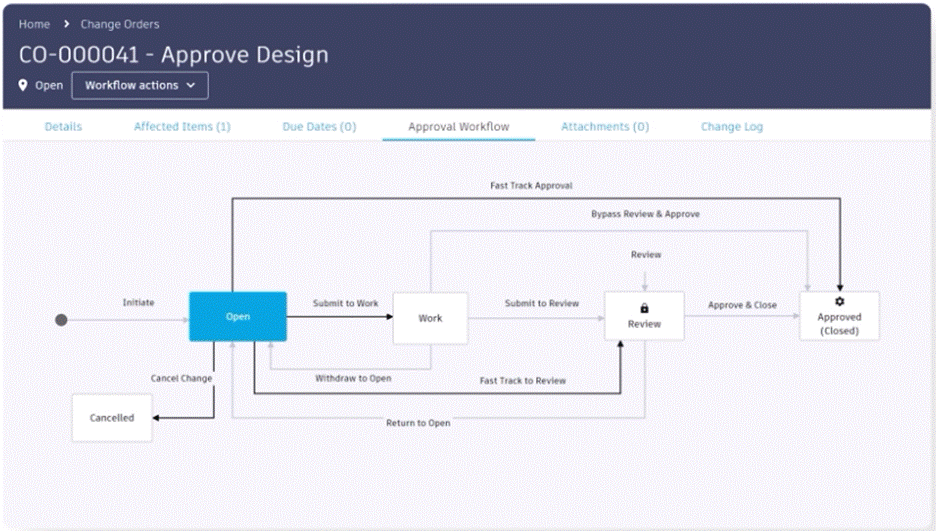
To simplify the process further, Fusion includes a visual configuration editor that lets teams adjust approval routes and add validation steps without custom code. Organizations can configure faster paths for minor revisions or require additional review stages for changes affecting regulated components. With Fusion’s real-time dashboards, managers can monitor all change workflows and identify bottlenecks before they affect delivery schedules.
In that way, the same connected environment that Fusion uses to help teams manage NPD changes also prepares them for new product introduction (NPI).
From reactive to resilient
Uncontrolled changes become more costly with each subsequent handoff. All things considered, teams that manage change through manual processes are at much higher risk of launch issues, whether production defects, supplier disputes, or compliance failures. With Autodesk Fusion, product teams can replace reactive problem-solving with a structured, auditable change process that keeps every function working from accurate, current data. Teams using Fusion can handle change confidently without losing momentum.
Change management in NPD is the process of tracking, reviewing, approving, and implementing design changes across a product’s lifecycle. In Autodesk Fusion, this includes managing change requests, approvals, and updates to CAD models, specifications, and bills of materials (BOMs) within a connected system.
Autodesk Fusion centralizes design data and change processes in one environment. Teams can create change requests, route them for approval, and update designs and BOMs without switching tools, while maintaining full visibility and control across the workflow.
Fusion logs every step in the change process, from initial request through approval and implementation, creating a complete audit trail. This allows teams to track who approved changes, when they were made, and how they impacted the design.
Fusion integrates BOM management with change workflows, so any approved design change is reflected in the BOM. Teams can create, manage, and track BOMs alongside engineering changes, ensuring all stakeholders work from accurate data.
Yes. Fusion provides configurable workflows that allow teams to define approval paths, add validation steps, and adjust processes based on change complexity or regulatory requirements.