 James Krenisky
Autodesk Fusion’s April 2026 update delivers workflow‑driven improvements for electronics, configurable designs, and advanced manufacturing teams.

Elevate your design and manufacturing processes with Autodesk Fusion
The April 2026 update to Autodesk Fusion delivers five major feature enhancements designed to streamline complex workflows, reduce manual setup time, and strengthen the connection between design and manufacturing. These updates address real pain points reported by users working with electronics, configurable products, and multi-axis machining.
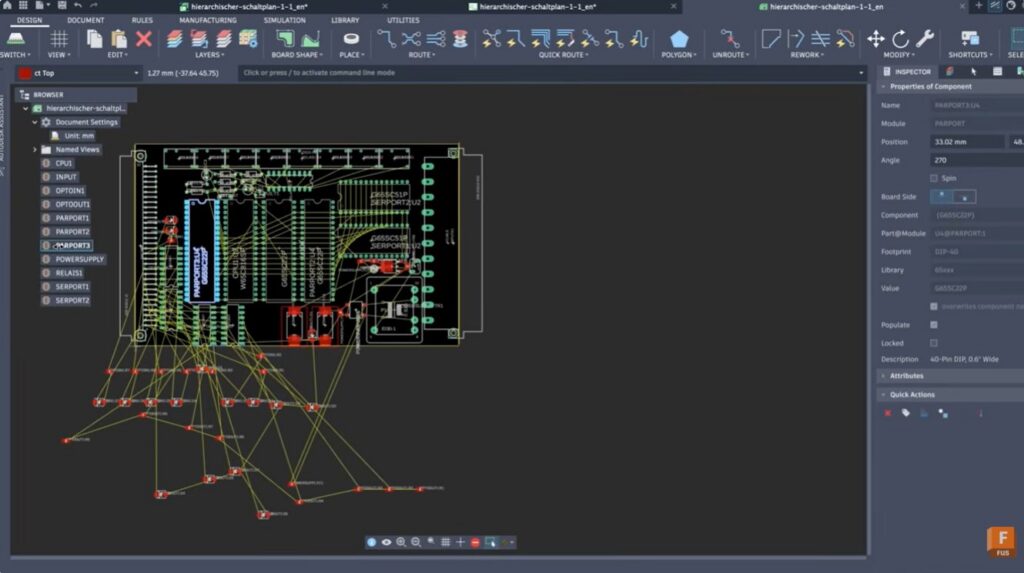
1. Dedicated electronics browser for schematic and PCB design
Navigating complex electronic designs just got significantly easier. Fusion now includes a dedicated electronics browser for schematic and 2D PCB work, bringing the same familiar hierarchical browsing pattern you already use throughout the platform.
This structured view replaces the canvas-only navigation approach with a comprehensive organizational system. You can now:
- Create and rename schematic sheets directly from the browser
- Hover over any sheet to preview it instantly, saving time when working across large designs
- Convert sheets into reusable modules to support scalable, modular design workflows
- Access named views, document settings, assembly variant selection, and find-in-window tools from a single location
For teams managing multi-sheet electronic designs with numerous modules and instances, this browser transforms what was once a complicated navigation challenge into a straightforward, organized workflow.
2. Construction geometry enhancements
This release includes a suite of construction geometry improvements that collectively accelerate the design process.
Pattern construction geometry
You can now pattern construction geometry including planes, axes, and points using rectangular, circular, and path-based patterns. This capability is built directly into the existing pattern command, eliminating the need to manually rebuild duplicated reference geometry.
The benefits extend beyond time savings. Patterning construction geometry also enables further automation through APIs, making it particularly valuable for teams building configurable or highly structured products.
Perpendicular construction plane command
A new command creates perpendicular construction planes directly from planar faces. You can flip orientation using U or V direction controls, anchor the plane to a reference point, and offset it along the perpendicular direction.
Improved plane interactions
Visual feedback when working with construction planes has been enhanced:
- Edge highlighting now features a stronger white overlay, consistent with face highlighting behavior
- Dragging to resize a plane shows dynamic updates during the drag operation rather than snapping to the new size only on release
Extended path geometry
Planes and points along a path can now extend beyond the endpoint of a selected edge or chain, removing previous boundary limitations.
3. Configuration rules
Building highly configurable products involves managing complex dependencies where one choice can require, exclude, or constrain another option. Tracking these relationships manually is error-prone and difficult to scale.
Configuration rules provide a systematic way to define this logic once and let Fusion enforce it automatically. The feature uses a visual rules engine with a drag-and-drop canvas where you connect blocks to define conditions and outcomes. No coding is required.
The visual approach makes logic easy to create, review, and maintain. Engineering teams can own and audit the rules themselves rather than relying on tribal knowledge or downstream verification processes.
Immediate and retroactive rnforcement
Once enabled, rules activate immediately. Fusion applies them not just to future changes but also updates existing values in the configuration table to ensure compliance. From the moment you enable a rule, your entire table becomes consistent.
As users make subsequent changes, Fusion enforces the rules in real time. The result is:
- Fewer configuration errors in product designs
- No non-manufacturable combinations slipping through
- A more scalable process for multi-user teams managing complex product ranges
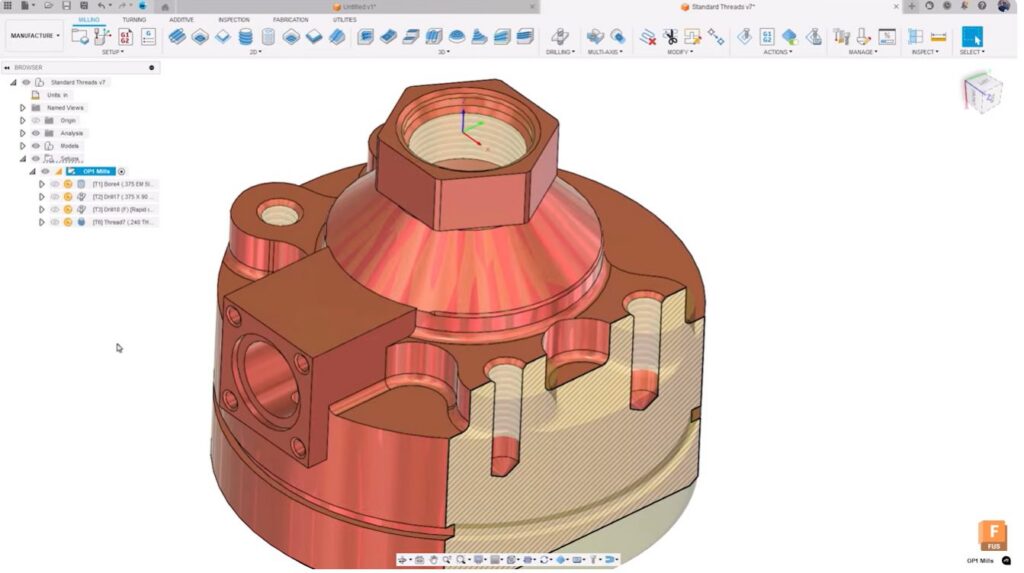
4. Thread data integration from Design to CAM
Milling customers can now consume thread data directly from the design environment, eliminating manual parameter entry in CAM.
Fusion reads thread definitions already established in design, including pitch, designation, threading hand, and other specifications. This data flows directly into your thread milling workflow.
The integration is fully parametric. When a thread is updated in design, that change automatically propagates to manufacturing, creating a seamless design-to-manufacturing connection that reduces errors and maintains process reliability.
One workflow constraint remains: you cannot select multiple different diameters simultaneously. When your part has multiple thread diameters, you’ll need to work with one diameter at a time. This is a minor limitation in an otherwise significant time-saving enhancement.
5. Box clearance geometry for multi-axis linking
For multi-axis programmers, controlling linking motion is critical. Unnecessary retracts consume cycle time and can create unpredictable tool movement.
Box clearance geometry provides more precise, geometry-specific control over how the tool links between cuts. This option joins the existing plane, cylinder, and sphere clearance options in the linking tab of your 3D toolpath form.
Flexible access and control
Box clearance is accessible in two locations:
- Directly from the top of the linking tab when setting up a toolpath
- When making leads and links modifications to an existing toolpath
A simple checkbox lets you keep the box symmetrical or scale it asymmetrically using drag handles in the graphics window. This flexibility allows you to dial in exactly the clearance envelope you need without over-retracting to a single plane when a tighter clearance is sufficient.
The result is more efficient toolpaths, reduced cycle time, and better control over machine movement in multi-axis setups.
Box clearance requires the manufacturing extension, though leads and links modification access is available across all manufacturing licenses.
Continuous improvement through user feedback
These updates come directly from customer feedback, reflecting Autodesk’s commitment to addressing real-world workflow challenges. The Fusion Insider program offers early access to major features and the opportunity to shape future releases before they ship.