 Shannon McGarry
Discover the value of simulation software in design and engineering, its applications across industries, and how Autodesk Nastran and Autodesk Fusion provide powerful tools for optimizing product design and manufacturing.
Through advanced modeling and analysis capabilities, simulation allows for thorough evaluation of designs under realistic conditions, unlocking efficient problem-solving, cost reduction, and product innovation. Let’s learn more about simulation software and the offerings that Autodesk brings to the table.
Understanding simulation software
Simulation software provides a digital framework for replicating physical systems and processes using mathematical models. Engineers can gain valuable insights without needing physical prototypes by mimicking the behavior of materials, components, and assemblies under various conditions. Ultimately, these tools enable a controlled environment to test design variables, understand performance limitations, and visualize results.
Modern simulation integrates complex algorithms and computing power to handle intricate analyses such as stress-strain relationships, heat transfer, fluid dynamics, and electromagnetic interactions. The ability to study these factors in tandem gives engineers the confidence to address real-world challenges in innovative ways.
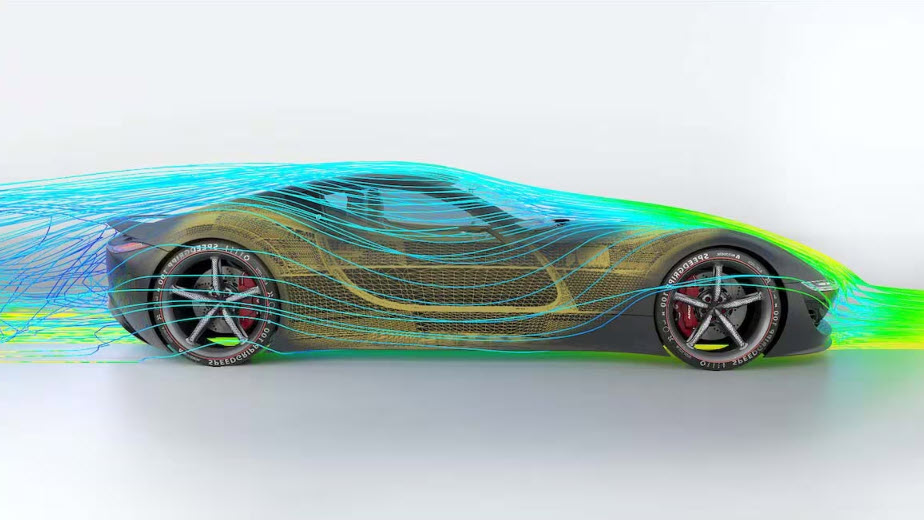
The greatest strength of simulation software is its ability to streamline design workflows, minimize costs, and enhance product quality. By replacing iterative physical prototyping with virtual testing, simulation allows teams to identify potential issues early in the design cycle. For instance, stress and load analyses can determine whether a structure will meet performance requirements, while fluid flow studies can optimize cooling mechanisms in electronics or enhance aerodynamics in automotive applications.
Simulation also reduces development timelines and accelerates time-to-market by eliminating inefficiencies in the design process. It fosters better decision-making by providing a data-driven understanding of a product’s performance.
Benefits of simulation software
The primary benefits of simulation software in design and manufacturing include:
- Risk-free experimentation: Allows for testing and validation of “what if” scenarios in a virtual environment without disrupting real-world operations.
- Cost reduction: Identifies potential issues early in the design process, saving time and money by avoiding costly mistakes.
- Enhanced efficiency: Optimizes processes, layouts, and workflows to improve productivity and reduce bottlenecks.
- Accurate predictions: Provides data-driven insights and realistic predictions to support informed decision-making.
- Flexibility: Enables quick adaptations to changes in production schedules, operating policies, and market conditions.
- Improved communication: Uses realistic 3D visuals and detailed process steps to help teams and stakeholders understand complex scenarios.
- Faster development: Accelerates design and manufacturing timelines by allowing quick testing and iteration of various configurations.
- Validation of investments: Helps validate proposed investments and strategic decisions, ensuring resources are allocated effectively.
- Continuous improvement: Supports ongoing optimization and refinement of manufacturing processes for sustained improvements in performance.
Common applications in design & engineering
Three common applications of simulation software in product design and engineering include:
Performance testing and optimization
Engineers can test and optimize the performance of a product under various conditions without the need for physical prototypes. This includes evaluating structural integrity, thermal performance, fluid dynamics, and other critical factors. By identifying potential issues early, engineers can make necessary adjustments to enhance product performance and reliability.
Design validation and verification
Simulation helps validate and verify the design against specified requirements and standards. Engineers can simulate real-world operating conditions to ensure the product meets safety, durability, and functionality criteria. This reduces the risk of design flaws and ensures that the final product will perform as intended.
Virtual prototyping and iteration
Engineers can explore different design alternatives, materials, and configurations quickly and cost-effectively. This accelerates the design process, reduces development costs, and leads to more innovative and optimized product designs.
Types of simulation studies
Simulation software encompasses a broad range of study types, each tailored to address specific engineering concerns. These include
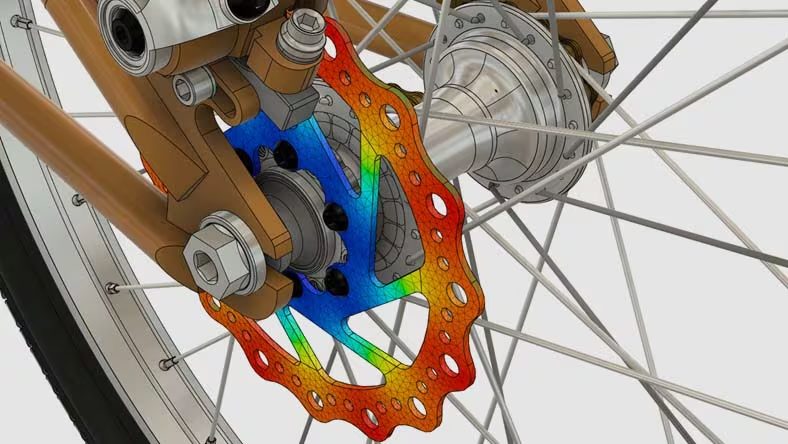
- Finite element analysis (FEA): Used to evaluate structural integrity, FEA examines how materials and components react to mechanical stresses, strains, and deformations. An application of FEA is to ensure that structures are safe and durable under operational loads.
- Computational fluid dynamics (CFD): This simulation type models fluid flow, heat transfer, and pressure distribution. CFD helps optimize designs involving gases and liquids, such as HVAC systems, automotive aerodynamics, or medical devices.
- Thermal analysis: Essential for managing heat flow and temperature distribution, thermal analysis is widely applied in electronics, automotive, and aerospace industries to prevent overheating and enhance energy efficiency.
- Dynamic and motion studies: These studies analyze the behavior of mechanical systems with interconnected components, helping designers understand the motion, vibrations, and forces within assemblies like engines or robotic arms.
- Electromagnetic simulation: With a focus on electromagnetic field behavior, this type of simulation serves electrical and electronic systems, such as antennas, circuit boards, and wireless devices.
Autodesk simulation software solutions
Autodesk Nastran and Autodesk Fusion stand out as premier simulation software solutions due to their comprehensive capabilities and user-friendly interfaces.
Autodesk Nastran, integrated within Autodesk Inventor provides advanced finite element analysis (FEA) capabilities that cater to detailed engineering analysis. It excels in performing linear and nonlinear stress analysis, dynamics, and heat transfer simulations, making it ideal for validating complex designs under various conditions. Engineers can rely on Nastran’s robust solver technology to accurately predict the behavior of their products, ensuring that designs meet performance and safety requirements. The seamless integration with Autodesk Inventor allows for a streamlined workflow, enabling engineers to conduct high-level simulations directly within their CAD environment, thereby enhancing productivity and reducing development time.
Enhance Your Engineering Workflows
Precise, powerful, and ready for innovation with Autodesk Inventor.
Autodesk Fusion, on the other hand, is a versatile and comprehensive tool that combines CAD, CAM, and CAE functionalities in a single platform. Its simulation capabilities include structural analysis, thermal analysis, and motion studies, all of which are essential for testing and optimizing designs. The finite element analysis (FEA) tools in Fusion enable designers and engineers to simulate real-world conditions, identify potential issues, and make necessary adjustments early in the design process. The cloud-based nature of Fusion also allows for collaborative work, enabling teams to share and review simulation results easily. This integration of design and simulation tools within Fusion not only accelerates the product development process but also ensures that products are designed with optimal performance and reliability in mind.
Get started today with Autodesk simulation software solutions to optimize the product performance today.