 Shannon McGarry
See how FlexSim connects factory layouts, DWG data, and simulation to validate throughput, reduce rework, and improve production decisions before implementation.
FlexSim: 3D Discrete Event Simulation Software
Easy-to-use 3D simulation modeling and analysis software with high-end capabilities. Predict and optimize production processes with realistic 3D visuals and data-driven scenarios.
Modern manufacturing teams don’t struggle to create layouts, they struggle to trust them.
A layout might look right on paper. But without validation, it’s just a snapshot. It doesn’t account for throughput constraints, bottlenecks, resource availability, or real-world variability. By the time those issues surface, often during installation or ramp-up, the cost of change is already high.
This is where simulation should help. But in many organizations, simulation is still disconnected from the design data that defines the factory itself. Autodesk FlexSim changes that.
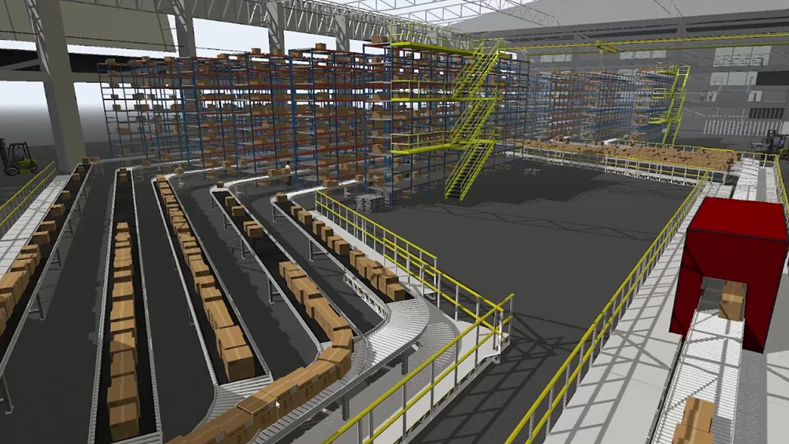
The problem with disconnected simulation
Simulation has long been used to evaluate production systems. But in practice, many simulation efforts fail to deliver value for a simple reason: they require too much manual setup.
Engineers often rebuild models from scratch using outdated or incomplete information. Layouts live in CAD tools. Equipment data lives elsewhere. Process assumptions sit in spreadsheets. Every change requires rework.
The result:
- Simulation models are slow to create
- They don’t reflect current design intent
- They quickly fall out of sync with reality
When simulation becomes a separate exercise instead of part of the workflow, teams stop relying on it for decision-making.
From static files to connected data flows with FlexSim
A better approach starts with connected data.
Instead of treating layouts, assets, and process data as static files, leading teams treat them as part of a shared system. Design intent flows directly into validation, without translation or duplication.
This is where FlexSim fits into the digital factory workflow.
With tighter integration into Autodesk workflows, simulation can now use real design data as its foundation, reducing the gap between design and validation.
Building simulation models from real design data
FlexSim helps teams move faster by leveraging the data they already have.
Rather than reconstructing models manually, teams can:
- Import layouts from Factory Design Utilities
- Use native Autodesk file formats and DWG metadata
- Reuse standardized asset libraries for equipment and processes
This does two important things:
- Reduces setup time: Engineers spend less time building simulation models and more time testing ideas.
- Improves accuracy: Models reflect current design intent, not outdated assumptions.
This shift from manual modeling to data-driven simulation is what makes simulation scalable across projects, not just reserved for high-risk decisions.
Turning “what-if” into actionable insight
Once a simulation is connected to real design data, it becomes much more powerful.
Teams can run scenarios based on actual layouts and constraints:
- What happens if demand increases by 20%?
- Where do bottlenecks appear in the current layout?
- How does adding automation change throughput?
- What’s the impact of downtime or variability?
Simulation allows teams to answer these questions before making physical changes, reducing risk and improving confidence.
Instead of reacting to problems during production, teams can surface them early, when changes are easier to make.
Reducing rework across the design process with FlexSim
One of the biggest benefits of connected simulation is reduced rework.
When layout, simulation, and design data are aligned:
- Engineers don’t need to rebuild models with every change
- Simulation results stay relevant as designs evolve
- Decisions are based on current, not outdated, data
This continuity improves both speed and confidence. It also helps teams explore more options, because testing new scenarios doesn’t require starting over.
Simulation as part of the workflow, not a separate step
The real shift is not just technical. It’s operational.
Simulation works best when it’s embedded in the workflow:
- Layout changes feed directly into simulation
- Simulation results inform design decisions
- Updates happen continuously, not just at milestones
This connected approach turns simulation into an everyday tool, not a specialized activity.
From validation to acceleration
When simulation is connected to design data, it stops being a checkpoint and becomes a driver of progress.
Teams can:
- Validate decisions earlier
- Iterate faster with fewer constraints
- Reduce risk before committing to physical changes
FlexSim enables this shift by connecting simulation to the broader digital factory workflow, turning data into insight, and insight into better decisions.
Frequently asked questions (FAQs)
Autodesk FlexSim is a 3D discrete event simulation (DES) software platform that helps organizations model, simulate, analyze, and visualize real-world operations in a virtual environment.
FlexSim is used to evaluate manufacturing systems, warehouses, material handling operations, logistics processes, and people flows so teams can improve efficiency, reduce costs, identify bottlenecks, and make more informed operational decisions before implementing changes in the real world.
Autodesk FlexSim is used to simulate and optimize manufacturing processes, assembly operations, warehouses, distribution centers, material handling systems, logistics networks, and people-flow scenarios. Organizations use it to validate factory layouts, improve throughput, optimize resources, identify bottlenecks, test operational changes, and evaluate “what-if” scenarios without disrupting live operations.
Autodesk FlexSim uses a visual, 3D modeling approach that allows users to create digital representations of real-world systems and processes. It’s an easy-to-use simulation software with drag-and-drop workflows for modeling production processes, material flow, warehousing operations, and people movement. Users can build virtual systems, test scenarios, and analyze outcomes to support operational decision-making.
Simulation accuracy depends on how closely the model reflects the real-world system being studied. Autodesk FlexSim is designed to account for variability, interdependencies, and time-based behaviors that affect real operations. Organizations use FlexSim to evaluate processes, predict outcomes, and compare operational alternatives before implementing changes.
Yes. One of FlexSim’s primary uses is helping organizations identify bottlenecks, constraints, and inefficiencies within manufacturing, warehousing, and logistics operations. By simulating the flow of products, materials, and resources over time, teams can evaluate throughput, resource utilization, queue formation, and operational performance to understand where improvements are needed.
Yes. Autodesk FlexSim supports workflows involving AutoCAD, Inventor, Factory Design Utilities (FDU), and Revit-based factory and facility models, helping organizations connect facility layouts with operational simulation and throughput analysis.
FlexSim is used by industrial engineers, manufacturing engineers, operations managers, facility planners, warehouse operators, logistics professionals, healthcare organizations, airports, retailers, and supply chain teams. Organizations use FlexSim when they need to model, analyze, and optimize complex operational systems and make data-driven decisions about process improvements, facility design, and resource utilization.