 Bryce Heventhal
Whole part machining strategies in Autodesk Fusion for Manufacturing enhance CAM programming by automating complex toolpath generation and improving precision. These strategies lead to higher efficiency, better part quality, and significant cost savings for manufacturers.

Elevate your design and manufacturing processes with Autodesk Fusion
In the ever-evolving world of manufacturing, efficiency and precision are paramount. Autodesk Fusion for Manufacturing offers a suite of advanced machining strategies designed to enhance the capabilities of CAM programming. Among these, whole part machining strategies stand out as a game-changer, providing manufacturers—like you—with the tools you need to shorten CAM programming times and create a smaller number of more efficient toolpaths, all of which help achieve superior results from your CNC machinery.
What are whole part machining strategies?
Whole part machining strategies encompass a range of automated toolpath generation techniques that streamline the machining process. The strategies handle complex geometries and intricate features, ensuring that every part is machined with the highest level of accuracy and efficiency. The key strategies include automatic hole recognition, steep and shallow toolpaths, flat finishing, corner strategy, and deburr toolpaths.
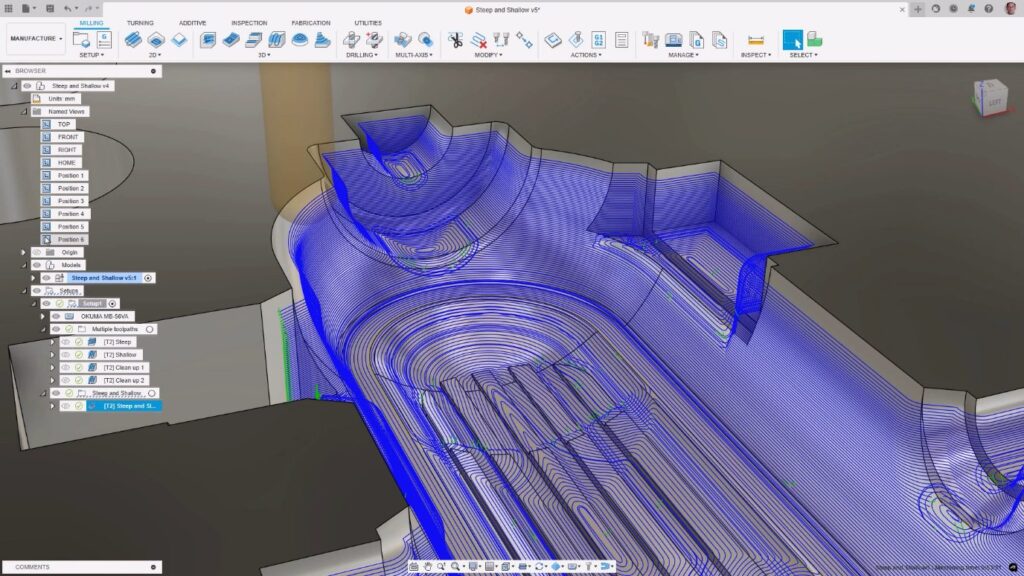
How do whole part machining strategies work?
- Automatic hole recognition: This strategy automates the detection of holes in a part and applies predefined templates to machine them. By simplifying and standardizing the process of finding and machining holes, it significantly reduces programming time, minimizes the risk of errors and helps teams to improve the consistency of machined parts.
- Steep and shallow toolpaths: This strategy is for machining complex, feature-rich parts. It creates a single, high-quality toolpath that machines the entire part using different cutting styles in the steep and shallow regions of the part. By combining regions together, Fusion can also manage the overlap between them. This results in superior surface finishes and greatly reduces CAM programming times.
- Advanced swarf: This strategy efficiently machines the sidewalls of parts using the side of the tool as opposed to scanning across the surface with multiple passes. It provides additional controls to achieve an optimal surface finish, manage machine motion, and avoid machining neighboring surface geometry.
- Corner strategy: This strategy automatically identifies unmachined stock left in internal corners and generates safe and efficient toolpaths to remove it. This ensures that all material is removed and the part is machined to the desired specifications.
- Deburr toolpaths: This strategy automates the identification and removal of sharp edges on machined parts. Eliminating the need for manual rework saves time and improves the overall quality of the part.
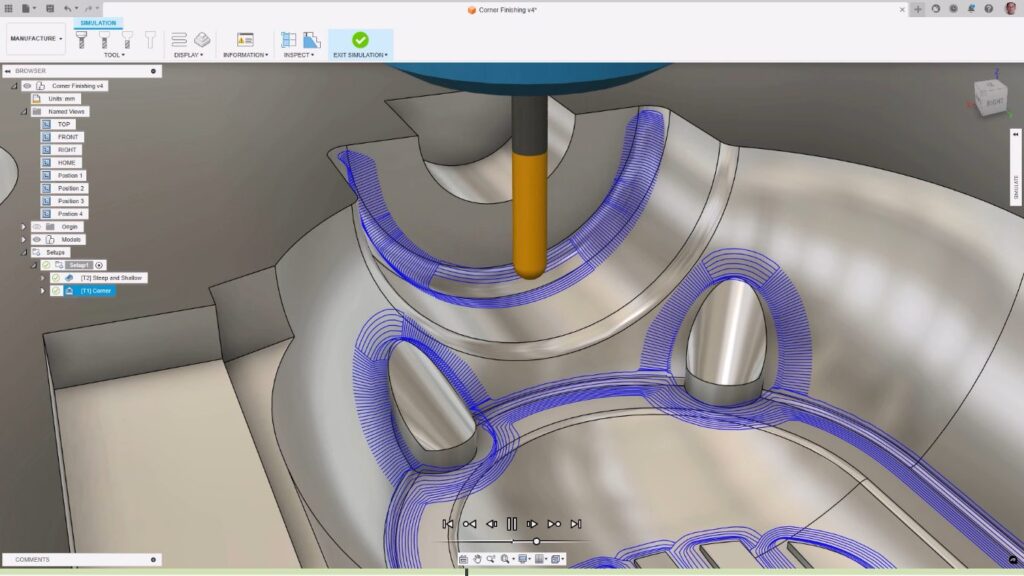
The impact on CAM programming
The integration of whole part machining strategies into CAM programming has a profound impact on the manufacturing process. These strategies automate many of the tedious and time-consuming aspects of programming. Production can start sooner and free up time for CAM programmers to focus on more critical tasks. The benefits include:
- Increased efficiency: By automating toolpath generation, these strategies reduce the time required to program parts, leading to faster production cycles.
- Enhanced precision: These automated strategies generate toolpaths with high accuracy, resulting in parts that meet exact specifications coming off the machine.
- Improved surface finish: Strategies like steep and shallow and advanced swarf help produce superior surface finishes, reducing the need for additional finishing operations
- Reduced errors: Automation minimizes the risk of human error and increases the level of standardization across the machining process. This ultimately leads to higher-quality parts with a reduced likelihood of defects appearing.
- Cost savings: By streamlining programming and reducing manual rework, parts are produced using less time, energy, and money. This significantly reduces production costs, allowing manufacturers to be more competitive and generate greater profits.
How to access whole part machining strategies in Fusion
Customers can access the whole part machining strategies by subscribing to the Autodesk Fusion for Manufacturing offering. A range of flexible subscription options exist, including 1- and 3-year options. These provide users with access to the full suite of advanced machining capabilities available in Fusion. For a limited time, customers can try the full suite of capabilities in Fusion for 30 days completely free.
Whole part machining strategies in the Autodesk Fusion for Manufacturing offering represent a significant advancement in CAM programming. By automating complex toolpath generation and enhancing precision, these strategies empower manufacturers to achieve higher efficiency, superior part quality, and substantial cost savings.
Fusion vs Fusion for Manufacturing – Capabilities
Note: Fusion and Fusion for Manufacturing include all core Fusion CAD, CAM, CAE, PCB , and data management capabilities. Fusion for Manufacturing also includes the advanced manufacturing capabilities listed below.
| Capability | Fusion | Fusion for Manufacturing |
| Drilling | ||
| Hole drilling (3-axis) | Yes | Yes |
| Automatic hole recognition and drilling (3-axis + multi-axis) | No | Yes |
| MILLING | ||
| 2D and 2.5-axis milling | Yes | Yes |
| 3-axis milling | Yes | Yes |
| 3+1 and 3+2 positional milling | Yes | Yes |
| Machine simulation | Yes | Yes |
| Automated whole part strategies (3-axis + multi-axis) | No | Yes |
| 4- and 5-axis simultaneous milling | No | Yes |
| Multi-axis collision avoidance | No | Yes |
| TURNING | ||
| 2-axis turning | Yes | Yes |
| Turn-mill machining | Yes | Yes |
| TOOLPATH MODIFICATIONS | ||
| Modify toolpaths (trim, delete passes, leads and links, replace tool, move entry positions) | No | Yes |
| INSPECTION & PART ALIGNMENT | ||
| Work coordinate system (WCS) probing | Yes | Yes |
| Manual inspection | Yes | Yes |
| Geometry probing | No | Yes |
| Surface inspection | No | Yes |
| Part alignment | No | Yes |
| POST PROCESSING | ||
| Generate NC code (post-processing) | Yes | Yes |
| SHEET-BASED NESTING | ||
| Basic single-sheet nesting | Yes | Yes |
| Associative nesting updates | Yes | Yes |
| Nest preparation tools | No | Yes |
| Advanced nesting (multi-sheet, auto detection) | No | Yes |
| Advanced part and material controls | No | Yes |
| Process material library | No | Yes |
| Custom nest reports | No | Yes |
| Nest comparison | No | Yes |
| Part labeling | No | Yes |
| SHEET-BASED FABRICATION | ||
| Toolpath generation (laser, plasma, router, waterjet) | Yes | Yes |
| Workflow automation | Yes | Yes |
| Automatic remnant cutting | No | Yes |
| DXF export with layer mapping | No | Yes |
| ADDITIVE MANUFACTURING | ||
| 2D/3D part nesting and arrangement | Yes | Yes |
| FDM and binder jetting | Yes | Yes |
| 3MF file export | Yes | Yes |
| Metal Powder Bed Fusion (MPBF) | No | Yes |
| Directed Energy Deposition (DED, multi-axis) | No | Yes |
| MPBF process simulation | No | Yes |