 Edwin Robledo
Learn what Electronic Design Automation (EDA) software is, how it works, key features to look for, pricing considerations, AI capabilities, and how to choose the right EDA solution for your electronics design workflow.

Elevate your design and manufacturing processes with Autodesk Fusion
What is electronic design automation (EDA)?
Whether you’re developing a consumer product, industrial device, IoT system, or embedded electronics, designing modern electronics is more complex than ever. Products are expected to be smaller, smarter, more connected, and delivered faster than previous generations.
Electronic design automation (EDA) software helps engineering teams manage this complexity.
EDA refers to the software tools used to design, simulate, verify, and manufacture electronic systems, including printed circuit boards (PCBs), integrated circuits (ICs), and embedded electronic devices. These tools automate many of the time-consuming tasks involved in electronics development, helping teams move from concept to production more efficiently.
From schematic capture and PCB layout to simulation and manufacturing preparation, EDA software provides a digital workflow that helps reduce errors, improve product quality, and accelerate development timelines.
Why EDA matters more than ever
The demand for connected products continues to grow across industries, from consumer electronics and robotics to medical devices and industrial equipment.
At the same time, electronic designs have become significantly more complex. Engineers must balance electrical performance, mechanical constraints, manufacturability, cost, and increasingly shorter product development cycles.
EDA software helps bridge these challenges by providing tools that support the entire electronics design process in one environment.
Key benefits of EDA Software
Faster product development
EDA tools automate repetitive design tasks, helping engineers spend less time on manual work and more time solving design challenges. This can significantly reduce development cycles and accelerate time-to-market.
Better design quality
Integrated simulation, verification, and design rule checking help identify potential issues before prototypes are manufactured, reducing costly redesigns later in the process.
Improved collaboration
Modern EDA platforms support collaboration across electrical, mechanical, and manufacturing teams, helping everyone work from the same data and reducing communication gaps.
Design reuse and standardization
Reusable libraries, components, and design templates allow organizations to maintain consistency while reducing engineering effort across projects.
Manufacturing readiness
EDA tools help ensure designs meet manufacturing requirements early in development, reducing production issues and improving yield rates.
How to choose EDA software
Not all EDA solutions are designed for the same users. Some focus on advanced semiconductor development, while others are built for PCB design and product development teams.
When evaluating EDA software, consider the following factors:
1. Schematic-to-layout integration
Look for software that allows seamless movement from schematic capture to PCB layout. A tightly connected workflow reduces errors and improves productivity.
2. ECAD-MCAD collaboration
Electronics and mechanical designs increasingly need to be developed together. Strong ECAD-MCAD integration helps ensure boards fit correctly inside product enclosures and packaging.
3. Simulation capabilities
Simulation tools help validate designs before manufacturing. Consider whether the platform supports signal integrity, thermal analysis, or circuit simulation based on your requirements.
4. Cloud collaboration
Distributed teams benefit from cloud-based design environments that enable version control, file sharing, and real-time collaboration.
5. Component libraries
Access to accurate, up-to-date component libraries can significantly reduce design time and improve consistency across projects.
6. AI-assisted design features
AI is increasingly being used to automate routing, suggest design improvements, identify potential issues, and streamline documentation workflows.
7. Pricing and scalability
The best solution for a startup may be different from one designed for large enterprise organizations. Evaluate both current needs and future growth requirements.
Comparing popular EDA software platforms
How much does EDA software cost?
EDA pricing varies significantly depending on the application and level of capability required.
Free and open-source
- Solutions like, Autodesk Fusion for personal use
- Community-supported tools
- Best for hobbyists and simple PCB projects
Professional and SMB solutions
- Subscription-based platforms, like Autodesk Fusion
- Typical range: hundreds to a few thousand dollars annually per user
- Suitable for startups, product development teams, and growing businesses
Enterprise solutions
- Advanced IC and semiconductor platforms
- Often require custom licensing and pricing
- Geared toward large engineering organizations
Electronic design automation technology
EDA encompasses a wide range of design activities, including:
- Schematic capture creates a graphical representation of the circuit using symbols and connecting them to form a circuit diagram.
- Simulation tools allow you to run virtual tests on the circuit to evaluate its behavior and performance under different conditions.
- Logic synthesis: Converting a high-level hardware description (e.g., in a hardware description language like VHDL or Verilog) into a gate-level representation.
- Placement and routing determine the optimal arrangement of components (placement) and establishes connections (routing) on a PCB or IC to minimize delays and optimize performance.
- Timing analysis allows you to evaluate the timing characteristics of a circuit to ensure that signals propagate correctly and meet desired performance criteria.
- Physical design verification allows you to check the layout of the circuit against various design rules and constraints to ensure manufacturability and reliability.
- Design for Test (DFT) incorporates features into the design that facilitate testing and fault diagnosis during manufacturing and operation.
- Design rule checking (DRC) verifies that the layout adheres to specific manufacturing rules and guidelines.
- Power analysis examines power consumption and optimizing circuit designs for energy efficiency.
- Formal verification uses mathematical techniques to prove or disprove the correctness of a circuit’s behavior.
How AI is changing EDA software
When evaluating cost, consider the total impact on productivity, collaboration, manufacturing quality, and engineering efficiency rather than software price alone.
Artificial intelligence is beginning to transform electronics design workflows.
AI-enabled EDA tools can help:
- Accelerate PCB routing
- Detect design issues earlier
- Suggest layout improvements
- Automate repetitive engineering tasks
- Improve design optimization
- Reduce time spent on documentation and setup
For small and mid-sized engineering teams, these capabilities can help achieve enterprise-level productivity without expanding headcount.
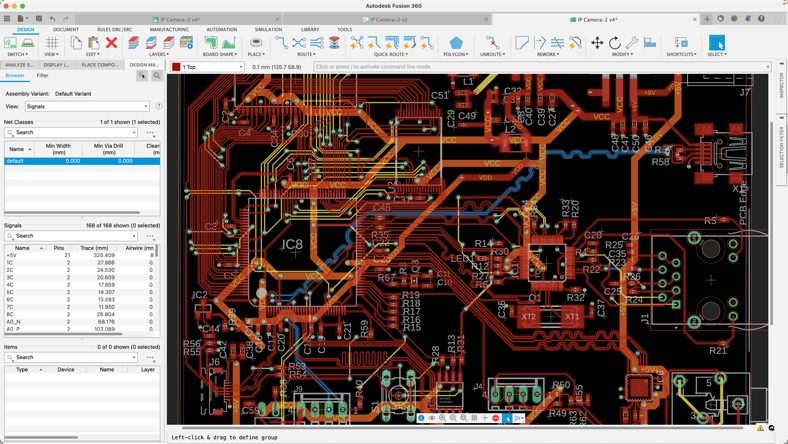
How Fusion supports modern electronics design
Fusion brings electronics and mechanical design together in a unified product development platform.
Instead of managing separate ECAD and MCAD systems, teams can work within a connected environment that supports:
- Schematic capture
- PCB layout
- 3D PCB visualization
- Mechanical enclosure design
- Simulation
- Manufacturing preparation
- Cloud-based collaboration
By connecting electronics, mechanical design, simulation, and manufacturing workflows, Fusion helps reduce disconnected processes and improves collaboration throughout product development.
Frequently asked questions about EDA software
The best EDA software depends on your needs, but for product development teams designing PCBs and physical products, Autodesk Fusion is a leading choice. Fusion combines schematic capture, PCB design, 3D electronics visualization, mechanical design, simulation, and manufacturing tools in a single cloud-connected platform, helping teams design and build products more efficiently.
EDA software pricing varies widely, from free open-source tools to enterprise platforms with custom licensing. For product development teams, Fusion offers a cost-effective approach by combining electronics design, PCB layout, mechanical design, simulation, and manufacturing workflows in a single platform. Rather than purchasing and managing separate tools, teams can streamline development in one connected environment, potentially reducing both software costs and design complexity. See flexible plans and pricing here.
EDA (Electronic Design Automation) is the broad category of software used to design, simulate, verify, and manufacture electronic systems. ECAD (Electronic Computer-Aided Design) is a subset of EDA that focuses specifically on schematic capture, circuit design, and PCB layout.
Autodesk Fusion supports ECAD workflows while also connecting electronics design with mechanical design, helping teams develop complete products rather than isolated circuit boards.
Many modern EDA platforms are introducing AI-assisted capabilities to help automate repetitive tasks, improve productivity, and accelerate design workflows. Fusion incorporates AI-powered features that help designers work more efficiently across product development processes, while AI continues to play an expanding role in areas such as routing, design optimization, simulation, and workflow automation across the electronics industry.
When evaluating EDA software, look beyond PCB layout capabilities alone. Consider how well the platform supports schematic capture, simulation, component libraries, collaboration, manufacturability, and integration with mechanical design workflows.
For teams developing physical products, solutions like Autodesk Fusion can provide additional value by connecting electronics, mechanical design, simulation, data management, and manufacturing in a unified environment, reducing the need for disconnected tools and manual data transfers.