 Muna Idriss
See how Autodesk Fusion connects with Claude via MCP, enabling AI to assist with design tasks inside Fusion while keeping users in control.

Elevate your design and manufacturing processes with Autodesk Fusion
The collaboration between Anthropic and Autodesk brings Fusion into Claude, enabling AI to work directly with design data, geometry, and workflows, rather than around them.
With the launch of Claude for Creative Work, Anthropic is moving toward deeper integration with professional tools. Autodesk and Anthropic are bringing that vision into practice, starting with the new Fusion Model Context Protocol (MCP).
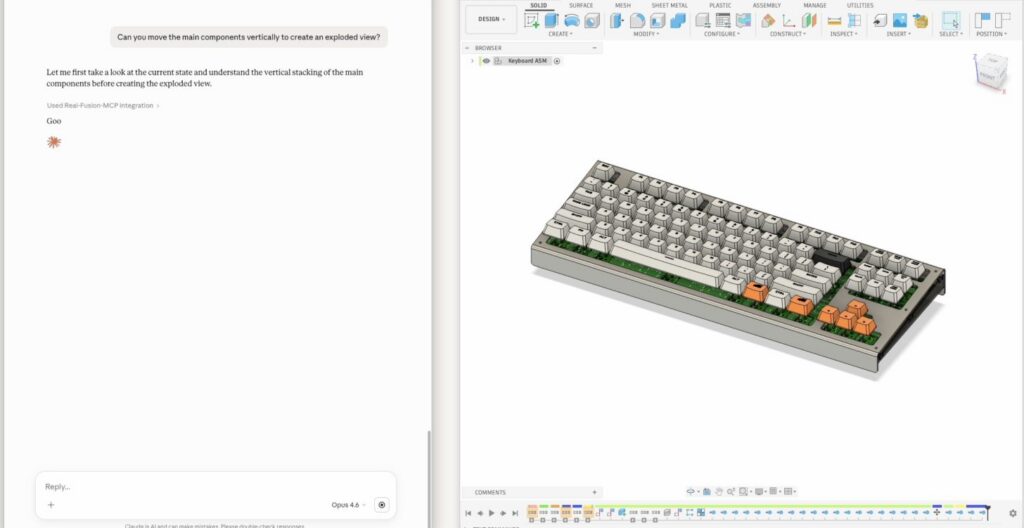
Through MCP, Claude can connect to Fusion, allowing natural‑language intent to translate into supported design actions within the product. For Fusion users, this represents an important shift: AI no longer just helps you think about designs. It can assist with work directly inside the environment where design and manufacturing happen, with the user remaining in control.
From ideas to action, inside the design flow
Most AI tools still sit outside the design environment. You explain an idea, copy the output, and manually recreate the work in CAD. Now, you can connect AI tools like Claude to Fusion via the Fusion MCP and use natural‑language prompts to query design context or support specific, product‑supported changes.
The new Fusion MCP can:
- Read and interpret relevant design context
- Translate natural language into concrete modeling actions supported by Fusion
- Assist with generating or refining geometry ideas
- Support setup, constraints, and repetitive workflows
This approach can help shorten the loop between intention and execution. Instead of bouncing between tools, assistants like Claude can work within Fusion, informed by real design data rather than disconnected prompts.
It also enables a more conversational and collaborative way to design. Rather than issuing rigid commands, you describe what you’re trying to accomplish—exploring variations of a model, refining a concept without starting from scratch, or reducing time spent on setup steps that require focus and precision. A tool like Claude can then help carry that intent forward within the design environment, based on what Fusion supports and what the user directs.
In this experience, AI isn’t acting independently or making changes on its own. It’s responding to user intent while respecting the technical structure and boundaries of the model. You’re no longer “talking to a chatbot”—you’re working with an assistant that understands the context of your work and operates within the rules of the product.
Practical gains in everyday work
With the Fusion MCP, AI tools can help reduce friction in the daily tasks that quietly slow design teams down, such as:
- Repetitive setup and modeling steps
- Navigating complex or unfamiliar workflows
- Translating rough ideas into actionable changes
By offloading some cognitive and mechanical overhead, teams may be able to spend more time evaluating ideas, making decisions, and improving outcomes.
Customer data, access, and user control
Any access Claude has to Fusion context is controlled by the user and governed by Fusion’s product settings, permissions, and applicable data terms. Users decide what information is shared, and AI interactions operate within the same access controls that apply to other Fusion workflows.
AI as a collaborative partner
Instead of taking creativity out of your hands, AI plays a supporting role—as a collaborative assistant that works with your tools, your data, and your intent. With the Fusion MCP, AI is not an external consultant or an autonomous designer. It’s something you work alongside, inside the same environment where ideas turn into real, physical products.
Autodesk’s broader vision for AI in design and manufacturing
This integration is part of Autodesk’s broader strategy focused on applied AI, AI designed to help work move forward inside real design and manufacturing workflows. Starting with MCPs, Autodesk is expanding contextual AI across the Design & Manufacturing portfolio through capabilities like Autodesk Assistant, bringing intelligence directly into the tools professionals already use.
What sets Autodesk apart is an emphasis on AI that understands design intent, respects data integrity, and is designed for use in professional design and manufacturing environments, not experimental demos detached from how products are made. By supporting open standards like MCP, Autodesk is also enabling a more connected ecosystem, where AI tools can interact with professional design software without locking teams into closed systems.