 Christa Prokos
Explore the importance of product data management (PDM) and see how Autodesk Fusion’s built-in PDM, enhances collaboration, centralizes design data, and facilitates change tracking for product development.
Systems that manage design data are under increasing scrutiny as product design becomes more complex. Engineers and product development teams are expected to iterate faster, collaborate across geographies, and maintain rigorous version control. At the same time, teams are tasked with navigating expanding datasets and adhering to strict quality requirements.

Product data management (PDM) is a powerful framework that brings order to this complexity. While PDM once served as a supplementary tool, today it is central to the modern design workflow, influencing how teams collaborate, how data evolves, and ultimately how quickly and successfully a product can reach market. Read on to learn about the importance of PDM and how Autodesk brings its power to the design and manufacturing process.
PDM for version control and enchanced collaboration
PDM addresses a simple yet foundational challenge: how to organize, control, and track all product-related information through the lifecycle of a design. This includes CAD files, specifications, bills of materials, documentation, and revision histories. While file organization and manual change tracking may suffice in a small, localized team, these methods fall short at scale. This is where PDM systems become indispensable.
One of the most important technical functions of a PDM system is version control. Every time a design file is modified, it creates potential for misalignment across team members and departments. Without a single source of truth, errors compound and can result in rework, delays, or even production defects. PDM platforms address this by automatically capturing each file iteration, associating changes with timestamps and users, and preserving previous versions for reference or rollback. This system reduces errors and creates an auditable history to support compliance and traceability.
Beyond versioning, PDM facilitates collaboration. In multidisciplinary environments where designers and engineers work in tandem, data silos can become serious bottlenecks. PDM centralizes information so that teams are accessing up-to-date design data in real time, no matter where they are. This centralized model mitigates issues like conflicting file versions or miscommunications about the current design state. It also supports change management workflows that are structured and enforce accountability.
PDM in Autodesk Fusion
Autodesk Fusion offers a modern approach to PDM that meets the needs of engineering teams. Specifically, the cloud-based nature of Fusion reimagines how product data is stored, accessed, and shared—moving beyond traditional on-premises PDM systems that often require complex infrastructure and dedicated IT resources.
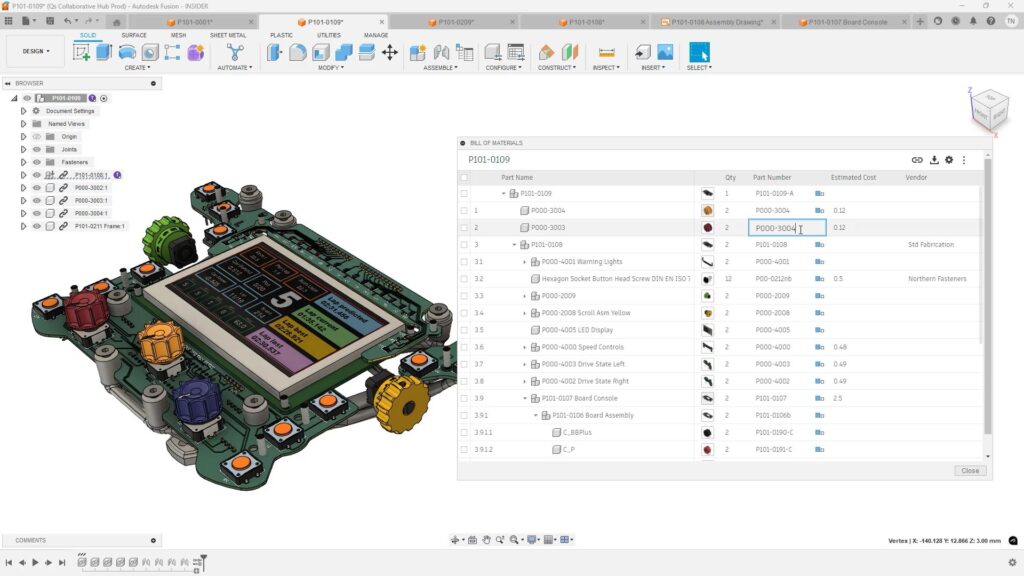
Fusion’s PDM solution is known for centralized data management. All files, whether 3D models, 2D drawings, or associated metadata, are housed in a unified cloud environment so that all stakeholders are working from the same set of data. It eliminates the need for local file duplication and reduces the risk of outdated versions being used in parallel workflows.
Version control within Fusion is fully automated and deeply embedded into the design workflow. Every save point captures a version snapshot, which includes who made the change, when it occurred, and what files were affected. These snapshots create a granular record of design evolution and support traceability without requiring manual file naming or change logging. Designers can easily review, compare, or revert to previous iterations, which is especially valuable during rapid prototyping or design reviews.
The system also includes structured change management capabilities. Change requests and approvals can be configured to follow customized workflows, so that all updates are tracked and reviewed before implementation.
But what really sets Autodesk Fusion apart is that fact that it’s built-in PDM. Users can transition smoothly from design to simulation to manufacturing without jumping between disjointed systems. The result is a connected development environment where data continuity is maintained and workflow efficiency is maximized.