 jodom4
Learn how 3D printing in Fusion enables fast design, prototyping, and low-cost commercial production.
3D printing in Fusion streamlines the process of designing, prototyping, and manufacturing products for commercial production. For businesses aiming to scale up with Fusion, it’s important to understand the practical workflow advantages and cost efficiencies that additive manufacturing offers. Fusion enables straightforward design modifications, rapid prototyping, and efficient production of small batches, making it a practical solution for commercial use.

Elevate your design and manufacturing processes with Autodesk Fusion
Why use 3D printing in Fusion for commercial production?
Autodesk Fusion offers a seamless design-to-production pipeline that maximizes the potential of 3D printing technologies. Here’s how Fusion empowers commercial manufacturing:
1. Rapid prototyping and agile design Iteration
With the integrated 3D modeling environment in Fusion, you can quickly design, modify, and print prototypes—all without the delays and costs of traditional manufacturing tooling. 3D printing in Fusion means:
- Speedy design iterations to respond to market or customer feedback.
- Cost-effective production for small batch runs (e.g., 500–1,500 units).
- Easy updates for PCB, connectors, or housing elements as your product evolves.youtube
2. Complex geometry and advanced features
The modeling tools in Fusion allow you to create intricate geometries—such as snap fits, custom bezels, and multi-material components—that would be cost-prohibitive with injection molding. Fusion easily allows you to:
- Design parts with features impossible to mold, thanks to freedom from draft angles and part-line constraints.
- Nest parts for efficient batch production, maximizing printer throughput.
- Select materials (e.g., TPU, nylon, rigid resins) to fit specific product needs.youtube
3. Lower costs for small production runs
Traditional injection molding demands large, expensive tooling investments. With Fusion, you only pay for material, machine time, and labor—not recurring tooling costs. This is perfect for startups or businesses needing flexible, scalable production:
- Significant cost savings for low-to-mid volume runs.
- Ability to update designs between runs without penalty.
- Efficient for creating both hidden utility components and visible consumer-facing parts.youtube
4. Feedback-driven product improvements
The 3D printing workflow in Fusion captures real-world assembly and user feedback. Quick design changes can be implemented, tested, and produced—all within the Fusion environment. This reduces the risk of outdated inventory and improves end-user satisfaction.
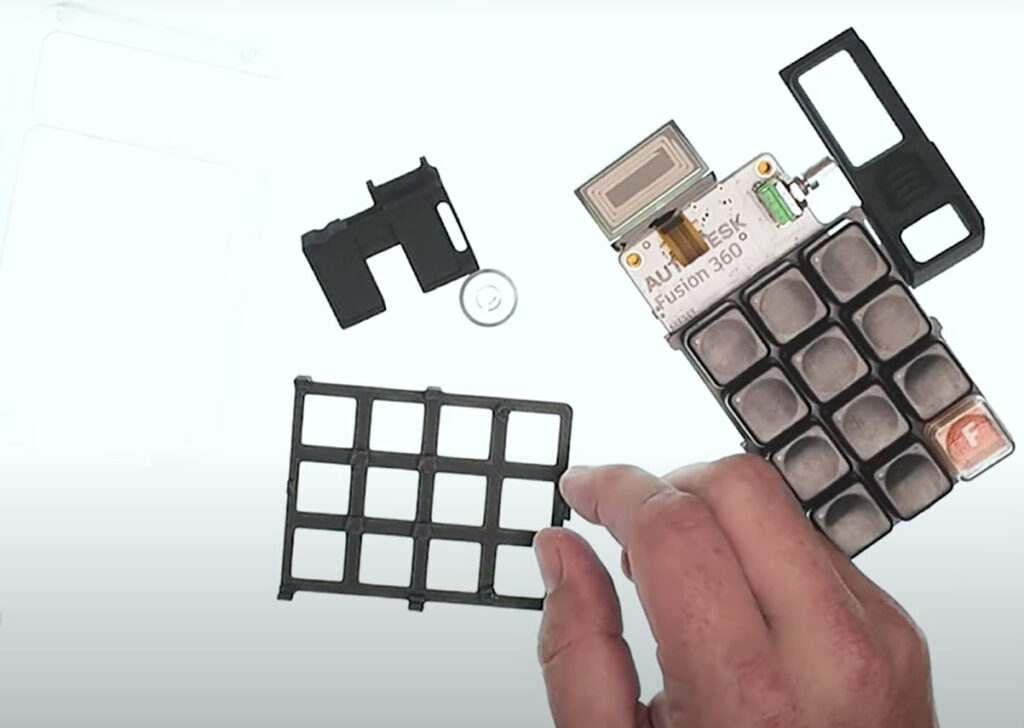
Key use cases for 3D printing in Fusion
- Consumer electronics: Prototyping and producing housings, internal spacers, custom buttons, and faceplates.
- Custom accessories: Small-batch badges, branded keycaps, specialized connectors, and cowlings.
- Industrial parts: Utility brackets, snap fits, and support spacers for low- to mid-volume runs.
3D printing in Fusion offers unmatched versatility for commercial production—combining speed, adaptability, and cost efficiency. Businesses can now prototype, iterate, and manufacture high-quality products in-house or via trusted service providers, all using the 3D printing workflows in Fusion.