 Trevor English
InfoDrainage has become increasingly connected to the wider Autodesk ecosystem, and with this release we’re taking another step in that direction by connecting drainage models to the same cloud project environment being used across Autodesk: Forma Data Management.
There’s a lot packed into InfoDrainage 2027.2, including a couple of features that will make former MicroDrainage users particularly happy. The most important update in this release is bigger than any individual drainage design feature: InfoDrainage can now connect directly to Autodesk Forma Data Management.
This is something we’ve been working towards, and you might’ve seen this option listed on our public Drainage Design Roadmap. Now, it’s available as a Tech Preview inside InfoDrainage.
InfoDrainage now connects to Autodesk Forma Data Management
If you’ve been following what Autodesk has been doing with Forma Data Management, you’ll know there’s a much bigger story taking shape around how project data moves between people, applications and different stages of a project.
Forma Data Management is the cloud-based Common Data Environment (CDE) for Autodesk Forma, connecting project data across AECO teams, workflows and phases. The idea is ultimately quite simple: instead of project information becoming fragmented between different applications, folders and teams, we want to make it easier for everyone involved in a project to work from connected, reliable information.
One of the central ideas behind Forma Data Management is connecting the desktop tools people already use to cloud-based project data without asking them to completely change the way they work. With InfoDrainage 2027.2, drainage models can now become part of the Forma environment.
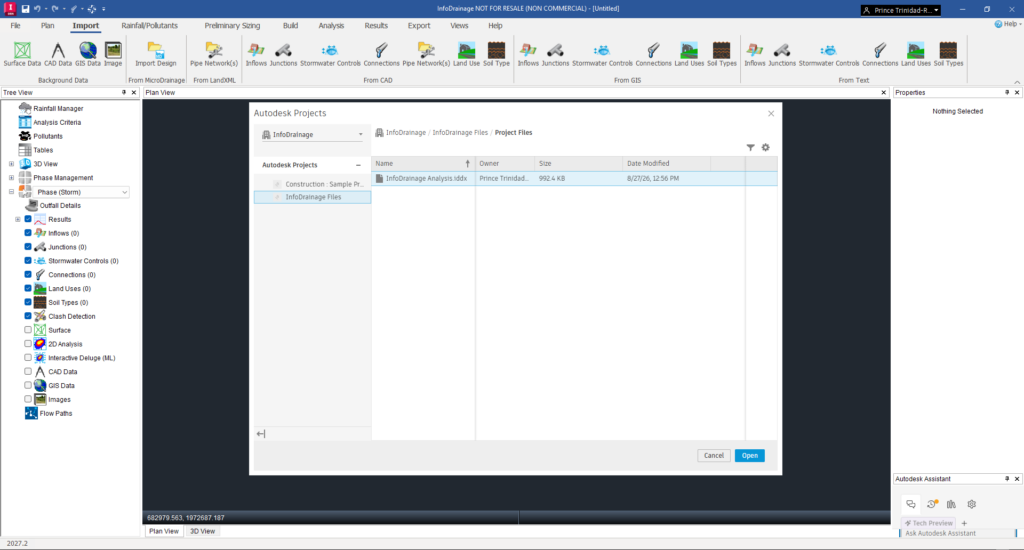
Note: The Forma Data Management Connection is currently under a Feature Flag. To make it accessible in the latest version of InfoDrainage, you’ll need to manually toggle it on, following instructions from our help site.
If you have access to Forma Data Management, you can now open and save InfoDrainage models directly from Autodesk cloud Projects. You’ll find ‘Autodesk Projects’ within the File ribbon, where you can browse your projects, open an existing InfoDrainage model, or upload one to the cloud.
You can still work locally in the way you’re accustomed to, but now there’s a route into Autodesk cloud Projects sitting alongside that workflow.
Letting the water data flow
For years, drainage design software has largely existed in its own corner of the infrastructure design process. You design the drainage network, run the calculations, produce the outputs, and then find ways of getting that information into the other tools and systems being used on the project.
We’ve been chipping away at those boundaries with increased connections between InfoDrainage and Civil 3D, and there’s plenty more work happening across InfoDrainage and the wider Autodesk portfolio. Connecting InfoDrainage to Forma Data Management extends that thinking beyond the connection between two individual applications. Now we’re also connecting the project data behind those workflows.
Forma Data Management provides the cloud-based foundation for Autodesk to connect project information across teams, tools, and phases. InfoDrainage joining that environment might seem like a relatively small step today, but it gives us a foundation to build much more interesting, connected workflows on top of in the future.
While the Forma connection is big news, InfoDrainage 2027.2 also brings along with it some other goodies.
Static Volume Summary makes a return
We’ve added a new Static Volume Summary in InfoDrainage 2027.2, bringing hydraulic connections, junctions, and stormwater controls together into a single view so you can quickly see the storage available across the network.
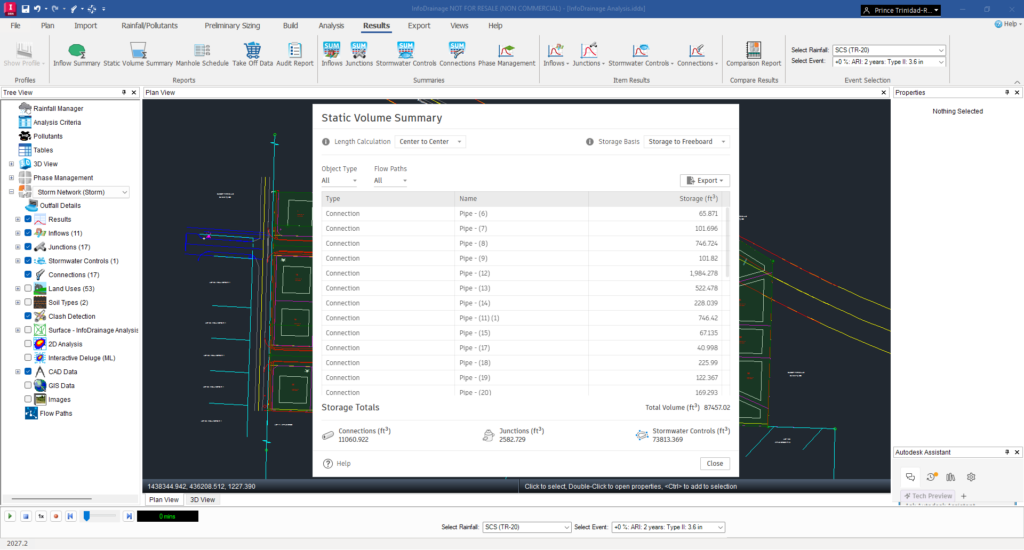
If you used MicroDrainage before moving to InfoDrainage, this may sound familiar. This was one of those useful MicroDrainage features that customers have been asking us to bring across, and it’s great to finally see it land in InfoDrainage.
It’s also one of those features that is much easier to appreciate when you see it than when somebody describes it to you. Having the storage across the network brought together into one clean view makes it considerably easier to understand what is happening in the design.
Big visual upgrade: assigning colors to catchments
You can now assign individual colors to catchments. Previously, catchments shared a single color across the drainage plan. That works, but once you have a reasonably complicated network in front of you, being able to visually distinguish one catchment from another makes a surprisingly big difference.
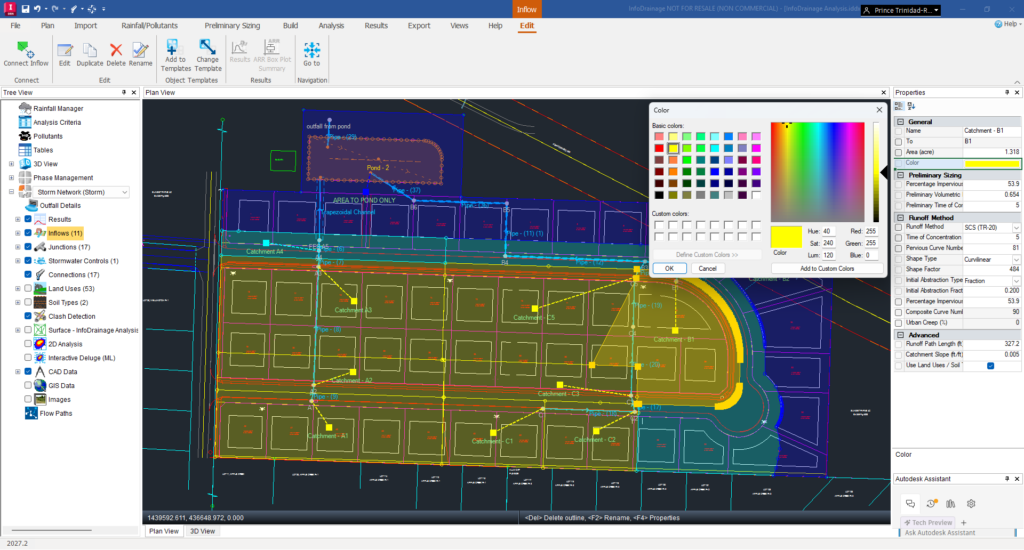
You can configure the colors directly from the Properties box or from the Inflow form. Again, this is something our MicroDrainage users will recognize and have been asking us to bring to InfoDrainage.
It’s all about connection
If there’s a theme running through where InfoDrainage is heading, I think it’s connection.
Connection between drainage and the wider civil design process. Connection between the tools engineers use to design infrastructure. And – increasingly – connection between the data those tools create and the Autodesk project environment surrounding them.
These new capabilities build on InfoDrainage’s mission to provide a comprehensive, modern drainage design platform that supports the entire project lifecycle, from concept planning and analysis through detailed design and regulatory approval.
Ready to upgrade?
Sign in to your Autodesk account at manage.autodesk.com to download the latest version of InfoDrainage. You can also go deeper and explore the latest release features on the InfoDrainage help site.