 Trevor English
InfoWater Pro is our water distribution modeling software integrated with ArcGIS for hydraulic analysis and system planning, used by utilities and consultants to better understand and manage their systems. Here’s what’s new for 2027.
There’s a lot of conversation right now about AI in engineering software. But for most water professionals, the real question is simpler: Can it actually help me do my job faster and with more confidence?
In InfoWater Pro 2027, Autodesk Assistant begins to answer that question in a practical way. It is not about replacing expertise or turning hydraulic modeling into a black box. It is about removing a little friction from the day-to-day work of building, troubleshooting, and understanding models so that you can keep moving.
Meet Autodesk Assistant in InfoWater Pro
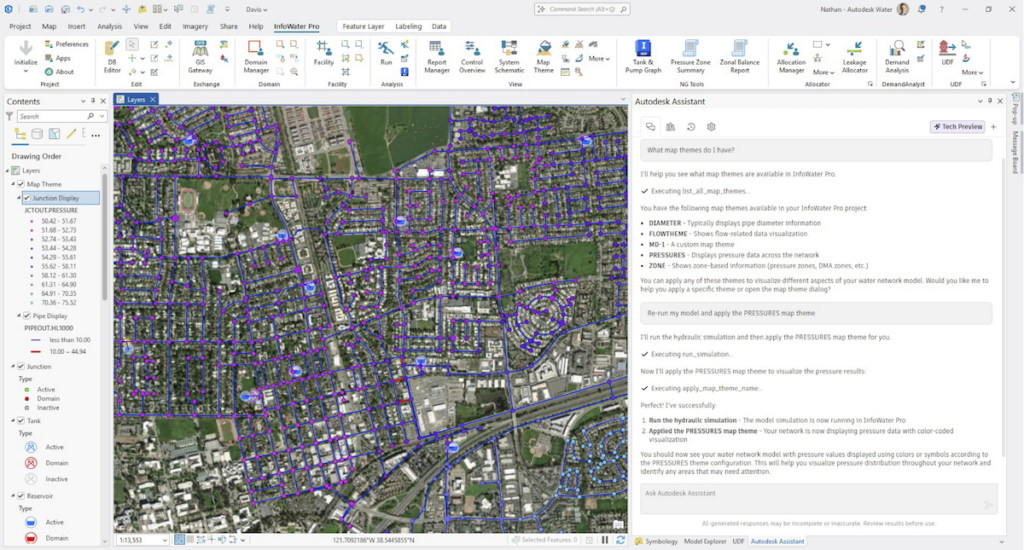
Autodesk Assistant is now available directly inside InfoWater Pro as a technical preview. You’ll find a toggle switch to turn it on or off in the settings. At its core, it’s designed to help you find answers, resolve issues, and move forward without leaving the product every time you hit a question mark.
That includes step-by-step guidance based on product help, troubleshooting support using knowledge articles, and in-product assistance for common tasks. Early preview capabilities also let you list and apply available map themes to your data and rerun standard Run and RunPreview workflows through preview MCP features.
That may sound modest by design, and that is exactly the point. The best use of AI in a modeling environment is not the flashiest one. It’s the one that saves a few minutes here, clears a roadblock there, and helps experienced engineers get to good decisions faster. Autodesk Assistant in InfoWater Pro feels like an early step in that direction.
Improving visualization in water distribution models
Alongside Autodesk Assistant, this release also improves some of the fundamentals of day-to-day model review. Base symbology now supports dynamic rotation, which means new map symbols can align with feature geometry and flow direction. When direction is easier to read, map interpretation becomes more intuitive and visual review becomes a little less error prone.
For existing models, you can apply the updated symbology by using Reset to Default and refreshing the map. Just keep in mind that resetting will also remove any custom symbol overrides in that model.
Advancing system insight with criticality analysis in hydraulic modeling
Criticality Analysis also continues to mature as a technical preview. You can now run hydraulic isolation simulations directly from the Isolation Areas table and interpret the results with clearer pressure and velocity thresholds. For utilities trying to understand which assets pose the greatest operational risk, that kind of clarity matters.
The feature builds on the same practical theme as the rest of this release: better context for better decisions. By incorporating valve locations and surfacing the consequences of pipe and valve failures more clearly, Criticality Analysis helps utilities move toward a more proactive, data driven maintenance strategy. We saw some of that story begin to take shape in InfoWater Pro 2026.2, and this release keeps that momentum going.
Enhanced fireflow analysis for realistic water system capacity
Fireflow analysis gets an important boost too. The revamped Multiple Fireflow run type can now constrain available flow results using any combination of pipe velocity and hydrant residual pressure thresholds. That gives modelers a more realistic picture of available capacity when multiple hydrants are operating at the same time, especially in systems where water quality concerns or lateral pipe limitations need to be accounted for.
In practice, it means utilities can better understand real firefighting capacity, identify bottlenecks, and make more confident upsizing decisions where needed.
📚 For more on this topic, see our post on other fireflow analysis improvements in InfoWater Pro or our technical article on how hydrants are modeled in InfoWater Pro.
A practical release for distribution modeling workflows
InfoWater Pro 2027 delivers a series of focused and practical updates for water distribution modeling workflows:
- Autodesk Assistant adds a useful layer of in product guidance.
- Dynamic rotation makes the map easier to read.
- Criticality Analysis and Multiple Fireflow continue to move toward more actionable, real world insight.
That practical focus is one reason InfoWater Pro continues to resonate with utilities and consultants alike. We have seen it in customer stories like Arcadis advancing clean water management for water utilities with InfoWater Pro and the City of Livonia responding faster to emergencies with InfoWater Pro and ArcGIS Dashboards, where better access to modeling insight translated into faster and more confident decisions in the field.
Learn more about InfoWater Pro and water modeling workflows
- Ready to upgrade? Sign in to your Autodesk account at manage.autodesk.com to download the latest version of InfoWater Pro.
- You can also explore more InfoWater Pro content on the One Water Blog, including the InfoWater Pro archive, past product release posts, and customer stories like Arcadis.