 Trevor English
The way water professionals work is evolving. Projects are becoming more complex, data is growing, and teams need tools that can keep up as demands change. Traditional seat-based subscription models don’t always offer the flexibility to scale when priorities shift or networks change.
That’s why Autodesk is introducing new capacity-based subscriptions for Info360 Asset and Info360 Insight, along with updated cloud simulation options for InfoWorks ICM and InfoWorks WS Pro. With this model, you will have the option to purchase a base subscription and add capacity as your needs grow, customizing what you’re buying to fit your specific needs. It’s a flexible way to align your software with the work you’re doing, helping your team scale efficiently and focus on delivering results.
Info360 subscriptions built for flexibility and value
Info360 Asset and Info360 Insight are transitioning from single-user subscriptions to capacity-based subscriptions, a more intuitive model that aligns directly with how you work. This approach lets you expand user access, add asset or channel capacity, and manage entitlements, so your subscription matches the size and complexity of your capital and operational programs.
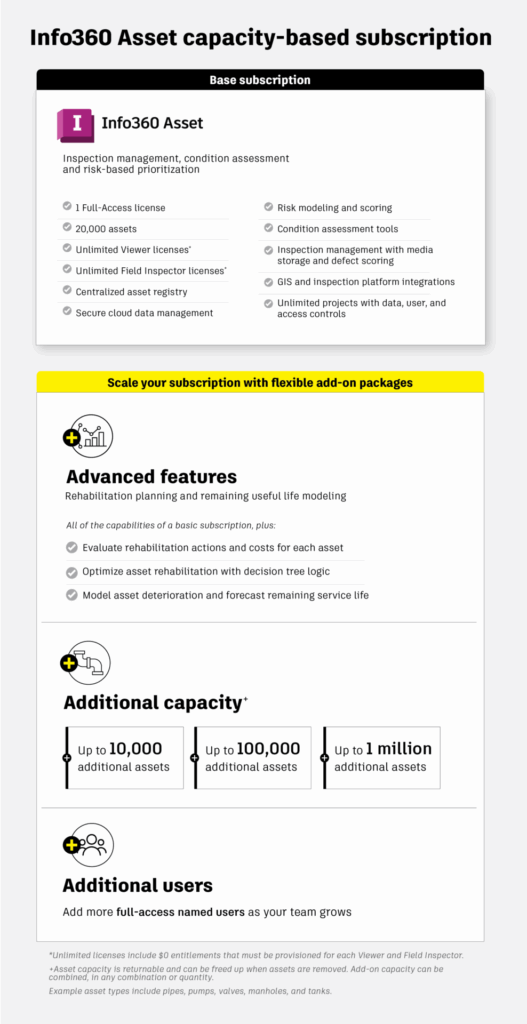
A base subscription of Info360 Asset now includes one Full-Access user, unlimited Field Inspector and Viewer users, and up to 20,000 assets. You can purchase additional full-access users or asset capacity as needed. In this model, assets refer to the physical components that make up a water or wastewater network — such as pipes, pumps, valves, manholes, and tanks. Capacity can be returned when assets are removed, giving you the flexibility to adjust as your needs evolve. Add-on capacity is available in quantities of 10K, 100K, and 1M and can be combined in any quantity on top of the included 20K assets.
The base subscription of Info360 Asset includes everything needed for inspection management, condition assessment, and risk-based prioritization to support capital planning. Teams that need more advanced capabilities can add the Advanced features entitlement to evaluate rehabilitation actions and costs, optimize rehab strategies using decision tree logic, and model asset deterioration to forecast remaining service life.
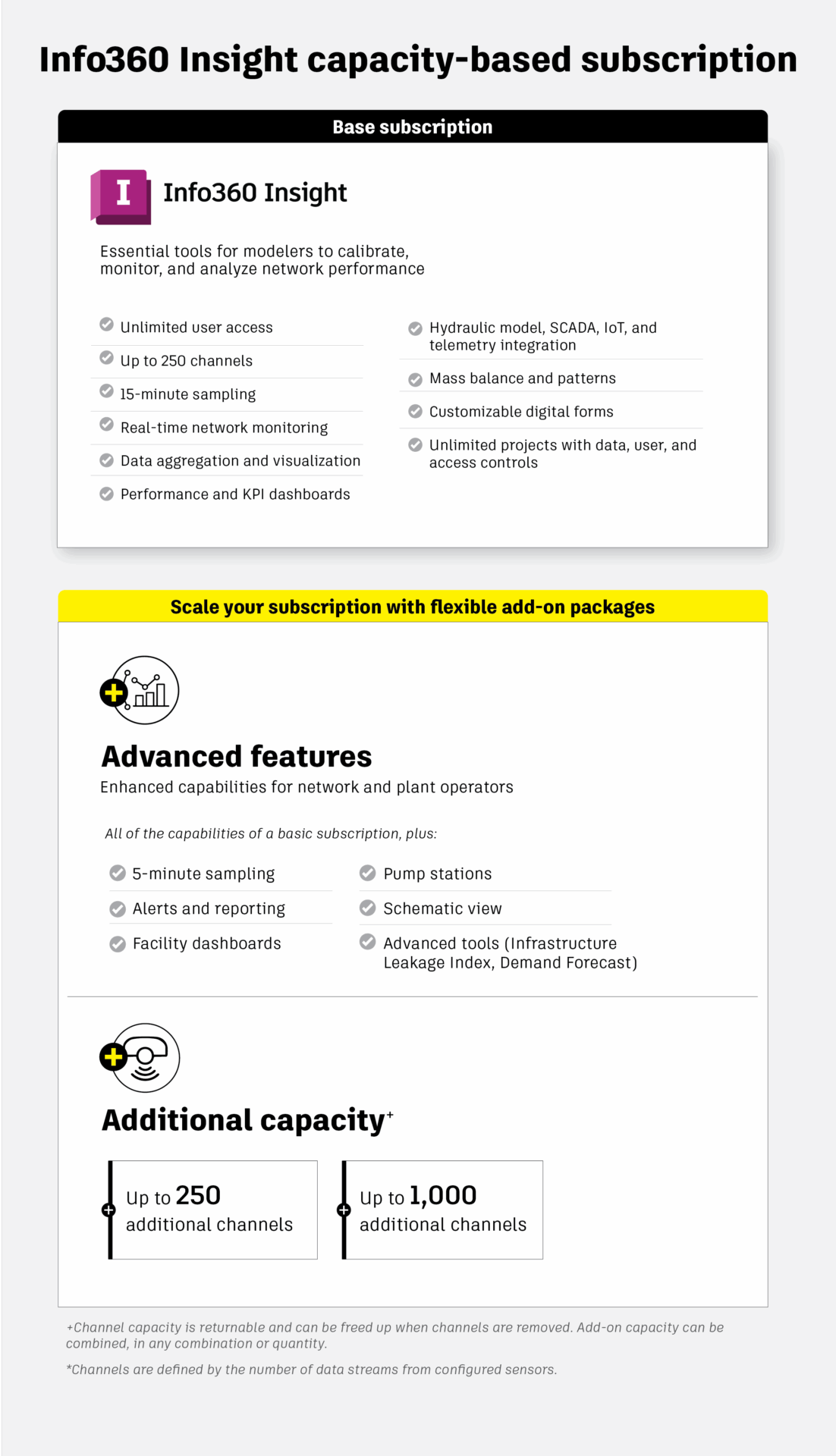
Info360 Insight is also moving to a capacity-based subscription model that makes it easier to scale monitoring and analytics based on the size and complexity of your water and wastewater network. Each subscription includes unlimited user access, a defined sampling frequency, and a defined number of channels, which represent the data streams coming from configured sensors.
The base subscription is ideal for modelers focused on calibration and performance analysis, providing all the core tools for network monitoring, data visualization, and event investigation. It includes 250 channels and 15-minute sampling, which is ideal for most modeling and calibration workflows where you need accurate, consistent data without high compute demand. Additional channel capacity is available in 250- or 1,000-channel increments and can be added as needed on top of the base subscription.
Teams that need more specialized tools for network and plant operations can add the Advanced features entitlement, which unlocks higher-frequency 5-minute sampling, along with advanced capabilities including alerts, facilities, pump stations, and schematic views for real-time operational insight.
This model gives you the flexibility to align your Info360 Insight subscription with the scale and complexity of your operations, helping your team monitor performance, respond faster, and make decisions with confidence.
For details on pricing and to determine the right configuration for your needs, we recommend contacting one of our Autodesk sales experts. Info360 pricing depends on several factors, so a brief consultation can help ensure your subscription is tailored to your organization’s size, usage, and goals. Visit our product pages for easy access to our sales team or to begin a free trial of Info360 Asset or Info360 Insight.
Changes to Info360 Plant
As part of this change, Info360 Plant will be retired officially on December 15, 2025. The capabilities of Info360 Plant are incorporated into Info360 Insight, which will now include both network and plant operational analytics. This integration means that Info360 Insight will cater to both network and plant operators, offering a comprehensive solution for full utility operations. The new capacity-based pricing model has been designed to accommodate both usage scenarios. Moving forward, Info360 Insight will be the product of choice for plant operators, and Info360 Plant will no longer be sold.
What’s changing for cloud simulations in InfoWorks WS Pro and InfoWorks ICM?
Our InfoWorks hydraulic modeling solutions have led the way in enabling cloud-based simulations, helping teams accelerate analyses and improve performance. However, as adoption has grown, there hasn’t been a clear path for how to scale usage beyond set cloud simulation limits.
To address this, we’re updating cloud simulation access in InfoWorks ICM and InfoWorks WS Pro to provide a more transparent and flexible model – making it easier to understand your included usage, plan for larger workloads, and expand access as your project demands grow.
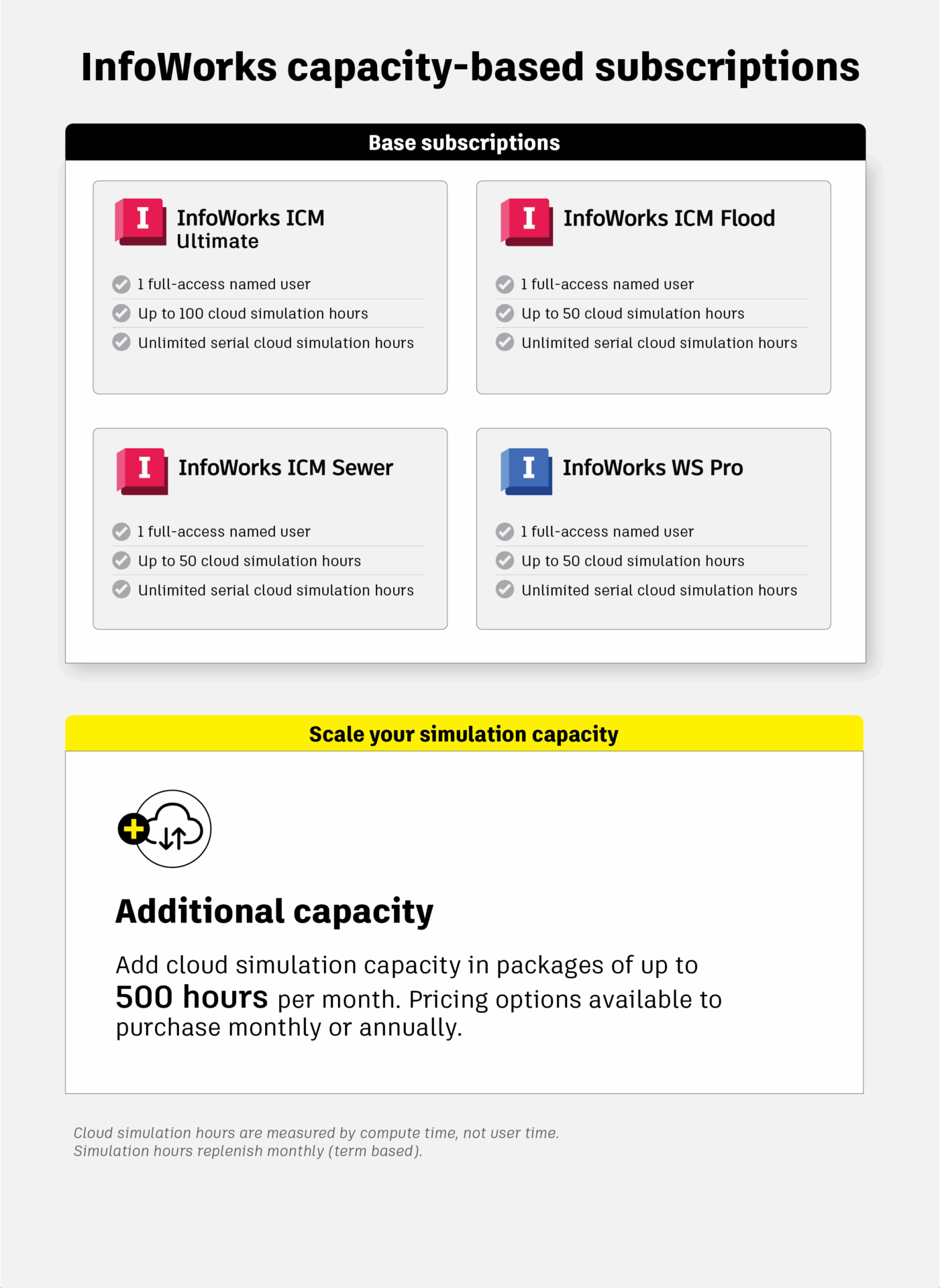
InfoWorks ICM Ultimate will include 100 cloud simulation hours while InfoWorks ICM Flood, InfoWorks ICM Sewer, and InfoWorks WS Pro will each include 50 cloud simulation hours, per subscription. These levels were determined based on typical usage patterns to better align included capacity with common customer needs.
Importantly, all InfoWorks subscriptions will continue to include unlimited access to serial cloud simulations so that you can always run cloud hydraulic simulations without restriction. For teams running more compute-intensive simulations beyond their included hours, additional cloud simulation hours can be purchased through your Autodesk Account in packages of up to 500 hours per month. Pricing and purchase details are available on the InfoWorks ICM and InfoWorks WS Pro product pages.
Note: Cloud simulation hours are measured by compute time, not user time. For example, if a parallel simulation runs for one hour on two machines, it consumes two compute hours, even though the total runtime experienced by the user is only one hour.
There are some important details to how cloud simulation hours are consumed that need to be underscored. Serial simulations run one task at a time on a single processing instance, while parallel simulations run multiple tasks simultaneously across several machines to accelerate results. Both serial and parallel simulations draw from your included or purchased cloud simulation hours. Once you reach your limit, you’ll still have unlimited access to serial simulations, while parallel simulations may pause and queue one at a time until additional hours are purchased or your monthly allocation resets.
These updates are designed to make cloud simulation usage more transparent and scalable, giving you greater control over how you manage computing capacity. As cloud technology continues to drive digital transformation in water modeling, this approach enables you to have the flexibility, visibility, and functionality to meet your project and performance goals.
Have more questons? Visit our customer FAQ for a more detailed explanation of the above.
Explore our public roadmap to see what’s ahead for Autodesk Water Infrastructure solutions and keep reading to discover how cloud-powered tools are transforming the way water professionals model, simulate, and manage infrastructure:
- Arcadis uses cloud simulations to model endless water distribution possibilities
- Hydraulic simulations ‘any way you want it’: Your cloud and local hydraulic model simulation options
- Project Administration functionality streamlines management and collaboration for Autodesk Water Infrastructure cloud tools