 Ryan Brown
 Tim Medearis
 Trevor English
In stormwater management and drainage design, selecting the right software is not just about features. It’s about how well a tool fits the way engineers actually work.
Tools like HydroCAD, TR-20, and TR-55 have long been used for runoff calculations based on established hydrology methods. At the same time, newer tools like InfoDrainage are expanding what’s possible by combining hydrology, hydraulic modelling, and design workflows in a single environment.
So how do these approaches compare in practice?
How engineers actually choose stormwater modelling software
In practice, engineers don’t choose stormwater tools based on feature lists alone. They choose based on:
- Regulatory requirements (TR-55, TR-20, local standards)
- Project scale and complexity
- Whether the focus is calculation or design
- How results need to be communicated
Some tools are designed to perform specific hydrology calculations quickly. Others are built to support broader workflows, including layout, visualization, and collaboration. Understanding this distinction is key to interpreting any comparison.
We’re providing a detailed comparison of these four tools to highlight the key differences and advantages of each. By reviewing a comprehensive feature-by-feature chart, you can gain a clearer understanding of how InfoDrainage, HydroCAD, TR-20, and TR-55 stack up against each other and make an informed decision for your next project.
To explore this in more detail, we reviewed HydroCAD’s published comparison of TR-20 and TR-55 and expanded it to include InfoDrainage, highlighting where approaches align—and where they differ.
As makers of InfoDrainage, we’re obviously biased towards our own software, but we wanted to approach this as fairly as possible, so we began by asking our technical team to review HydroCAD’s published HydroCAD, TR-20, TR-55 Comparison, and expanded it to include InfoDrainage, highlighting where approaches align – and where they differ. We’ve added a column for InfoDrainage to help us detail the similarities and differences between all four applications.
(Did we get any details wrong? Let us know.)
Comparison of HydroCAD, TR-20, TR-55, and InfoDrainage
| Criteria | HydroCAD | TR-20 | TR-55 | InfoDrainage |
|---|---|---|---|---|
| Runoff methodology | • Unit hydrograph procedure (unlimited points) • Santa Barbara Urban Hydrograph • Rational Method | Unit hydrograph procedure (301 points) | Tabular method derived from TR-20 | • SWMM method • Rational method • Modified Rational method • SCS method • Santa Barbara Unit Hydrograph • FEH Method • FSR Method • Time of Concentration Method • A long list of others |
| Rainfall types | Extensive rainfall library, user-defined storms, and synthetic rainfall distributions generated from local precipitation frequency data | SCS type I, IA, II & III | SCS type I, IA, II & III | Extensive rainfall library, user-defined storms, and synthetic rainfall distributions generated from local precipitation frequency data |
| Unit hydrograph | Extensive UH library including SCS, Delmarva, and others | SCS Unit Hydrograph or user-defined curve | SCS Unit Hydrograph only | Extensive UH library including ToC, SBUH, SCS, Laurenson, Modified Rational method, SWMM and others, plus user-defined |
| Curve number entry | Automatic Curve Number look-up and weighting, with adjustment for unconnected impervious areas | Requires direct entry of composite curve number | Automatic Curve Number look-up and weighting, with adjustment for unconnected impervious areas | Automatic Curve Number calculations and adjustments based on imported land use and soil polygons |
| Curve number weighting | Area-weighted, or separate runoff for each Curve Number with weighted flow | Requires direct entry of composite Curve Number | Area-weighted Curve Number | Automatic Curve Number calculations and adjustments based on imported land use and soil polygons |
| Curve number limitations | No restrictions | No restrictions | Reduced accuracy as Curve Number differs from 75 | No restrictions |
| Time of concentration calculations | All TR-55 methods plus common channel shapes, upland method, Curve Number method, and Kerby/Kirpich method | Contains no Tc calculations; requires direct Tc entry | Calculates Tc for sheet, shallow concentrated, and channel flow | Embedded calculators for Kirby/Kirpich, TR-55, Kinematic Wave and others |
| Tc limitations | No restrictions | Must be greater than zero | Limited to 0.1–2 hours | No restrictions |
| Tc precision | 1/10 minute or 1/600 hour | 1/100 hour | Rounded to nearest step | 1/100 of a minute |
| Subarea limitations | None | None | Must not differ by more than factor of 5 | None |
| Runoff accuracy | Within 1% of 1982 TR-20 release | “The standard” | Within +25% of TR-20 release | Within 1% of 1982 TR-20 release |
| Reach routing | Muskingum-Cunge or Storage-indication method with optional routing delay (translation) | Modified Att-Kin procedure | No routing, separate tables for travel times of 0–3 hours | Dynamic wave equations |
| Reach hydraulics | Automatic calculation for common shapes or custom cross-sections | None; requires entry of routing coefficients | N/A; no reach routing | Based on open channel and closed system geometry |
| Pond routing | Storage-indication method, dynamic Storage-indication method, or simultaneous routing | Storage-indication method | None; only estimates ponding effects | Routing determined by the size, dimensions, and attributes of the pond, subject to the dynamic wave equations |
| Pond hydraulics | Automatic calculations for orifice, weir, culvert, etc; used alone or combined for outlet structures | Must be entered directly; no calculations provided | N/A; no pond routing | Embedded calculators for common outlet structures and configurations including multi-stage risers, orifices, weirs, gates, etc |
| Tailwater | Dynamic tailwater handling with all standard outlet devices | None; uses static stage-discharge curves | None; uses static stage-discharge curves | Tailwater can be free discharge or based on a fixed or variable WSE |
| Dam breach | Progressive dam breach triggered at specified time or WSE | None | None | None |
| Pumps | Full pump simulations including pipe losses and tailwater effects | None | None | Full pump simulations as outlet from SCMs |
| Pond sizing estimate | Using actual inflow hydrograph | None | Using assumed hydrograph shape | Embedded calculators for pond size estimate based on discharge and quantity requirements |
| Detention time | By plug-flow and center-of-mass methods | Not calculated | Not calculated | By plug-flow and center-of-mass methods; not explicitly reported |
| Pond storage calculations | Automatic calculation from pond dimensions or surface areas, plus direct entry | Direct entry only | N/A; no pond routing | Automatic calculation based on the pond dimensions, shape, and slope |
| Underground storage | Automatic chamber layout and modeling, including embedded storage calculations | Requires external calculations | Requires external calculations | Various underground storage (box, arch chambers, etc) can be modeled along with estimation with embedded calculators |
| Flow diversions (split flows) | Automatic diversion of outflow from specified pond outlet(s) | Separate “Divert” procedure based on user-defined curve | N/A | Split flows based on HGL in the system subject to the dynamic wave equations |
| Pollutant loading | Automatic land-use reporting and pollutant loading calculations. | None | None | Offers automatic pollutant loading options and removal methods via percentage and first-order decay |
| Routing diagram | Interactive, on-screen, with labels and background image | None | None | • All infrastructure is drawn ‘true to site’ • Interactive, on-screen layouts which can be directly published to Civil 3D to be used in site plans • Adjustable labels, background imagery, surfaces, and more |
| Calculation procedure | Automatically calculated as required | “Batch mode” calculation of entire watershed | Manual initiation of each calculation | Standard 1D analysis or 1D-2D analysis with fully exposed SWMM5 engine |
| Unit system | US English, metric, or custom, plus split input/output units | US English only | US English only | US English, metric, or custom, plus split input/output units |
| Graphics capabilities | Full graphics to screen, printer, or file | None | None | Full graphics, tables, videos, or files |
| Reports | Automatic reports with headings, graphics, etc | Manual | Manual | • Custom or automatic options • Includes flexible reporting tables and easy exports to Civil 3D, PDF, or Excel |
| Data storage | Automatic by job name | Manual | Manual | • Manual based on project name • Includes phase/scenario management with templates (rainfall data, SCMs, pipes and structures, etc) • Supports file recovery if program closes unexpectedly |
Hydrology methods: TR-55, TR-20 and beyond
HydroCAD is widely used for workflows based on TR-20, TR-55, and SCS-based hydrology methods. These approaches remain common, particularly in the United States, and are well suited to:
- SWMM-based modelling
- Runoff estimation
- Detention sizing
- Regulatory submissions
However, these methods are based on specific assumptions about rainfall distribution, catchment behavior, and regional conditions. For example, TR-55 uses standardized rainfall distributions and curve number methods developed for US watersheds, which may not fully reflect conditions in other regions.
Working across regions and standards
In practice, stormwater modelling often needs to reflect local conditions. Different regions use different approaches, including:
- FEH and FSR methods (UK)
- ARR (Australian Rainfall and Runoff)
- Region-specific rainfall datasets and guidelines
These standards account for variations in:
- Climate
- Soil conditions
- Catchment characteristics
📚 Learn how these methods are applied in practice:
- Rainfall and runoff calculation methods in InfoDrainage
- Implementing ARR guidelines for climate change
- Using ARR2019 in InfoDrainage
- FSR vs FEH rainfall methods
- Regional and customizable rainfall settings in Canada
Why this matters
Stormwater modelling is not just about applying a method. It’s about applying the right method for the location and project.
Tools that support multiple regional standards allow engineers to:
- Work across different jurisdictions
- Adapt to local rainfall behavior
- Respond to changing climate conditions
This flexibility is increasingly important as modelling moves beyond standardized assumptions toward site-specific and climate-aware design.
Where the approaches diverge
The biggest differences between these tools are not in individual features, but in how they support engineering workflows.
From calculation to design
Traditional tools represent drainage systems as nodes and links. InfoDrainage allows engineers to move beyond this, supporting layout-based design that can be visualized and integrated directly into site plans.
In other words, we think that your H&H modeling shouldn’t be representing your network with nodes and lines any longer – visuals are more important than ever, particularly when collaborating with other contractors and consultants on a project site. Since InfoDrainage offers Civil 3D integration for visualizing ponds, profiles, channels, grade lines, etc, your modeling work can be easily displayed in the final deliverable.
Supporting multiple methods in one workflow
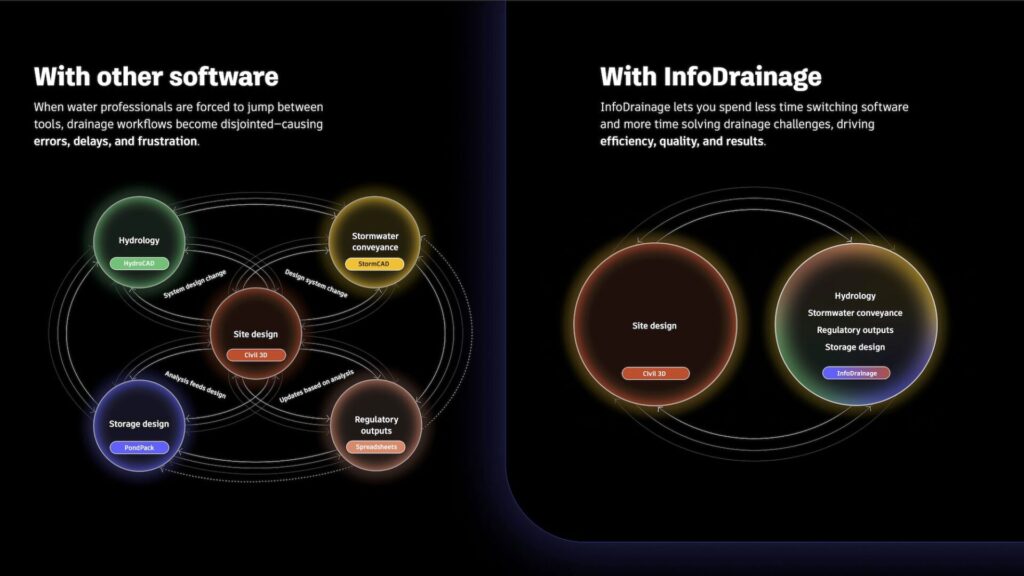
Many engineers need to work across different hydrology methods depending on project requirements. Rather than switching between tools or spreadsheets, InfoDrainage allows these methods to be applied within a single environment.
We know that it can be frustrating for civil engineers to need to learn multiple (sometimes antiquated) H&H programs or spreadsheets to please different regulatory agencies. InfoDrainage eases this frustration by providing the most diverse and wide-ranging set of rainfall, runoff, hydrograph, and other H&H methods on the market. InfoDrainage also provides over 40 different design calculators to right-size stormwater infrastructure such as ponds, rain gardens, pipes, and even green roofs. This allows engineers to work across multiple standards and regions without switching tools.
Incorporate land use and soil type to minimize SCS rework
While technically this might be considered just another one of InfoDrainage’s 40+ calculators, the ability to add polygons which can help automatically generate SCS Curve Numbers, Percentage Impervious, Volumetric Runoff Coefficient, and more has proven invaluable to our customers. Hours, if not days, of rework can be spent in antiquated programs when projects change and Curve Numbers must be recalculated. InfoDrainage saves civil engineers all that time and energy.
Understanding exceedance and system behavior
Many engineers need to work across different hydrology methods depending on project requirements. Rather than switching between tools or spreadsheets, InfoDrainage allows these methods to be applied within a single environment.
We often design systems for the 10 or 25-year storms, but as climate change impacts our “normal” storms with more volume and intensity, regulatory agencies are increasingly asking, “What happens when we have one of these more extreme events?”
InfoDrainage allows you to answer that question with its 1D-2D analysis. When the analysis is run, as water fills and begins to surcharge, you can see where water will go, based on realistic surfaces and understand at what point flooding will impact nearby structures.
These types of analyses are also essential when designing systems such as sustainable drainage systems (SuDS), where managing runoff and exceedance flow pathways is critical to reducing flood risk.
Choosing the right approach
HydroCAD, TR-20, and TR-55 represent proven approaches to stormwater modelling. InfoDrainage reflects a broader shift – toward integrated modelling workflows that combine hydrology, hydraulic modelling, and design.
The right choice depends on:
- Project requirements
- Regulatory context
- How results need to be used
Because in practice, stormwater modelling is not just about calculations. It’s about understanding how systems behave – and communicating that clearly.
Try it before you buy it
Before you purchase any H&H software, you should try it out:
- HydroCAD offers HydroCAD Sampler, which supports up to 5 nodes and has advice for comparing results to other programs. Autodesk offers a 30-day free trial of InfoDrainage with no credit card required, with all features available in the trial.
- If you want to review every feature of InfoDrainage, you can follow along with our tutorial and training. If you’d rather speak to someone on our team who can walk you through InfoDrainage’s latest features, you can send us your contact details and we’ll set you up with a custom walkthrough.
- Are you student or educator? Autodesk Water Infrastructure product licenses are available for free.
- Want to take this chart with you? We created a large poster PDF you can download if you wish. 👇