 Shannon McGarry
See how model-based definition (MBD) in Autodesk Inventor improves manufacturing accuracy, quality, and collaboration, and when it’s worth adopting.
Enhance Your Engineering Workflows
Precise, powerful, and ready for innovation with Autodesk Inventor.

For most manufacturing teams, the 3D model has been the real source of truth for years. The drawing just made it official. Model-based definition (MBD) changes that dynamic.
Instead of translating the model into a drawing and asking downstream teams to interpret it, MBD keeps everything inside the model itself. This includes everything from dimensions to tolerances to inspection requirements to notes.
Tools like Autodesk Inventor have quietly made this shift more practical, not by reinventing workflows overnight, but by embedding MBD into the way engineers already design.
What model-based definition means in practice
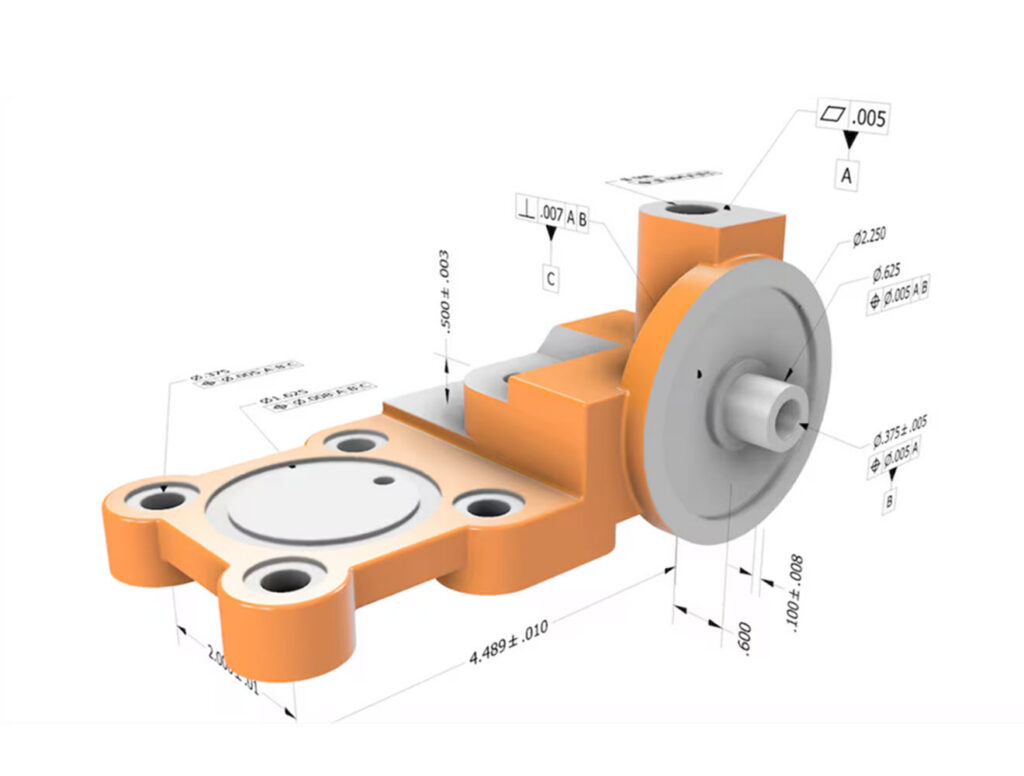
At a basic level, MBD (model-based definition) means defining the product completely within a 3D CAD model.
In Inventor, this typically shows up as:
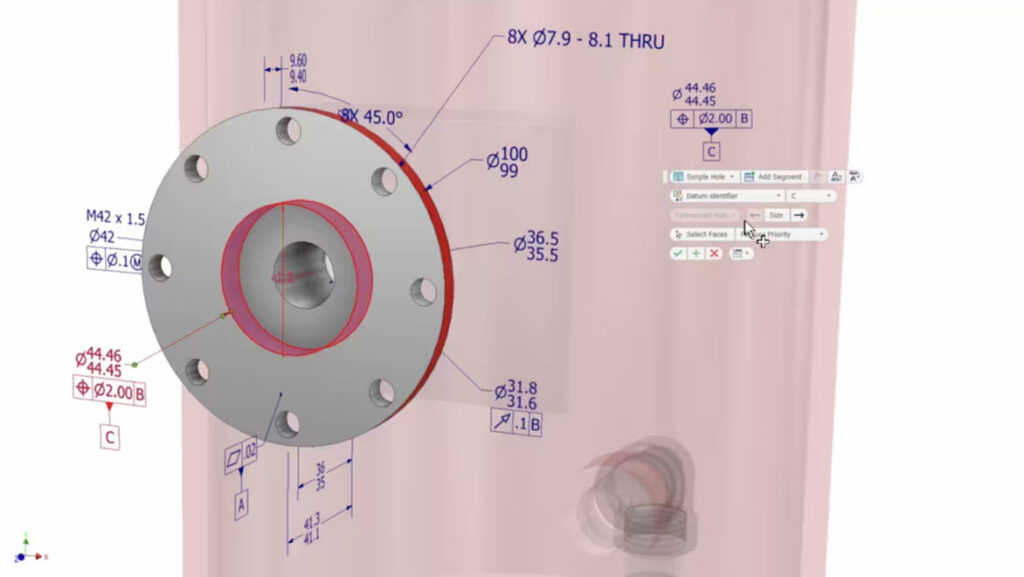
- 3D annotations (dimensions, GD&T, datums) applied directly to the model
- Product Manufacturing Information (PMI) tied to geometry
- A model that can be shared for manufacturing and inspection without relying on separate drawings
The goal isn’t necessarily to eliminate drawings entirely. It’s to reduce how often teams need them.
How Inventor supports model-based definition
Autodesk Inventor includes several purpose-built capabilities that help engineering teams adopt model-based definition without completely changing their existing workflows.
Annotation planes
Annotation planes allow engineers to organize Product Manufacturing Information (PMI) into specific model views. This makes it easier to communicate GD&T, dimensions, and manufacturing requirements for individual operations without creating separate drawing files.
Semantic PMI
Inventor supports semantic PMI, allowing dimensions, tolerances, datums, notes, and manufacturing requirements to remain associated with model geometry. Because the information is tied directly to the model, updates can be propagated more consistently when designs change.
3D PDF publishing
Teams can share annotated models with manufacturing, suppliers, and quality stakeholders who may not have direct access to CAD software. This helps reduce dependence on static drawings while improving collaboration.
Sharing annotated models with 3D PDF and STEP AP242
Creating 3D annotations is only part of the model-based definition workflow. To realize the full value of MBD, teams need a way to share annotated models with suppliers, manufacturing partners, quality teams, and other stakeholders who may not use the same CAD tools.
Inventor supports two common formats for sharing model-based definition data outside the native CAD environment: 3D PDF and STEP AP242. Each serves a different purpose.
3D PDF
A 3D PDF packages the model geometry and its annotations into a PDF document that can be viewed without CAD software. This makes it a practical option for reviews, quotations, manufacturing planning, supplier communication, and inspection preparation. Recipients can rotate, zoom, and interrogate the model while viewing the attached dimensions, tolerances, notes, and other manufacturing information. Viewing requires a PDF application that supports embedded 3D content, such as Adobe Acrobat Reader.
STEP AP242
STEP AP242 (ISO 10303-242) is an open standard for exchanging 3D product data and Product Manufacturing Information (PMI). In addition to geometry, AP242 can carry manufacturing information such as dimensions, geometric tolerances, datums, and other annotations. Because it is a neutral format, AP242 enables annotated models to be exchanged between different CAD, CAM, quality, and inspection systems without requiring every participant to use the same authoring software.
It’s important to note that the amount of PMI retained depends on the capabilities of the receiving application. While AP242 is designed to preserve manufacturing information, support can vary across downstream CAD, CAM, and inspection tools.
Which format should you use?
| 3D PDF | STEP AP242 | |
|---|---|---|
| Best for | Visual review and communication | System-to-system data exchange |
| Recipient needs | A PDF viewer that supports 3D content | Software that supports STEP AP242 |
| Typical audience | Suppliers, quality teams, production personnel, stakeholders | CAD, CAM, quality, and inspection systems |
| Primary purpose | Human-readable model review | Reuse of geometry and PMI in downstream software |
| Can the recipient edit the model? | No, it is primarily a viewing format | Geometry and supported PMI can be imported into compatible systems |
In practice, many organizations use both formats together. A 3D PDF provides an accessible way for people to review and understand design intent, while STEP AP242 enables software systems to consume the same model and manufacturing information as part of a connected digital workflow.
Tolerance analysis integration
Inventor Tolerance Analysis allows engineering teams to evaluate tolerance stack-ups before production, helping identify potential manufacturing issues and balance product quality against manufacturing cost.
Associative documentation
When models change, associated annotations and downstream documentation can remain synchronized, helping reduce revision-control issues that commonly occur in drawing-centric workflows.
Why teams adopt MBD
Most teams don’t switch to model-based definition because it’s cleaner. They switch because something isn’t working, like:
- Drawings going out of sync with models
- Too many clarification cycles with suppliers
- Rework caused by small interpretation mistakes
MBD addresses those issues by removing a layer of translation. When manufacturing teams can reference the model directly, and see the same tolerances and requirements engineers defined, there’s less room for ambiguity.
In Inventor workflows, that often means:
- Less back-and-forth on drawings
- Fewer “Which version is correct?” moments
- More confidence that what’s being built matches what was designed
Accuracy improves when the model carries the full context
Accuracy in manufacturing usually breaks down at the handoff. It’s rarely the design itself. It’s how that design gets interpreted downstream.
By embedding tolerances, annotations, and requirements directly into the model, MBD removes that interpretation step. Systems and teams can work off the same dataset, rather than recreating it. This results in:
- Fewer tolerance stack-ups caused by misread drawings
- Less manual transcription into CAM or inspection workflows
- More consistent part quality across suppliers
Quality control shifts earlier in the process
Traditionally, quality control validates what’s already been built. With model-based definition, it starts earlier.
Because inspection criteria can be defined inside the model:
- Inspection teams don’t need to rebuild requirements from drawings
- Plans can align directly with the original design intent
- Tolerances are already associated with the features they apply to
That alignment reduces errors and strengthens traceability, especially in regulated environments.
In Inventor-based workflows, this tends to make quality less reactive and more embedded in the process.
Collaboration gets simpler, not just faster
One of the less obvious benefits of MBD is how much quieter collaboration becomes. When everyone is looking at the same annotated model:
- Suppliers don’t need separate documentation to understand intent
- Manufacturing doesn’t need to reinterpret drawings
- Engineering doesn’t have to answer as many clarification questions
The model becomes the shared reference point across the lifecycle.
This is where Inventor’s integration into broader Autodesk workflows (like downstream manufacturing or data management tools) starts to matter. Model-based definition only works if the data can move cleanly between teams.
Where model-based definition fits best
MBD tends to deliver the most value where complexity is already high and is most common in:
- Aerospace and defense
- Automotive
- Industrial machinery
- Electronics and high-precision products
These industries depend on tight tolerances, traceability, and coordination across multiple teams.
For simpler products, the benefits are less immediate. If a part is straightforward and rarely changes, a drawing may still be perfectly sufficient.
When model-based definition may not be worth the effort
Model-based definition is not automatically the best solution for every product or organization.
For relatively simple parts, low-volume production runs, or products that rarely change, traditional drawings may continue to provide sufficient documentation with minimal overhead. Some suppliers and manufacturing partners may also lack the ability to consume semantic PMI or model-based data directly, requiring drawings as part of the workflow.
Organizations often realize the greatest return from MBD when they manage complex products, collaborate across multiple teams or suppliers, maintain strict quality requirements, or pursue broader digital transformation initiatives.
For many manufacturers, the most practical transition strategy is a hybrid approach that combines model-based definition with traditional drawings while processes and supplier capabilities mature.
Choosing MBD software: what matters in real workflows
Feature lists don’t tell you much unless those features show up downstream. The most useful capabilities in MBD, especially in tools like Inventor are the ones that keep data connected beyond design:
- Standards-based PMI that downstream systems can interpret
- Associativity, so annotations stay tied to geometry as designs change
- Compatibility with manufacturing and inspection tools
- Clear data management, so teams aren’t working from outdated models
For example, Inventor’s annotation planes help organize manufacturing views, semantic PMI enables machine-readable product definitions, and tolerance analysis tools help engineers evaluate manufacturability before production begins. These capabilities become especially valuable when design, manufacturing, and quality teams all need to consume the same product definition without manually recreating information.
It’s not just a technology shift
Model-based definition isn’t just about turning features on. It requires:
- Agreement on standards (how annotations are applied)
- Confidence that suppliers can consume model-based data
- A willingness to rely less on drawings as the contract
Most organizations don’t move all at once. They start with specific parts or programs, and expand as workflows mature.
Ultimately, MBD isn’t about abandoning drawings. It’s about reducing dependence on them.
Planning an MBD implementation strategy
Adopting model-based definition typically involves more than enabling software features. Organizations often need to establish annotation standards, validate downstream manufacturing and quality workflows, and develop governance processes for maintaining a consistent digital product definition.
In tools like Autodesk Inventor, teams can annotate models, share them downstream, and slowly rely less on secondary documentation.
The real value shows up when that model becomes trustworthy enough that everyone from design to manufacturing to quality can depend on it without translation.
Model-based definition frequently asked questions (MBD)
Model-based definition. It refers to defining all product and manufacturing data directly in a 3D model instead of separate drawings.
MBD in Inventor is used to reduce drawing dependency, improve clarity of design intent, and enable downstream teams to work directly from the model.
Yes. Inventor allows engineers to apply 3D annotations (PMI) directly to models and use them as part of design, manufacturing, and inspection workflows.
Aerospace, automotive, industrial equipment, and other industries where precision and traceability are critical.
Not always. It delivers the most value in complex, multi-team environments. Simpler products may still rely on traditional drawings.
Not necessarily. Many teams adopt a hybrid approach, using MBD to reduce, but not eliminate, drawings.
Standards-based annotations (PMI), strong associativity, interoperability with downstream tools, and clear data management.
Yes. It gives all stakeholders access to the same model, reducing miscommunication and version confusion.
It helps reduce waste by improving accuracy, minimizing rework, and lowering the need for physical prototypes.
Autodesk Inventor includes several capabilities designed to support model-based definition workflows, including annotation planes, semantic Product Manufacturing Information (PMI), GD&T tools, 3D PDF publishing, associative documentation, and tolerance analysis. Together, these features help engineering, manufacturing, and quality teams work from a shared digital product definition while reducing dependence on traditional drawings.
MBD may provide limited value for simple products, low-complexity manufacturing environments, or organizations whose suppliers cannot consume model-based data. In these situations, traditional drawings may remain the most practical documentation method. Many manufacturers adopt a hybrid approach, using both model-based definition and drawings while gradually expanding digital workflows over time.