 Christa Prokos
Uncontrolled revision practices create rework and production errors in manufacturing, but Autodesk Vault is a great solution. Vault’s tools, such as its check-in/check-out system, lifecycle states, and change traceability, help engineering teams stop designing from outdated data and build from a reliable single source of truth.
Optimize Data Management with Autodesk Vault
Secure, organize, and manage your engineering data efficiently.
At some point, every engineering team faces the consequences of fragmented, siloed workflows. Maybe an older design revision makes it to manufacturing, or an assembly won’t fit because two engineers worked from different versions of the same file. It’s difficult to catch such mistakes until they show up on the assembly line, and by then the consequences are significant. Most teams can’t afford the deadline delays or rework costs, especially when they could have been avoided with better, more cohesive workflows. Autodesk Vault changes the equation by giving engineering and manufacturing teams a structured environment for revision control, lifecycle management, and traceability.
Revision control in manufacturing
Engineering teams don’t intentionally try to create revision control problems. They appear gradually as CAD files organically accumulate in local folders, shared drives, and email threads during the design process. With engineers saving models haphazardly “just for now” and emailing revisions to suppliers in isolated threads, everyone ends up contributing to the problem just to keep the project going.
Before long, designers start to circulate multiple versions of the same design and teams lose their single source of truth. In a worst-case scenario, one engineer updates a part in one location, while another updates the same part elsewhere, and both think they have the latest file.

In such cases, problems can start to spread before anyone catches them. In practice, this looks like shops cutting parts to the wrong specification, assemblies failing fit checks, and teams scrambling to redo work under deadline pressure. It can be equally difficult to trace these problems back to their true cause. Instead, teams blame shop errors or unexpected scrap, masking a systemic failure in data control.
All things considered, organizations face compounding risk as product complexity grows. Human-driven workarounds, such as stricter naming conventions, more folder structure, extra review steps, ultimately can’t sustain under deadline pressure. Engineering teams need a system that enforces correct behavior by design, not one that relies on everyone following conventions under pressure.
Have you outgrown shared drives?
Many teams do not realize they have a revision-control problem until production is affected. Common warning signs include:
- Engineers frequently asking which file is the latest version.
- Manufacturing using outdated drawings or models.
- Design reviews spent validating file versions instead of design decisions.
- Engineers maintaining manual revision logs or spreadsheets.
- Teams relying on email to distribute approved designs.
- Difficulty tracing who made a change and why.
If these challenges sound familiar, the issue is often not employee error. It’s a lack of structured product data management that can scale with the business.
How Vault restores revision control
Autodesk built Vault to deliver reliable version control for the entire organization, across the entire design lifecycle. A Product Data Management system, Vault helps teams distinguish product lifestages, indicating when a design is in progress, under review, or obsolete. Whereas shared drives treat all files as equal, Vault structures revision history and enforces access boundaries that prevent version collisions.
Because of that structure, Vault offers teams check-in/check-out workflows that solve many of the core version-conflict problems. Engineers who check out a file lock it for exclusive editing, so no one else can overwrite it while they’re working on it. When they check it back in, Vault logs a new revision automatically. The result is that everyone always knows which file is current.
Building on that control, engineering teams can use lifecycle states to tie revision management to production readiness. They can configure workflows that move a design from “work in progress” through review or approval stages before it reaches a “released” state. Manufacturing teams can then easily pull only released revisions, preventing them from accidentally using unapproved revisions and machining parts to superseded drawings.
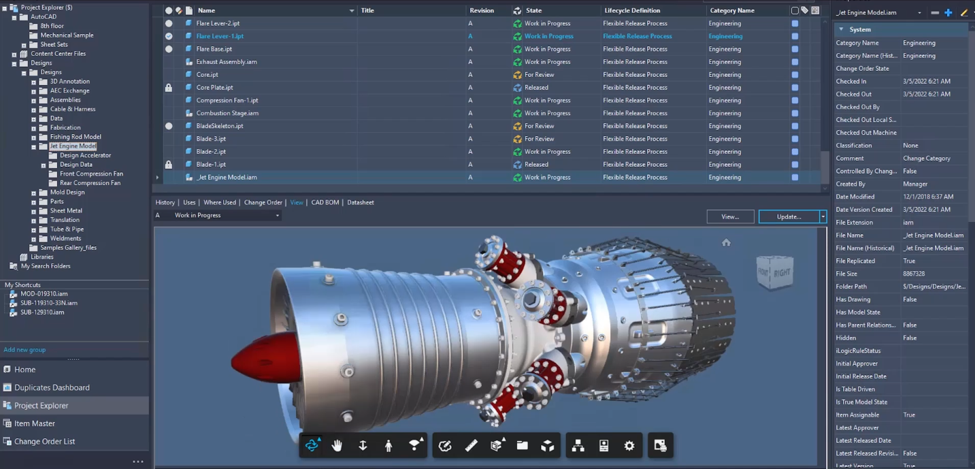
Beyond controlling which revision is in use, Vault also lets teams trace the full impact of every change. When an engineer submits a design update, teams can see what changed, when it changed, and which downstream files (e.g., drawings, assemblies, and bills of materials) the update affects. Reviewing that impact before approval gives teams the chance to catch potential conflicts during the change process, not on the shop floor. Similarly, designers can use Vault to coordinate such changes with external suppliers and across distributed production sites.
Revision control is only the beginning
For many manufacturers, revision control is the first step toward improving product data management. Once teams establish a single source of truth for engineering files, they often look to standardize how changes, approvals, and product data move through the organization.
In addition to version control, Autodesk Vault helps teams manage bills of materials (BOMs), engineering change orders (ECOs), release processes, and item records from a centralized system. This helps ensure approved product information reaches manufacturing, purchasing, and other downstream stakeholders while maintaining full traceability of product changes.
What better revision control means for the business
When engineering teams work from controlled product data, the benefits extend beyond design.
Organizations using structured product data management can:
- Reduce scrap caused by outdated drawings.
- Minimize rework resulting from version conflicts.
- Improve collaboration between engineering and manufacturing.
- Shorten release cycles with controlled approval workflows.
- Increase confidence in engineering change decisions.
- Create a complete audit trail for compliance and quality initiatives.
By ensuring everyone works from approved product data, Vault helps reduce operational risk while improving overall efficiency.
Designing with confidence
Design teams today manage more variants, tighter timelines, and distributed supply chains. When revision data is uncontrolled, teams have to manage project risks that only increase with every handoff. Fortunately, Autodesk Vault solves version confusion for teams and lets them focus on perfecting their product design.
Frequently asked questions about revision control in manufacturing
Revision control is the process of managing changes to engineering data, ensuring teams work from the latest approved version of a design while maintaining a complete history of previous revisions.
Vault uses check-in and check-out workflows that allow only one user to edit a file at a time, helping prevent version conflicts and accidental overwrites.
Yes. Vault maintains version history and traceability so teams can understand what changed, who made the change, and when it occurred
Yes. Vault supports BOM management and item tracking, helping teams maintain more accurate manufacturing data and better alignment between engineering and production.
Manufacturers often adopt PDM software when manual file management, revision errors, approval bottlenecks, or collaboration challenges begin affecting product quality, production schedules, or engineering productivity.