 Shannon McGarry
Discover the complete guide to GD&T symbols, their categories, standards, and practical applications across industries. Learn how Autodesk Inventor makes geometric dimensioning and tolerancing easier for beginners, improving design accuracy, manufacturing efficiency, and quality control.
Enhance Your Engineering Workflows
Precise, powerful, and ready for innovation with Autodesk Inventor.
Modern manufacturing demands precision beyond basic dimensional tolerances. Engineers rely on GD&T symbols to communicate complex geometric requirements for critical components—whether making sure that turbine blades maintain exact profiles or bolt holes align perfectly across assemblies. GD&T transforms lengthy written specifications into clear, universally understood graphical instructions.
These symbols appear across industries: auto, aerospace, medical devices, and consumer electronics. They provide manufacturing teams with precise guidance on allowable variation and quality control requirements, making sure that parts fit and function correctly worldwide.
What are GD&T symbols?
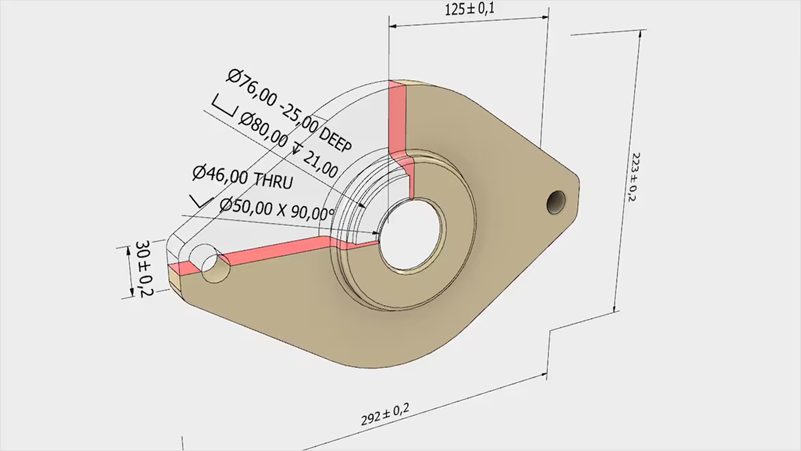
GD&T symbols are standardized geometric shapes that replace lengthy descriptions of tolerances on technical drawings. Instead of paragraphs explaining flatness or hole positioning, engineers use a single symbol within a feature control frame.
Each symbol defines a tolerance zone around nominal geometry. For example:
- Flatness creates a zone bounded by two parallel planes.
- Position creates a cylindrical tolerance zone for holes and pins.
This universal language eliminates ambiguity, ensuring consistent interpretation across global supply chains.
The five categories of GD&T symbols
1. Form tolerance symbols
Form tolerances control the shape of individual features without referencing datums.
- Straightness: Controls deviation from perfect straightness, applied to surfaces or axes.
- Flatness: Ensures surfaces remain within two parallel planes.
- Circularity (Roundness): Requires cross-sections of cylindrical/spherical features to lie between concentric circles.
- Cylindricity: Combines circularity and straightness, requiring surfaces to fall within coaxial cylinders.
These are ideal for features where intrinsic shape quality matters most.
2. Orientation tolerance symbols
Orientation tolerances control angular relationships between features and datums.
- Perpendicularity: Ensures features maintain 90° angles relative to datums.
- Parallelism: Controls how parallel surfaces or axes are to datums.
- Angularity: Specifies angular relationships other than 90°.
These always require datum references to establish measurement consistency.
3. Location tolerance symbols
These tolerances specify exact positioning requirements for assembly and function.
- Position: Most widely used; controls location of holes, slots, and pins relative to datums.
- Concentricity: Ensures circular features share the same axis.
- Symmetry: Controls symmetrical positioning relative to datum centerlines.
Location tolerances ensure proper fit and alignment in assemblies.
4. Profile tolerance symbols
Profile tolerances control 2D and 3D surface shapes, managing form, orientation, and location simultaneously.
- Profile of a line: Controls linear elements along a surface.
- Profile of a surface: Controls entire 3D surface geometry.
These are especially useful for complex curved surfaces like turbine blades or automotive panels.
5. Runout tolerance symbols
Runout tolerances control variation during rotation about a datum axis.
- Circular runout: Controls variation of circular cross-sections during rotation.
- Total runout: Controls entire surface variation during rotation.
These symbols ensure smooth operation of rotating parts like shafts, gears, and bearings.
Material condition modifiers
Modifiers optimize tolerances based on actual feature sizes:
- MMC (Maximum material condition): Provides bonus tolerance when features contain maximum material.
- LMC (Least material condition): Provides bonus tolerance when features contain minimum material.
- RFS (Regardless of feature size): Maintains constant tolerance regardless of size.
These modifiers reduce costs by allowing practical tolerance adjustments while maintaining functionality.
Reading feature control frames
Feature control frames organize tolerance information:
- Symbol: Indicates type of control.
- Tolerance value & modifiers: Defines allowable variation.
- Datum references: Establish measurement order.
This standardized format ensures consistent interpretation across design, manufacturing, and inspection.
Standards governing GD&T
ASME Y14.5
The most widely used GD&T standard in North America. Defines 14 main symbols and supporting concepts. Updated every 10–15 years, with the 2018 version clarifying datum concepts, tolerance zones, and integration with modern inspection methods.
ISO 1101
The global alternative, widely used in Europe and Asia. Shares similar symbols but differs in applications and interpretations. Often combined with national standards like BS 8888 for compatibility.
Practical applications
- Automotive: Engine components, transmission parts, and safety systems rely on GD&T for precise fit and performance.
- Aerospace: Flight-critical components require tight tolerances for reliability under extreme conditions.
- Medical Devices: Implants and instruments demand precise surface profiles and form tolerances.
- Consumer Electronics: Tight tolerances ensure proper connector alignment and heat dissipation.
- Additive Manufacturing: GD&T communicates post-processing requirements for critical surfaces.
Benefits of GD&T
- Cost reduction: Avoids over-specification, applies tight tolerances only where necessary.
- Bonus tolerance: MMC and LMC provide flexibility, reducing machining costs.
- Improved quality control: Clear inspection criteria eliminate ambiguity.
- Statistical process control: Enables monitoring of manufacturing processes.
- Enhanced communication: Standardized language improves collaboration across teams.
- Global supply chains: Ensures consistent interpretation worldwide.
- Integration with CAD/CAM: Directly interprets tolerances for machining and inspection.
Common mistakes
- Applying form tolerances larger than size tolerances.
- Using position tolerances without proper datum references.
- Mixing ASME and ISO conventions in the same drawing.
- Over-constraining features with conflicting tolerances.
- Neglecting material condition modifiers when bonus tolerance is intended.
Avoiding these errors ensures manufacturability, cost efficiency, and functional reliability.
Autodesk Inventor for GD&T
Autodesk Inventor integrates geometric tolerancing directly into the 3D modeling workflow. Instead of struggling with abstract symbols on a 2D drawing, users can apply GD&T controls to actual features in their digital models and immediately see how tolerance zones interact with part geometry. Inventor’s intuitive interface guides users through feature control frames, datum selection, and modifier application, reducing the risk of common mistakes. It also connects tolerancing decisions to downstream processes like CAM programming and inspection planning, so users quickly understand the practical impact of GD&T on manufacturing and quality control. Try it free for 30-days today.
GD&T frequently asked questions (FAQs)
Geometric Dimensioning and Tolerancing (GD&T) is a standardized engineering language used to define how much geometric variation a part can have while still functioning as intended. Instead of relying only on size dimensions, GD&T specifies requirements for shape, orientation, and location—making design intent clearer across teams.
Many engineers apply GD&T directly in Autodesk Inventor to ensure tolerances stay connected to the model as designs evolve. If you want to see how this works in practice, you can try Autodesk Inventor and explore GD&T tools firsthand.
GD&T helps eliminate ambiguity between design, manufacturing, and inspection by defining geometry relative to functional references. A part may meet linear dimensions and still fail during assembly—GD&T prevents this by controlling real‑world variation.
Using GD&T in a CAD environment like Inventor makes it easier to communicate these requirements digitally, especially in model‑based workflows. Teams evaluating whether this approach fits their process often start by trying Inventor or reviewing Inventor pricing to understand what’s included.
Traditional plus‑minus tolerances describe size, but not how features relate to each other in three‑dimensional space. GD&T defines tolerance zones tied to functional datums, reducing fit issues, rework, and inspection disputes.
Applying GD&T directly in Autodesk Inventor helps keep these relationships explicit and consistent throughout design changes—something many teams explore during a free trial of Inventor.
GD&T symbols are standardized geometric symbols placed in feature control frames to specify tolerance requirements visually. Each symbol represents a specific geometric control, replacing written explanations with a universal language understood across manufacturing teams.
Autodesk Inventor supports these symbols natively, making it easier to apply and review them digitally before parts ever reach the shop floor.
GD&T symbols fall into five main categories:
-Form
-Orientation
-Location
-Profile
-Runout
These categories cover everything from basic shape control to complex surface definition—capabilities that are built directly into Inventor’s annotation and tolerancing workflows.
Form tolerances control the shape of individual features without referencing a datum. Examples include straightness, flatness, circularity, and cylindricity. These controls ensure features stay within acceptable geometric limits regardless of orientation or position.
In Autodesk Inventor, form tolerances can be applied directly to features, helping teams validate shape early and reduce downstream corrections—something you can test yourself by trying Inventor.
Orientation tolerances define how a feature is angled relative to a datum, such as perpendicularity, parallelism, or angularity. These controls are critical for alignment during assembly.
Inventor supports these tolerances as part of its GD&T toolset, allowing engineers to clearly communicate alignment requirements and verify intent before manufacturing begins.
Location tolerances specify the exact position of features like holes or slots relative to datums. Position is the most commonly used location tolerance because it ensures fasteners and mating features align correctly.
Being able to place and review these tolerances in Inventor helps teams reduce assembly issues. Get started today with a 30-day free trial.
Autodesk Inventor allows engineers to apply standardized GD&T symbols and tolerances directly in the digital design environment. This helps ensure design intent is clearly communicated and kept aligned as models change.
Teams exploring model‑based definition or more robust tolerancing workflows can try Inventor to see how GD&T fits into their existing process.
GD&T in Inventor benefits design engineers, manufacturing engineers, and quality teams who need clear, unambiguous definitions of allowable variation. It’s especially useful for teams moving toward digital or model‑based workflows. Get started today with a free trial.