 Christa Prokos
Earlier this year, Autodesk Vault 2027 took a meaningful step forward in product data management. The release focused on a clear goal: removing friction from everyday work while keeping Vault as the trusted system of record. The result is an experience that feels more intelligent and connected, without asking teams to rethink how they already work.
Optimize Data Management with Autodesk Vault
Secure, organize, and manage your engineering data efficiently.
Autodesk Vault 2027.1 builds on that foundation with a modernized Thin Client experience that now includes the AI-powered Autodesk Assistant, expanded connectivity with Autodesk Fusion Manage and Autodesk Forma, and practical enhancements across everyday workflows with Vault PDM.
Let’s take a closer look at what’s new.
Autodesk Vault 2027.1 Highlights
A smarter, more modern Thin Client
The Autodesk Vault Thin Client gives project stakeholders browser-based access to controlled engineering data without requiring the desktop client. In Vault 2027.1, the Thin Client has been transformed, delivering a more consistent and efficient way to work with less searching, less manual work, and less friction.
The updated Thin Client experience includes:
- Autodesk ID sign-in
- AI-powered Autodesk Assistant integration
- A redesigned layout and clearer navigation
- Improved search and table interactions
- User settings and more admin control
- Multi-row selection
- Horizontal scrolling for wider tables
- The ability to pin important information while working
- Access to the Thin Client through Vault Gateway
Sign in with Autodesk ID
Users can now sign in to the Thin Client with their Autodesk ID and move directly into their Vault workspace. This creates a more familiar entry point for people who already use Autodesk products and services. It also makes it easier for occasional and downstream users to access the product information they need without introducing unnecessary steps into review and collaboration workflows.
Get work done faster with the AI-powered Autodesk Assistant
Available to Vault Professional users, the Autodesk Assistant tech preview is now integrated into the Vault 2027.1 Thin Client, bringing natural-language interaction to Vault tasks. This means the same Autodesk Assistant capabilities available in the Vault desktop client are now also available in the Thin Client.
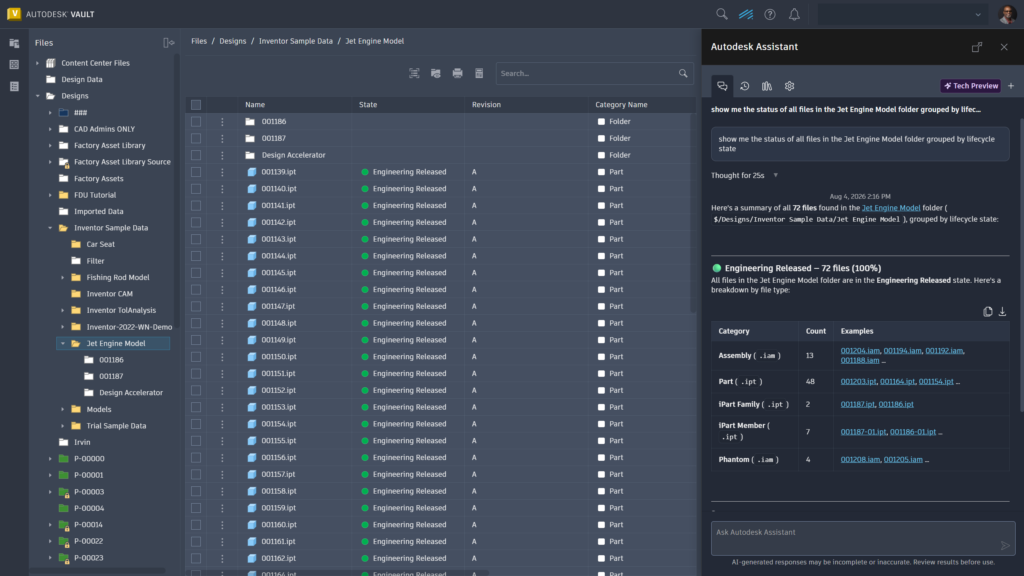
Instead of searching through menus or remembering specific commands, users can begin common workflows by simply describing what they need.
Users can ask Autodesk Assistant to:
- Run a standards check
- Create charts and reports from Vault data
- Copy an existing item for reuse
- Export a bill of materials
- Set up a project folder structure
For more information on the Vault 2027.1 Thin Client updates, see this post.
More connectivity for downstream workflows
Vault 2027.1 expands how engineering data connects with business and better project delivery. The focus is not simply on transferring data between applications, it’s on reducing manual handoffs, limiting application switching, and helping teams work from consistent, trusted information.
Vault Connector for Fusion Manage enhancements
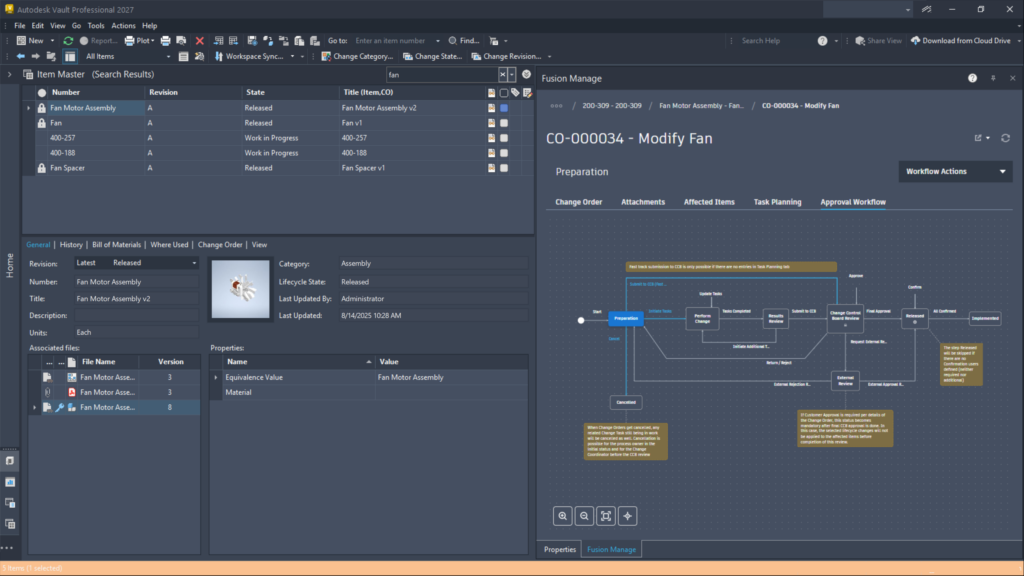
Enhancements to the Vault Connector for Fusion Manage product lifecycle management (PLM) bring more change-management activity directly into Vault. Users can add affected items, create workflow records, review status, and take available actions without repeatedly moving between applications.
Administrators also gain more control over synchronization. They can choose which items are synchronized and determine whether to include a complete bill of materials or properties only. Connector configurations can now be exported and reused, making it easier to maintain consistent deployments across environments.
New native Vault Connector for Autodesk Forma
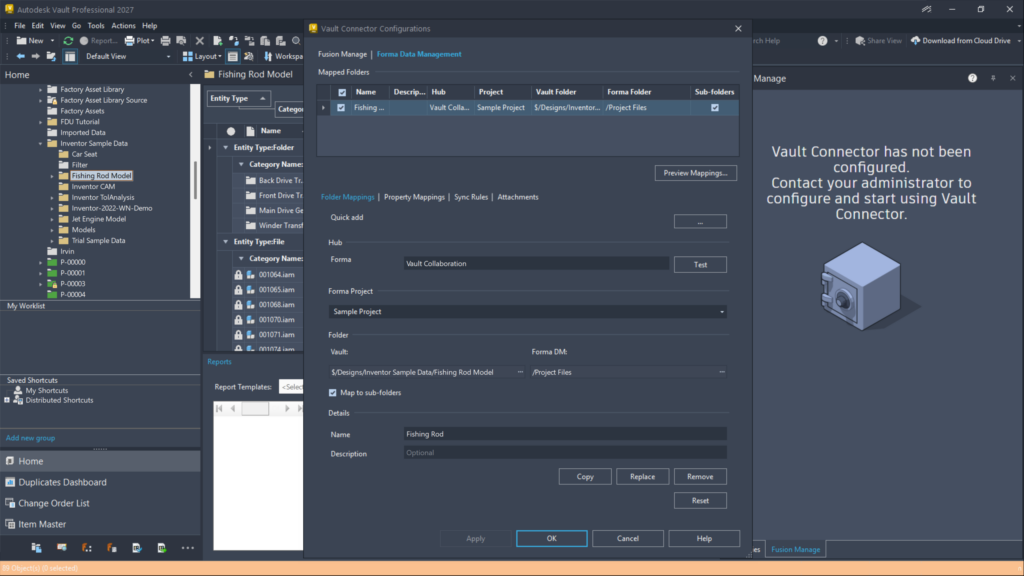
The new native Vault Connector for Autodesk Forma securely delivers managed design data from Vault into Forma projects.
Administrators can:
- Map Vault folders to one or more Forma projects
- Map required properties
- Use lifecycle transitions to trigger synchronization automatically
Synchronization results remain visible in Vault, giving teams a clear view of what transferred successfully and what still requires attention. Project teams receive the design information they need, while engineering teams retain control through established Vault lifecycle processes.
Keep the numbering scheme and folder structure that engineers already trust in Vault — while giving downstream stakeholders the structure that works for them in Forma. The Connector lets users rename or move files in Forma without breaking their link to the corresponding files and folders in Vault
Faster, more flexible everyday workflows
Vault 2027.1 also introduces several practical enhancements designed to remove friction from routine work.
Improved model state processing
Checking in Inventor assemblies with many model states can require significant processing time. Vault 2027.1 allows administrators to configure Inventor Server instances based on the machine resources available in their environment. This provides greater flexibility when processing complex assemblies and can help make check-in metadata available in Vault more efficiently.
Advanced search for multiple values at once
Advanced Search now supports multiple values within a single condition. Users can search for several part numbers, project identifiers, categories, or other property values without creating a separate criterion for each entry.
This makes complex searches faster to build and easier to review, helping teams gather the right records for design reviews, change activities, audits, and downstream planning.
Has BOM and Has Parent Item properties
New searchable Has BOM and Has Parent properties make it easier to identify items with bills of materials or parent-child relationships. Users can display and filter these properties to find structurally relevant items without opening each record individually.
Job Queue access from Job Processor
Job Processor operators can now open the Job Queue directly from the Job Processor interface. This makes it easier to review, prioritize, and manage jobs without leaving the current workflow.
Cross-workgroup job processing
Job Processor can now accept jobs from any workgroup within a replication environment. This helps distributed organizations balance workloads, reduce processing bottlenecks, and make better use of available processing capacity.
Autodesk Vault 2027.1 keeps your data and teams moving forward
Vault 2027.1 is built to help teams move faster without adding complexity. By bringing a more modern Thin Client with AI-powered Autodesk Assistant capabilities, expanded integrations connectivity, and practical workflow improvements into the tools teams already rely on, this release helps reduce friction, improve access to trusted data, and keep product development moving. It’s another meaningful evolution for product data management—one that makes Vault simpler to use, more connected, and aligned to the way teams work today.
Built with the Vault community
Autodesk Vault continues to evolve through direct customer input. Through Vault Ideas, the Vault Forum, and feedback programs, customer voices directly influence the product roadmap. Vault 2027.1 reflects that ongoing collaboration.
As mentioned above, Autodesk Assistant in Vault is currently available as a tech preview. Capabilities will continue to evolve over time based on user feedback and ongoing development. Join the community of users and share your feedback here: Autodesk Assistant in Vault
Ready to explore Autodesk Vault 2027.1?
Whether you are new to Vault product data management or a long-time customer, Autodesk Vault 2027.1 helps teams work faster, collaborate more effectively, and stay confident that product data remains secure, controlled, and connected.
And it does so without changing the workflows your teams depend on every day.
For more information, see What’s New in Vault 2027.1.
Check out more on Vault 2027.1
Autodesk Vault 2027.1 Delivers a More Modern, Intelligent Thin Client
Autodesk Vault 2027.1 Expands Connectivity and Data Continuity Across Workflows