 Christa Prokos
Engineering data does more than support design work. It feeds change processes, project coordination, planning, procurement, manufacturing, and execution. Yet many organizations still struggle to maintain data continuity as information moves from product development into project delivery and execution. When teams rely on manual exports or disconnected systems, data can quickly become outdated, inconsistent, or difficult to trace.
Optimize Data Management with Autodesk Vault
Secure, organize, and manage your engineering data efficiently.
Autodesk Vault 2027.1 enables data continuity through a new native Vault Connector for Autodesk Forma, enhanced connectivity with Autodesk Fusion Manage, and Vault Connector APIs for custom workflows making managed data easier to use across cloud-based project and business workflows while extending product data management into the broader digital thread.
Let’s take a closer look at what’s new.
Vault 2027.1 Connectivity Highlights
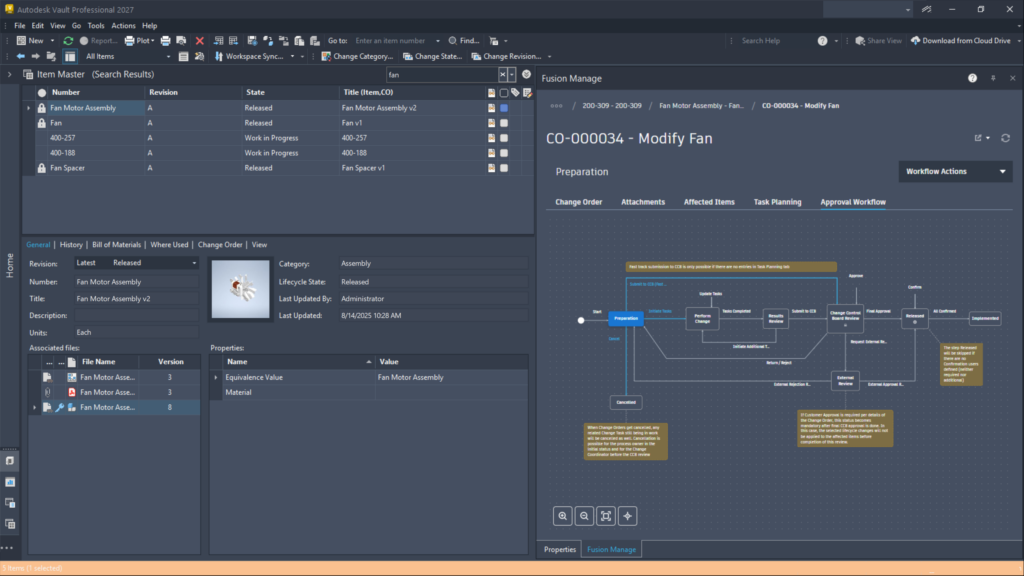
Bring more Fusion Manage change management work into Vault
Vault 2027.1 enhances the Vault Connector for Autodesk Fusion Manage so engineering teams can take part in more product lifecycle management (PLM) activities without constantly jumping between applications.
From Vault, users can:
- Add affected items to a change process
- Create Fusion Manage workflow records
- Review workflow status
- Complete available workflow actions
Because these activities sit closer to the engineering data they affect, teams can spend less time switching systems and more time moving work forward.
Administrators also get more control over how information is synchronized. They can choose which items to sync and decide whether to include a full bill of materials or properties only. Vault Connector configurations can be exported and reused as well, making it easier to keep deployments consistent across environments.
These enhancements keep controlled engineering data connected to change processes, while letting engineers continue working in familiar Vault workflows.
Securely connect managed Vault data to Autodesk Forma
Vault 2027.1 also introduces a native Vault Connector for Autodesk Forma. The connector securely moves managed design data from Vault into Forma projects, giving project teams access to data while engineering teams maintain control through established Vault lifecycle and release processes.
The idea is straightforward: keep Autodesk Vault as the source for authored and managed engineering data and make the right information available in Forma for cloud collaboration, coordination, and project execution.
Configure the connection around your project structure
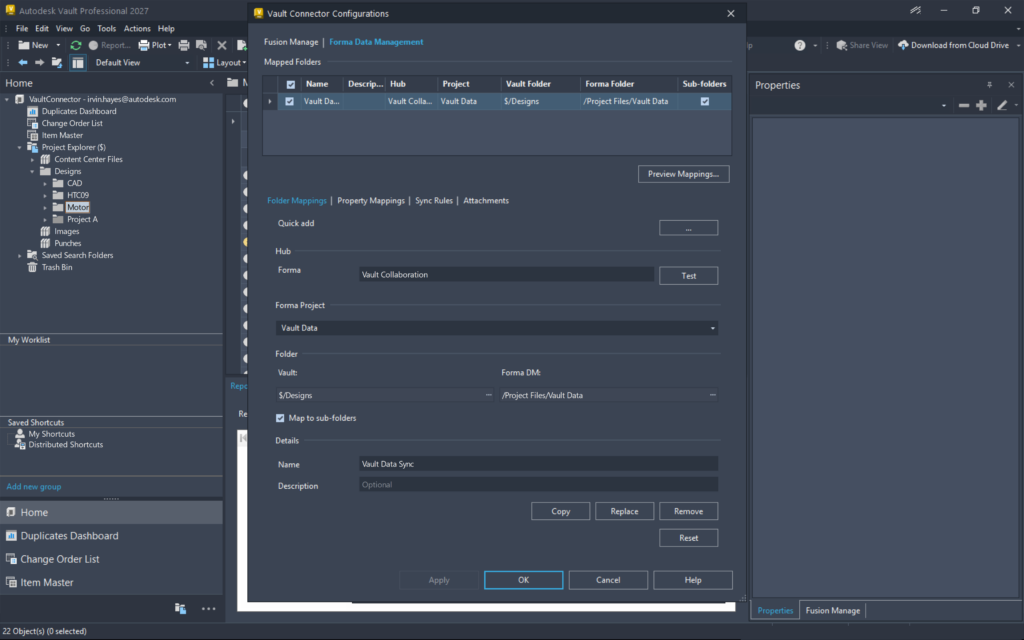
Administrators start by mapping the Vault folders that contain project data to the corresponding locations in Forma. They can also map Vault properties to Forma attributes so useful context moves with the files.
This creates a repeatable structure for synchronization and makes it clear where managed content will be delivered.
Organizations can preserve the numbering conventions and folder structures engineers already trust in Vault, while downstream stakeholders organize content in the way that works best for their Forma projects.
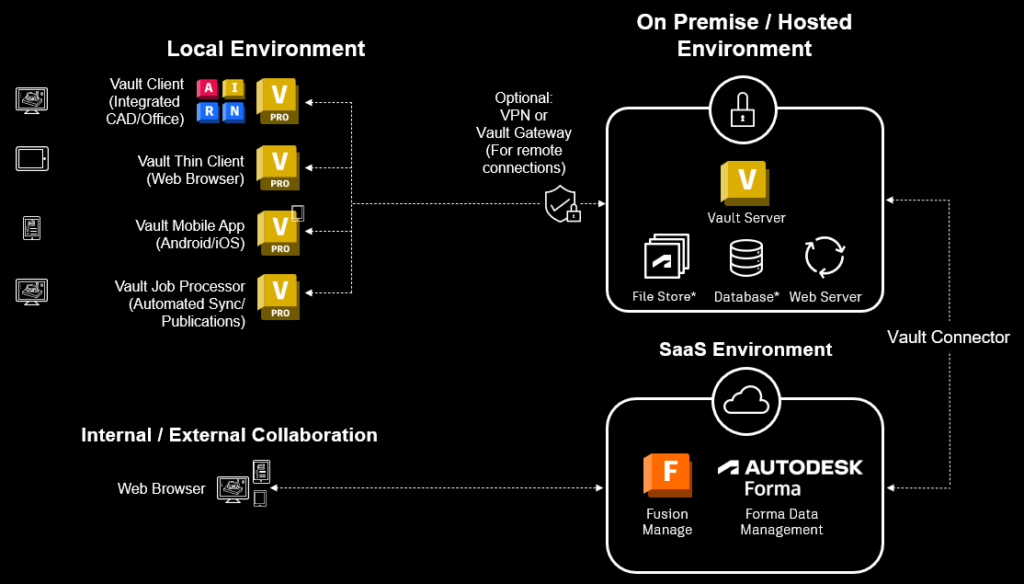
Vault Server supports multi-site environments with flexible replication options for File Store and Database — either combined or separate.
Deliver the right information to one or more projects
Not every file in a source folder needs to move downstream. Administrators can create synchronization rules based on Vault properties, helping project teams receive the right information at the right stage of the process.
A single Vault folder can also sync with multiple Forma projects. Teams can maintain one consistent source in Vault while delivering the required content to each project environment.
Connect synchronization to the release process
Synchronization can be triggered by a Vault lifecycle-state change. Instead of depending on someone to remember when approved information should be handed off, administrators can set synchronization to happen when content reaches a designated lifecycle state.
Engineers can keep following established Vault release processes, while approved project information moves into Forma at the right time. That reduces manual updates and helps downstream teams work from current, controlled data.
Maintain the connection as Forma projects evolve
After synchronization, users can go directly from Vault to the corresponding file or folder in Forma. Downstream users can also rename or move synchronized content within Forma without breaking its connection to the original files and folders in Vault. Project teams get flexibility in how they organize their environment, while traceability back to the engineering source of truth stays intact.
See synchronization results in Vault
Synchronization results and exceptions stay visible in Vault. Teams can see which files transferred successfully and which items still need attention, making it easier to spot issues, resolve exceptions, and confirm that project teams received the expected information.
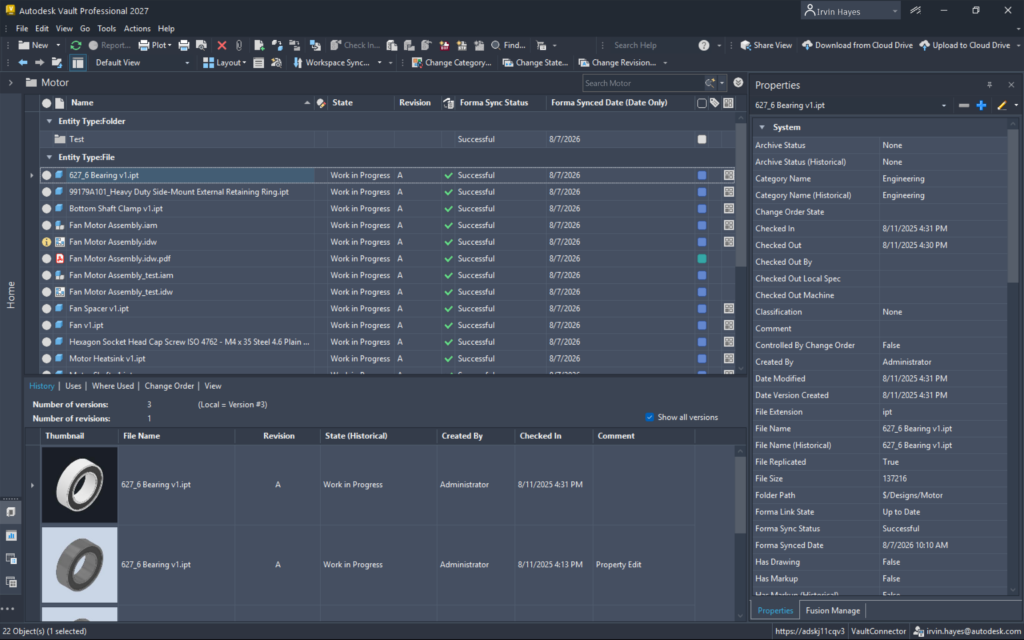
Together, these capabilities help engineering and project teams collaborate through connected workflows without losing the control, structure, or release processes already established in Vault.
Build custom connections with Vault Connector APIs
Vault Connector APIs are now available on Autodesk Platform Services (APS) to support custom specific requirements while leveraging the Vault Connector for Fusion Manage and Forma.
This gives organizations another way to connect Vault to the broader digital thread while keeping control over what information is shared and how it moves downstream.
Keep trusted data moving from design to execution
Updates to the Fusion Manage connector bring more change-management work into Vault. The new Forma connector delivers approved design data to cloud-based project teams while preserving lifecycle control and traceability. Vault Connector APIs give organizations a path to build connectivity around their own processes and systems.
From design through execution, Vault 2027.1 helps teams reduce manual handoffs, stay aligned, and move faster with more confidence in the data behind their decisions.
For more information, explore What’s New in Autodesk Vault 2027.1.
Join the Vault community
Autodesk Vault continues to evolve through direct customer input. Through Vault Ideas, the Vault Forum, and feedback programs, customer voices directly influence the product roadmap. Vault 2027.1 reflects that ongoing collaboration. Join the Vault community and help influence what’s next for new Vault features.
Check out more on Vault 2027.1
Autodesk Vault 2027.1 What’s New Overview
Autodesk Vault 2027.1 Delivers a More Modern, Intelligent Thin Client