 Paolo Bastianelli
Learn how to use the GRBL post with Fusion for precise CNC and laser GRBL machining. Download the software and optimize your CNC machine workflow.

Elevate your design and manufacturing processes with Autodesk Fusion
If you are using Fusion to prepare designs for CNC machining or laser cutting, understanding how to use the GRBL post processor is essential. Whether working with a traditional CNC router or a laser engraving machine controlled by laser GRBL, this guide covers what GRBL is, where to find the right post processor, and how to set up your workflow using GRBL software with Fusion.
What is Grbl for CNC machines and laser cutters?
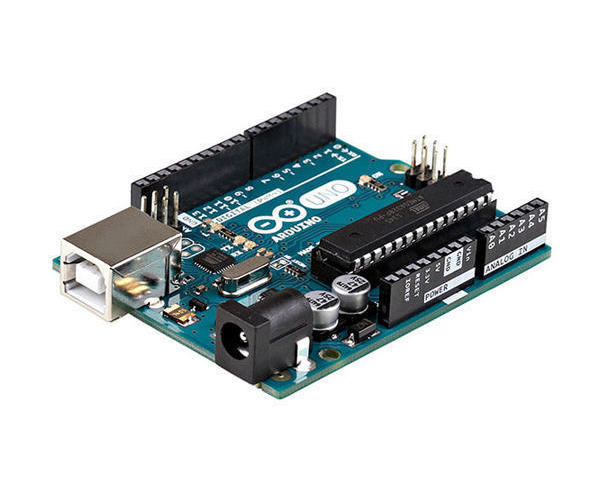
Grbl is software that converts g-code to motions on a CNC machine. It runs on an Arduino or similar development board. G-code is the instructions that tell the machine what to do. The Arduino receives these instructions line by line via USB from a g-code sender. The g-code sender also serves as the human machine interface (HMI) and runs on a laptop, computer, or Raspberry Pi.
For laser applications, there is a specialized variant called laser GRBL that adds support for controlling laser power smoothly during cuts and engraving, ensuring precision and safety.
History
Grbl development began in 2009 under Simen Svale Skogsrud, and Sonny Jeon continued the work in 2011. The software is open source and has a large community of developers and users. Consequently, many companies utilize Grbl for their CNC machines, including Inventables, Carbide 3D, and Openbuilds. You can use it to automate all different types of machines, from hot wire foam cutters to 3D printers. It has also forked into various other projects like TinyG, which is a conversation in and of itself. Grbl continues to be a vital catalyst for desktop CNC; hence, the noteworthiness of Sonny and Simen’s contribution.
How to pronounce it?
According to Simen, Grbl is named after the animal, gerbil, because it is small and does one thing very well. However, some pronounce it “garble,” with others using a hard g as in “girl” in place of the soft g in “gerbil.” It probably doesn’t matter too much how you say it, as long as your machine is working hard for you.
The Grbl post-processor
For those who don’t know, a post-processor (post) converts toolpaths from CAM software into g-code. While there are standards for g-code, most machines only follow them roughly. This means selecting the correct post processor, and its settings are essential. Fortunately, the Grbl g-code follows the LinuxCNC g-code specification and is relatively simple. It should be noted that not all LinuxCNC commands are implemented in Grbl. Furthermore, depending on the g code sender, the implementation of Grbl, and the machine type, your CNC setup may have special g-code requirements. Be sure to select the correct post processor for your setup.
What is a GRBL post processor in Fusion?
When creating toolpaths in Fusion, the software outputs G-code with the help of post processors that tailor the code for specific machine controllers. The GRBL post is designed to produce G-code compatible with GRBL firmware. Using this post ensures your CNC or laser machine interprets the toolpath commands correctly and runs without errors.
For laser machines, Fusion offers a dedicated laser GRBL post processor which incorporates commands specific to laser control, like spindle speed adjustments mapped to laser power settings.
How to download and use GRBL software and post processor
To get started, you need to:
- Download the latest software firmware from the official GitHub repository and install it on your Arduino or compatible hardware.
- In Fusion, download the post processor from the post processor library or trusted third-party sources.
- Upload your design’s G-code in the format generated by the GRBL or laser GRBL post to a GRBL-compatible G-code sender program (such as Universal G-code Sender or LaserGRBL).
- The sender software communicates with your CNC machine or laser engraver, sending commands to execute the toolpath accurately.
Why use GRBL for CNC and laser machines?
- Open-source and free: No licensing fees mean easy accessibility for makers and small businesses.
- Flexible: Supports both three-axis milling and laser engraving operations.
- Popular software ecosystem: A large user base and community support make GRBL software easy to learn and troubleshoot.
- Compatibility: Fusion’s GRBL post works seamlessly with the firmware, enabling smooth CNC or laser operation.
Tips for using Fusion and GRBL together
- Test with simple shapes before working on complex toolpaths to verify settings and machine behavior.
- Always select the correct GRBL or laser GRBL post processor in Fusion before exporting G-code.
- Adjust firmware settings to match your machine’s hardware specifications.
- For laser users, ensure the laser mode is enabled in firmware to handle laser power modulation.