 Shannon McGarry
Discover Carter Bilawchuk’s Fusion journey building Euler Bikes — a self‑taught 16‑year‑old maker blending design, performance, and creativity into his most ambitious project yet.
Welcome to our next Fusion Community Spotlight series where we celebrate the makers, builders, and dreamers using Autodesk Fusion to bring their ideas to life. These are the real stories of people pushing creative and technical boundaries.

Meet Carter Bilawchuk. Carter is a 16 year old designer, maker, and mountain bike enthusiast from the Boston area. He’s passionate about blending real world functionality and aesthetic design. His projects explore the balance between mechanical performance and visual elegance through projects that challenge him to learn new tools and techniques. Beyond just bikes, Carter’s interests include photography, video work, and digital/3d renderings. He uses all of these skills to document the journey of building a bike and inspiring others to start their own ambitious projects.
Euler Bikes – Sparked by curiosity, fueled by passion
Not every project begins with a grand solution to a problem—sometimes, it’s just a curious experiment. For Carter Bilawchuk, the idea behind Euler Bikes was simple: Could I build a bike frame for less than buying one? When a collarbone injury kept him off the bike, Carter found himself with extra time. He used it to dive into Fusion and share his progress on Instagram.
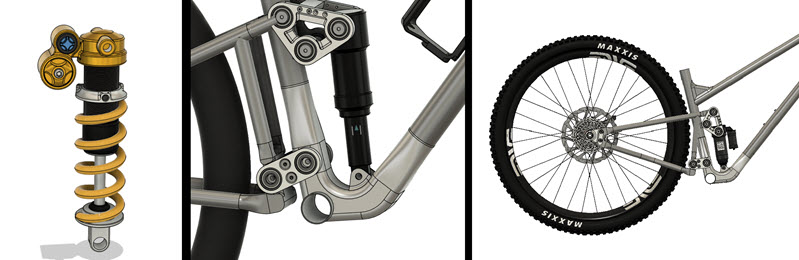
The Fusion tools that turned vision into reality
Working with any software tool is a learning experience, but for Carter, Fusion’s cohesion and flexibility truly stand out. The ability to view full assemblies, move suspensions with joints, and easily reference models across files made a big impact. He could quickly refine details using procedural and parametric workflows. Features like materials and appearances made large assemblies easier to manage—and more enjoyable to build.
“Fusion is so integrated. Seeing assemblies and even suspension movements in joints—very cool! Referencing models in other files is super helpful, and parametric workflows make little tweaks really simple. Handling appearances and materials adds to that ease, especially in big builds.”
Biggest win: Learning, smoothing, and leveling up
One standout milestone for Carter was mastering surface modeling in Fusion. This gave him the freedom to create smooth, complex frame shapes—like headtubes and bottom brackets—that are hard to do with standard modeling. Using the surface tools in Fusion, Carter joined multiple tubes into seamless lugs, giving the bike a professional and unique look.
“Learning surface modeling was huge. It helped me make beautiful shapes the regular workflow just can’t. Smoothing the headtube and bottom bracket with surfacing, blending multiple tubes into one clean form—it makes everything look professional.”
Behind the scenes: Hiccups, lessons, and growth
Euler Bikes isn’t just Carter’s most ambitious project—it’s a culmination of everything he’s learned in modeling, animation, and academic study. The biggest challenge? Wrangling all the features Fusion offers and learning as he went, especially through the trial-and-error (and frequent redesigns) that come with exploring a new tool. Inefficient? Maybe. Valuable? Absolutely.
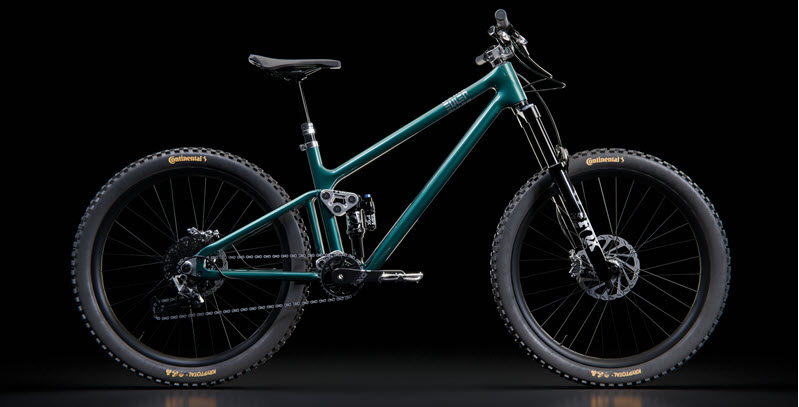
What’s next: From screen to road
Carter’s ultimate goal is close: Build the bike for real and ride it. That’s the vision that’s driven the whole adventure. In Fusion, Carter still has plenty to explore, especially learning parametric modeling to speed up changes and using constraints to keep sketches accurate.. As Carter admits, lax constraints can break things quickly…but every mistake is a chance to learn.
Advice to newcomers: Just dive in
For those just starting out, Carter encourages you to begin modeling right away—even if you don’t know the final goal. Let the project grow and change. The finished design won’t match your first sketch, but it will be much better.
“If you’re starting any project, especially one you love but don’t know the design side, just start drawing or modeling. The goal will change and evolve. I began with almost no knowledge of Fusion and kept learning as the project grew—and my skills grew right alongside.”
Check out Carter’s build, inspiration, and ongoing progress on Instagram at eulerbikes. Also, stay tuned for more voices, more projects, and more of the everyday brilliance that keeps our Fusion community thriving.