 Christa Prokos
Learn how a connected Bill of Materials (BOM) brings structure to change management by improving traceability, reducing errors, and aligning engineering and manufacturing.

Elevate your design and manufacturing processes with Autodesk Fusion
Change is a constant in product development. Designs evolve. Suppliers shift. Costs fluctuate. Requirements can change overnight.
A single update can ripple across engineering, procurement, production, and quality. Left unmanaged, even a minor tweak can trigger delays, rework, or compliance issues. This is where the Bill of Materials helps keep change under control.
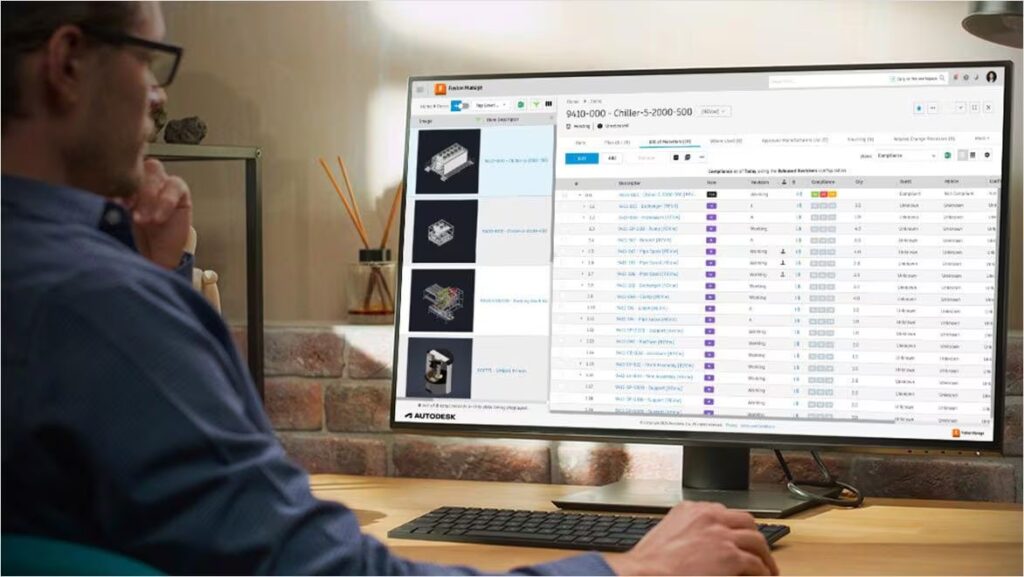
Where change management breaks down
Teams often struggle to manage the consequences of change. Swap a component, and you might also need to:
- Update assembly instructions
- Requalify suppliers
- Recalculate costs
- Adjust inventory and production schedules
Without a structured system, the effects often surface too late, on the shop floor, in missed timelines, or during audits.
What follows is predictable: misalignment between engineering and manufacturing, costly rework, and avoidable compliance risk. The issue isn’t the volume of change. It’s the absence of a shared, controlled way to manage it.
The BOM as the control layer
A bill of materials is often treated as a parts list. In practice, it’s far more than tha. It’s the definition of how a product is built, capturing every component, relationship, and requirement across its lifecycle.
When tied directly to change processes, the BOM becomes the control layer. Every update is:
- Documented
- Reviewed and approved
- Communicated across teams
- Implemented consistently
That shift, from static list to governed system, is what turns change management from reactive to controlled.
Where BOM-driven change management delivers
Traceability built in
Effective change management starts with visibility. What changed, when, and who approved it?
BOM revision control creates a clear audit trail, making it easier to track product history, support compliance, and resolve issues without guesswork.
Early visibility into impact
Every bill of materials update affects downstream systems—procurement, inventory, production, and quality.
With the BOM driving planning, costing, and scheduling, even small changes carry real consequences. Proper control allows teams to assess impact before implementation, rather than reacting after problems appear.
Alignment across engineering and manufacturing
Engineering defines intent. Manufacturing defines execution.
BOM management keeps those views aligned, so design changes translate cleanly into production without disconnects.
Faster, repeatable execution
When change workflows, like engineering change orders (ECOs), are tied directly to the BOM, the process becomes structured,
- Reviews and approvals are enforced
- Tasks are routed automatically
- Updates reach the right stakeholders
The result is less reliance on spreadsheets and workarounds, and more consistency in how changes move through the system.
Fewer errors, less rework
Disconnected BOM versions lead to predictable mistakes.
A digital bill of materials creates a shared, synchronized dataset, ensuring every team works from current information. That alone reduces errors, cuts rework, and improves production readiness.
The shift to digital BOMs
As products grow more complex, the role of the BOM expands with them.
Modern teams need BOMs that:
- Integrate across CAD, ERP, and PLM systems
- Update in real time
- Support multiple views (engineering, manufacturing, service)
- Enable collaboration across distributed teams
In this environment, the BOM becomes part of a broader digital thread, linking design intent to production and beyond. Without that connection, change management remains fragmented.
Where Autodesk Fusion fits in
Autodesk Fusion brings this model together in a single platform. Rather than separating design, manufacturing, and lifecycle management, Fusion connects CAD, CAM, CAE, and data management.
- A connected source of truth: BOM data stays consistent and up to date across the lifecycle, giving teams a shared foundation to work from.
- Change processes tied to the BOM: Engineering change requests and orders are managed through structured workflows, with approvals, task routing, and revision tracking built in—directly connected to BOM updates.
- End-to-end traceability: Every change is recorded, creating a complete product history across design, manufacturing, and supply chain.
- Cross-functional alignment: Engineering, manufacturing, and procurement operate on the same data backbone, reducing silos and ensuring changes propagate cleanly.
- From design to production, without disconnects: Because the BOM stays linked to the 3D model and manufacturing processes, design intent carries through to execution without translation gaps.
Change is inevitable. Chaos isn’t. Teams that treat BOM’s as a connected, governed system gain something more valuable: control.
BOM frequently asked questions
What is the difference between EBOM, MBOM, and SBOM?
–MBOM (Manufacturing BOM) reflects how the product is built—organized around production processes, tooling, and sequencing.
–SBOM (Service BOM) is structured for maintenance and after-sales support—used to identify replacement parts and service procedures.
The distinction matters because each BOM serves a different stage of the lifecycle. The challenge is keeping them aligned.
With Autodesk Fusion, EBOM and MBOM can be mapped and synchronized using predefined rules, reducing manual reconciliation between design and manufacturing views.
How do teams maintain a single source of truth for BOM data?
-Storing BOM data in a shared system, not spreadsheets
-Tracking revisions and versions in one place
-Ensuring every update flows through controlled workflows
PLM systems like Fusion Manage layer processes directly on top of BOM data, including revision tracking, comparison, and change workflows. Because the system is cloud-based, teams across engineering, manufacturing, and supply chain can work from the same up-to-date dataset, rather than maintaining disconnected copies.
How do you manage BOM accuracy across multiple systems and teams?
Teams maintain accuracy by:
-Integrating BOM data across systems (e.g., PLM ↔ ERP)
-Using revision control to track every change
-Automating updates instead of relying on manual entry
Fusion Manage supports integration through APIs and connectors, enabling data exchange between systems like ERP or PIM platforms. It also supports:
-BOM comparison and version tracking
-Automated change processes tied to BOM updates
-Cross-team visibility into current revisions
The result is a synchronized dataset that reduces errors caused by outdated or conflicting BOM versions.
How does BOM management help with cost and production planning?
When BOMs are connected to lifecycle management workflows, teams gain the ability to evaluate how changes will affect cost, supply, and production readiness before they are released.
In Autodesk Fusion, this is supported through dynamic, configurable BOMs that can generate the appropriate structure based on product options or variants, enabling more accurate and responsive planning, particularly for complex or highly configurable products.
How do BOM tools manage permissions and approvals?
In Autodesk Fusion, these capabilities are implemented through granular permissions that can be set by user group or region, along with automated workflows that generate and route change orders and enforce approvals tied directly to BOM updates.
Together, these controls ensure that changes are not only visible, but formally reviewed, authorized, and managed before they reach production.
What teams should use BOM management tools
Engineering – defines the EBOM and manages design changes
Manufacturing – uses the MBOM to plan production and assembly
Procurement / Supply Chain – sources components and manages suppliers
Quality – tracks compliance, issues, and corrective actions
Service / Support – relies on SBOM data for maintenance and repairs
Autodesk Fusion supports custom BOM views for different roles, so each team sees the structure in the context they need.