 Maxime Cazaillon
Hear from Maxime Cazaillon, founder or Makeyo, on how his passion for design, 3D printing, and Fusion led to to innovative modular PC cases that blend creativity with technical precision. Get insights on his creative process and practical Fusion tips for 3D printing enthusiasts.
Welcome to our next Fusion Community Spotlight series where we celebrate the makers, builders, and dreamers using Autodesk Fusion to bring their ideas to life. These are the real stories of people pushing creative and technical boundaries.
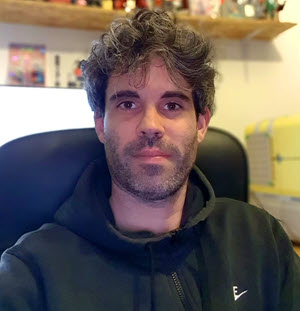
Hi! I’m Maxime Cazaillon. In 2019, I launched Monkey Bidouille, a micro-business focused on creating computers with a unique design that combines wood and aluminum. Today, I work full-time as a graphic designer, but in my spare time, I’m launching Makeyo to share my passion for design and object creation with the world.
My passion for design and 3D printing came naturally, as I’ve always loved creating things and reimagining objects with what was on hand. Some of my earliest design experiments were cardboard toys as a kid, then console mods as a teenager. Graphic design sharpened my aesthetic eye, but 2019 was a turning point—I co-founded Monkey Bidouille and built the MB01 PC: a premium computer case inspired by classic hi-fi design, mixing wood and aluminum.
I wanted to offer something unique in an industry flooded with gamer-style cases—something design-oriented, influenced by Dieter Rams, Apple, and Teenage Engineering. Building MB01 meant investing savings and working with French manufacturers. After the first ten units, funds ran short, but my dream stuck with me.
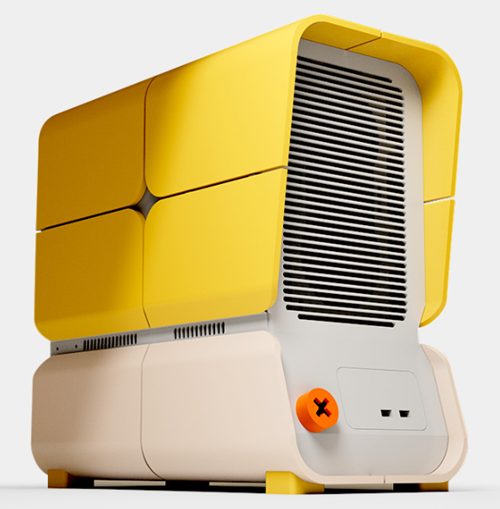
Fast forward to 2025, I wanted to get back to creating—but without the pressure of mass production. 3D printing offered exactly what I needed: creative freedom and speed. For Makeyo’s launch, I honored my roots by designing the MK01 PC case with the signature rounded corners—echoing the MB01, but now with the modular possibilities empowered by 3D printing.

Elevate your design and manufacturing processes with Autodesk Fusion
Where creative inspiration meets iteration
My process is simple, even a bit old-fashioned—a notebook and marker, sketching late at night on the couch. Graphic design keeps my mind buzzing with trends and inspiration. Once the idea clicks, I build the first 3D volumes in Maya, then refine every technical detail in Fusion to get it ready for 3D printing.
Honestly, instinct drives the workflow; whatever catches my creative eye that day is what gets explored. When it feels right physically and digitally, I hit print.
Tips for print-ready design with Fusion
I first picked up Fusion in 2019, needing technical drawings for MB01’s production. It was intuitive—I could start designing precise parts after a handful of tutorials. I’m still no Fusion sage; I prefer learning by doing, running into problems and solving them as I go.
Here are three tips—maybe not “pro,” but practical I encourage you to always keep in mind!
- Stay organized: Name sketches clearly, manage components. You’ll thank yourself months later when you reopen old projects.
- Use sketch offsets and construction objects: They’re great for drawing in complex planes and making creative shapes.
- Chamfers and fillets: Small changes, big impact on detail and finish. Play around—you’ll see what works for your design.
Handling 3D printing details and constraints
My workflow is pure trial and retry. Fusion lets me design, print, test, and refine as many times as I need. Always consider the printer’s build volume, support needs, and detail sizes. Print tolerances? Test your machine—understanding fit is key.
On MK01, the panels are divided to fit the printer. Instead of hiding seams, I made them part of the design, adding to the case’s character.
Designing for modular possibilities
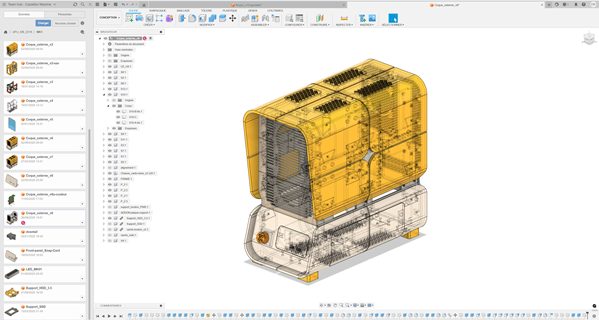
The parametric workflow in Fusion is a lifesaver. It’s built right in – perfect for learning and refining as you go. You can save milestones, jump back to explore new ideas, and never lose progress.
Sketch constraints and the timeline feature are incredibly powerful. You can tweak numbers dozens of edits later and see everything update. Coming from mesh modeling, it was a “game changer” and has become my favorite Fusion feature.
3D printing allows designs that were impossible for traditional manufacturing—it’s the difference between a concept car and the production version. At Makeyo, fun and form come first. But printability always matters: manage tolerances, simplify supports, and respect the limits of FDM detail.
My advice to everyone who read this… just do it! Don’t overthink the process—design, iterate, and put your creations out into the world.
Stay tuned for more voices, more projects, and more of the everyday brilliance that keeps our Fusion community thriving.