 Trevor English
As urban drainage and flood modeling challenges continue to grow in complexity, modelers need tools that can scale with larger datasets, richer terrain detail, and increasingly global data sources, without adding friction to everyday workflows.
In InfoWorks ICM 2026.3, we’ve focused on strengthening some of the most heavily used parts of the platform: raster-based workflows, 2D subgrid meshing, cloud database usability, and international data compatibility. The result is a release that improves both modeling fidelity and day-to-day productivity for drainage and flood professionals.
Raster workflows ready for production use
2D results rasterizer enables modelers to work with spatial results and large datasets more efficiently. In InfoWorks ICM 2026.3, the Rasterizer moves fully out of technical preview and into production-ready status. This means support for on-premises databases, accurate handling of coordinate reference systems, improved performance for large models, and the removal of the 2GB output limit.
With these changes, your rasterizer workflows should become more reliable and efficient for use in projects, large to small.
Better Model Group icons in cloud databases
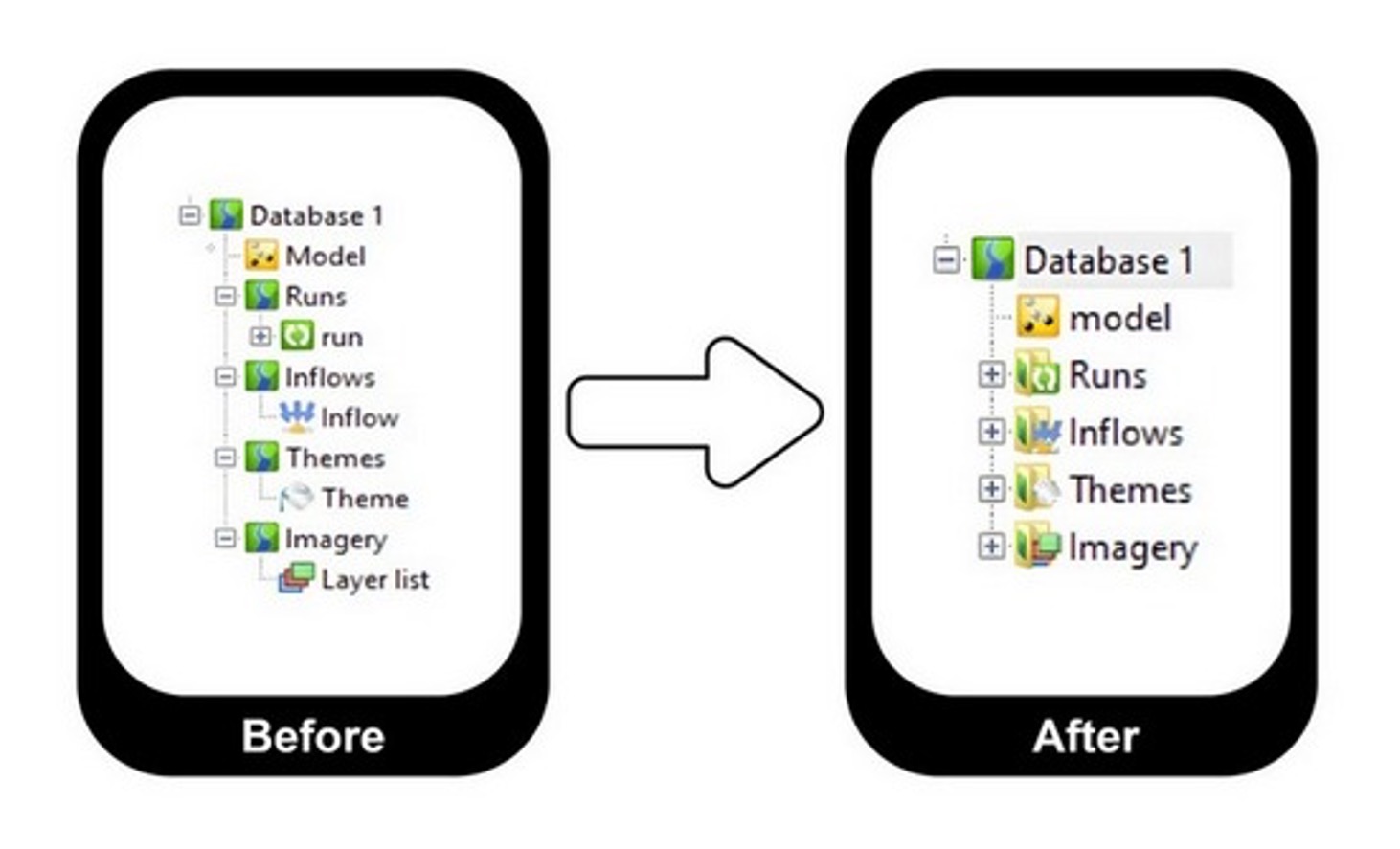
From time to time, we examine our user interface and make changes that will improve the usability and understandability of the tool – and that’s exactly what we’ve done in InfoWorks ICM 2026.3. Cloud databases now update Model Group icons based on the contents of the folder – matching the behavior that already existed in workgroup and standalone databases.
When a Model Group contains only one type of object (eg, rainfall files, layer lists), its icon automatically changes to reflect that object type. This should create a more consistent experience across all database types and improve navigation clarity in cloud-based projects.
Subgrid meshing improvements for richer 2D representation
Accurately representing surface processes is essential for flood risk and drainage analysis. One of the ways we helped ensure accuracy in the past was by introducing the widely-loved feature, Subgrid Sampling. InfoWorks ICM 2026.3 continues to expand the software’s subgrid meshing capabilities, bringing additional flexibility to 2D modeling workflows.
In InfoWorks 2026.3, the following 2D element types can now be used with Subgrid Sampling:
- Porous Walls
- Porous Polygons
- Base Linear Structures
- Sluice Linear Structures
- Bridge Linear Structures
- Infiltration Zones
- Infiltration Surfaces
- Permeable Zones
In addition, ground elevation resampling is now available, allowing you to better align terrain data with subgrid resolution and improve overall result quality.
Improved 2D boundary behavior at network connections
Representing boundary conditions accurately at the interface between 1D and 2D systems is also important for realistic flood modeling.
In this release, inflow and level boundaries applied at Connect 2D nodes can now behave as true 2D boundaries, rather than being limited to 1D behavior. These boundaries can be applied directly to:
- 2D conduits
- 2D culverts
This ultimately improves physical realism and gives you greater control when defining boundary conditions in complex hydraulic scenarios.
Get going with InfoWorks ICM 2026
- You can update your InfoWorks ICM app by visiting manage.autodesk.com.
- Read the What’s New product notes.
- Did you know? We have a YouTube playlist that compiles “The latest on InfoWorks ICM”? It’s a good resource for product update information.