 Paul Munford
Optimize your Inventor title blocks easily with iLogic forms. Streamline data entry, maintain CAD standard compliance, and reduce errors with a centralized, easy-to-use interface.
Automate title block updates to save time and boost consistency across your projects. Learn how to simplify your workflow today with iLogic.
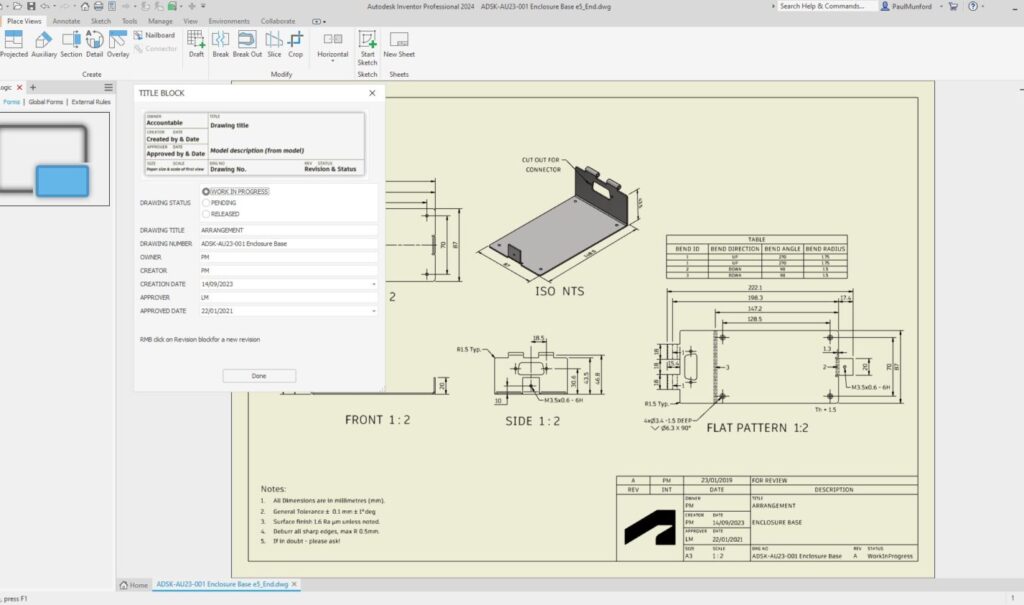
Filling out title blocks in Inventor can often be a tedious, error-prone process. Between editing field text, iProperties of drawings, or iProperties of models, it’s easy to get confused about where the data should be entered. But there’s a better way.
By creating an iLogic form, you can collect all necessary inputs in one intuitive interface—making title block updates quick, standardized, and error-free.
Enhance Your Engineering Workflows
Precise, powerful, and ready for innovation with Autodesk Inventor.

Why use an iLogic form for title blocks in Inventor?
- Centralized data entry: Consolidates inputs into a single form so your team doesn’t have to search for iProperties scattered across drawing and model files.
- Standardization: Automatically enforces your CAD and drawing standards, reducing inconsistencies.
- Time savings: Eliminates manual updates in multiple places, increasing efficiency and reducing mistakes.
- Automatic updates: Changes entered in the form instantly update the title block and associated properties.
How to set up the title block form
- Open your Inventor template drawing (DWG or IDW).
- Access the iLogic Form Editor dialog.
- Drag user parameters such as Drawing_Status, OWNER, CREATOR, APPROVER, SCALE, TITLE, and others into the form builder area.
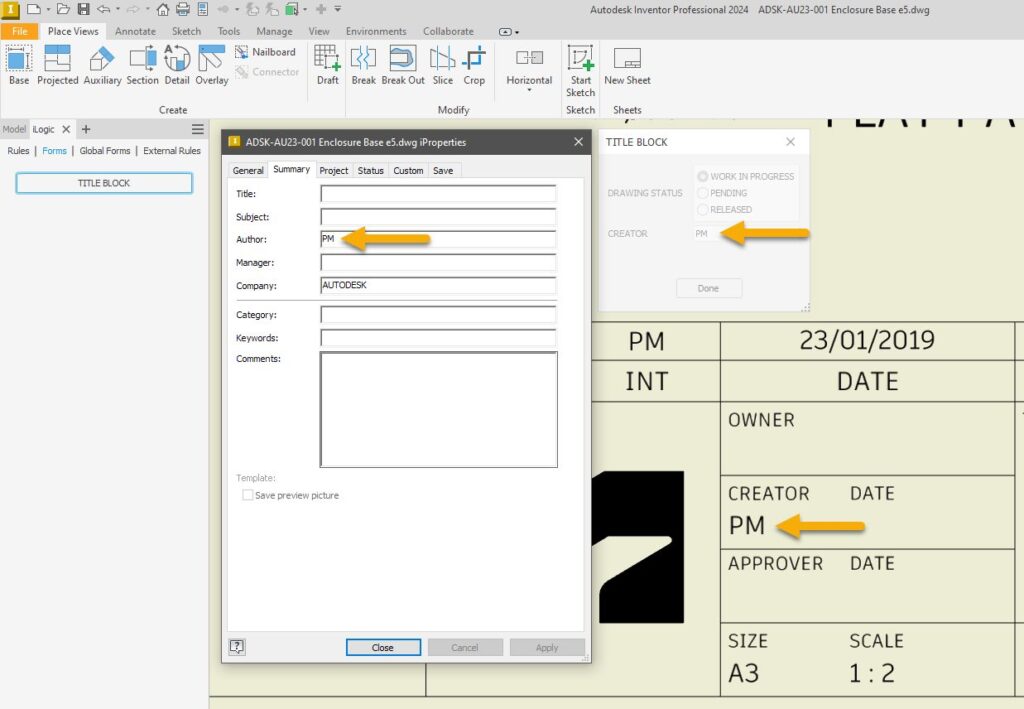
- Use the standard iProperties linked to the current drawing or model, following the property mappings:
| Parameter | Type | Source | iProperty Tab | Notes |
|---|---|---|---|---|
| OWNER | Standard iProperties | Current Drawing | Project | Designer |
| CREATOR | Standard iProperties | Current Drawing | Summary | Author |
| CREATION DATE | Standard iProperties | Current Drawing | Project | Creation date |
| APPROVER | Standard iProperties | Current Drawing | Status | Eng. Approved by |
| SCALE | Sheet Properties | Current Drawing | n/a | Auto completed |
| TITLE | Standard iProperties | Current Drawing | Summary | Title |
| DESCRIPTION | Standard iProperties | Model | Project | Auto completed if in model |
| REV | Standard iProperties | Current Drawing | n/a | Controlled by revision table |
- Test the form by filling it out and watching the title block update instantly.
Benefits
- Automate tasks to save time and reduce errors.
- Improve compliance with drawing standards.
- Make it easier for your team to fill out title block info correctly every time.
By introducing this iLogic form into your workflow, your team can focus more on design and less on administrative updates. Plus, automated title blocks in Inventor help ensure precision throughout your project lifecycle.