 Shannon McGarry
Although most manufacturers handle some level of custom orders, many lack a streamlined process. Instead, they rely on manual processes that are slow, costly, and risky. Companies can use Autodesk Inventor features such as templates, iLogic, and automation to handle custom orders faster and more consistently.
Enhance Your Engineering Workflows
Precise, powerful, and ready for innovation with Autodesk Inventor.

Nearly every manufacturer is asked to fill a custom order at some point. A customer may want an existing product with a longer frame, a different motor mount, and two added options. To accommodate this unique demand, the design team often takes the existing model and spends an afternoon editing geometry, fixing what breaks, and retyping the BOM
Autodesk Inventor helps teams codify many of these steps as rules and reuse them on every subsequent order. With Inventor’s templates, automation, and iLogic, designers can respond to custom orders faster and more consistently.
The engineering cost of custom orders
Many manufacturers lack a streamlined process for fulfilling custom orders. Instead, they handle each order as an entirely new configuration, with its own design files and BOM. Even if the order is a small variation on an existing product, teams still rebuild the configuration from the base design.
Because of this tedious process, designers may end up adding design files faster than the company adds products. The result is dozens of near-identical assemblies and no easy way to tell which one is current. If an engineer finds a design flaw in a specific part, they must manually check every design file to see which ones include the part and fix each one. If they miss a file, the manufacturer may produce and ship a custom order with a known, uncorrected defect.
The custom-order pipeline is further complicated by ambiguity in the handoff from sales to design. Typically, a salesperson takes the customer’s request and marks up a drawing or writes a list of options. A designer then uses the salesperson’s notes to determine what to modify and how to modify it in an existing assembly. Because the designer must interpret these notes, they may have to guess what the customer wants, which creates the risk that the manufacturer ships a product that doesn’t meet the customer’s needs.
To fill custom orders consistently, manufacturers need a single source for design variants and a clear sales-to-design handoff that captures what each customer ordered.
Building configurations in Autodesk Inventor
Fortunately, Autodesk Inventor includes several features that help manufacturers streamline custom orders. In Inventor, designers can start each configuration from a controlled base instead of rebuilding it manually. They do this by building the company’s named parameters and title-block fields into part, assembly, and drawing templates, so no one needs to retype them on a new job. Just as important, consistent parameter naming means every model in a family refers to the same dimension by the same name, so a single rule can later update all of them. Inventor also lets designers share one project file, so they can pull hardware from the same Content Center library instead of modeling their own.
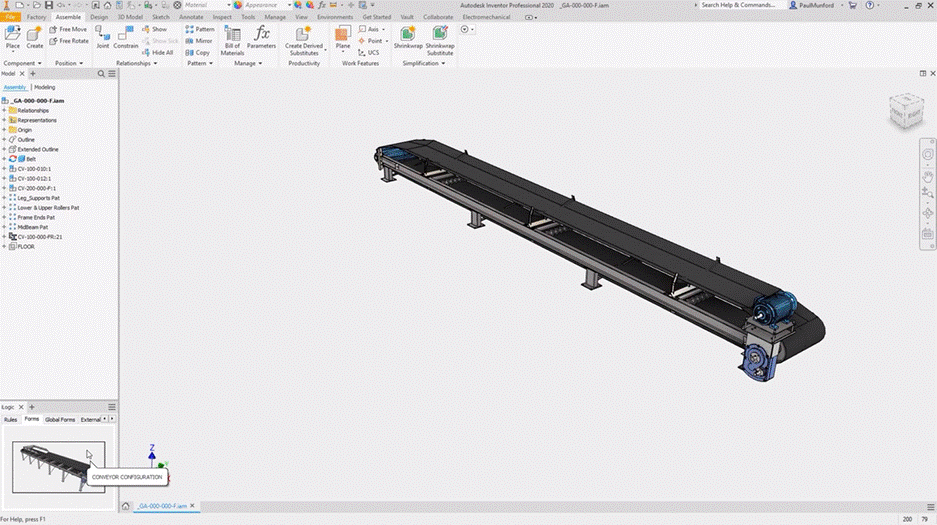
Autodesk Inventor iLogic standardizes and automates design processes, helping designers quickly configure new variants.
Building on that base, engineers can use Inventor’s iParts and iAssemblies to replace the sprawl of saved design files with one managed family. Designers can set up each family in a factory—the master file whose table gives each member its own dimensions and part number. In the factory, designers can make a single change and push it to every member. This approach is especially helpful when someone finds a design flaw in a specific part, because engineers can see which variants use it and correct them from one place.
When engineers want to store a set of variants in a single file, they can use Model States. Model States let designers represent different sizes, manufacturing stages, and simplification levels within one part or assembly. Designers can give each state its own parameters, iProperties, and BOM and then point a drawing view at the state they need without redrawing documentation for every configuration.
Finally, Inventor reduces ambiguity in the sales-to-design handoff with iLogic. With iLogic, designers can write rules that read parameter values from a form and update the model accordingly. For example, a designer could write a rule to change a dimension or replace a component based on the option a user selects. The design team can then build a form, driven by these rules, that the sales team uses to record each customer’s request. Because the form offers only predefined options and the rules are tied to the model, a salesperson can configure a custom order with far less room for misinterpretation.
Design once, sell many
Many manufacturers struggle to fill custom orders quickly, accurately, and with high quality because they rely on fragile, manual design processes. With Autodesk Inventor, these companies can define a product family once and generate its variants and associated files on demand, helping them fill custom orders faster and more consistently.
Frequently asked questions
Use Inventor features such as templates, iLogic, and automation. They let you codify repeated steps as rules and reuse them on every order, so you don’t rebuild each configuration from the base design.
iLogic standardizes and automates design processes. Designers write rules that read parameter values from a form and update the model, such as changing a dimension or replacing a component based on a selected option.
Build an iLogic-driven form that the sales team uses to record each customer’s request. The form offers only predefined options, and the rules are tied to the model. Designers no longer have to interpret marked-up drawings or option lists.
They replace the sprawl of saved design files with one managed family. Each family is set up in a factory, the master file whose table gives each member its own dimensions and part number. One change in the factory can be pushed to every member.
-Build named parameters and title-block fields into part, assembly, and drawing templates.
Use consistent parameter names so one rule can update every model in a family.
Share one project file so designers pull hardware from the same Content Center library.
Model States store a set of variants in a single file. They can represent different sizes, manufacturing stages, and simplification levels. Each state can have its own parameters, iProperties, and BOM, and drawing views can point to the state you need without redrawing documentation.