


The early days of BIM @ BIG
BIM at BIG has been a somewhat bumpy ride at times, especially because of the scale and complexity of the first projects we took on in BIM, as well as the number of different software products that were utilized at that point, which in 2010 didn’t synch well with each other.
Looking back, taking on a project like Copenhill, a waste-to-energy plant with a ski slope on the roof, as our first Revit and BIM project in the office, probably wasn’t the wisest idea.
We ended up with a great result in the end, but it was a steep learning curve for everyone involved. And I would surely advise anyone new to BIM to start out with something slightly simpler and more straight forward.
You can create beautiful architecture with any tool
Because of this bumpy ride we had in the early years of using Revit and BIM in the office, we decided to switch horses after a couple of years and were convinced to give ArchiCAD a try.
The Copenhagen office became the primary office to switch, and we successfully ran several great projects in ArchiCAD, amongst others the Kistefos museum in Norway, also know as “The Twist.”

And the Kistefos project clearly shows that you can do great architecture in any tool if you have the right people behind the screen.
But ArchiCAD also proved to be a bumpy ride for us, and eventually the company decided to switch fully back to Revit in 2018, as the NYC office was starting to pull off some great projects in Revit and it had a much more streamlined approach and setup.
Clean cut, or as clean as possible
One of the first things we decided to do was to make the cleanest cut possible when switching away from ArchiCAD again, even if that would require making some tough decisions in the process. And we did end up making some rather tough decisions, but I think everyone today thinks it was the right thing to do.
Instead of relying on having staff available to draw in ArchiCAD a few years down the line, we instead aimed to shut down all activities in ArchiCAD as quickly as possible, as the recruiting and staffing part of the process was one of the key reasons why we switched back.
So to anyone trying to switch from one software to another one, whether it’s a BIM tool or something else, I’d recommend just cut it clean and get it over with. The longer you try to run things in parallel, the worse it gets.
Global alignment
Another thing we identified quite early on that we needed to improve was the global alignment on BIM between our offices. This meant that we increased the number of check-ins between our BIM office leads quite drastically in the beginning, not only to improve the coordination between our offices, but also to streamline the tools and plug-ins we would use.
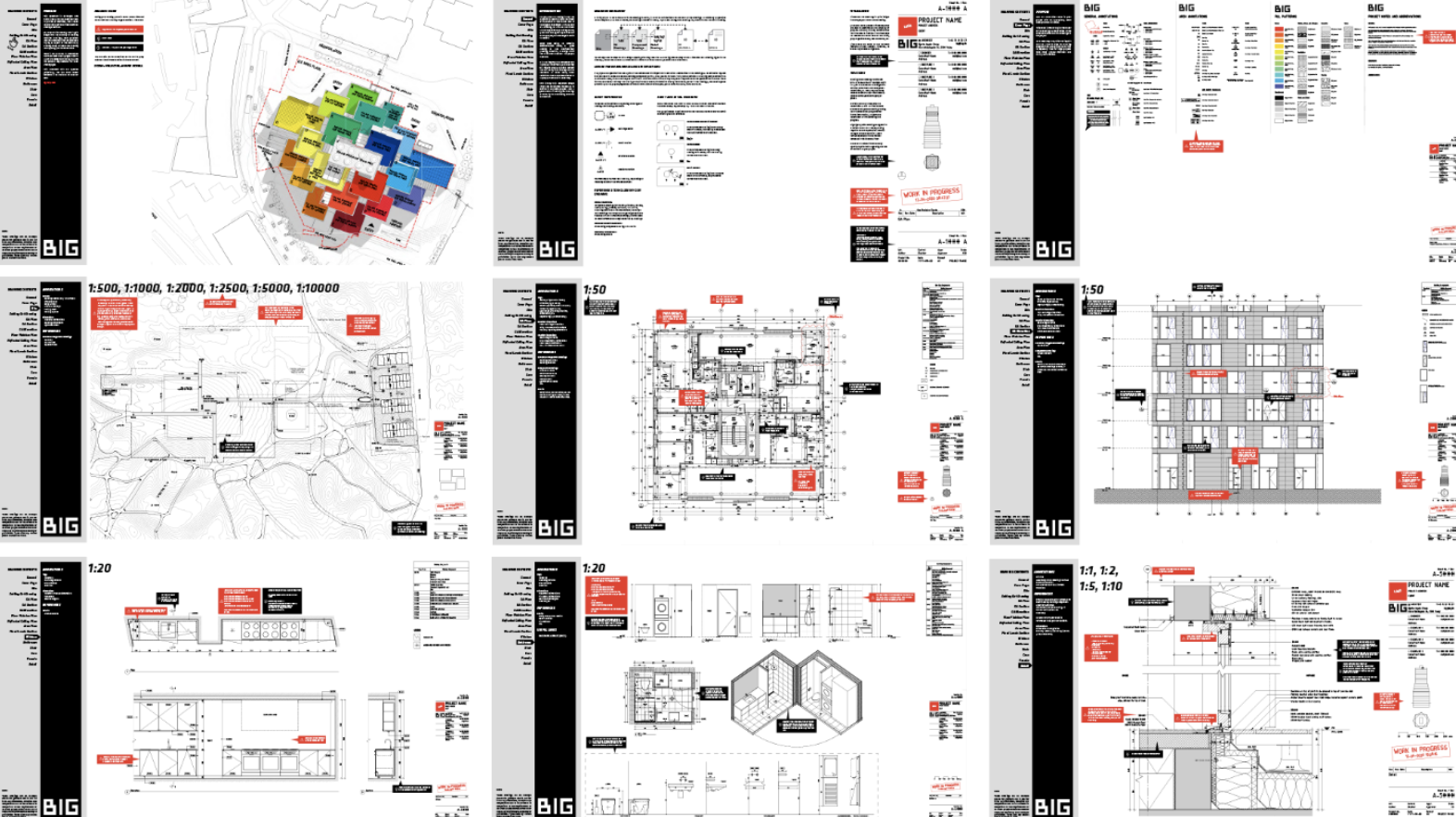
The ecosystem of software and tools for BIM and the AEC industry in general is ever-increasing, so we decided to drastically streamline our setup and cut away a number of tools that we found were either obsolete or just not giving us the value we needed anymore.
We also focused a lot on the global alignment in order to build a stronger sense of community within our global BIM team and really get that family feeling into our wider team. I still think this works really well to this day, as there is generally a very positive energy within our global team today.
Lack of standards and structure
What also became clear in some of our earliest projects was the need for proper drawing standards and structure around how to do things—and also what not to do in a BIM model.
We created a lot of amazing projects, with great looking drawing sets, but our models weren’t always looking great “under the hood.” And the look and feel of a drawing could differ quite a lot from project to project, based on the team in charge of the project.
So we completely re-did the Revit templates in Copenhagen from the ground up, with a strong focus on keeping them as lightweight and simple, to make it as easy as possible for people to get onboard with them.
On top of that, we spent a good amount of time with our partners in Copenhagen, agreeing on the look and feel of a BIG drawing, which was then converted into a set of drawing standards for everyone in the office to follow.
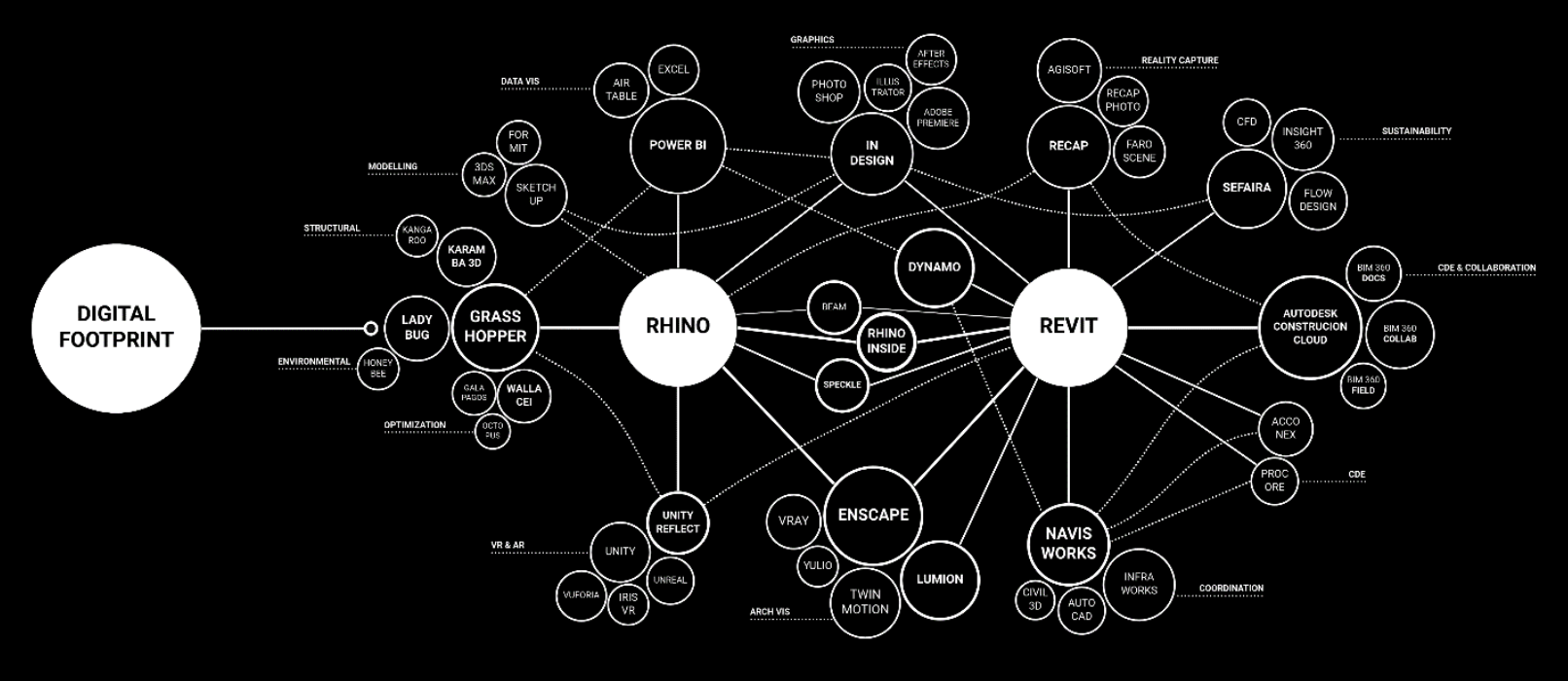
In the process, we made sure that these drawing standards were fully coordinated with our newly built Revit templates, so that you would follow the drawing standards 1:1 if using the templates.
On top of that, in an effort to make the drawing standards more easily accessible and more intuitive to use, we incorporated them into an interactive PDF document, with a little overview menu on the side, so it’s easy to browse and find the examples you need. As a little extra add-on, we also included a number of small speech bubbles with either things to look out for or things to remember, such as when working on a ceiling plan, for instance.
All this work was initially done in the effort of ensuring a more unified look and feel for our drawings, but in the end, it became just as important as a tool to onboard new BIGsters into the firm and to get them going quickly.
The need for better content management
A year or so into the process of re-implementing Revit, we realized that we needed a better way to control and distribute our BIM content. This was because we went for a very lightweight approach to our Revit templates, as mentioned above, with the idea that they only contained the bare minimum of annotation symbols to comply with our drawing standards. But they were stripped of any furniture, families, or similar objects, as we wanted people to bring in the contents when needed.
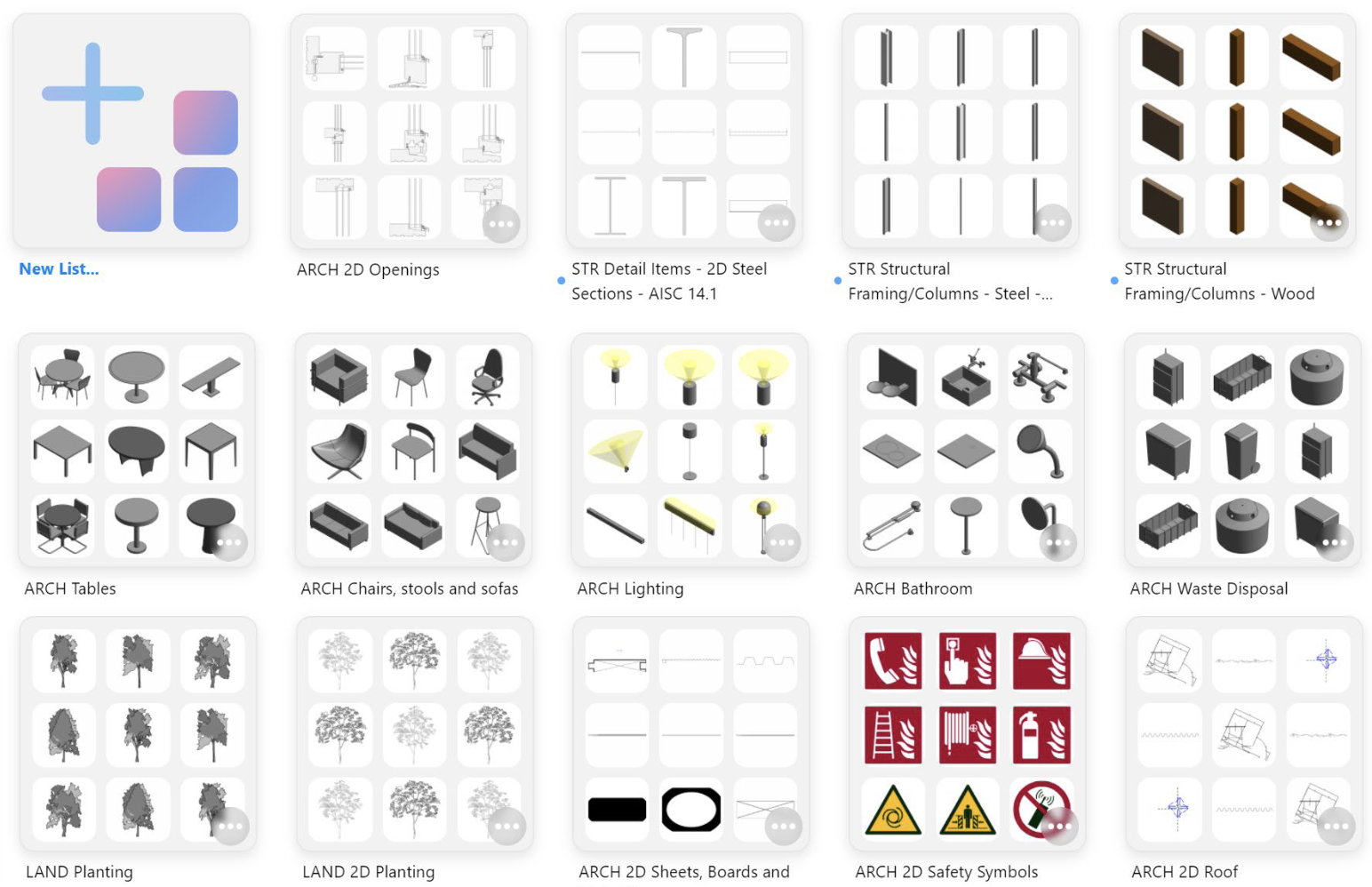
To better support this approach we knew we would need a centralized way of distributing and managing our shared content across the office. To help us with that we chose to go with a tool called Kinship. There are a number of tools available on the market, but we found that Kinship suited our needs quite well.
The goal of adopting a cloud-based content management solution was also to help make it easier for our architects and engineers to find and locate content, even if you are new at BIG or new to Revit. This was done again in the effort of making the switch to Revit easier, and to lower the bar for new hires to get onboard.
You can manage what you don’t measure
As we progressed with our switch, and as we started having the Revit setup more or less in place and under control with our new templates, standards, and tools, we started to realize that we lacked a general overview of our projects. We also felt we needed a deeper overview of the health and progress of our BIM projects and models.
So, we started investigating how we could best monitor the projects and build what we typically referred to as “BIG Brother,” a tool that could gather valuable data about the health and performance of the projects and the people working on them. In the beginning we had all sorts of ideas, and we built a handful of different prototypes, but they were all too reliant on sub-tools and scripts. In the end we realized that most of the information we needed was already captured by Kinship, as Kinship would sync the content between our models.
This meant that we changed our focus from building a tool to focusing on ways to best visualize and present the data we already had available, since we wanted this data to be available to others beyond the BIM team. This led us down the PowerBI route like many others in recent years.
These days, we use the data in many ways—to report on the health of projects, to spot issues with IT equipment, track Revit builds, and to track behaviors of teams and people within our organization.
We’re using the data in many ways, all in the effort of streamlining our setup and approach even further, as well as to spot when some of our staff might need a bit of additional training or guidance.
Our take on the Revit ribbon
To put a bow on the rollout of our templates, drawing standards, training, and general implementation, we concluded that we needed an easy way for our staff to access all the different things we had built, purchased, and implemented over the last few years.
This led us to the idea of creating a custom Revit ribbon, or what some would call a custom toolbar. But what differentiates ours from many of the more traditional custom toolbars I have seen in Revit over the years is that ours is less focused on the tools within the toolbar and more focused on providing easy access to knowledge, standards, training material, and content.
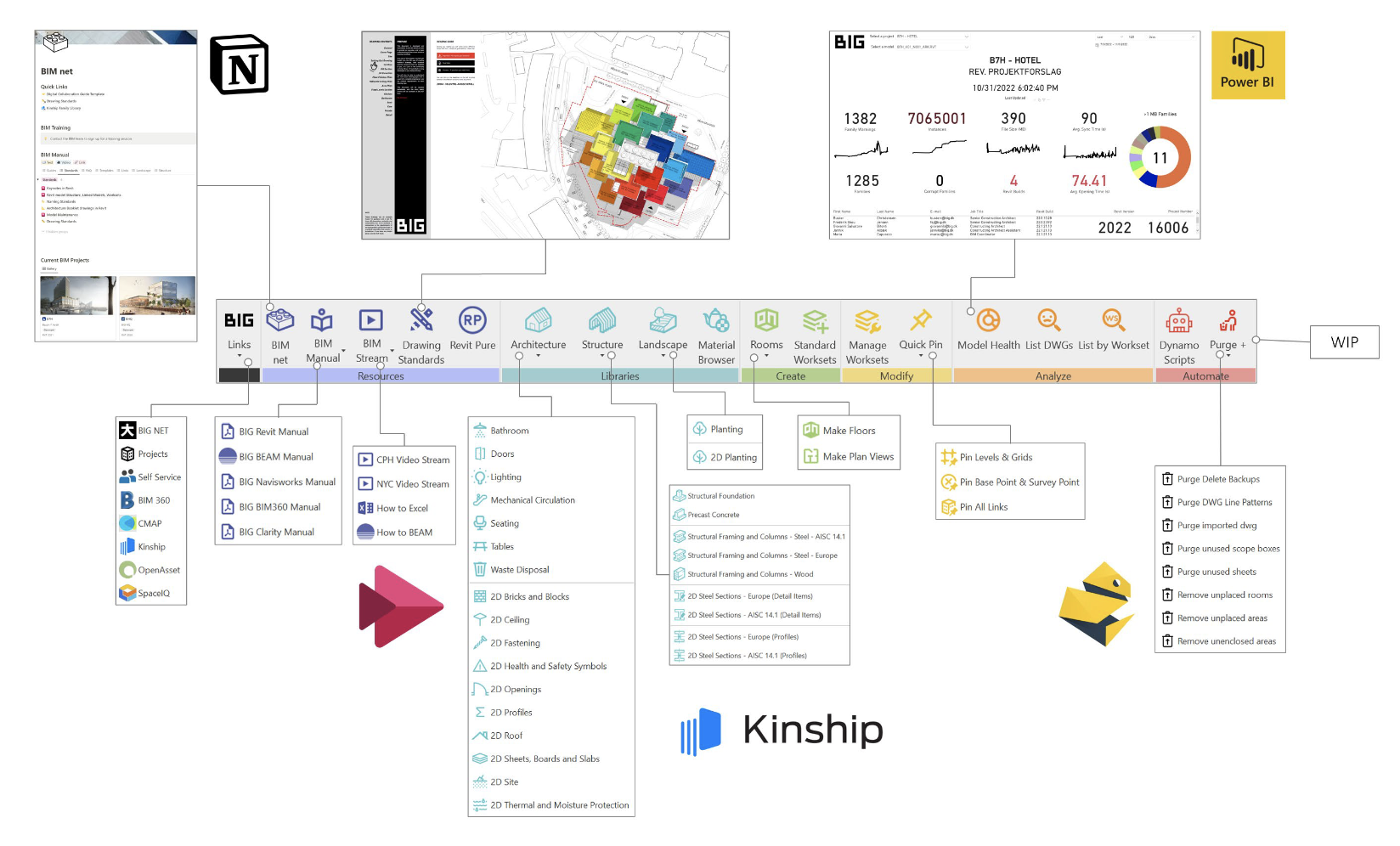
We also tailored our PowerBI dashboards with direct project health right into the ribbon, to make it as easy as possible for our BIM leads and teams to track the health and performance of their projects.
To sum it up
Ultimately, the above steps over the years were all done in the effort of making our system as simple and easy as possible for people to learn and use. Our aim has been to make sure that knowledge, training material, and general support are placed at the fingertips of our colleagues, instead of overwhelming them with a ton of custom tools and tricky things to follow.
My final piece of advice is to keep things simple, easily accessible, and straight forward to use. And make sure you allow for certain cowboy tricks in the process. I know the BIM police might not like it, but sometimes it’s needed to get to the finish line on time, especially if you want to maintain a positive mindset around BIM.
What’s next for BIM at BIG?
We’re currently working on several interesting things. Like many others, we are looking into AI and how we can use it in our design process, also in relation to BIM. We are looking at XR using Unreal Engine and Unity. And we’re pursuing some direct developments around sustainability, both from an LCA point of view, but also at a material library/database level.
Related class:
BIM @ BIG: The Journey from Small to Big, and the Learnings Along the Way
Jens Majdal Kaarsholm is Director of Design Technology at BIG and an experienced professional in the fields of architecture and technology. Having worked as a dedicated BIM professional for more than a decade, Jens has been involved in various large-scale projects around the planet, as well as the implementation of BIM in leading architectural companies such as BIG and Foster and Partners.