 Tony Watkins
From carving foam to 3D‑printed molds, Fusion transformed RC airplane design for Tony. Now, with his YouTube channel, CAD Build Fly RC, he helps others model, print, and fly their own creations.
Six years ago, I saw something that completely changed the way I thought about building RC airplanes: someone was creating them from 3D‑printed molds.
Having worked in the fiberglass industry, I knew how much time and effort the traditional process required. First, you had to make a plug—usually carved from foam—then glass the airplane and finally build molds from that plug. It was a long, labor‑intensive process. Seeing 3D‑printed molds, and even 3D‑printed airplanes, made me realize there was a faster, smarter way.
Discovering Fusion for RC airplane design
I quickly learned that the first step in this new workflow was CAD modeling. Like most people, I turned to YouTube for help. After exploring different CAD programs, I found Kevin Kennedy’s Learn Fusion in 30 Days series.
I learned a lot from those videos, but I still couldn’t model an airplane. I reached out to Kevin directly, and with his guidance, I kept practicing until things started to click. Within a few months, I was modeling airliners in Fusion. Soon after, I tackled molds, jet airplanes, and even complex shapes with help from tutorials by Fusion educator Matt Perez.
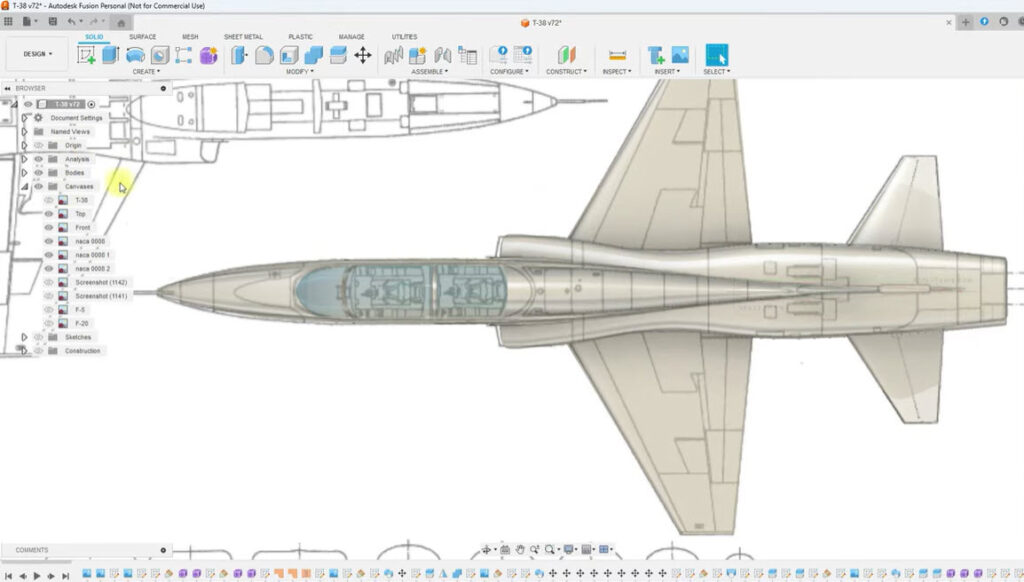
RC airplane design: From modeling to making
Once I had my first airplane modeled, I ordered a 3D printer and began producing molds. The learning curve was steep, but the payoff was huge.
By learning Fusion, I can now 3D print my molds or a plug, saving me so much time compared to the old fiberglass process.
To document my journey with RC airplane design, I launched my YouTube channel, CAD Build Fly RC. At first, I shared build videos, but when I began teaching others how to model airplanes in Fusion, my channel started to grow rapidly.
Teaching and learning together
On my channel, I now teach:
- How to model airplanes in Fusion
- Preparing designs for 3D printing
- Creating 3D‑printed molds
- Generating DXF files for laser cutting or routing
- Reverse engineering 3D models in Fusion
The more I taught, the more I learned. Everything clicked when I realized that every sketch starts on a plane. Once I understood that, working in 3D space became much easier.
I also overcame my hesitation with surface modeling. At first, I was intimidated, but I eventually realized it was just another tool. Now I use forms or surfaces depending on the project and the time I have.
A designer’s mindset
Fusion has changed the way I see the world. When I’m at the flying field, I look at airplanes and think about how I’d model them. Out and about, everyday objects spark ideas for new designs.
When I first started learning Fusion, I never thought I’d have a YouTube channel teaching people how to model airplanes. But Fusion made it possible.
My advice for the Fusion community
If you’re learning Fusion, here’s what helped me:
- Practice often. Repeat what you know and build on it.
- Step away when stuck. Sometimes the solution comes after a break.
- Don’t fear new tools. Forms, surfaces, lofts, splines—they’re all part of the same design language.
Looking back
From modeling a Lego block in Kevin Kennedy’s beginner series to teaching thousands through my own channel, my journey shows how Fusion can transform workflows, save time, and open new opportunities.
Little did I know, that a simple Lego block would lead me here—helping others design, print, and fly their own RC airplanes.
Follow my journey on YouTube at CAD Build Fly RC.
Stay tuned for more voices, more projects, and more of the everyday brilliance that keeps our Fusion community thriving.