 Christa Prokos
Explore the importance of bill of materials (BOM) management in manufacturing and discover how Autodesk Fusion’s integrated tools enhance efficiency, collaboration, and accuracy throughout the production process.
As supply chains continue to change and product requirements continue to tighten, coordination across departments and disciplines has never been more important. Central to this synchronization is bill of materials (BOM), which is a structured list of all components, assemblies, and materials required to produce a product. Though often viewed as a static document, a BOM is a dynamic data structure that’s essential for controlling costs and facilitating product consistency. Fortunately, Autodesk Fusion offers powerful built-in data management capabilities that help designers manage their BOM with consistency and accuracy.

BOM management in manufacturing
Beyond acting as a parts list, a BOM is a blueprint for production that connects design with manufacturing and procurement. From the earliest concept through to final assembly, the BOM drives decisions by providing an authoritative record of what constitutes a product. It includes details such as part numbers, quantities, units of measure, and lifecycle states. This ensures that every team involved in a product’s development is aligned on specifications and expectations.
Naturally, inaccuracies or disconnects in BOM data can have serious consequences. This includes misordered parts, production delays, cost overruns, or quality issues. Consider the example of an electronics manufacturer preparing a new wearable device that mistakenly sends an outdated BOM to procurement—leading to the purchase of an incompatible Bluetooth module. When production starts, the assembly line halts because the part doesn’t fit the updated PCB design. The error causes delays, necessitates reordering, and ultimately undermines both schedule and budget.
In contrast, well-managed BOMs improve collaboration between engineering, procurement, and manufacturing teams for leaner operations and better forecasting. As manufacturing becomes increasingly global and complex, centralized BOMs enable consistency across multiple facilities. They also help meet compliance and traceability demands.
BOMs are also central to change management. Any updates to a product, whether for innovation, compliance, or correction, require accurate documentation. This guarantees that downstream teams can implement changes without disrupting production.
BOM management with Autodesk Fusion
Autodesk Fusion introduces a robust set of capabilities for managing BOMs in the context of integrated design and manufacturing workflows. Rather than treating BOMs as separate static documents, Fusion integrates BOM management directly into the design environment. This means that as a CAD model evolves, the associated BOM updates dynamically to reflect changes in real time, reducing the potential for manual errors.
Fusion also allows users to interact with BOM data from multiple tabs within the design workspace, with the ability to customize specific properties to focus on for each specific use case. This customization even extends to viewing multi-level BOMs. This simplifies the navigation of complex assemblies and facilitating better cross-referencing between the digital model and the components list.
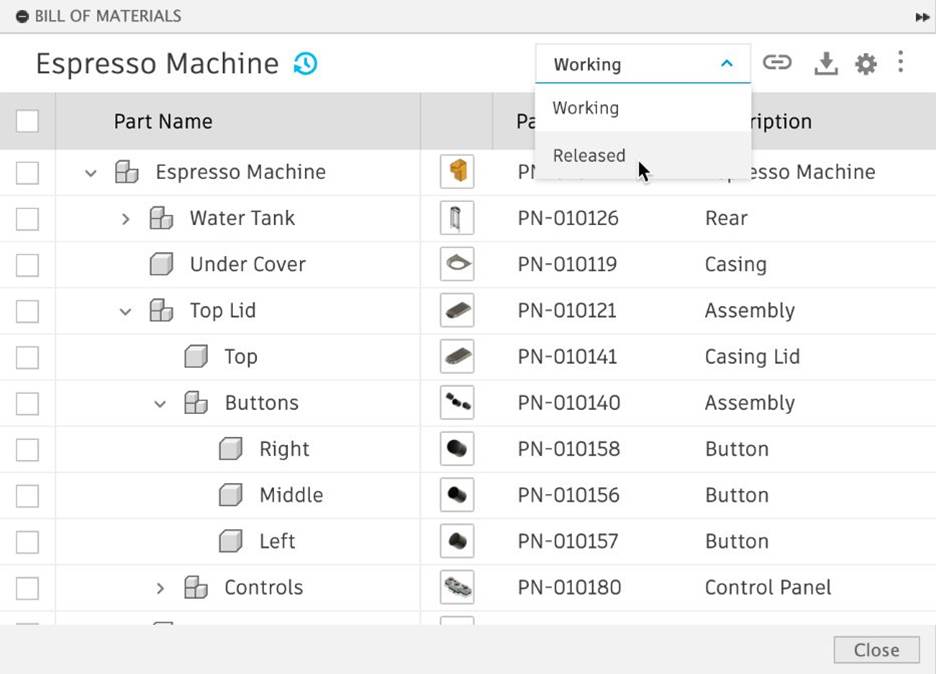
To further unify design and operations, Autodesk Fusion includes capabilities for version control and change tracking. Released BOMs can be generated through workflows such as assign item and release via change order, so that finalized configurations are documented and accessible. Historical versions are also preserved so that engineers can analyze previous iterations for support or regulatory review.
Fusion’s BOM functionality also supports collaboration. Teams can share live BOMs through web-based links, allowing colleagues in procurement, quality assurance, or manufacturing to access accurate and current information. The platform’s compatibility with other business systems is further reinforced by export options to CSV and XLS formats for integration into enterprise resource planning (ERP) or supply chain management tools.
Manage BOMs efficiently
Effective BOM management is necessary for modern manufacturing. By providing a detailed and accurate representation of all components involved in a product, a well-managed BOM helps facilitate efficient production planning, cost control, and quality assurance. Fortunately, Autodesk Fusion enhances this process by offering integrated, dynamic BOM capabilities that promote collaboration and transparency. As manufacturing continues to change, leveraging such advanced tools will help companies maintain competitiveness and meet ever-changing market demands.