 Rana Udayveer Singh
Discover the benefits of 4-axis machining with Fusion for Manufacturing, including enhanced precision, reduced tool deflection, fewer setups, and more.

Elevate your design and manufacturing processes with Autodesk Fusion
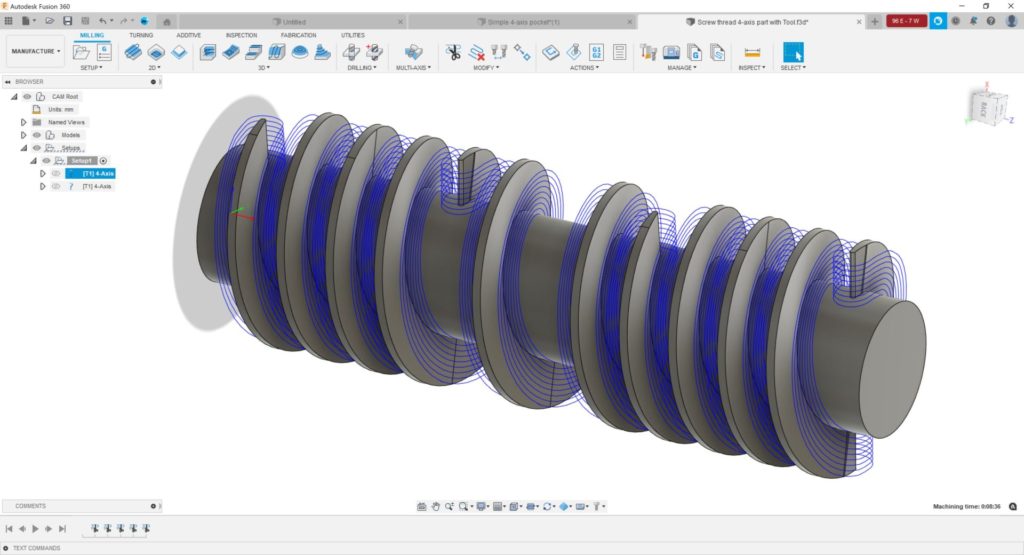
What is 4-axis machining?
4‑axis machining is a type of CNC (computer numerical control) manufacturing process that adds a rotary axis—most commonly the A‑axis rotating around the X‑axis or, in some configurations, the C‑axis rotating around the Z‑axis—to the standard three linear axes (X, Y, and Z). This allows the cutting tool to move left–right, front–back, and up–down while the workpiece rotates during machining, enabling multiple sides of a part to be machined in a single setup without stopping to manually re‑clamp or reposition it.
In this article, we’ll explore the benefits of 4-axis machining using Fusion and how it can revolutionize your manufacturing processes.
Benefits of 4-axis machining
- Shorter tooling: The addition of an extra rotary axis allows features and geometry to be machined using much shorter, more rigid cutting tool assemblies, enabling more aggressive feeds and speeds that can reduce cycle times by 20–40%.
- Less tool deflection: Shorter cutting tools reduce the likelihood of tool deflection (deviation of the cutting tool under load), improving dimensional accuracy and surface finish while reducing the need for costly manual polishing.
- Fewer setups and reduced human error: Using 4-axis machining significantly reduces the number of setups required, often by 50% or more. This decreases setup time, increases throughput, and minimizes potential for human error.
- Enhanced part quality and reduced costs: With fewer setups, there is less chance for mismatch and scope for expensive repairs, eliminating the need for manual polishing or hand finishing.
- Increased profitability: 4-axis machining allows you to take on more complex and valuable projects, giving you a competitive advantage in the market.
3-axis vs. 4-axis vs. 5-axis machining aomparison
| Feature | 3-axis | 4-axis (including 3+1) | 5-axis |
|---|---|---|---|
| Axes of movement | X, Y, Z | X, Y, Z + 1 rotary | X, Y, Z + 2 rotary |
| Setup requirements | Multiple setups for complex parts | Reduced setups | Minimal setups |
| Part complexity | Simple to moderate | Moderate to complex | Highly complex |
| Typical use cases | Flat surfaces, pockets, drilling | Cylindrical parts, turbine blades, impellers | Aerospace components, medical implants, molds |
| Relative cost | Lower | Moderate | Higher |
4-axis machining capabilities in Fusion for Manufacturing
- 3+1 machining: This is the simplest type of 4-axis machining, and the one that offers the biggest bang for the buck. 3+1 machining uses the 4th axis to index/position the part, then machines with 3-axis strategies. Once the features are machined, we rotate the 4th axis into the next position and repeat the process.
- Efficient machining of free-form shapes: Simultaneous 4-axis machining is where all four axes move at the same time. It aids in the efficient machining of free-form and cylindrical-like shapes that are either impossible or impractical to produce with 3-axis or 3+1 machining alone. This can open up possibilities for businesses allowing them to produce more complex, higher-value parts.
- Automated deburring: Automatic deburring of sharp edges (3-, 4-, and 5-axis) improves throughput by removing the manual process. This saves time and money, while also ensuring consistency and avoiding potential health and safety issues.
- Collision checking for safety and efficiency: Full machine simulation and collision avoidance are vital in 4-axis machining. The software detects potential collisions, ensuring safe and efficient machining by automatically adjusting toolpaths and avoiding collisions with the shaft and holder.
4-axis machining offers a wide range of benefits, including enhanced machining capabilities, improved tooling setup, reduced tool deflection, fewer setups, enhanced part quality, reduced costs, increased profitability, and competitive advantage.
With Autodesk Fusion for Manufacturing, you can achieve greater precision, efficiency, and profitability in their manufacturing processes. From intricate geometries to optimized toolpaths, Fusion provides the tools and capabilities necessary for advanced manufacturing.
Fusion vs Fusion for Manufacturing – Capabilities
Note: Fusion and Fusion for Manufacturing include all core Fusion CAD, CAM, CAE, PCB , and data management capabilities. Fusion for Manufacturing also includes the advanced manufacturing capabilities listed below.
| Capability | Fusion | Fusion for Manufacturing |
| Drilling | ||
| Hole drilling (3-axis) | Yes | Yes |
| Automatic hole recognition and drilling (3-axis + multi-axis) | No | Yes |
| MILLING | ||
| 2D and 2.5-axis milling | Yes | Yes |
| 3-axis milling | Yes | Yes |
| 3+1 and 3+2 positional milling | Yes | Yes |
| Machine simulation | Yes | Yes |
| Automated whole part strategies (3-axis + multi-axis) | No | Yes |
| 4- and 5-axis simultaneous milling | No | Yes |
| Multi-axis collision avoidance | No | Yes |
| TURNING | ||
| 2-axis turning | Yes | Yes |
| Turn-mill machining | Yes | Yes |
| TOOLPATH MODIFICATIONS | ||
| Modify toolpaths (trim, delete passes, leads and links, replace tool, move entry positions) | No | Yes |
| INSPECTION & PART ALIGNMENT | ||
| Work coordinate system (WCS) probing | Yes | Yes |
| Manual inspection | Yes | Yes |
| Geometry probing | No | Yes |
| Surface inspection | No | Yes |
| Part alignment | No | Yes |
| POST PROCESSING | ||
| Generate NC code (post-processing) | Yes | Yes |
| SHEET-BASED NESTING | ||
| Basic single-sheet nesting | Yes | Yes |
| Associative nesting updates | Yes | Yes |
| Nest preparation tools | No | Yes |
| Advanced nesting (multi-sheet, auto detection) | No | Yes |
| Advanced part and material controls | No | Yes |
| Process material library | No | Yes |
| Custom nest reports | No | Yes |
| Nest comparison | No | Yes |
| Part labeling | No | Yes |
| SHEET-BASED FABRICATION | ||
| Toolpath generation (laser, plasma, router, waterjet) | Yes | Yes |
| Workflow automation | Yes | Yes |
| Automatic remnant cutting | No | Yes |
| DXF export with layer mapping | No | Yes |
| ADDITIVE MANUFACTURING | ||
| 2D/3D part nesting and arrangement | Yes | Yes |
| FDM and binder jetting | Yes | Yes |
| 3MF file export | Yes | Yes |
| Metal Powder Bed Fusion (MPBF) | No | Yes |
| Directed Energy Deposition (DED, multi-axis) | No | Yes |
| MPBF process simulation | No | Yes |
Frequently asked questions
What is 4-axis machining used for? 4-axis machining is used for producing complex parts with cylindrical features, angled surfaces, and intricate geometries—common in industries like aerospace, automotive, medical devices, and energy.
When should I use 4-axis instead of 3-axis? Use 4-axis machining when your parts require multiple setups on a 3-axis machine, have features on multiple faces, or include cylindrical or wrapped geometries that benefit from rotary axis movement.
Do I need the Fusion Machining Extension for 4-axis work? If you don’t currently have a Fusion subscription, subscribe to Fusion for Manufacturing to gain access to advanced 4-axis and 5-axis toolpaths. If you already own, subscribe to the Fusion Manufacturing Extension to gain advanced manufacturing capabilities including 4-axis machining.
What industries benefit most from 4-axis machining? Aerospace, automotive, medical device manufacturing, energy, and mold-making industries benefit most due to their need for complex geometries, tight tolerances, and high-value components.
Key takeaways
- 4-axis machining adds a rotary axis to standard 3-axis CNC, enabling machining of complex parts with fewer setups.
- Shorter tools and reduced deflection improve surface finish quality and dimensional accuracy.
- Fewer setups mean reduced cycle times, lower labor costs, and minimized human error.
- Simultaneous 4-axis machining enables production of free-form and cylindrical shapes impossible with 3-axis alone.
- Fusion for Manufacturing and the Fusion Manufacturing Extension provide full 4-axis capabilities including collision avoidance and automated toolpath optimization.