 Muna Idriss
The new Backflip AI add-in for Autodesk Fusion helps engineers move from scanned physical parts to editable, parametric CAD models-without leaving their Fusion design environment.
Physical parts often contain valuable design information, but that information can be hard to reuse when the original CAD file is missing, a replacement part is no longer available, a production fixture needs to be modified, or a prototype has evolved through hands-on iteration.
3D scanning makes that geometry easier to capture, but turning a mesh into a clean, editable CAD model can still require hours of specialized reverse-engineering work.
The new Backflip AI add-in for Autodesk Fusion is designed to accelerate that conversion process inside the same environment where teams already design, validate, manufacture, and manage products.
Backflip’s AI-powered CAD copilot converts 3D scans, STL files, and other mesh geometry into parametric models with editable features. Inside Fusion, designers and engineers can move from a physical part to a model they can refine, validate, manufacture, and manage in a connected product-development environment.
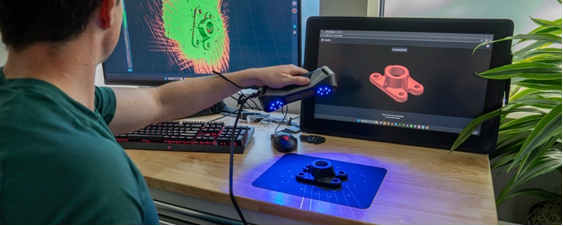
From physical geometry to an editable Fusion design
Mesh files capture the shape of an existing object, but engineering teams often need geometry they can intentionally modify.
That might mean changing the diameter of a bore, adjusting a mounting interface, strengthening a bracket, adding manufacturing allowances, or adapting an existing component for a new application. These changes are easier to manage when the model contains recognizable parametric features rather than only a collection of mesh triangles or reconstructed surfaces.
The Backflip add-in is designed to reconstruct scanned geometry using familiar CAD operations such as extrudes, revolves, and patterns. The resulting model includes an editable feature history intended to reflect the way an engineer might build the part manually.
Once reconstructed in Fusion, the scan becomes the start of the engineering workflow.
Teams can continue working with Fusion’s integrated capabilities for:
- Parametric and direct modeling
- Assembly design
- Drawing creation
- Simulation and design validation
- Manufacturing preparation and CAM
- Collaboration and data management
By bringing AI-assisted reconstruction into Fusion, engineers can avoid moving between disconnected scanning, conversion, CAD, and manufacturing tools. Fusion provides the shared product-development environment where reconstructed geometry can become a manufacturable outcome.
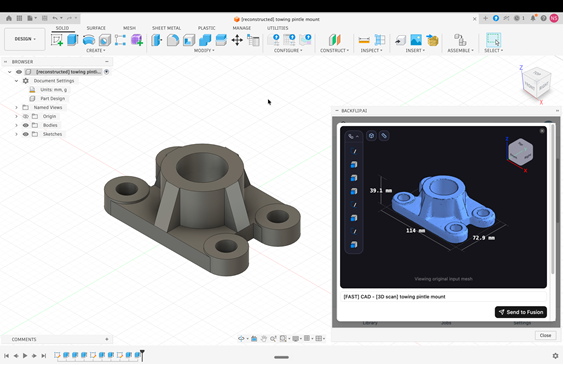
From reverse engineering to reengineering
Reconstructing an existing part can consume valuable engineering time, especially when the original CAD data is missing or a critical component is no longer available.
Backflip says its technology can reduce some scan-to-CAD reconstruction tasks from hours to minutes. By automating more of the initial reconstruction work, the add-in gives Fusion users a stronger starting point so they can focus on refining design intent, improving performance, and preparing the model for manufacturing.
Fusion users could use the add-in to modify a scanned fixture for a new workpiece, turn a hand-shaped prototype into editable engineering geometry, or reconstruct an existing interface around which a new component must fit.
In this way, physical objects become reusable design inputs. Combined with the integrated design and manufacturing capabilities in Fusion, AI-assisted scan-to-CAD workflows can help teams move more directly from what already exists to what they need to make next.
Expanding what’s possible with Fusion
The Backflip AI add-in shows how the Autodesk Fusion partner ecosystem can bring specialized workflows directly into the environment where teams already design, validate, manufacture, and manage products.
Together, Backflip’s AI reconstruction capability and Fusion’s integrated product-development environment help teams turn scanned geometry into engineered products.
The Backflip AI add-in for Autodesk Fusion is available now. Explore it to see how AI-assisted scan-to-CAD reconstruction can help your team move faster from existing physical geometry to designed and manufactured products.