 Jim Byrne
Explore Autodesk Fusion simulation capabilities, including FEA, thermal, modal, event, and generative design tools that help engineers validate designs earlier.

Elevate your design and manufacturing processes with Autodesk Fusion
Design decisions made early in development have impact on product cost, performance, and manufacturability. Yet many engineering teams still rely on physical prototypes to uncover issues that could have been identified long before the first part is built.
That approach is becoming increasingly difficult to justify. Physical prototypes consume time, materials, and engineering resources. When a design fails testing late in the development cycle, teams often face expensive redesigns, schedule delays, and additional manufacturing costs.
Simulation is no longer reserved for specialist analysts working with dedicated software. More product engineers are bringing it directly into the design process, using it to evaluate performance, compare alternatives, and optimize products before they reach production.
Autodesk Fusion integrates simulation into the same environment used for design, engineering, electronics, and manufacturing. Instead of exporting geometry between disconnected tools, engineers can model, simulate, refine, and manufacture within a single platform. Fusion’s capabilities include structural, thermal, modal, buckling, event, manufacturability, and generative design studies, helping teams validate decisions earlier and reduce reliance on physical prototypes.
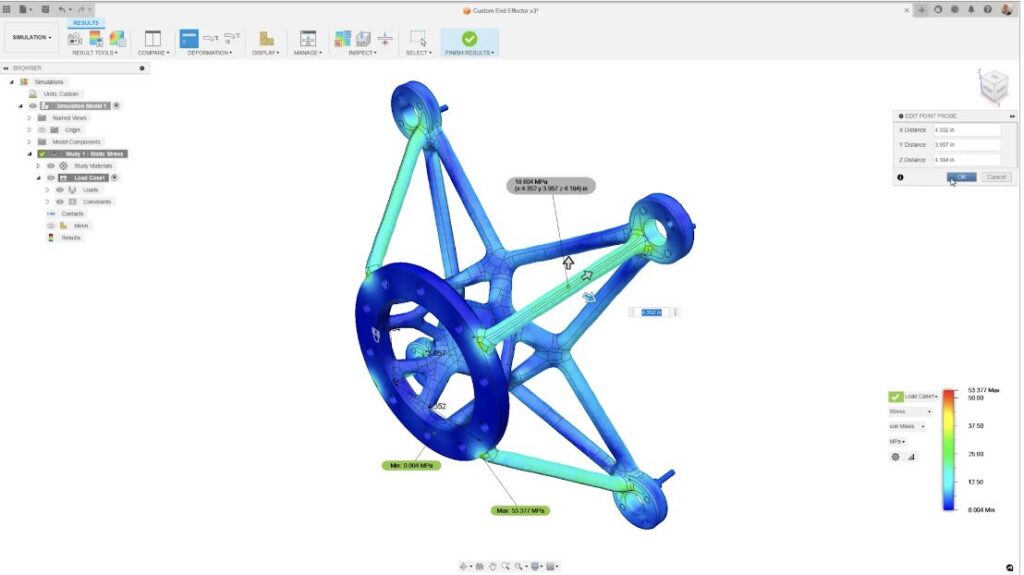
Structural simulation: Understanding how products respond to real loads
Structural simulation helps engineers evaluate whether a design can withstand expected operating conditions.
Rather than building prototypes and conducting destructive tests, teams can digitally apply forces, fixtures, and constraints to determine how components may behave under load. Fusion supports a range of structural studies, from basic stress analysis to more advanced nonlinear simulations capable of evaluating large deformations, contact conditions, and changing loads.
Engineers can visualize:
- Stress concentrations
- Displacement and deformation
- Safety factors
- Reaction forces
- Potential failure locations
These insights help identify weaknesses before parts reach production, reducing the likelihood of costly engineering changes later in development.
Modal analysis: Preventing vibration-related failures
Many products experience vibration during normal operation. Motors, rotating equipment, handheld devices, machinery, and consumer products can all be affected by resonance.
Fusion’s modal frequency studies help engineers identify the natural frequencies of a design and understand how vibration may influence performance. By evaluating these conditions early, teams can make adjustments before resonance issues lead to excessive wear, noise, or structural failure.
This type of analysis is particularly valuable for products that contain moving components or operate in environments where vibration is unavoidable.
Thermal simulation: Designing for heat management
Heat can dramatically affect product reliability, performance, and lifespan. Fusion includes thermal simulation capabilities that allow engineers to evaluate how heat moves through a product and how temperature changes can impact structural performance.
Engineers can use thermal studies to:
- Analyze heat transfer
- Investigate temperature distribution
- Evaluate thermal stresses
- Improve product cooling strategies
- Reduce the risk of temperature-related failures
For electronics, thermal performance has become especially critical as devices become smaller, more powerful, and more densely packed. Fusion’s electronics cooling capabilities help teams identify potential overheating risks before physical prototypes are built.
Event simulation: Evaluating real-world dynamic conditions
Not all loads occur gradually. Products often experience impacts, drops, collisions, or other time-dependent events that can be difficult to evaluate with traditional static analysis methods.
Fusion’s event simulation capabilities help engineers understand how designs perform during these dynamic scenarios. They can model rapidly changing conditions and provide visibility into displacement, stress, velocity, acceleration, and even potential material failure under extreme conditions.
Common applications include:
- Consumer product drop testing
- Impact analysis
- Forming processes
- Dynamic loading conditions
- Durability evaluation
By testing these scenarios digitally, teams can identify weaknesses much earlier in development.
Designing for manufacturability with injection molding simulation
Many engineering challenges do not emerge because a part fails structurally. Instead, problems arise when a design is difficult or expensive to manufacture.
Fusion includes injection molding simulation capabilities that allow engineers to evaluate manufacturability before tooling investments are made. Teams can analyze conditions that influence mold filling, cooling, warpage, and overall part quality.
“We were able to reduce the number of trial runs of the mold by 25% on average. The 25% reduction is significant because we have to stop the actual production line for about four hours during trial runs. We design about 30 new products annually, so just one less test run saves us about 120 hours every year.”
-Koichi Sato, Kawai Plastics
This enables manufacturers to make informed design adjustments earlier, reducing risk and avoiding costly surprises during production ramp-up.
Generative design and shape optimization
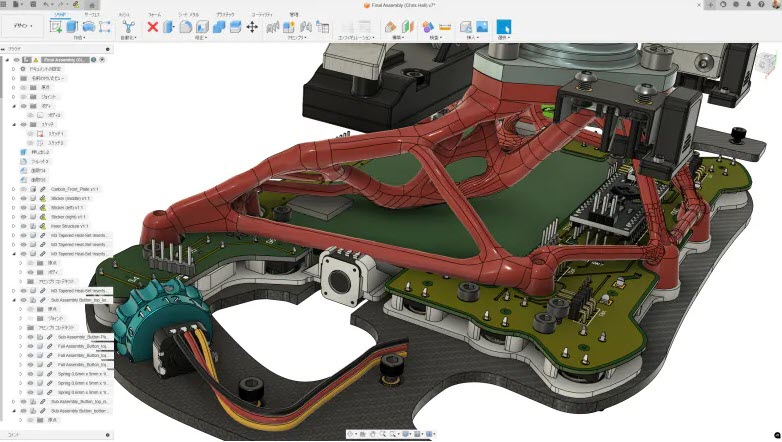
Fusion’s generative design and shape optimization technologies use engineering requirements and performance criteria to automatically generate design alternatives that satisfy specified objectives. These tools can help teams reduce weight, improve performance, consolidate parts, and explore design options that would be difficult to discover through conventional workflows. ccur after design completion, generative approaches place simulation at the center of the design process, creating a more data-driven path to innovation.
Connecting to manufacturing
Because Fusion combines CAD, CAM, electronics, simulation, and data management on a single platform, engineers can move directly from validated designs into manufacturing workflows without transferring data between disconnected systems.
This connected workflow helps teams:
- Reduce engineering rework
- Improve collaboration
- Accelerate design iterations
- Validate manufacturability earlier
- Move from concept to production more efficiently
The result is a more streamlined product development process where simulation actively informs design and manufacturing decisions rather than functioning as a standalone validation step.
Why Fusion is an effective simulation solution for product development
Many engineering organizations are looking for ways to incorporate simulation without adding complexity to their workflows.
Fusion’s advantage is that it exists within the same environment used for product design and manufacturing preparation. Engineers can evaluate performance, make design changes, rerun studies, and continue development without leaving their primary workspace.
For product designers, mechanical engineers, and manufacturing teams, this approach makes simulation more accessible and easier to adopt across the organization. Rather than treating simulation as a specialized activity performed late in development, Fusion enables validation to occur throughout the design process, helping teams build better products with greater confidence.
Ready to explore simulation in Autodesk Fusion? Try it free for 30-days or explore Fusion plans and pricing to see how integrated simulation can help reduce prototyping costs, accelerate development, and improve product performance.
Frequently asked questions
Autodesk Fusion supports linear static stress analysis and, with Fusion for Design or the Fusion Simulation Extension, users gain access nonlinear stress, structural buckling, modal frequencies, thermal simulation, event simulation, electronics cooling, injection molding simulation, shape optimization, and generative design capabilities.
Yes. Fusion supports a range of finite element analysis (FEA) workflows, including structural, thermal, modal, buckling, and nonlinear studies. It is designed to help engineers validate products earlier in development without leaving the CAD environment.
Yes. Fusion includes thermal simulation capabilities that allow engineers to analyze heat transfer, temperature distribution, and thermal stress to better understand product performance and reliability.
Event simulation evaluates how designs respond to time-dependent loading conditions such as impacts, drops, collisions, and other dynamic events. Results can include stress, displacement, acceleration, velocity, and potential failure behavior.
Fusion combines design, simulation, electronics, and manufacturing workflows on a unified platform. Results can be used to guide engineering decisions before designs move into CAM, additive manufacturing, or production planning workflows.
Generative design is available through the Fusion for Design or the Fusion Simulation Extension and uses performance requirements, materials, and manufacturing constraints to generate optimized design alternatives that can reduce weight while maintaining engineering objectives.
Static stress and event simulation are both used to evaluate how a design responds to forces, but they solve different engineering problems.
Static stress simulation analyzes how a part or assembly behaves under steady, constant loads. It helps engineers understand stress, deformation, displacement, reaction forces, and safety factors when forces are applied gradually and remain relatively unchanged. Typical use cases include evaluating brackets, frames, fixtures, machine components, and structural parts under expected operating loads.
Event simulation analyzes time-dependent loading conditions where forces change rapidly over time. It is used to study impacts, drops, collisions, forming operations, and other dynamic events. It can calculate displacement, stress, velocity, acceleration, and, in some cases, estimate part failure under extreme conditions. This makes it valuable for understanding how products perform during real-world events that cannot be accurately represented by static loading alone.
Autodesk Fusion helps engineers identify potential design failures before manufacturing by allowing them to simulate real-world conditions directly within the design environment. Instead of building multiple physical prototypes, teams can digitally test how products respond to structural loads, vibration, temperature changes, impacts, and manufacturing processes.
Using Fusion for Design or the Fusion Simulation Extension, engineers can perform studies such as nonlinear stress analysis, structural buckling, modal frequencies, thermal simulation, event simulation, electronics cooling, and injection molding simulation. These analyses reveal potential issues including excessive stress concentrations, deformation, vibration problems, thermal failures, structural instability, manufacturability concerns, and overheating risks before production begins.
Results are displayed directly on the 3D model, making it easier to visualize safety factors, failure locations, displacement, temperature distribution, and other performance metrics. Because simulation remains connected to the CAD model, engineers can quickly modify designs, rerun studies, and validate improvements without exporting geometry between different tools.
By identifying weaknesses earlier in development, Fusion helps reduce physical prototyping, accelerate design iterations, improve product reliability, and lower the risk of costly engineering changes after manufacturing has started.
For manufacturing and design teams, the highest-value simulation features are: integrated CAD-to-simulation workflow (no file translation), multi-physics support (structural, thermal, fluid), generative or AI-assisted optimization, cloud-based solve capacity for large assemblies, and direct connection to manufacturing outputs like CAM and additive manufacturing.
Autodesk Fusion addresses all of these in a single platform, allowing engineers to move from concept to simulation to production-ready toolpaths without leaving the tool.
The major trends in 2025–2026 are: AI-assisted simulation setup and mesh generation, cloud-based solve infrastructure for high-fidelity models, integration of simulation into generative design loops, and digital twin connectivity that ties simulation models to live production data.
Autodesk Fusion include AI generative design technology and the Fusion platform’s cloud architecture supports scalable simulation compute without local hardware investment.