 Shayne Prichard
The enhanced user and group management features in Fusion give teams more control, security, and efficiency by enabling flexible, role-based access across projects, streamlining collaboration and reducing admin burden.

This post will explain how user and group management capabilities in Fusion can help you expand access across your organization and manage users in all your design projects with secure permissions control. We have made improvements that now make it more flexible than ever.
Before we go into the improvements, let’s take a look at the areas we addressed:
- Adding granular roles at any level: Managing individual user access across multiple projects can quickly become a headache—especially when team members are constantly shifting between roles and assignments. Also, being able to control access at the project, folder, and subfolder level was not possible. Roles were applied at the project level and that role was used for every folder and subfolder underneath the project. This introduced the need to create more projects to control access for groups of users.
- Creating custom groups: Fusion admins were also spending too much time updating individual permissions across projects. Every time a designer joined a project or someone left the team, they had to manually adjust access in multiple places. Not only was this tedious—it also increased the risk of missed updates and inconsistent roles.
- Control project hierarchy: Fusion users could also create projects without the consent of the admin. This would result in a messy structure that the Fusion admins would have to clean up and reorganize.

Elevate your design and manufacturing processes with Autodesk Fusion
Improvements to Fusion group management
Fusion admins can now use hub-level groups and define the groups’ role. These groups can be applied across any number of folders or projects. Now, whenever someone needs access—or needs to be removed—it’s as simple as updating the group membership. Their permissions automatically update everywhere that group is used.
Roles now can be applied at any level, giving more granular control of the entirety of the project.
Fusion admins can now control which hub members can create projects. Don’t worry, any user with editor role or above can create sub folders in projects that they have been provided access to. This is a good blend of maintaining a consistent top level project list and empowering users to manage their own folder structure without having to burden the Fusion admin with this task.
The result? A more streamlined process, fewer errors, and less time spent managing access and project structure. Leveraging hub-level groups will make a big impact on efficiency and security.
These data management features are part of Fusion’s increased flexibility and functionality for improving collaboration and streamlining workflows. You can now experience smoother, more efficient teamwork with Fusion.
User and group management capabilities
Manage people in projects
Roles: Fusion allows administrators to assign specific roles and permissions to users. This ensures that individuals have access to the tools and data relevant to their role within the organization. Admins can apply roles directly to individuals or groups, and Fusion automatically inherits those roles down to all folders and subfolders from the assigned level.
Admins should assign roles only where they want to grant access and start with the lowest-level role. This will allow admins to add a higher level role down the structure.
Here is a reference to our roles and the permissions allowed. As you can see, the roles are accumulative. Also, we have an option to remove a user or group from a project, folder or subfolder by selecting the “No role” option from the list.
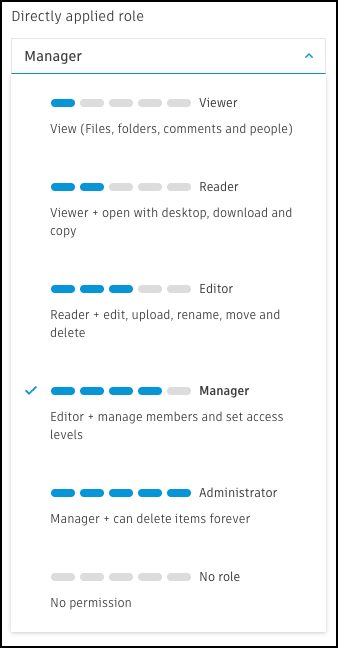
Granular permissions: Administrators can set permissions for individual users or groups, controlling access to projects, folders and subfolders.
Groups
- Group creation: Fusion admins can create hub-level groups with any combination of users and reuse them across any project, folder, or subfolder.
- Group roles: When applying a group to a specific project, folder or subfolder, the admin can then assign any role to that group.
- Group management: From any project, folder or subfolder, the group list is visible. Admins can rename groups, add or remove users. Fusion automatically updates those changes everywhere the group is used.
How does it work?
We’ve significantly enhanced the capabilities of the members and permission tab. And we’ve added quick glance indicators to know exactly the users or groups applied role without having to drill down the details.
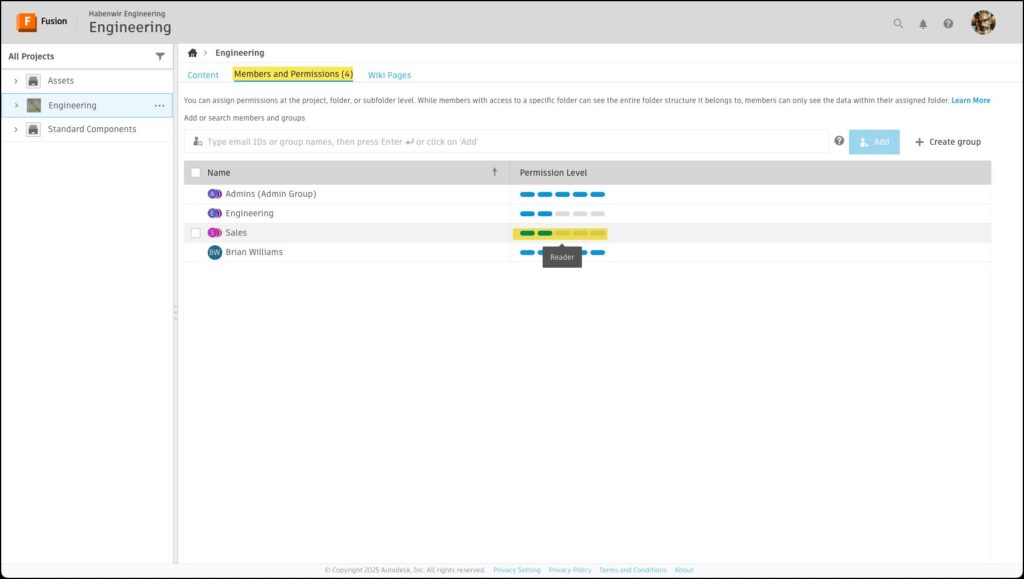
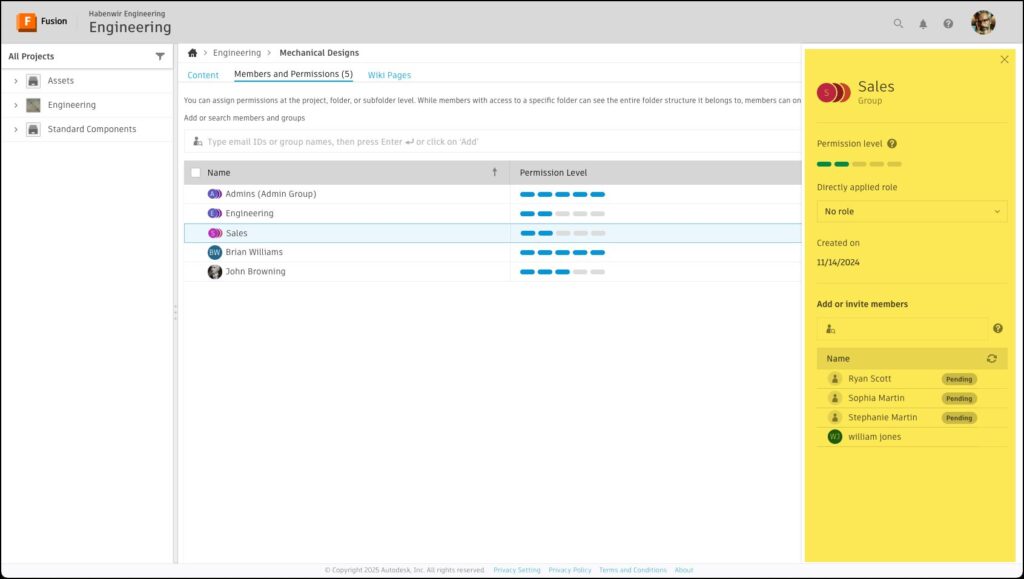
Updating an individual or group is easy by just selecting one or more in the list to bring up the focus panel. The image below shows the selection of the sales group. From here the admin can modify the name, the role and members. Notice that the admin has added different access to the mechanical designs folder than the engineering project.
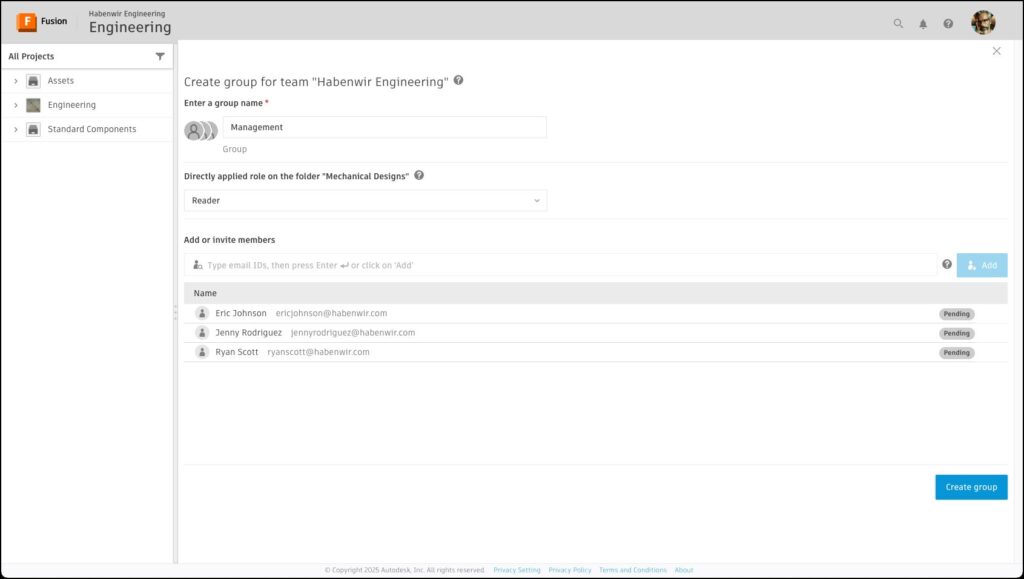
We’re also excited to introduce new functionality for creating custom hub-level groups. Groups can be created when navigated to any project, folder or subfolder.
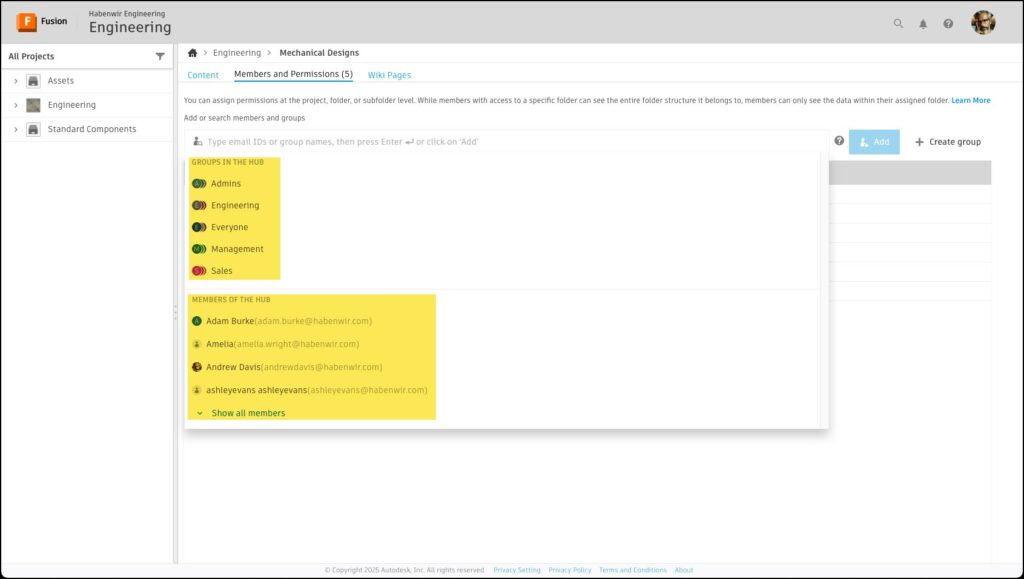
Being able to quickly apply a hub-level group is very important. We have added a list to all the hub-level groups when an admin starts to type in the find, add and invite field. Since this is not an everyday task, we wanted to make sure that finding groups will not be something an admin will have to remember. Also, we have added a list to all the members in the hub too.
Why are these enhancements important?
- Enhanced collaboration: Fusion’s user and group management capabilities enable seamless collaboration among team members, both within and outside the organization. This leads to faster design iterations, improved communication, and higher quality outcomes.
- Improved security: Customers can protect sensitive data and intellectual property by using granular permissions and role-based access control. Only authorized users can access critical information, reducing the risk of unauthorized access.
- Increased productivity: Efficient management of users and groups reduces administrative overhead and streamlines workflows. Teams can focus on design and innovation rather than managing access and permissions.
- Flexibility and scalability: Fusion’s robust user and group management features are designed to scale with the organization. Whether it’s a small to medium team, Fusion can accommodate growing needs and changing requirements.
Overall, the new user and group management capabilities in Fusion significantly enhance collaboration, improve security, and boost productivity, making it a valuable product development solution for modern design and engineering teams.
As a side note, we are in the process of converting all existing projects to support the above-mentioned new features. You can either wait for us to automatically convert your projects soon or you can utilize our existing project upgrade option. You can learn more about upgrading projects HERE.