 Trevor English
Water utilities are under increasing pressure to do more with limited resources by prioritizing the right assets, validating system capacity, and delivering reliable results they can trust. Hydraulic models play a critical role in these decisions, but only when insights are easy to generate, easy to explain, and grounded in real-world system behavior.
In InfoWater Pro 2026.2, we’re continuing to focus on practical outcomes for utilities and consultants through simplifying complex analysis, improving the accuracy and usability of core workflows, and delivering a more stable modeling experience overall.
New Criticality Analysis (tech preview)
Asset criticality analysis has become a growing priority for utilities, especially as capital planning, risk management, and resilience efforts continue to converge. At the same time, many traditional criticality workflows are difficult to configure and even harder to translate into actionable decisions.
InfoWater Pro 2026.2 introduces a new Criticality Analysis module, available as a technical preview. This new approach focuses on:
- Ease of use, with minimal setup required
- Clear, defensible results that can support planning and prioritization
- Meaningful value, even without extensive data preparation
The goal is to help utilities quickly identify which assets matter most so you can focus time, budget, and operational attention where it has the greatest impact.
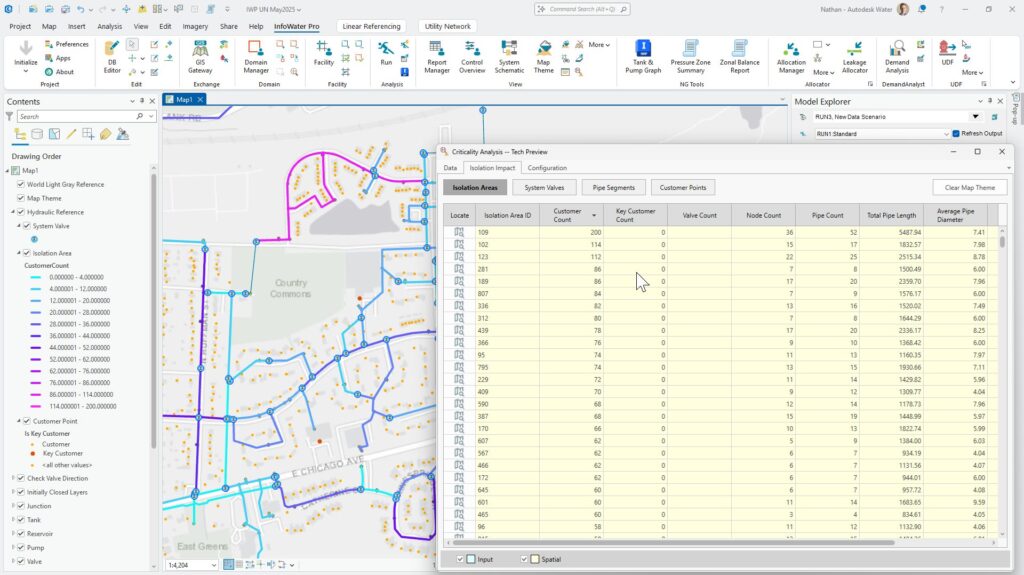
Because this is a technical preview, we’re actively expanding capabilities and incorporating feedback. If you begin exploring this workflow now, you can help shape how it evolves in future releases.
Fire flow enhancements that improve results confidence
Fire flow analysis remains one of the most widely used – and most scrutinized – workflows in water distribution modeling. In InfoWater Pro 2026.2, we’ve made targeted improvements to both how fire flow is calculated and how results are presented.
These enhancements help:
- Better represent true system capacity during fire flow analysis
- Provide more clearer outputs and reporting, making results easier to interpret and share
The outcome is a fire flow workflow that not only delivers stronger technical results, but also supports better communication with stakeholders, reviewers, and decision-makers.
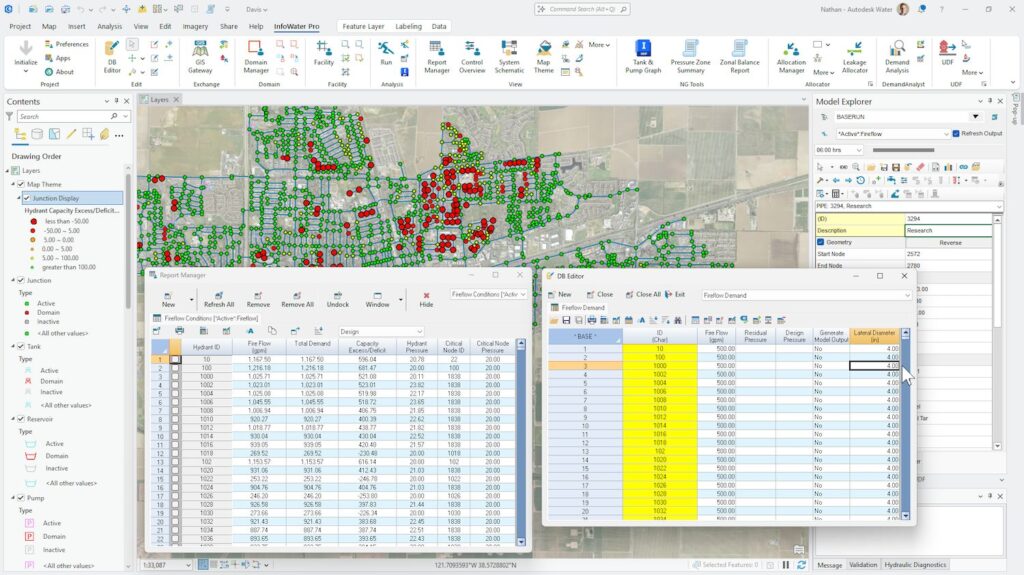
This release marks the latest in a long string of improvements and updates we’ve made to fire flow capabilities for modelers over the years, including allowing for fire flow analysis in the cloud. Learn about our most recent step-change improvement to fire flow from InfoWater Pro 2025.1.
From the real world into the software
Beyond these major updates, InfoWater Pro 2026.2 includes several customer-driven improvements that enhance everyday modeling workflows:
- A new roughness method for India, supporting region-specific modeling needs
- Reverse-trace water quality simulation, enabling deeper insight into system behavior
- User-defined flushing (UDF) improvements, based directly on customer feedback
Each of these updates reflects how InfoWater Pro is used in practice across different regions, regulatory environments, and operational contexts. They also underscore that our development teams are building tools for you, our customers, not for some theoretical modeling team. Do you have updates or improvements you’d like to see in the next release? Submit them on our ideas portal.
Compounding value with Info360 integrations
InfoWater Pro 2026.2 also continues to strengthen connections across the Autodesk Water platform. For utilities looking to expand their workflows beyond desktop modeling, InfoWater Pro pairs naturally with Info360 Insight for effortless model calibration and cloud-based simulation workflows and Info360 Asset for leakage analysis and asset-focused criticality workflows.
Together, these tools help bridge hydraulic modeling, asset management, and operational decision-making into a more connected digital water strategy, part of our vision and goals as we’re building the Autodesk Water Portfolio into everything it can be.
Getting started with InfoWater Pro 2026.2
With InfoWater Pro 2026.2, we’re focused on making advanced analysis more accessible, more reliable, and more impactful. Ready to get started?
- Read more about What’s New in InfoWater Pro 2026.2.
- We aso fixed a few bugs. Read the release notes.
- You can update to InfoWater Pro 2026.2 at manage.autodesk.com.
- Curious about how to connect InfoWater Pro to Info360 apps? We have docs for that.