 Irvin Hayes Jr.
Intelligent help, faster answers, and task automation—right where you work. Vault 2027 introduces Autodesk Assistant, an AI-powered assistant that helps you find information faster, learn features in context, and complete everyday data management tasks using natural language.
Optimize Data Management with Autodesk Vault
Secure, organize, and manage your engineering data efficiently.
For many teams, Vault product data management (PDM) is the system of record for design and engineering data, but navigating workflows, understanding features, or tracking-down the right files can still take time. Autodesk Assistant helps reduce that friction by letting you ask Vault questions the same way you’d ask a colleague—without leaving the product.
What is Autodesk Assistant in Vault?
Autodesk Assistant is an AI-powered assistant within Vault 2027, now available as a tech preview. It brings natural language interaction to three core areas of your daily work:
- In product help and guidance
- Natural language search and guidance
- Task execution and workflow assistance
All interactions respect Vault permissions and access controls, and your Vault data remains within your environment.
What you can do with Autodesk Assistant in Vault
1. Get help without leaving Vault
Vault is powerful, but learning workflows like lifecycle changes, Copy Design, or permission management often means stopping work to search documentation.
With Autodesk Assistant, you can ask how to do something and receive contextual guidance directly inside Vault, without navigating menus or online help pages.
Example questions you can ask
- “How do I use Copy Design in Vault?”
- “What are the steps to change a lifecycle state?”
- “How do I manage user permissions?”
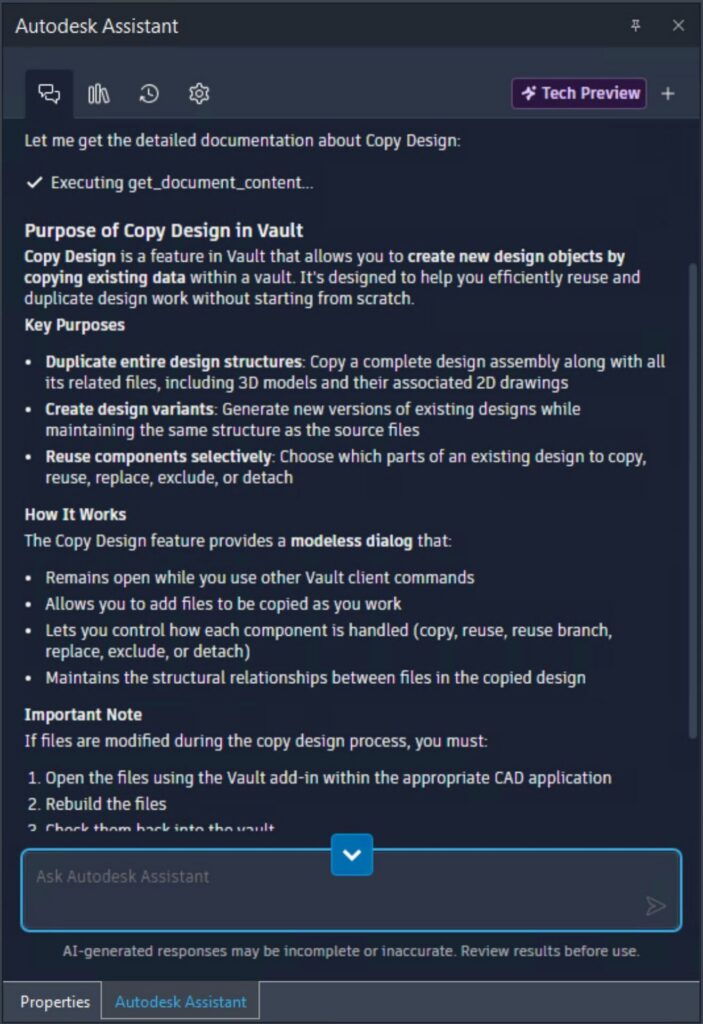
Autodesk Assistant responds with relevant explanations and guidance, helping reduce onboarding time and day-to-day interruptions.
2. Find files and insights using natural language
Searching in Vault has traditionally required knowing property names, filters, or folder structures. Autodesk Assistant changes that by allowing you to describe what you’re looking for in plain language.
Instead of building complex searches manually, you can ask questions and let that Autodesk Assistant interpret your intent.
Example search prompts
- “Show me outdated drawings in the Current Projects folder.”
- “Find all files containing ‘bracket’ in the name.”
- “Show me a list of files by category and provide a summary table”
For more advanced use cases, Vault 2027 also supports complex queries using pattern matching (including RegEx) to help teams identify compliance issues or analyze large datasets without writing scripts.
Example of a query to give you an idea
- “Give me a count of files in the _Jet Engine Model.iam and it’s components where the Part Number value matches this RegEx expression /\d{3}\-\d{2}/gm.”
3. Let Autodesk Assistant in Vault do tasks for you
Autodesk Assistant doesn’t stop at answering questions; it can also help carry out certain Vault tasks on your behalf, based on your request and permissions. This allows you to stay focused on your design or data review work instead of navigating multiple dialogs.
Example of a workflow scenario you can do
You’ve completed an assembly and want to check whether related drawings are up to date.
Instead of opening and reviewing each file manually, you can ask Autodesk Assistant. Within seconds, it identifies associated drawings and flags those that need updating, helping you understand the required action.
Examples of tasks you can ask Autodesk Assistant to do:
File Operations
- “Update all outdated drawings in this project.”
Item Operations
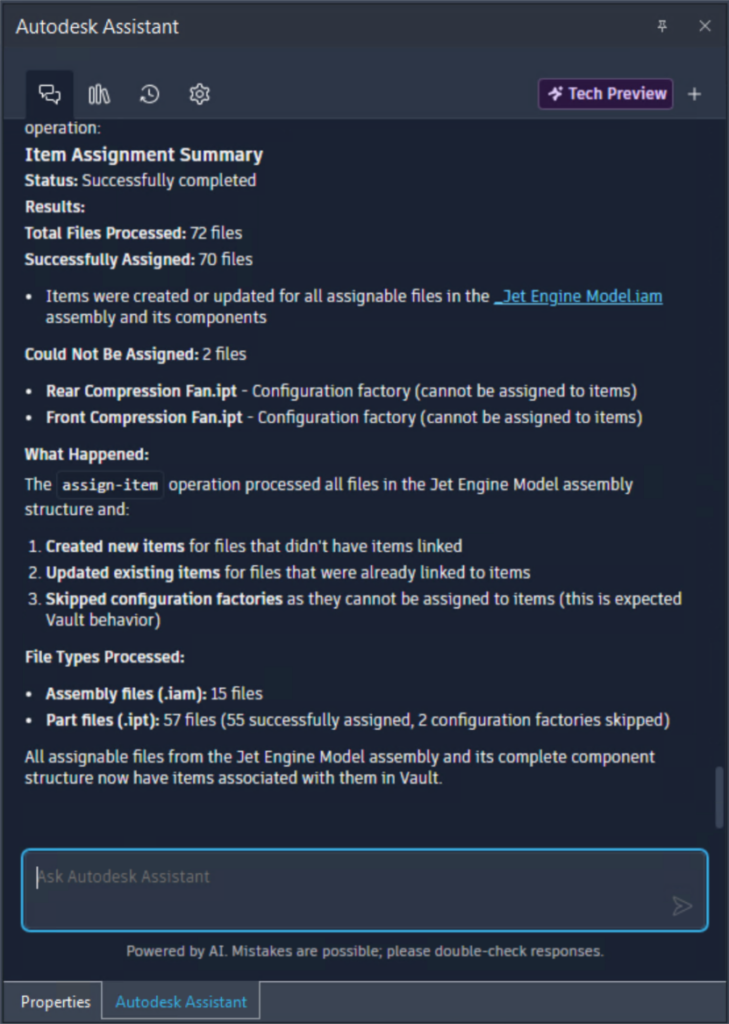
- “Create Items for the Motor.iam and associated files.”
- “Synchronize the Motor assembly Item to Fusion Manage.”
This type of interaction helps teams reduce repetitive steps and make faster decisions, especially in large projects.
Designed for how Vault users actually work
Autodesk Assistant in Vault was built around a simple idea: data management should support your work, not slow it down.
Rather than forcing users to think in terms of Vault commands, properties, or workflows, the Assistant allows you to focus on your intent, finding information, understanding what to do next, or completing a task efficiently.
It’s part of a broader Vault 2027 focus on:
- Reducing unnecessary clicks
- Improving discoverability of features
- Helping both new and experienced users work more confidently
Autodesk Assistant in Vault ultimately helps teams spend less time navigating systems and more time moving work forward. By bringing search, guidance, and task execution into a single, conversational experience, it reduces the friction that often comes with managing complex engineering data. Whether you’re onboarding new users, tracking down critical files, or completing routine workflows, the Assistant helps you get to the right answer—and the next step—faster.
Autodesk Assistant in Vault is currently available as a technology preview. Capabilities will continue to evolve over time based on user feedback and ongoing development.
Join the community of users and share your feedback here:
Autodesk Assistant in Vault