 Markus Koechl
The Autodesk Vault SDK/API is an inclusive component of each Vault Client or Vault Server installation. To install the SDK, run the setup in C:\Program Files\Autodesk\Vault Client <version>\SDK\setup.exe or C:\Program Files\Autodesk\Vault Server <version>\SDK\setup.exe. Both options result in a new folder C:\Program Files\Autodesk\Autodesk Vault SDK <version>.
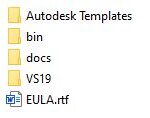
I recommend completing your working environment right after the SDK installation:
- Install the Visual Studio templates for Vault. The subfolder .\Autodesk Templates\ProjectTemplates\Visual C#\ indicates the target programming language. We do not provide templates for other .NET languages, so you must convert these. The templates are compatible with Visual Studio 2017 and Visual Studio 2019 (recommended).
- No action is required for the SDK .\bin\ folder for now. You will need these to add references for projects that haven’t started using the installed templates.
- I prefer to have a shortcut to the SDK documentation on my Desktop. So, I would create a shortcut for the .\docs\VaultSDK.chm file.
- Studying the Introduction, Best Practices, and Getting Started chapters is necessary.
- Studying the chapter KnowledgeBase is highly recommended, but not in a single step. Even after years, I return to it from time to time.
- Studying the Introduction, Best Practices, and Getting Started chapters is necessary.
- The folder VS19: As the name indicates, this folder contains Vault SDK sample solutions ready to be built and run using Visual Studio 2019. You can choose from C# and VB sources. However, there are some more samples available written in C#. I recommend reviewing all the samples after you finish reading the blog posts of the Vault SDK – Get Started series.
This blog is article number #1 of the Getting Started series:
#1 Installing the SDK and a first look into its content
#2 Creating a Vault console/standalone application
#3 Creating a Custom Vault Job
#4 Creating a Vault extension handling events and restrictions
#5 Discussing Vault Login, including authorization and licensing
Hope you liked this introduction!
Markus
Learn more
Leverage the Vault Customization Forum whenever you have questions about programming Vault APIs or customizing Vault Data Standard.
To learn more about Autodesk Vault product data management, visit our product center here.
Join our Vault Communities
You can join the following communities to share feedback and product improvement requests with our Autodesk Vault product team:
Vault Ideas – Submit your ideas for improvements and new features.
Vault Forum – Discuss Autodesk Vault’s current workflows with our technical teams and your peers.
Feedback Community – Test Autodesk Vault alpha and beta releases and give your feedback directly to the Vault product team.