 Irvin Hayes Jr.
The release of Vault 2026.1 brought the Autodesk Vault Connector, making it easier than ever to synchronize data between your product data management and product lifecycle management solutions. With the release of Vault 2026.2, we’ve added even more functionality using the Vault Connector—highlighted in this post.

About the Autodesk Vault Connector
First, a refresher if you’re new to the Vault Connector, it’s a native, out-of-the-box connector that bridges the gap between design data management and process management systems. Built for such solutions as Autodesk Vault PLM, the Vault Connector seamlessly integrates Vault Professional (PDM) with Autodesk Fusion Manage (PLM), enabling secure, cloud-based collaboration for your entire organization. Watch the video to learn more.
What you can do with the Vault Connector
With the Vault Connector, synchronizing Vault Items and bill of materials (BOM) data to Fusion Manage is just a click away. New with the Vault 2026.2 release, an intuitive Fusion Manage panel is now embedded directly within Vault, so you can access and manage Items, BOMs, and change orders without ever leaving the Vault client.
Lifecycle state updates for Vault Items and their linked files are triggered by change orders in Fusion Manage. This maintains clear synchronization between environments and ensures data consistency without additional administrative steps.
Best of all, there’s no need for burdensome or lengthy customization. The Vault Connector is ready to go out-of-the-box, helping you save time and work more efficiently by combining the power of data and process management in one seamless solution.
Autodesk Vault Connector What’s New Highlights
Below you will learn about additional new functionality introduced in the Vault 2026.2 release of the Vault Connector.
Vault Connector Attachment Type Configuration
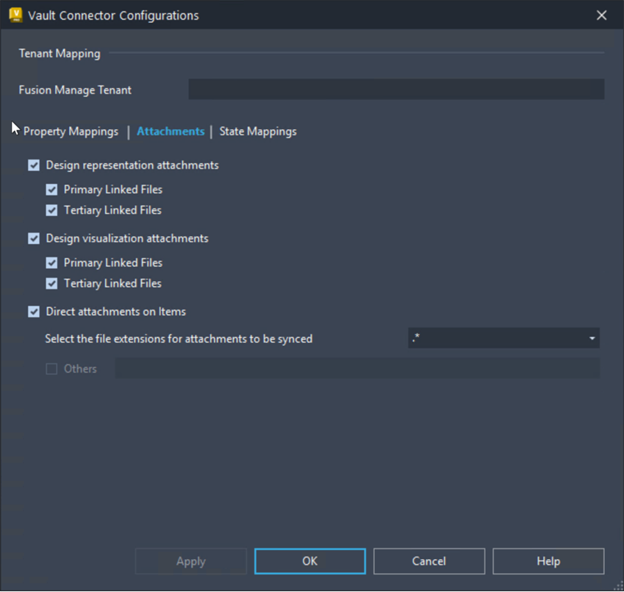
Admins can now specify which Vault file attachment types are eligible for syncing to the Files tab in Fusion Manage. This targeted control ensures that only the most relevant files are transferred, supporting both compliance and efficiency goals.
Sync Primary File Properties
Syncing has become even more powerful. Properties from a primary Vault file can be mapped and synchronized to their corresponding fields in the Fusion Manage Item Details page through Vault Connector Mappings. This guarantees accuracy and reduces manual data entry.
Vault Connector Sync Task Management
Users now get greater transparency and control over synchronization. The Vault Connector task window allows users to view sync job details and, if needed, resubmit or remove tasks associated with manual sync, auto sync, or Change Order State Sync actions.
Save time and work more efficiently. Every step is faster, smarter, and fully connected with the Vault Connector.
Learn more
Read related posts:
- Autodesk Vault Connector for Seamless PDM and PLM Integration,
- The Value of Autodesk Vault Items in your Digital Transformation Journey
Visit the Vault PLM product center here.