Cost overruns, rework, and late-stage redesign are still frustratingly common in construction. And too often, teams only look for savings after things go over budget or behind schedule.
This is why many teams are turning to value engineering (VE). Rather than reactive cost-cutting, VE is a proactive, structured approach to improving project outcomes. Contrary to common belief, value engineering isn’t about lowering quality. Rather, it’s about maximizing performance, functionality, and cost efficiency from the very start.
Table of contents:
Value engineering, aka VE, is a systematic method for improving value by analyzing a product, system, or process and optimizing its function relative to its cost. Originally developed in manufacturing by Lawrence Miles at General Electric, the approach focuses on delivering the required performance at the lowest lifecycle cost.
These days, we see value engineering come to life in various areas, including:
Teams that implement VE can be more competitive thanks to the following benefits.
Value engineering helps teams control costs without sacrificing performance. Because they’re evaluating materials, systems, and construction methods early, project teams are able to lower lifecycle costs. Fewer surprises during construction also means fewer change orders and less budget volatility. The result is stronger ROI for owners and developers, since projects deliver the intended function while keeping spending on track.
VE improves how teams work together throughout the project lifecycle. Designers, estimators, and builders can evaluate alternatives earlier, which helps uncover constructability issues before they show up in the field. That early alignment reduces rework and shortens the decision cycle. When teams collaborate around value rather than react to problems later, the entire workflow becomes more efficient.
Value engineering also strengthens long-term project outcomes. Teams test options early and evaluate how design decisions affect cost and performance. By looking beyond first cost, VE also helps teams account for durability, maintainability, and long-term operational impact. This approach makes risks easier to manage, and owners gain more confidence that projects will meet expectations. Over time, this builds trust among stakeholders and leads to more consistent project delivery.
Bottom line: projects demand closer alignment between design intent, cost realities, and construction outcomes. The earlier teams evaluate value, the easier it becomes to control risk and performance. Early decisions shape nearly every downstream cost and outcome on a project.
Value engineering works best when teams follow some practical principles. The following will help guide how they evaluate ideas and make decisions throughout the project.
At its core, value engineering asks a simple question: what function does this element actually need to perform? Instead of focusing on specific materials or systems, teams focus on the outcome.
For example, if a facade system’s job is weather protection and thermal performance, the team might compare curtain wall, panelized systems, or alternative materials to deliver the same function at a better cost.
Good value engineering doesn’t happen in silos. Designers, estimators, contractors, specialty trades, and owners all bring different perspectives that lead to better ideas. A structural engineer may propose a design that looks efficient on paper, but a contractor might suggest a prefabricated alternative that is faster and easier to build. When those conversations happen early, teams can land on smarter solutions.
Strong VE decisions rely on real project data rather than assumptions. Teams compare options using cost models, historical project data, performance metrics, and constructability insights. All of these things are taken into consideration, so when it’s time to make decisions, they rely on data and not solely on gut feelings.
The earlier value engineering happens, the more impact it can have. Once drawings are finalized or construction is underway, options become limited and changes get expensive. During early design, however, teams can explore alternatives with minimal disruption.
For instance, adjusting the structural grid early in design may reduce steel tonnage and simplify construction before any detailed drawings are issued.
Value engineering looks beyond upfront construction costs and considers long-term performance. A cheaper material might reduce initial costs but lead to higher maintenance costs later.
A team might choose a slightly more expensive roofing system because it lasts longer and requires fewer repairs, ultimately lowering the building’s total cost over its lifespan.
Many teams think of VE as a single workshop, but the most effective projects treat it as an ongoing process. As designs evolve and new information becomes available, teams continue evaluating options and refining decisions.
Value engineering works best when the right people contribute their expertise. Each role helps evaluate options, balance priorities, and keep the project aligned with its goals.
Project owner - The owner defines the project's value. They establish priorities, including budget targets, performance requirements, and long-term operational goals. During VE discussions, the owner helps teams understand what trade-offs are acceptable and which outcomes matter most to the business.
Design lead (architect/engineer) - The design lead protects the project’s functional intent while exploring alternative solutions. Architects and engineers evaluate whether proposed changes still meet performance, safety, and design requirements.
Estimator / cost engineer - Estimators model costs, compare alternatives, and quantify the financial impact of design decisions. Their analysis helps teams understand which options deliver meaningful savings without introducing new risks or hidden costs.
Contractor / builder - Contractors bring practical field knowledge to the conversation. They evaluate how design decisions affect construction methods, schedules, and labor requirements. For example, a contractor might recommend prefabricated assemblies or simplified structural details that reduce installation time and field complexity.
BIM manager - The BIM manager coordinates models across disciplines, runs clash detection, and uses the model to test how design adjustments affect the overall project.
Project manager - The construction project manager keeps the VE process organized and aligned by facilitating discussions, tracking proposed ideas, and ensuring approved changes move smoothly into the design and construction.
Technology lead - The technology lead ensures the tools and systems used by the team stay connected. They help maintain data continuity across design platforms, cost systems, and project management tools, enabling teams to evaluate VE ideas with accurate, up-to-date information.
| Role | Responsibility |
| Project owner | Defines value objectives |
| Design lead (architect/engineer) | Protects functional intent |
| Estimator / cost engineer | Cost modeling and impact analysis |
| Contractor / builder | Constructability insights |
| BIM manager | Model coordination and clash detection |
| Project manager | Risk and workflow alignment |
| Technology lead | Data continuity and tool integration |
As projects become more data-driven, BIM managers and digital leads play a key role in keeping design, cost, and construction information aligned. They help ensure that changes made during value engineering flow through the model and related systems, so teams work from the same information.
Value engineering follows a structured process that helps teams evaluate ideas, compare alternatives, and make decisions that improve project value without compromising performance.
First up, teams need to gain clarity into the project’s goals, scope, constraints, and major cost drivers. These are actions to take during the information phase of VE:
The next step is breaking down the project into the functions each system or component needs to perform. Here, teams:
Once you know what functions the project must deliver, it’s time to get creative and find solutions that achieve those functions more efficiently. Here’s how:
When you have options for delivering the same function, the next step is to assess them and figure out which solutions provide the best overall value. You need to:
Then comes the development phase, which is where the most promising ideas are refined and tested in greater detail. Consider the following:
After the team refines the best options, they present the recommendations and move forward with implementation. This is what the presentation and implementation phase involves:
Value engineering used to happen in occasional workshops. Today, digital tools allow teams to evaluate options as designs evolve and new information emerges.
With BIM, teams can evaluate design decisions and their cost implications in a shared digital environment.
Instead of reviewing static drawings, stakeholders work with live models that reveal how systems interact. Teams use 3D visualization to align owners, architects, and builders around design intent. They also leverage clash detection to catch conflicts early and reduce rework. Meanwhile, model-based quantity takeoffs support continuous estimating as the design develops.
Autodesk has a number of tools that support VE, including Revit, which enables teams to create detailed models. There’s also Autodesk Navisworks to help coordinate disciplines and identify issues before construction begins.
Value engineering ideas only matter if teams can track them and implement changes effectively. Modern construction project management platforms centralize RFIs, change management, and issue resolution so teams can evaluate decisions with full context.
Cost dashboards help stakeholders see how design updates affect budgets in real time. Version control and documentation ensure everyone works from the latest information. These systems also support real-time collaboration between owners, architects, and contractors.
Solutions like Forma Build bring together estimating data, documentation, and project workflows so teams can manage VE decisions throughout the project lifecycle.
Cloud-based common data environments keep project information organized and accessible across teams.
Drawings, models, and documents all live in one controlled workspace, so teams avoid version confusion. This structure also maintains traceability between design decisions and cost changes, which is critical during value engineering reviews.
A CDE creates an auditable history of updates so teams understand why changes were made. Solutions like Forma Data Management provide a centralized environment where project teams can manage files, control versions, and maintain a reliable source of truth.
AI helps teams spot cost risks earlier and evaluate alternatives more quickly. Predictive cost analysis can highlight potential budget drift before it becomes a problem, while pattern recognition tools analyze past projects to identify common drivers of change orders. Automated model validation helps teams check designs against performance and cost criteria.
And when it comes to exploring design options, generative design tools can suggest optimized alternatives based on constraints and goals.
Platforms like Autodesk Forma include AI-native intelligence to support early-stage planning and analysis, helping teams test scenarios and make more informed value engineering decisions.
How does VE come to life in the real world? Here are some examples that illustrate the impact of good value engineering practices.
Consider this: a project team originally specified a cast-in-place concrete structural system. During value engineering reviews, the contractor and structural engineer explored a steel alternative that could deliver the same structural performance.
Steel reduced on-site labor, simplified sequencing, and shortened the schedule. The building still met all design and performance requirements, but the team lowered overall construction costs and improved installation efficiency.
Because they focused on the function of the structural system rather than the original material choice, the team preserved design intent while improving project value.
On a large commercial project, the team connected BIM models directly with fabrication workflows for mechanical and structural components. Instead of interpreting 2D drawings in the shop, fabricators worked directly from coordinated models.
This reduced errors, improved dimensional accuracy, and minimized the need for field adjustments. Prefabricated components arrived ready for installation, which accelerated construction and reduced rework.
Linking design and manufacturing workflows helped the team ensure that value engineering ideas translated smoothly into real-world construction.
In many projects, teams struggle with outdated drawings circulating across email threads and shared folders. One project addressed this by using a cloud-based common data environment where every stakeholder accessed the same documents and models.
Designers uploaded updates directly to the platform, and field teams always worked from the latest information. This eliminated confusion about which version was correct and allowed issues to be resolved faster. With fewer document conflicts, teams made better field decisions and avoided costly rework.
Value engineering can unlock real project value, but only when teams approach it strategically. These common mistakes often limit its impact.
One of the biggest mistakes is treating value engineering as something you do after the budget is already in trouble. At that point, teams are scrambling to remove scope or downgrade materials. That approach rarely improves value and can compromise performance. VE works best when it’s approached intentionally. It also yields the best results when VE happens early in design, when teams still have flexibility to explore smarter alternatives.
Contractors bring practical insights that design teams may not see on paper. When builders are left out of early VE conversations, teams miss opportunities to simplify construction methods or improve sequencing. Contractors can identify prefabrication opportunities, labor efficiencies, and installation risks that affect cost and schedule. Bringing them in earlier helps teams make decisions that actually work in the field.
Ideas generated during VE sessions should always be tested against models and data. Without digital validation, teams risk choosing options that introduce coordination issues later. BIM models, clash detection, and cost analysis tools help teams confirm whether a proposed alternative will truly work before committing to it. Skipping this step can lead to downstream coordination problems.
Value engineering often produces multiple design alternatives and revisions. If teams fail to document decisions clearly or track versions properly, confusion can spread quickly across stakeholders. Field teams may end up referencing outdated drawings or specifications. Clear documentation and strong version control ensure that approved VE decisions are implemented correctly across the project.
Focusing only on upfront construction costs can lead to decisions that create long-term problems. A cheaper component might save money today but increase maintenance, energy, or replacement costs later. Value engineering should consider the full lifecycle of the building. Looking at long-term performance helps teams choose options that deliver better value over time.
When teams rely on disconnected tools and data sources, it becomes harder to evaluate design changes accurately. Cost data, models, schedules, and documentation may live in different systems that don’t communicate with each other. This fragmentation slows decision making and increases the risk of errors. Integrated platforms help teams evaluate VE ideas using consistent, up-to-date information.
When teams follow a few proven practices, value engineering becomes a powerful tool for improving project outcomes rather than a last-minute exercise.
At the concept and schematic design stages, teams still have flexibility to explore structural systems, materials, layouts, and construction methods. That’s why VE works best when it happens early.
Small adjustments at the beginning stages can prevent expensive redesign later. Once detailed drawings are complete or construction has begun, options become limited, and changes get costly.
Successful VE depends on teams working with connected information. When design models, cost estimates, schedules, and documentation live in separate tools, it becomes harder to evaluate changes.
A connected digital platform brings these systems together so teams can see how a design adjustment affects cost, schedule, and coordination. Instead of guessing at the impact of a decision, stakeholders can evaluate real data and move forward with confidence.
Projects generate an enormous amount of information, from models and drawings to RFIs and cost estimates. Without a central location for that data, teams often end up working from outdated files or conflicting versions. A single source of truth ensures that everyone references the same information.
Cost awareness should not happen only at major milestones. Continuous estimating allows teams to track how design decisions affect budgets as the project evolves. Estimators can update cost models alongside design development, giving teams real-time visibility into how materials, systems, and scope changes influence the bottom line. This approach prevents surprises late in the process and keeps cost expectations aligned with the design.
Design teams often focus on performance, aesthetics, and functionality, while project stakeholders must also consider budget constraints. Value engineering helps bridge that gap. When teams connect design models with cost insights, they can see the financial impact of decisions as they happen.
Some of the best VE ideas come from conversations between people who see the project from different perspectives. Cross-functional workshops bring designers, builders, estimators, and owners together to review challenges and brainstorm alternatives. A contractor may identify a simpler construction method, while a designer might suggest a material change that maintains performance. These collaborative sessions often uncover opportunities that individual teams might miss.
Even the best ideas should still be validated. Before teams move forward with a VE recommendation, they should test it against models, cost data, and performance criteria. Digital tools allow teams to simulate changes, check coordination impacts, and verify cost implications before making final decisions.
Value engineering is evolving from a periodic design exercise into a continuous, data-driven process that spans the entire project lifecycle. As digital tools become more connected, teams gain continuous visibility into cost as designs evolve. Instead of waiting for milestone estimates, project stakeholders can see how design decisions affect budgets in real time.
AI is starting to augment design decisions by helping teams analyze patterns, identify cost risks earlier, and evaluate design alternatives more quickly. Model-based procurement is another emerging trend, where coordinated BIM models directly inform fabrication, procurement, and construction workflows. At the same time, delivery models such as design-build and integrated project delivery (IPD) are accelerating collaboration between owners, designers, and builders.
Value engineering will place greater emphasis on adaptability, resilience, and technology infrastructure, since these capabilities are far less expensive to embed early than to retrofit later. At the same time, VE is expanding beyond cost optimization to include sustainability and embodied carbon, with teams comparing materials and systems based on carbon impact, resilience, and regulatory compliance alongside performance and budget.
Looking ahead, integrated digital twins will extend value engineering beyond design and construction into operations. Platforms like Autodesk Forma help enable this shift by supporting data continuity, collaboration across the project lifecycle, and better early-stage decision-making.
Value engineering in construction is a structured approach to improving a project’s value by looking closely at how each component performs relative to its cost. Teams review the design, materials, systems, and construction methods to determine whether the same function can be delivered more efficiently. The goal is to achieve the required performance at the lowest lifecycle cost, without compromising safety, quality, or reliability.
The main goal of value engineering is to maximize value by optimizing the relationship between function and cost. Instead of simply reducing expenses, the process focuses on improving performance, eliminating unnecessary spending, and reducing inefficiencies. When done well, value engineering helps teams minimize rework, control project risk, and deliver better long-term outcomes for owners.
Value engineering typically follows a structured six-step process. Teams start by gathering project information and identifying major cost drivers. They then analyze the functions each system must perform and brainstorm alternative ways to deliver those functions. Next, the team evaluates those options, develops the most promising ideas in more detail, and presents recommendations to stakeholders before implementing approved changes.
Value engineering works best during the early design phases, such as concept design or schematic design, when teams still have flexibility to explore alternatives. Changes made early are easier and less expensive to implement. That said, value engineering can still provide benefits later in the project lifecycle if teams identify opportunities to improve performance or reduce risk.
Building Information Modeling (BIM) helps teams evaluate value engineering ideas more effectively by providing a shared digital model of the project. With BIM, teams can visualize design changes in 3D, detect clashes between systems, generate model-based quantity takeoffs, and test alternatives before construction begins. This digital environment improves collaboration and helps teams avoid costly surprises later in the project.
No, value engineering is not the same as cost cutting. Cost cutting focuses only on reducing expenses, often by removing scope or lowering quality. Value engineering, on the other hand, focuses on improving the relationship between function and cost. The goal is to maintain or even improve performance while delivering the project more efficiently.
2026 has been an incredible year for the construction industry so far. Here at Autodesk, we continually marvel at the creativity, innovation, and hard work shown by construction professionals all over the world.
That’s why we always love celebrating and spotlighting the innovators and changemakers helping to advance the AEC industry. Today, we’re thrilled to announce that nominations are now open for the eighth annual 40 Under 40: Champions of Construction!
We encourage you to nominate AEC professionals who you believe have made a tremendous impact on the industry by May 4. Forty global nominees will then be selected and included in Autodesk’s 40 Under 40: Champions of Construction list.
Autodesk’s 40 Under 40 will be a list of shining (and rising) stars in the industry. It will recognize construction professionals under the age of 40 who are making waves in the AEC field for their creativity, forward-thinking, and dedication, particularly over the first half of this year.
Nominees must meet the following criteria:
Got someone in mind? Be sure to hit that nominate button on or before the 4th of May!
Please note that a panel of unbiased experts review hundreds of nominations every year for 40 Under 40: Champions of Construction. Every nomination is carefully reviewed against the program criteria, however, only 40 of the most exceptional nominations will be chosen.
The list will be announced this summer, so keep an eye out in your email. Better yet, subscribe to the Autodesk blog to get alerted about news and updates.
Whoever makes it to this year's list will be in great company! The 40 Under 40 alumni have done — and are continuing to do — some amazing things to take the industry to new heights. Have a look below.
In construction, most project teams do not lose control of costs because of poor estimates. They lose control because they lack visibility into what is happening in the field until it is too late.
Financial systems are precise, but they are inherently backward-looking. By the time labor hours, equipment usage, and materials show up in cost reports, the work is already done and the opportunity to course-correct has passed.
That gap between jobsite activity and financial reporting is one of the most persistent challenges in construction today.
At Autodesk, we consistently hear from contractors that field teams are still relying on paper timesheets, spreadsheets, or disconnected tools to track labor, productivity, and time-and-materials work. While these methods may work in the moment, they often introduce delays, inconsistencies, and blind spots that compound over the life of a project.
The result is predictable. Project managers are forced to react instead of manage proactively. Forecasts drift from reality. Margins erode, not because teams are not capable, but because they are operating without timely, reliable data.
This is why resource visibility in the field is becoming a critical focus across the industry. Labor, materials, and equipment represent a significant portion of project costs, and without accurate, real-time visibility into how these resources are being used, decisions are often made with incomplete information.
Last week, we announced that Autodesk had signed a definitive agreement to acquire Rhumbix, a construction technology company focused on capturing accurate jobsite data as work happens.
Today, I’m excited to say we’ve successfully closed the transaction, and Rhumbix is now officially part of Autodesk.
This acquisition reflects a clear belief: That improving construction outcomes starts with making field data more reliable, more timely, and more connected to the systems that drive decisions.
The construction industry does not lack data. It lacks trustworthy, real-time data from the field.
When labor hours are captured late or inaccurately, teams struggle to understand true project costs. When time-and-materials work is not documented as it happens, revenue is left on the table. And when field data does not connect to financial systems, reporting becomes fragmented and manual.
These are not isolated inefficiencies. They are systemic issues that directly impact productivity, compliance, cash flow, and profitability.
Addressing these challenges requires more than digitizing existing processes. It requires connecting what happens in the field directly to cost tracking, forecasting, payroll, and financial workflows, while improving the data foundation that informs planning and forecasting over time.
“Our partnership with Autodesk has always been focused on connecting what happens in the field with the decisions we make in the office,” said Atul Khanzode, chief technology officer at DPR Construction. “Bringing Rhumbix into Autodesk has the potential to close one of the biggest gaps we see today: reliable, real-time field data tied directly to project and financial outcomes. When jobsite activity is accurately captured and connected upstream, our teams can make faster decisions, reduce risk, and drive more predictable results across every project.”
Rhumbix has built a platform designed to capture high-quality field data in real time across labor tracking, production tracking, and time-and-materials work, along with daily reporting, analytics, and configurable field workflows.
By enabling crews to capture data once in the field and use it across payroll, project controls, and reporting processes, Rhumbix helps reduce manual data entry and improves the consistency of jobsite information.
“Rhumbix has been focused on helping construction teams capture reliable jobsite data as work happens,” said Zach Scheel, co-founder and CEO of Rhumbix. “We believe that, in partnership with Autodesk, there is a powerful opportunity to further connect real-time field data with broader project workflows, and support more complete visibility across the project lifecycle.”
With strong adoption among self-performing general contractors and specialty trades, Rhumbix has demonstrated the ability to operate in real-world jobsite conditions, where ease of use and reliability are critical to adoption in the field.
Autodesk has worked alongside Rhumbix for several years as both an investor and integration partner. This acquisition builds on this foundation, with the intent to bring capabilities more directly into Autodesk’s construction portfolio in the future.
Rhumbix strengthens the connection between field execution and downstream financial systems, while creating a more reliable feedback loop that informs upstream planning and forecasting.
Instead of waiting days or weeks for cost data to be reflected in financial systems, Rhumbix users can gain visibility into labor and production within the same reporting period. Instead of relying on fragmented records, they can work from a more consistent, shared source of truth.
Most importantly, it allows project teams to make decisions based on what is actually happening, not what has already happened.
This acquisition intends to support Autodesk’s broader effort to connect workflows across the construction lifecycle from planning and design through execution and operations.
By strengthening the link between field data and downstream systems, Autodesk is working to reduce the disconnects that have historically limited visibility and slowed decision-making, while improving the data that informs planning and execution over time.
Construction projects are complex by nature. Managing them should not depend on delayed or incomplete information.
We believe that better outcomes start with better data, captured at the source, connected across workflows, and delivered in time to act on it.
And that is the opportunity ahead.
It’s easy to throw around buzzwords like “AI” and “innovation,” but they don’t mean much unless they change how work gets done. Innovation isn’t just new tech or shiny tools. It’s about solving real problems, improving outcomes, and making work easier, faster, or more reliable for the people doing it. And in construction, that impact must show up on the jobsite, not just in theory.
That’s exactly what we’re unpacking in this conversation.
On this episode, I’m joined by Steve Long, Director of Innovation and Learning at Dome Construction, to double click on the concept of innovation and how technologies like AI are reshaping construction.
We discuss:
Steve has been at Dome for nearly 30 years, so he’s seen how innovation in construction plays out over time. When he started in the late ’90s, the industry was largely analog. Think: paper plans, manual workflows, and processes.
He recalls joining Dome at a time when even adopting basic digital tools felt like a big leap forward. "I know our organization at the time was one of the first to bring computers into the construction world. At that time, it was a new thing in construction because we are generally not an industry that is known for doing all kinds of crazy things really quickly.”
Innovation in construction hasn’t been about sudden breakthroughs or overnight change. At Dome, that’s meant steady progress. First, bringing computers into the business. Then mobile tools. Then BIM.
It’s also worth noting that some of the firm's biggest shifts and innovations didn’t come from technology alone. “A huge change was lean construction and how we think about working together as a group. From an organizational standpoint, that was one of the biggest innovations for us, because it was about rethinking how the business was structured,” shares Steve.
That’s why, for him, innovation is less about tools and more about rethinking how teams collaborate, make decisions, and move projects forward.
AI shows up differently depending on where you sit. In the field, it’s about speed and staying mobile. In the office, it’s about depth, analysis, and handling more complex workflows.
AI adoption in the field
For superintendents, the job is simple on paper and chaotic in practice. “Their prime directive is to be on the job site all day, every day, moving around, solving problems in the moment.” They don’t have time to sit behind a screen. But the paperwork still has to get done.
That’s where AI is making an immediate impact.
Instead of typing long emails or reports, teams are using voice-to-text and AI writing tools to capture ideas on the fly. “They just got to go,” Steve says. So, they talk into their phones, and AI turns that into something clear and professional.
It’s also speeding up routine tasks. A superintendent can mark up a PDF, flag an issue, and then “put it in whatever LLM and say, ‘Convert this into an RFI.’ Boom, written, done.” No extra typing. No delays.
Meetings are another big win. Daily huddles and foreman meetings used to mean more notes and more admin later. Now, teams record conversations and instantly generate summaries, action items, and follow-ups.
At the end of the day, it all comes back to one thing, remarks Steve: “How do we get them to be faster and quicker and not be beholden to the machine?”
AI adoption in the office
In the office, the workflow looks completely different, and so does the way AI gets used.
Project engineers and managers spend more time at their desks, working through procurement, submittals, and coordination. That opens the door for deeper use cases. “The usage is certainly a little bit more enhanced,” Steve explains.
One of the biggest gains is in document-heavy work. Teams can take a full specification and “turn that into a submittal register, boom, done.” They don’t have to manually sort through pages; AI handles it in seconds.
Coordination is also faster. Office teams are using AI to connect information across documents, spot gaps, and keep everything aligned. Even schedules are getting a second set of eyes. Steve shares how he once uploaded a PDF schedule and asked AI to analyze it. “It came up with pretty much exactly what it needed to be.” From there, it can turn that analysis into a clear narrative for clients.
Preconstruction teams are seeing similar gains. Takeoff, which used to take days or weeks, can now be done almost instantly.
The work is more complex, but the goal is the same: reduce manual effort and free up time for higher-value thinking.
That high-value thinking mentioned above is critical because ultimately, AI should support your judgment, not replace it. So, the risk isn’t using AI. It’s relying on it too much.
Steve puts it plainly: “When an estimator does takeoff, that’s how they learn about the job, the scope, what’s in, what’s out, what are the risks.” If AI handles all the admin and clicking around, you save time. But you also might lose understanding. “We have to balance the reduction in clicking with, do you still know what’s in there?”
That’s the tension teams are navigating right now.
“You can’t divorce yourself from understanding the scope and knowing what’s important,” Steve says. “We can automate a lot of things, but we have to be careful not to over-automate and take the thinking away.”
There’s also a larger question underneath it all: how do you train the next generation?
“That’s probably one of the biggest challenges,” he says. “How do we develop future managers and leaders if we’ve automated the learning curve?”
AI can speed things up. But teams still need to create space to learn, think, and build real judgment.
There’s no question that teams can benefit from AI and organizations should promote their use. That being said, leaders must be thoughtful about how they communicate and implement their AI strategy.
Because, for better or for worse, AI introduces major changes to how folks work. As Steve points out, AI is "the ultimate change management situation.”
“This is the mother of all changes,” Steve says. And like any big shift, people react differently. Some see risk. Others jump in right away. “You’ve got a whole spectrum,” he explains, which means one-size-fits-all training doesn’t work. Field teams, office staff, and back-office roles all need different approaches. The key is to “meet people where they’re at.”
At the same time, structure matters.
If you want adoption, you need clear guardrails. Dome started by defining its AI strategy and setting expectations early. “You have to be very clear with what’s allowable and what’s not,” says Steve. That includes addressing real concerns around privacy, hallucinations, and data security.
From there, it’s about creating a safe environment to experiment. To facilitate this, Dome uses a walled-off system using Microsoft Copilot so employees can explore without putting sensitive data at risk.
At Dome, the goal isn’t just to use AI. It’s to build something bigger around it.
Steve describes it as “sticking a brain on all of our back-of-house data.” The idea is simple, but the impact is massive. Instead of digging through systems, teams could ask a question and get a clear answer right away.
“I want the insights and the proactive ability to identify risk,” he says. “What are the combinations of factors that lead to success or failure?” After years of running team alignment sessions and project retrospectives, Steve has a sense of what drives outcomes. Now he wants AI to pressure test that. “What am I missing?”
The end goal is a single place where “no question goes unanswered.” Whether it’s process-related (“How do I do an RFI?”) or project-specific (“When are we installing drywall on level three?”), the answer is there, instantly.
And it all ladders up to something bigger than efficiency.
“This is in service of allowing our people to be on the job site more, so they can solve more creative challenges and build relationships.” Because at the end of the day, “it’s a people business.”
Digital Builder is hosted by me, Eric Thomas. Remember, new episodes of Digital Builder go live every week. Listen to the Digital Builder Podcast on:
or wherever you listen to podcasts.
While architecture, engineering, construction, and operations (AECO) are technically distinct specialties, they don’t work in isolation during projects. Decisions made early in planning and design directly impact construction outcomes and long-term operations.
Collaboration in AECO has become highly distributed, and projects are more complex than ever.
If you want to be successful in 2026 and beyond, you can't treat a building project like a relay race where you just hand off a baton and walk away. You have to treat it like a single, continuous flow of data.
And to truly deliver better outcomes, our technology must reflect this connected reality and support teams across the entire lifecycle, not just in individual phases.
To see where we’re going, let’s briefly revisit how this evolution started.
In 2019, Autodesk launched Autodesk Construction Cloud (ACC) to connect teams, workflows, and data on a single platform. ACC was designed to simplify collaboration, anticipate change, and enable data-driven decision-making.
Then in 2023, we introduced Autodesk Forma, which was initially focused on early-stage planning, design, and decision-making with built-in AI and automation.
Since then, Forma has continued to evolve by expanding its vision as Autodesk’s industry cloud for architecture, engineering, construction, and operations.
Today, we’re excited to announce the next evolution in our AECO product strategy as Autodesk Construction Cloud becomes an integral part of Autodesk Forma.
This is a major step forward in our industry cloud vision. By uniting ACC’s leading construction management capabilities with Forma, we’re delivering a single, connected platform that spans the full project lifecycle.
With ACC joining Forma, a more unified future for AECO begins. Planning, design, construction, and operations are no longer linked by handoffs and file transfers, but by shared data and intelligent workflows. Teams can move from early concepts to detailed designs to on-site execution within one connected environment where collaboration is streamlined, information stays aligned, and decisions are informed by real-time insights and predictive analytics. The result is greater clarity across teams, stronger coordination across disciplines, and the confidence to scale as projects and portfolios grow in size and complexity.
ACC is becoming Forma, but that doesn’t mean you need to relearn how you work.
How you use ACC today won’t change with the brand update. There will be no disruption to existing workflows, projects, or ways of working. As such, your data, permissions, integrations, and day-to-day processes remain intact, and no migration is required.
This evolution is about bringing solutions together in a unified industry cloud while preserving the proven tools you already rely on.
The AECO industry is being asked to do more than ever before: deliver faster, build more sustainably, and adapt to constant change. Yet static deliverables, fragmented workflows, and reactive decisions continue to slow progress.
Forma is changing that, with dynamic data, integrated processes, and predictive intelligence across the AECO lifecycle.
As Autodesk’s AI-native, end-to-end industry cloud for AECO, Forma connects teams, workflows, and data across all phases of the project lifecycle in one shared environment. By bringing ACC into Forma we are closing the long-standing silos between design and construction.
With connected data and consistent governance at the core, teams can make smarter decisions faster, anticipate risks earlier, and deliver better outcomes.
Here are the updated product names under the Forma industry cloud. As mentioned above, their functionalities remain the same; these new product names simply reflect a single, unified platform.
| Old name | New name |
| Autodesk Construction Cloud | Autodesk Forma |
| Autodesk Docs | Forma Data Management |
| Autodesk BIM Collaborate Pro | Forma Design Collaboration |
| Autodesk Build | Forma Build |
| Autodesk Takeoff | Forma Takeoff |
| Autodesk Estimate | Forma Estimate |
| Preconstruction Bundle | Forma for Preconstruction |
| Model Management Bundle | Forma for Model Management |
| Construction Operations Bundle | Forma for Construction Operations |
| Autodesk Construction Cloud Connect (ACC Connect) | Forma Construction Connect |
Connecting people and workflows only works when everyone is aligned around the same data. That foundation is Forma Data Management.
At the core of the Forma industry cloud, Forma Data Management (formerly Autodesk Docs) now serves as the common data environment for all of Forma. It provides a centralized environment for managing AECO project data, supporting connected collaboration across teams and organizations, not just file storage.
As Forma evolves, this foundation extends beyond traditional documents. Project information is no longer limited to static files exchanged between phases. Cloud-native, granular project data generated through connected workflows is surfaced and managed directly within the project environment. This shift strengthens how information moves across planning, design, construction, and operations.
With Forma Data Management Essentials now included in standalone subscriptions to AutoCAD, Revit, and Civil 3D, along with the Product Design and Manufacturing Collection, AECO design and engineering teams can access this connected foundation directly from the desktop tools they already use.
And more importantly, critical project data remains connected as work moves from one phase to the next, supporting smoother handoffs, stronger coordination across disciplines, and more reliable deliverables for owners and operators.
Learn more about Forma Data Management in our blog.
Forma brings planning, design, and construction teams closer together — not by adding new systems, but by reducing the gaps between them.
With Forma Data Management Essentials included in AutoCAD, Revit, Civil 3D, and the Product Design & Manufacturing Collection, design teams begin projects inside the same connected project environment construction teams already use. That means construction teams spend less time chasing drawings, reconciling versions, or manually reposting files — and more time moving work forward.
What begins in planning and design now informs construction earlier and more directly. With AI-powered early-stage site analysis and scenario modeling in Forma, contractors can evaluate constructability, phasing, cost implications, and schedule impacts before key decisions are finalized. When constraints and trade-offs are visible sooner, teams can address them before they turn into change orders in the field.
With Forma Board embedded in Forma Data Management, teams can review proposals, compare options, and capture feedback directly against live project information. Instead of exporting models into presentations or recreating context in meetings, teams collaborate against the actual drawings and models. Comments, feedback, and decisions remain tied to real project information, moving teams from siloed exchanges to more continuous collaboration.
Construction teams keep the management workflows they rely on today. Build remains Build. Takeoff remains Takeoff. Estimate remains Estimate.
What changes is how consistently project information flows into those workflows. With more projects beginning connected by default, design information enters the construction phase earlier and with fewer manual transfers in between. That strengthens alignment before work reaches the field. The outcome is fewer surprises, less rework, and greater confidence from design through handover.
And because project information stays connected beyond delivery, owners receive a more complete and usable project record — not just a collection of files assembled at closeout. The connection that supports delivery now supports long-term asset performance as well.
Bringing ACC into Forma is an important step toward a fully connected industry cloud, but we’re far from done. We continue to invest in AI, usability, and scalability.
Forma is built with AI designed directly into the platform where your data already lives and your teams already work. That means AI isn’t bolted on or dependent on separate tools, exports, or new integrations.
We are expanding AI capabilities that augment your people, automate your workflows, and analyze your connected project data. Functionality built into Autodesk Assistant will continue to expand, providing more intelligent, context‑aware support across workflows. It will get even better at helping teams find answers faster, reduce manual work, and focus on higher‑value decisions.
Because project data is already connected across planning, design, and construction, AI can move beyond hindsight reporting to proactive, insight-driven action. The result is fewer manual steps, earlier risk detection, and faster, more confident decisions without leaving the tools teams rely on every day.
Sophistication shouldn’t come with complexity.
We’re committed to making Forma accessible and scalable for organizations at every stage of growth. So, no matter how large your portfolio is or how complex your projects become, you can start where you are and scale from there.
Solutions like Forma Data Management Essentials and Forma Build Essentials lower the barrier to entry while providing a clear path to expand as teams, projects, and business needs evolve. Small and growing contractors can get started quickly, adopt digital workflows with confidence, and build from there without having to rip and replace systems later.
We’re focused on giving teams powerful tools that aren't overwhelming, so they can modernize how they work without slowing down.
The future of AECO depends on connected teams, connected data, and connected decisions.
Now that Autodesk Construction Cloud is Autodesk Forma, we’re delivering a single industry cloud that reflects how projects are actually delivered today and how they’ll need to be delivered tomorrow.
With Forma Data Management at the foundation, customers can move forward with confidence, knowing their data and their teams are connected from the very first idea through the full life of the asset.
Learn More About Autodesk Forma
The Forma industry cloud is Autodesk's AI-native end-to-end platform for the AECO industry that connects all stakeholders, workflows, and data into a single, insight-driven environment. This helps support more informed decision-making across planning, design, construction and operations.
Forma isn’t replacing ACC. Instead, Autodesk is evolving Forma into a broader, end-to-end AECO industry cloud, with the capabilities of ACC becoming part of that ecosystem. ACC products will continue to exist and will be represented within the Forma industry cloud brand.
ACC’s enterprise controls, infrastructure, and user management will now extend across all of Forma. By bringing ACC into Forma, Autodesk is creating a single, connected industry cloud that supports the full AECO lifecycle—from planning and design through construction and operations.
No. Autodesk’s investment in construction remains strong, and current product roadmaps will continue to be delivered as planned. Bringing construction capabilities into the Forma industry cloud allows us to invest with a more comprehensive AECO mindset, connecting planning, design, construction, and operations across the full project lifecycle.
In fact, joining the Forma industry cloud provides us with more scale and accelerates our development. For you, that should mean a more seamless experience and accelerated delivery of new tools designed to help you work smarter.
No, there will be no disruption to how existing customers access or use ACC products. Licensing, subscriptions, files, permissions, folder structures, and current connections to other ACC products like BuildingConnected will remain intact. Additionally, any automations, integrations or APIs currently in place will not be affected. And, importantly, there will be no data migration required for current ACC or Forma customers.
A single, common data environment and platform across AECO will enable improved data flow across the project lifecycle and introduce more AI-native workflows.
Outside of branding, we do not expect any changes to the mobile app. Functional updates will continue to be released as previously planned in accordance to our roadmap, ensuring ongoing improvements without disruption to the user experience.
The core functionality and layout of the ACC user interface will remain consistent, ensuring a smooth experience for existing users. There will be new Forma branding introduced and we will continue to deliver updates to the user experience as part of ongoing improvements to the product.
Autodesk Docs is evolving to better represent its role within the Forma industry cloud. A purpose-built, cloud-native common data environment (CDE) connecting AECO project data across the full asset lifecycle—planning, design, construction, and operations. To reflect this evolution, Autodesk Docs has been renamed Forma Data Management. The new name signals a move beyond file-based collaboration toward connected project data, supporting both files and more granular data as the AECO industry advances toward more hyper-collaborative, data-driven workflows.
Autodesk Docs will be renamed to Forma Data Management, serving as the common data environment across the Forma industry cloud. Additionally, several existing product names will be updated to reflect their inclusion in Forma. Beginning March 24, these new names will appear across our websites, contracts, licensing, and Autodesk Account.
Autodesk Construction Cloud (ACC) has officially joined the Forma Industry Cloud and is now rebranded as Autodesk Forma. This brand change marks a major step in Autodesk’s vision to unify the entire project lifecycle under one comprehensive industry cloud for architects, engineers, contractors, and owners.
But here’s the most important thing to know upfront: this is a brand and experience evolution, not a platform replacement. Your projects, data, workflows, and infrastructure remain exactly where they are.
So, what is Autodesk Forma? Why did ACC become Forma? And what does this mean for the future of our industry?
Let’s take a closer look.
Autodesk Forma is the first comprehensive industry cloud designed to support the full lifecycle of AECO projects — from planning and design through construction and operations.
Rather than treating each project phase as separate, Forma connects them within a unified environment. It creates a common data environment where teams can collaborate, manage information, and maintain governance across disciplines and stages.
The vision behind Forma is to eliminate silos.
Imagine generating insights during early site design and having that data seamlessly inform downstream workflows — from model coordination and takeoff to construction execution and long-term operations. That connected digital thread is what Forma is built to deliver.
With ACC officially joining the Forma Industry Cloud, construction workflows now become part of this broader ecosystem — bringing trusted infrastructure together with expanded design and lifecycle capabilities.
Autodesk Construction Cloud has long provided a robust, trusted foundation for construction teams — supporting collaboration, document management, coordination, and field execution.
Now, that same infrastructure becomes the backbone of the Forma Industry Cloud.
Technically speaking, Forma has joined ACC’s proven infrastructure, and ACC has taken on the Forma name. The result is a unified platform that extends beyond construction into planning, design, and operations.
This move signals a shift in how Autodesk sees the industry: not as isolated disciplines, but as a connected ecosystem where data should flow continuously from concept to completion.
The transition to Forma primarily affects branding and user experience — not your technical or operational foundations.
Here’s what changed:
To reflect their place within the Forma ecosystem, several products have been renamed:
Bundles are also being updated:
Additionally, the current Forma product is now renamed Forma Site Design, paving the way for expanded design capabilities such as Forma Building Design in the future.
These updates create a consistent naming structure across the industry cloud and reinforce the integration of design and construction workflows.
While the branding evolves, your operational environment stays the same.
To ensure a seamless transition:
In short, your foundation remains stable while the platform expands around it.
One operational note: email notifications will now include Forma branding, so organizations should add these to their safe sender lists.
Today, Forma already enables teams to:
But the long-term value lies in connectivity.
As more capabilities are integrated into the Forma Industry Cloud, data created during early site planning can flow directly into design collaboration, construction management, takeoff, and eventually operations.
Instead of handing off information between disconnected systems, Forma enables a continuous digital thread.
That continuity improves decision-making, reduces rework, and strengthens collaboration across the entire lifecycle.
The transition from Autodesk Construction Cloud to Autodesk Forma represents a strategic evolution in how the AECO industry operates.
It brings construction workflows into a broader ecosystem that connects planning, design, execution, and operations under one unified cloud platform.
Your tools remain familiar. Your workflows remain intact. Your data stays exactly where it is. But now, it’s part of something bigger.
Autodesk Forma isn’t replacing what you rely on, but it’s expanding it. And in doing so, it lays the foundation for a more connected, intelligent, and collaborative future for our industry.
When we first introduced Forma Site Design over two years ago, we knew it would be a game-changer for design and construction workflows. More than just a set of tools, Forma Site Design is the industry's first end-to-end AI native industry cloud designed to unify work across project planning, design, construction, and operations.
At its core, Forma Site Design is built to connect teams, workflows, and project phases. Integrations strengthen that connection by extending Forma beyond a single platform into the broader construction tech ecosystem.
To help you make the most out of your construction tech stack, today we’re sharing some of the top Forma Site Design integrations that help you get more value from the platform. We’ll cover how each integration supports better collaboration, sharper insights, and smoother handoffs from early planning through execution.
As an AI-native industry cloud, Autodesk Forma supports smarter, more informed decisions, starting with early-stage planning and design in Forma Site Design.
Forma Site Design helps teams evaluate sites, test ideas, and analyze sustainability early on, so project execution becomes a smoother process. With powerful capabilities, including built-in site analysis, zoning insights, and environmental data, teams can spot risks, validate feasibility, and optimize designs sooner rather than later.
Beyond design exploration, Forma enables collaboration on shared data instead of disconnected files through Forma Data Management, its common data environment. This connected foundation paves the way for smarter decisions before breaking ground, better stakeholder alignment, and a clearer path from planning to construction. Now, with Autodesk Construction Cloud apart of Forma, teams can seamlessly bridge early-stage planning with downstream construction workflows, ensuring continuity from design through delivery.
We all know (and have likely experienced) the challenges of disconnected workflows. From inconsistent data to miscommunication between teams, those digital gaps can turn into rework, delays, and unnecessary costs.
This is why connected platforms and integrations are critical. When your systems facilitate seamless data sync and collaboration, teams spend less time chasing information and more time making informed decisions.
Autodesk Forma is built with interoperability in mind. It supports open, connected workflows that let teams share data across tools and project phases. That way, planning insights flow into design and construction in a smoother and more efficient way.
The result is better alignment, stronger decisions, and smoother handoffs across design, construction, and operations.
As AECO tech stacks grow, firms are moving toward point-to-point integrations and middleware that connect best-in-class tools. This enables teams to link systems, so data moves where it’s needed, when it’s needed.
Let’s dive into the top integrations that make Autodesk Forma a powerhouse for planning and design.
Autodesk’s AECO Technology Partner Ecosystem connects Forma Site Design to several integrations, helping teams extend their existing tools and streamline workflows across the project lifecycle.
Here are some of our top picks.
What it does: This integration brings authoritative GIS data into Forma Site Design, giving teams access to real-world spatial context like terrain, imagery, zoning, and infrastructure directly within the design environment.
Why it matters: Teams can get their hands on geospatial data sooner. This enables them to assess terrain, utilities, and environmental constraints with confidence. Down the line, that knowledge leads to better decision-making and ultimately less rework.
Use case: ArcGIS for Autodesk Forma lends itself well to early-stage design and infrastructure projects. Site complexity is high in these environments, and decisions depend on up-to-date geospatial data from public and private sources.
Learn more: Arcadis: How data is the key to designing resilient communities
What it does: Envelope Analysis helps teams optimize façade and envelope design for energy performance. It analyzes glazing, shading, and material options, then connects to Revit to generate detailed models based on code-ready configurations.
Why it matters: The building envelope—i.e., the physical barrier that separates a building's interior from the outdoor environment—represents the buildings aesthetic and character. But it also plays a major role in how a building uses energy and performs over time. That’s why envelope design decisions can significantly impact energy use and long-term costs.
With FenestraPro Envelope Analysis, teams can evaluate those decisions and see to it that the project is in the best position to meet local energy codes and sustainability outcomes.
Use case: FenestraPro is well-suited for projects where energy efficiency goals or green building certifications are top of mind. For some commercial projects, the facade plays a critical role, so early optimization can do wonders for compliance and overall performance.
Learn more: From runway to concourse: how early analysis lifts airport performance
What it does: Finch is an AI-driven design tool that enhances early design processes by enabling rapid iteration of floor plan layouts, providing instant performance feedback, and ensuring compliance with regulations. It quickly generates multiple floor plan and unit options based on zoning, building codes, and key performance metrics. This integration makes it easier for teams to explore more possibilities with less manual effort.
Why it matters: Early feasibility work can be slow and repetitive. Finch speeds things up by automating compliance checks and design adjustments. As such, teams can test more scenarios and identify viable options sooner.
Use case: Ideal for developers, architects, and planners who need to evaluate multiple floor plan and unit options quickly while balancing zoning requirements, density targets, and overall project feasibility.
Learn more: Accelerating site design to BIM with Forma, Finch, and Revit
What it does: Archistar brings generative design into Forma Site Design. It does this by creating multiple 3D building options based on zoning, setbacks, height limits, and environmental constraints.
Why it matters: Land-use decisions directly impact project returns. Archistar helps teams optimize layouts, compare scenarios, and identify options that improve yield and ROI before designs move too far downstream.
Use case: This integration can be a strong fit for projects that need to balance density, compliance, and design while evaluating multiple site and building options.
What it does: Zoneomics brings zoning data and compliance insights directly into Forma Site Design. Using AI-driven analysis, teams can understand zoning rules, building envelopes, and regulatory constraints for a specific property early in the planning process.
Why it matters: Zoning surprises can derail projects. Teams can use Zoneomics to identify compliance issues, which then helps reduce regulatory risk. It also helps projects move through approvals with ease.
Use case: This is a strong fit for any project that requires zoning compliant design and analysis, especially in cities with complex or highly regulated planning requirements.
Connected ecosystems like Autodesk Forma and its integrations enable construction teams to work with fewer unknowns and more confidence. When data flows smoothly from planning to design to construction, folks can collaborate more effectively and make decisions based on real data rather than assumptions.
This shift supports broader industry trends, including:
Integrations make project planning and execution smoother and more efficient.
When you connect Autodesk Forma with the tools teams already rely on, data stays consistent and decisions get made faster with less risk.
Teams benefit from better planning, smoother handoffs, and stronger outcomes across the project lifecycle.
Ready to unlock these advantages? Explore these integrations and start building smarter with Autodesk Forma today.
As the AECO landscape continues to evolve, our platform needs to reflect how your work happens. Teams, data, and workflows must be connected across design, construction, and operations, not siloed in separate tools.
With that, we’re excited to introduce Forma Build Essentials. An offering of Forma Build (formerly Autodesk Build) that is efficient and focused on field execution, built for the work teams onsite perform everyday.
If you are wondering what the difference is between Forma Build and Forma Build Essentials (and which option is best for your company and projects), dig in to the details below.
Forma Build Essentials is a solution that brings key field workflows together in one place, so teams can stay up-to-date on the latest drawings, provide onsite feedback, capture work as it happens, and keep projects moving forward. It includes the primary tools crews need for common jobsite workflows, including issues, forms, photos, sheets, and files. They are available on web or on the Autodesk Forma mobile app (available on iOS and Android) that features mobile workflow shortcuts and mobile-optimized model viewing.
Forma Build Essentials works best for:
Forma Build Essentials was designed with jobsites in mind: practical, dynamic, and mobile-forward.
You can set up projects quickly and keep crews moving on site. Forma Build Essentials enables teams to access the tools and information they need—including the latest drawings and files—so they can spend less time stuck in their inbox tracking down the latest versions and more time getting work done.
And when it comes to day-to-day field documentation, Forma Build Essentials equips superintendents, foremen, and project engineers with capabilities for capturing issues, photos, and daily activity from the web or mobile.
Forma Build Essentials is creating a purpose-built environment for construction teams on the jobsite. It focuses on equipping crews with the tools they use every day in the field, without a heavy administrative lift, including:
Forma Build connects field execution and project management into a single solution, giving teams greater visibility, control, and confidence across more complex projects. It includes everything in Forma Build Essentials, plus project management, cost control, advanced data and AI powered workflows, and deeper reporting and insights.
Forma Build works best for:
Forma Build provides teams with a more comprehensive way to plan, manage, and deliver projects. It includes added capabilities to support data management (document reviews), project management (RFIs, submittals, scheduling, closeout), cost management (budgets, pay apps, forecasting), and advanced data management (reviews, transmittals, smart folders).
Forma Build also comes with reporting and insights, with dashboards, KPIs, Construction IQ, and data connectors. And to take data and analytics even further, it’s also equipped with Autodesk AI capabilities, which include AI‑powered assistance and accelerated workflows.
Forma Build extends the capabilities of Forma Build Essentials by connecting field execution and project management in one solution. It gives teams greater visibility, control, and confidence across more complex projects.
Here are some of the things you can do with Forma Build:
You can see all pricing information here.
| Forma Build Essentials | Forma Build | |
| Per-user monthly | $100 /month | $175 /month |
| Per-user annually | $67 /month | $117 /month |
| Unlimited user | N/A | Contact sales |
| Forma Build Essentials | Forma Build | |
| Field execution | included | included |
| Data management | partially included | included |
| Project management | not included | included |
| Cost management | not included | included |
| Administration & standardization | partially included | included |
| Reporting | partially included | included |
| Insights | not included | access based on license type |
| Autodesk AI | not included | access based on license type |
| Capability | Forma Build Essentials | Forma Build |
| Punch list | included | included |
| Issues | included | included |
| Daily reports | included | included |
| Forms | included | included |
| Photos | included | included |
| Sheets | included | included |
| Models | included | included |
| Files | included | included |
| Quality inspections | partially included | included |
| Safety observations | partially included | included |
| Quality management | partially included | included |
| Safety management | partially included | included |
| Risk insights | not included | included |
| Capability | Forma Build Essentials | Forma Build |
| Specifications | not included | included |
| Submittal management | not included | included |
| RFIs | not included | included |
| Meetings | not included | included |
| Correspondence | not included | included |
| Schedule management | not included | included |
| Work planning | not included | included |
| Asset management | not included | included |
| Closeout | not included | included |
| Capability | Forma Build Essentials | Forma Build |
| Budget management | not included | included |
| Contract administration | not included | included |
| Change management | not included | included |
| Payment applications | not included | included |
| Expense management | not included | included |
| Forecasting | not included | included |
| Capability | Forma Build Essentials | Forma Build |
| Bridge | included | included |
| Version control | included | included |
| Reviews | not included | included |
| Transmittals | not included | included |
| Packages | not included | included |
| Metadata | not included | included |
| Saved search | not included | included |
| Smart folders | not included | included |
| Auto workflows | not included | included |
| Page extract | not included | included |
| Drawing extract | not included | included |
| Capability | Forma Build Essentials | Forma Build |
| Reports | partially included | included |
| Dashboards | partially included | included |
| KPI templates | not included | included |
| Construction IQ | not included | included |
| Data Connector | not included | included |
| Capability | Forma Build Essentials | Forma Build |
| Core admin | included | included |
| Roles | partially included | included |
| Custom roles | not included | included |
| Integrations | partially included | included |
| Custom integrations | not included | included |
| Library | not included | included |
| Apps | not included | included |
| Capability | Forma Build Essentials | Forma Build |
| Autodesk Assistant | not included | included |
| Quick create RFI | not included | included |
Wondering if Forma Build Essentials is right for you? Here’s a quick cheat sheet.
Choose Forma Build Essentials when you:
If your needs go beyond managing work in the field, then Forma Build may be a better fit.
Choose Forma Build when you:
Yes. Forma Build Essentials and Forma Build users can work in the same Forma project, sharing the same underlying project data. Access to tools is governed by license type, keeping collaboration centralized and consistent.
Built for lean crews and growing jobs, Forma Build Essentials brings issues, forms, photos, sheets, and files into one place so crews can document work and keep tasks moving.
Yes, Forma Build is mobile-forward. It’s available on the web and in the Forma mobile app, with offline‑capable workflows designed for field teams.
Yes. Both license types operate in the same Forma project environment and share project data.
You should upgrade to Forma Build when you need deeper project management, cost control, reporting, or Autodesk AI. Forma Build is also well-suited for more complex jobs, so if your projects are growing in size or complexity, then Forma Build helps you stay in control as demands increase.
This article is part of a community spotlight series from The Big Room, where industry professionals share real-world construction workflows. In this installment, Victor Oliva, Project Engineer, All 5's, explains how his team uses Autodesk Forma (formerly Autodesk Construction Cloud) to keep project management and field teams connected.
Subcontractors have a unique role in construction projects because we’re responsible for delivering a specific scope while still coordinating with the broader project team. We often manage information coming from the GC, the design team, and our own field crews, which can easily get messy if everything lives in different places. That’s why having a clear way to organize and share information matters so much, and this is where Autodesk Forma has really helped.
As a sub, we’ve found tremendous value in Forma’s ability to connect our project management team with the field team. After we’re added to the GC’s project in Forma, we set up our own sub-project for those in the field.
That way, our crew can easily access information that’s relevant to our scope, instead of spending time looking through everything in the main Forma project. We’ve also equipped them with iPads that they can use on the ground, and everyone is trained to navigate the mobile app in iOS.
These steps ensure the field always has quick access to the latest drawings, files, and updates without relying on paper documents or phone calls.
Below, we’ll discuss how we use Forma to keep our project management and field teams aligned throughout the project.
One of the ways we connect our field team to the main project is through the use of Bridge in Forma. With Bridge, any new Sheets added to the main project are automatically uploaded to our project, so team members can access the latest version of the drawings. They are also alerted when new Sheets or versions become available, so they always know when something has changed.
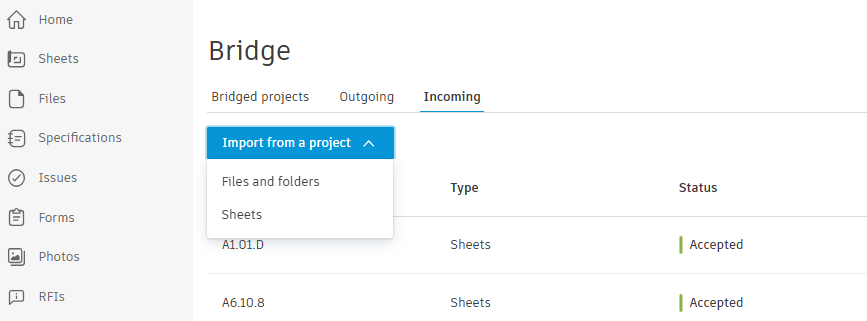
The great thing about Bridge is that it allows us to customize what gets shared. For example, when it comes to automatic Sheet updates, we choose to only import the sets that apply to our field teams—usually Architectural and Interior—and leave out the sets that don’t relate to our scope. We can even go a step further and only include individual Sheets rather than entire sets.
This approach saves time because they won’t have to sort through irrelevant Sheets. They get exactly the information they need, without the extra noise.
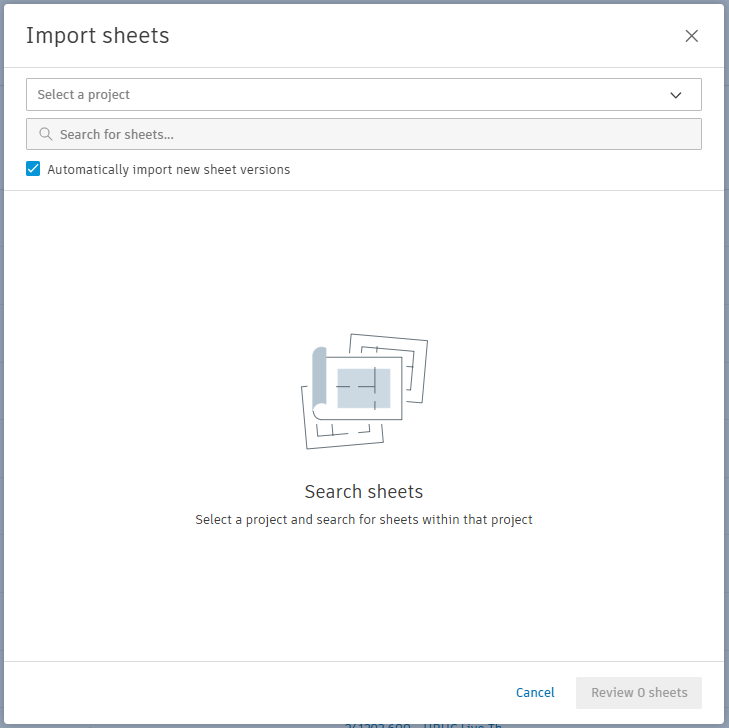
Beyond sharing Sheets, Bridge enables us to import files and folders. This is especially helpful for any standard forms or reports that the GC requires us to submit.
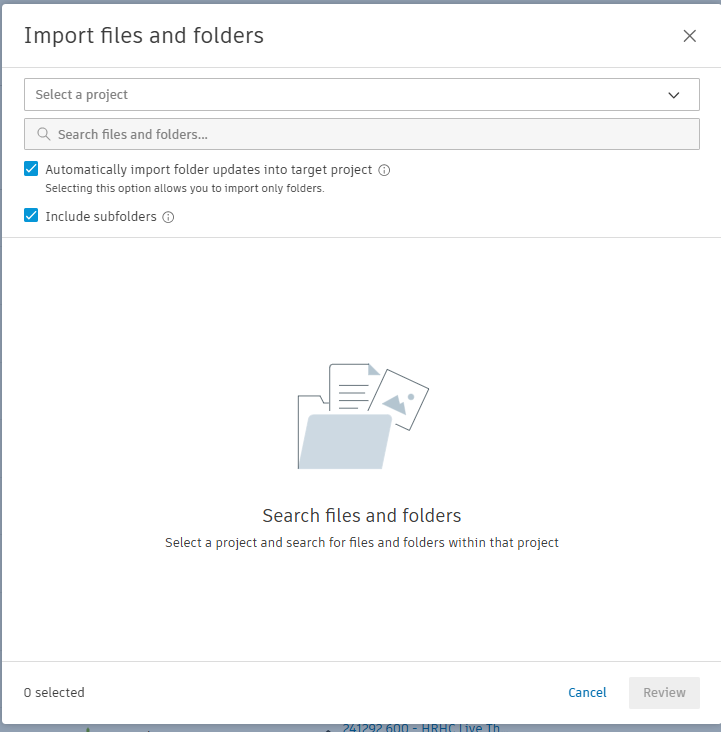
We can connect entire folders or individual files as needed. Bridge helps ensure that our field teams always have the latest files available as they are uploaded by the GC. We can provide access to GC-required daily reports and other documents through Bridge by linking those folders and enabling automatic updates.
When new versions are uploaded to the main project, Forma sends notifications to the crew letting them know the latest forms are ready to use.
When we submit RFIs on the main project, we copy them into our sub-project and update the RFI status there so our field team members can easily track them. We download relevant RFIs from the main project and upload them to our sub-project to make them accessible to the field.
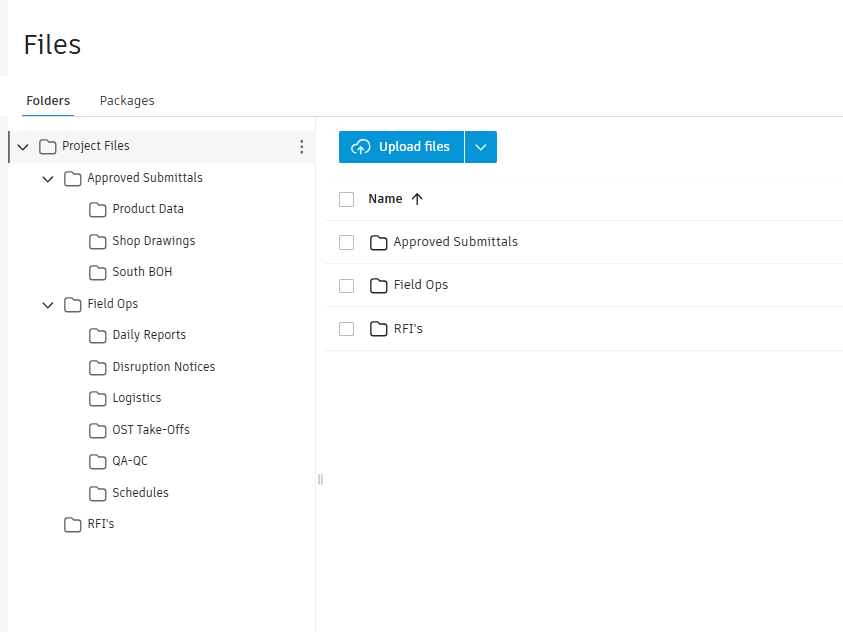
From there, we can add context helpful to the crew, including comments, photos, sheets, and markups. We typically store these in the Files section inside an RFI folder so folks know exactly where to find them. This approach gives them a clearer direction and helps ensure everyone is working from the same information.
When our operations team conducts field visits, we take photos and upload them to Issues or Drawings as needed. We use the Issues feature to communicate with the field so anyone with access to Forma can see what needs attention.
For items that are meant to stay internal between operations and the field, we track them within our sub-project. The ability to upload photos and tag them directly on drawing locations makes it easy for the field to understand exactly where the issue is in the project.
By managing this through our sub-project, we’re able to track issues while also supporting quality control. The field team can upload their own photos once the issue is resolved, which helps our operations team confirm that the work has been addressed and follow up on items during the next site visit.
For us, the biggest value of Forma is how it keeps everyone connected without adding complexity. Our project management team and field crews can stay aligned and focus on the work instead of chasing documents.
Thanks to Autodesk Forma’s ability to connect workflows and data, folks in the field know exactly what they need to do their jobs well while still staying connected to the larger project team.
Learn More About Autodesk Forma
Picture an active jobsite. Maybe it’s a retail buildout with multiple trades working in tight spaces. Or a custom luxury home, where crews are coordinating across larger areas. Perhaps it’s a school renovation or a multi-family project, where timelines are tight, and teams need to stay aligned.
These jobs have one thing in common: across projects like these, you’ll see contractors moving fast to keep work on track.
The challenge is that the information crews rely on doesn’t always move as easily.
Drawings get shared across email threads, and punch list follow-ups live in spreadsheets, texts, and photos. And when it comes to daily reports, the information crews need often ends up scattered across folders or buried in paperwork.
For project engineers, superintendents, and trades, a big part of the day can be spent simply tracking down what’s current. And when that happens, work slows down.
Teams need a reliable way to:
It’s a tall order, but there is a solution that ticks all these boxes. We’re thrilled to introduce Forma Build Essentials, an efficient, focused solution designed for everyday work onsite.
Forma Build Essentials brings the core jobsite tools contractors rely on together in one field-focused workspace.
Built for small to medium-sized crews and growing firms, it’s designed for the everyday tasks work, helping teams get started quickly and keep work moving.
With Forma Build Essentials, teams can:
Everything is accessible on the web or in the Forma mobile app, so you can work from wherever the job takes you.
What’s more, Forma Build Essentials makes projects easy to set up and access, so small and mid-sized construction teams can hit the ground running and stay aligned as they execute the job.
One of the biggest challenges on active projects is getting everyone aligned from the start.
Forma Build Essentials is designed with low administrative lift in mind:
That means crews are able to start doing real work right away, and they won’t have to spend hours configuring systems or chasing down access.
Forma Build Essentials keeps sheets, files, and models in one place. Crews can access the current set of drawings from the field and review and mark up sheets on site.
And because it’s easy to keep everything on the platform up to date, teams avoid working from outdated versions and don’t have to second-guess which file is current. Instead of searching across emails, folders, and messages, you can go straight to the information you need.
Field execution doesn’t stop for documentation. With Forma Build Essentials, teams can capture and access information without interrupting the flow of work. The platform allows you to:
So you have a clear and complete record of that broken tile in the 2nd floor bathroom or the progress of the window installation on the ground floor, and teams can sign off on their daily reports and keep work moving.
The Forma mobile app enables crews to efficiently and reliably access sheets, files, issues, forms, photos, and 3D models on site. The app’s new shortcuts feature means superintendents jump straight into their quality workflows, like signing off on the latest QA forms, marking up drawings, capturing issues, or starting a report.
And the new photo gallery enables permission-gated photo albums. That way, quality and safety issues stay between GC and subcontractor: not the whole project gallery. The Forma mobile app also offers offline-capable access to projects. So even if you experience connectivity issues, you can keep working without disruption.
Forma Build Essentials was designed with your work onsite in mind. From running punch lists and tracking issues to logging daily reports and marking up drawings, everything is built around what crews already do.
Teams spend less time tracking down information and more time moving work forward. Staying aligned is more efficient, records are more consistent, and teams have visibility across the jobsite without adding extra steps. As projects move, the system keeps pace with the work so teams can stay focused on execution.
Ready to enhance your field delivery? Explore how Forma Build Essentials can work for you and try it, for free, today.
| Question: | Answer: |
| What is Forma Build Essentials? | Built for lean crews and growing jobs, Forma Build Essentials brings issues, forms, photos, sheets, and files into one place. Crews can run punch lists, log daily reports, and review sheets and models on web or the Forma mobile app. |
| How does Forma Build Essentials help with construction field tasks? | Review sheets, drawings, files, and 3D models for onsite context into designs, daily tasks, as well as markups, comments, and changes. Capture punch list items and other quality and safety issues with photos and locations, assign an owner and due date, and track work from open to closed. Log daily logs and reports, and complete forms with photos and signatures, so documentation stays consistent. |
| How does Forma Build Essentials improve collaboration between teams? | Keep field and office working from the same current sheets, files, and updates. Assign issues with clear ownership, share photos and form results, and follow status and comments through resolution so handoffs stay clear. |
| Is Forma Build Essentials suitable for small and large projects? | Forma Build Essentials is designed for the field. Use it on smaller projects or across multiple jobs when you need consistent field capture for sheets, issues, photos, and daily reporting without heavy setup. When you need to tackle more complex jobs with additional project management or cost management capabilities, Forma Build is a great choice. |
| Is Forma Build Essentials available on mobile devices? | Yes. Forma Build Essentials is available on web and in the Forma mobile app, with mobile-optimized workflows designed for field teams. Forma Build Essentials supports offline-capable workflows for key field tools, so crews can keep working in low or no connectivity and sync updates once reconnected. |
| What tools are included in Forma Build Essentials? | Forma Build Essentials includes issues, forms, photos, sheets, and files, plus project templates, core admin, and Bridge for sharing. Mobile-optimized model viewing, shortcuts, and online sync with offline-capabilities help crews move through daily field work faster. |
| What admin controls are included with Forma Build Essentials? | Forma Build Essentials includes low-lift, built-in administration for projects, members, companies, templates, and settings, so teams can get set up quickly and get to work fast while keeping access organized as the project grows. |
| Does Forma Build Essentials include project templates? | Yes. Project templates help you reuse settings and forms, so each new project starts with the same structure and checklists, keeping documentation consistent across jobs. |
| Can I choose where my project data is stored? | Yes. You can select your project data storage location, consistent with the options available for your account. |
| What does Forma Build Essentials support? | Forma Build Essentials supports the same languages as Forma Build, including English, French, German, Spanish, Japanese, and more. |
| Can Forma Build Essentials users work with Forma Build users? | Forma Build Essentials and Forma Build users can operate in the same Forma project environment and share the same underlying project data. Collaboration happens in one project, with access to project data and available tools governed by license type. |
| When should I consider Forma Build compared to Forma Build Essentials? | If you need deeper workflows like project management, cost, reporting and insights, advanced permissions, or Autodesk AI capabilities for complex projects, Forma Build is the better fit. |
We’ve reached an exciting milestone for the AEC industry. Autodesk Construction Cloud is now part of Autodesk Forma – the industry cloud for AEC – bringing together data, workflows, and teams across the entire project lifecycle. Built around three tenants: end-to-end, cloud-first and AI native, Forma is designed to break down traditional AEC lifecycle siloes, connect information seamlessly, and unlock smarter, faster ways of working.
But what does AI-native really mean?
It means AI isn’t layered on top. It’s built directly into the platform where your data lives and your teams already work. Instead of switching tools, moving data, or losing context, you can use AI to analyze project information, automate workflows, and surface insights in real time, right where the work is happening.
That’s a critical difference. New AI-powered tools are being introduced every day in construction, but they require integrations, data to be manually uploaded, or even new third-party tool introduced which slows teams down and breaks context. As these solutions become more complex, the barrier to getting started only increases.
With Forma, AI is built in from the start. It understands your projects, your workflows, and how your data connects, so it can deliver value instantly without setup. The result is a simpler, more accessible way to bring AI into your everyday work.
And that’s exactly what Autodesk Assistant bring to your teams. Today, we’re officially bringing Autodesk Assistant for construction workflows in Forma out of beta, making AI-powered insights and actions available directly within your everyday workflows.
Since its introduction last year, thousands of users have made Autodesk Assistant part of their daily workflows with an increase of queries originating from the My Home page. This means project team members are starting their days with the help of the Assistant – prioritizing work and proactively identifying the areas that are most important to focus on.
The Assistant is not just a simple help chatbot, it is something far more powerful. It is an action-oriented tool for your projects that not only answers questions, but helps take tasks off your team’s plate.
You can think of the Assistant as a project-level agent, working across your connected data and workflows. Behind the scenes, it communicates with all relevant agents to return a response. Like a project manager coordinating across teams, it pulls together insights from data sources like specifications, issues, RFIs, and other agents to give you a complete answer, without the manual effort.
Autodesk Assistant turns connected project data in Forma into foresight, not just hindsight. It analyzes your project in real time to surface risks, track progress, and highlight what matters now. No reports. No data stitching. Just clear, actionable insights in full context.
Without Forma and Autodesk Assistant, project data remains scattered, and getting answers means digging through dashboards, building reports, or chasing updates across teams. By the time you find what you need, it is already outdated.
Prompts to try:
Autodesk Assistant can serve as an AI-powered ally for your project teams, giving them instant access to the answers they need using natural language to search across specifications, RFIs, issues, submittals, meetings, change orders, and schedules in seconds. From generating meeting summaries to uncovering patterns across thousands of data points, it helps teams stay aligned and ahead of problems.
Without it, teams waste time digging through endless logs and risk missing critical blockers because disconnected data lacks context.
Prompts to try:
Autodesk Assistant helps streamline everyday workflows by drafting emails, generating summaries, building reports, and surfacing project data in more actionable ways. It also includes a prompt library, allowing teams to save and reuse prompts to quickly repeat common tasks and standardize how work gets done without starting from scratch. The result is fewer steps, less manual effort, and faster execution across your workflows.
Prompts to try:
“As the Autodesk Assistant expands, it will become a critical link across workflows within the already comprehensive and connected platform. I envision it becoming the go-to tool for facilitating coordination, quality assurance, engineering, and construction administration activities for our teams.” - Lauren L. Collier, Director of AI and Innovation, SSOE Group
Autodesk Assistant makes it simple to ask questions and find answers across large amounts of data. As part of Forma, it understands industry context and how data connections across different disciplines and lifecycle stages, with direct access to the information already stored in your projects.
This is powered by Autodesk’s construction data model and ontology, which automatically classifies data points allowing users to get insights in a way that could never happen before. The Assistant understands how work is structured in construction and how it’s connected.
For example, you can ask, “Show me all information related to carpentry,” and Autodesk Assistant will surface relevant RFIs, issues, submittals, schedules, and more, even if “carpentry” is not explicitly labeled in every record. It recognizes how that work ties across trades, documents, and activities, giving you a complete, contextual view that would be difficult to assemble manually.
The result is a fundamentally different way to interact with your data, where insights are connected, contextual, and immediately actionable.
Autodesk Assistant is just one part of a broader set of AI-powered capabilities in Forma designed to support more efficient workflows for construction teams. Across the platform, AI helps reduce manual effort and accelerate everyday tasks.
For example, teams can speed up RFI creation by simply entering a prompt and generating a context-rich, ready-to-review draft. You stay in control, with the ability to review, refine, and submit with confidence. Soon, teams will also be able to capture a photo, add a short prompt, and use AI to generate a detailed issue for review.
With more than 15 AI-powered capabilities embedded across Forma, teams can move faster, reduce repetitive work, and keep information flowing seamlessly across workflows so more time is spent delivering projects, not managing processes.
Autodesk Assistant is part of a broader shift toward more connected, AI‑supported workflows in Forma. With a built-in shared data foundation and industry context, teams can adopt AI with more confidence and consistency.
Autodesk Assistant is available in Autodesk Forma for construction workflows. Access is based on license type and user permissions.
Autodesk Construction Cloud has joined the Autodesk Forma industry cloud and has taken on the Forma brand. As part of this evolution, additional Autodesk Construction Cloud product names have also been updated to align with the Forma brand. You will see these updates reflected throughout this blog.
This month, Autodesk Forma introduces over 70+ construction product updates to support more efficient, connected project delivery. These releases strengthen how teams manage access, information, and change across projects.
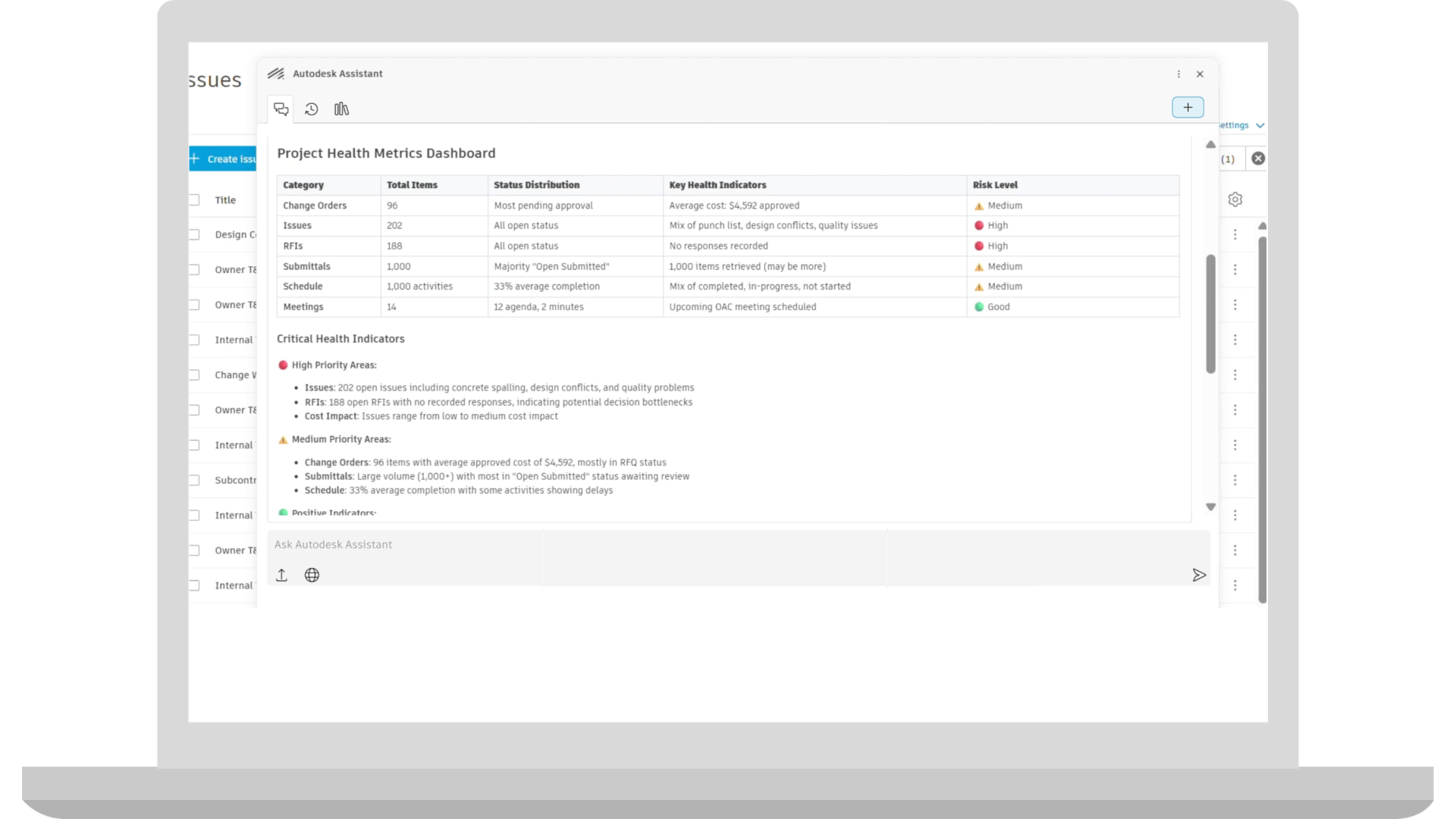
Autodesk AI | Autodesk Assistant: Project Data
The Project Data agent in Autodesk Assistant is exiting beta, unlocking a smarter way for construction teams to interact with their project data. Embedded directly in the Autodesk platform, the Assistant helps teams instantly surface insights, automate routine work, and stay focused on what matters most.
Admin (Hub) | Default Roles Simplification
Three new default roles—Administrator, Power Collaborator, and Collaborator—are now available for new hubs. These roles include predefined permissions designed to simplify project setup and help teams onboard users more quickly.
Project Admins can still create custom roles and adjust tool permissions within individual tools when additional configuration is needed.
As-Built Export | Enhanced Photos Experience Support
As-Built Export now supports photo albums created with the enhanced photos experience in new projects. Photos are organized by album in the export, making it easier to deliver site photos, inspections, and progress documentation as part of project closeout.
Bridge | Repeat Sharing Across Projects - Bridge Tool
The Bridge tool now includes a share again option that allows users to quickly repeat a share to another project without starting the process of Bridge process over. After sharing to one project, users can select another project while keeping the same selected files, title, and message. This helps teams distribute the same information across multiple projects with fewer steps.
Dashboards | Quality KPI Dashboard Improvement
"Overdue issues or forms by company" will include issues and forms assigned to users associated with the companies.
Dashboards | ACC My Home - Surface Items Assigned to Roles and Companies
My Home "Assigned to me" card now includes items assigned to a project member's roles and companies in addition to their assignments. It now aggregates their tasks from across all active roles and companies, even if they span multiple projects or accounts.
Data Connector | Forms Data Enhancement
Forms Data Enhancement for Data Connector removes signature SVG files from exports and replaces them with a lightweight signed indicator. This reduces dataset size and improves extract performance while still allowing customers to report on whether a Form has been signed.
Data Connector | Cost Data Enhancements
Cost Data Enhancements introduce new Data Connector fields to support deeper analysis of project costs and financial performance. These additions enable better tracking of budgets, forecasts, quantities, compliance status, and financial deadlines for more robust cost reporting and dashboards.
Data Connector | Issues Data Enhancements
Issues Data Enhancements add new Data Connector fields that provide more context on where issues appear within project content. These fields link issues to their placements and related viewables, making it easier to analyze how issues relate to models and documents.
Data Connector | Plan Data in Data Connector
Plan data is now supported in the Data Connector export. Export information about individual work plans, tasks and task progress, commitments, handoff and task comments to be used to create BI dashboards on a project and company level.
Handover | Expanded Export Configuration
Handover now supports additional export configuration options for Sheets, RFIs, and Submittals to match the capabilities available in As-Built, giving teams more control over the project records included in Handover packages and making it easier to prepare final deliverables for project closeout.
Insight Builder | Estimate Data in Insight Builder
Estimate data is now available in Insight Builder to help create custom dashboards and reports. A prebuilt Estimate dashboard template is included to help users quickly create powerful analytics for their estimates. The template includes pre-built visuals such as total cost of estimates across projects, average cost by project type, project totals by line item, number of takeoff packages, and other data points to help estimating teams quickly uncover cost implications and make informed decisions during preconstruction.
Insight Builder | Share Dashboards with Projects
Teams with any value-based subscriptions or EBAs, can utilize Insight Builder to add customized dashboards to the project home page. Admins can create role-based dashboard templates with one click to improve data standardization.
Issues | Photo Grid
Photo Grid introduces a visual grid view for Issues, allowing project members on mobile to quickly browse issues using their associated photos. The grid view can be pinched to resize, making it easier to scan, and locate issues visually.
Issues | Quick Issue Create
Accelerate multiple issue creation on site through Quick Issue Create. Project teams can snap a photos, add context, and create multiple issues in one go.
Issues | Issue-Associated Markups
Associate 2D markups directly with issues. Project teams can now create and edit markups that are persistently tied to an issue, so the markups stay connected with the issue. To support issue resolution, these issue-associated markups can be edited and deleted at any point in the issue lifecycle.
Issues | Copy/Paste Issues
Project members can now copy and paste issues, accelerating entry for commonly found problems on site.
Markups | Snap to Line
Project members can snap to a line or point when creating a measure markup on a 2D file.
Mobile App | Share Effortlessly
Project members can send content via deep links using their mobile device's native share options.
Mobile App | Faster Project Entry
Project members using the Forma mobile app now can enter projects faster, with data downloading in the background.
Mobile App | Improved Mobile Photo Sync
Improved Mobile Photo Sync speeds up photo access on mobile by downloading optimized images first, reducing sync times and storage usage. Full-resolution photos remain available on demand when higher detail is needed.
Photos | Enhanced Photos Experience
The new, enhanced photos experience provides new projects with creatable photo albums, permission management, and bulk actions:
Albums and Permissions in Photos:
Bulk Download, Delete and Move:
Project Templates | Cost Report Templates in Project Templates
Cost report templates will be included in project templates, allowing teams to start new projects with predefined cost reporting structures. This helps standardize how project costs are tracked and shared, reduces setup effort, and supports consistent financial reporting across projects.
Project Templates | Safety Project Template
Jobsite safety template for construction teams. This template helps project teams stand up safety programs that support consistent standardization and proactive risk management.
Reports | High-resolution Photo Thumbnails in Reports
Customers will now see change that allows for larger photo thumbnails (1024px) for newly uploaded photos via attachment component.
Reports | User Created Templates in Create Report Template Workflow
User-created report templates are now available directly within the Create New Report workflow, alongside standard templates. This brings all templates into one place, making it easier to reuse custom report configurations and create reports that align with project or business needs.
Specifications | Auto-Sectioning Improvements
Auto-sectioning improvements will deliver more accurate and reliable spec document structuring for non-CSI MasterFormat and non-English specifications.
Specifications | Delete Spec Sections
Specifications will support deleting individual spec sections from a version set. This allows outdated and incorrect spec sections to be removed so that the version set accurately reflects the current project and maintains up-to-date documentation.
Specifications | Current Version Determined by Issuance Date
Issuance date of a version set will drive what is considered current in the Specifications tool. This update aligns to the logic of the Sheets tool and supports project managers to control the current version of the project spec.
Workspaces | In-Product Hub Provisioning
Users can now create a hub directly from within Autodesk Forma through My Home, without needing to go to manage.autodesk.com. This allows customers to start using Autodesk Forma as soon as they get access, reducing setup steps and improving the onboarding experience.
Workspaces | In-Product Purchasing
Customers will be able to purchase additional licenses for select Autodesk Forma products directly from the Hub Admin tool, including converting trials and adding seats for Forma Build Essentials, without needing to leave the product.
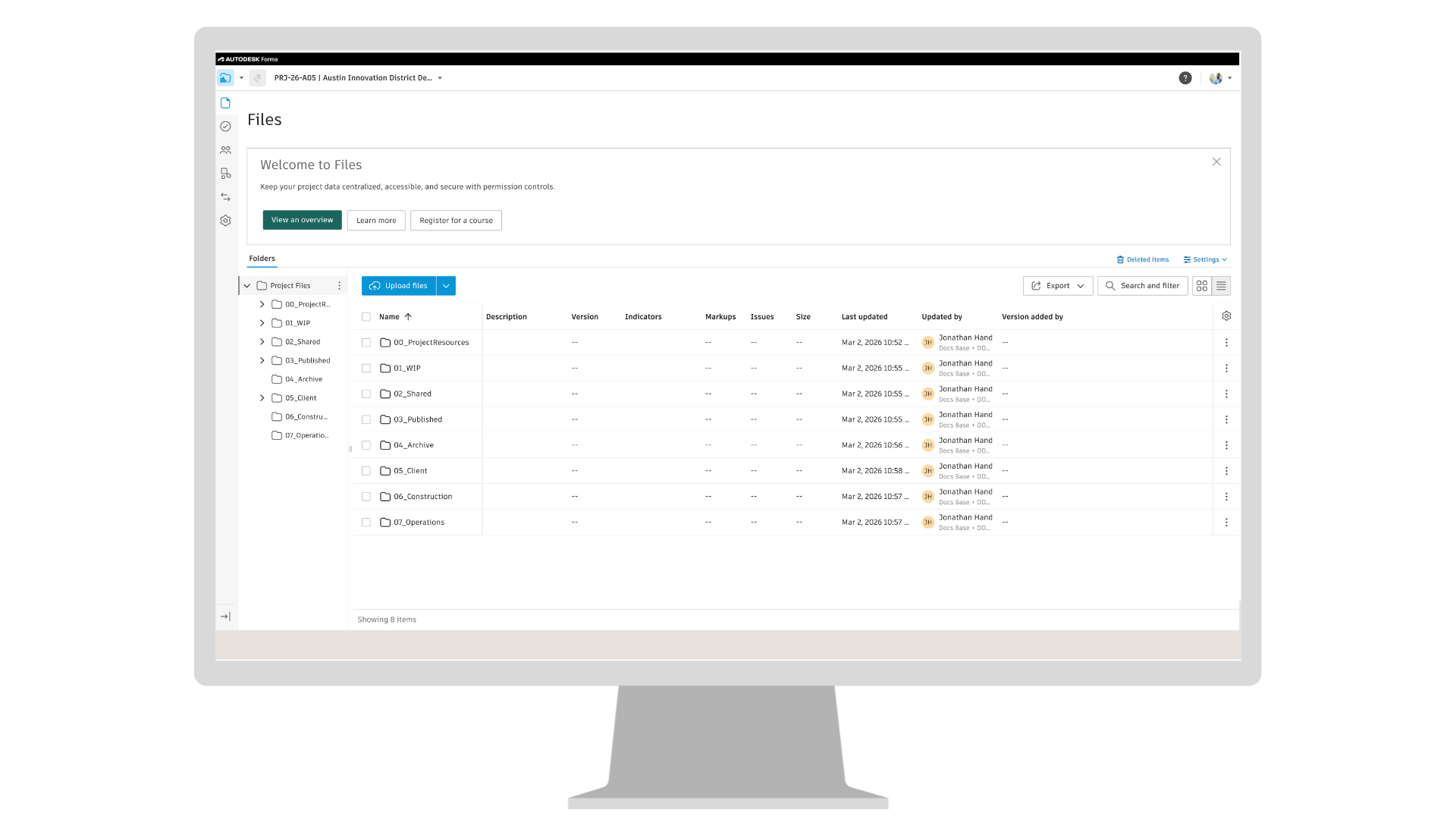
Forma Data Management Essentials
Introducing Forma Data Management Essentials, a new starting point for connected project data in Autodesk Forma. It is included with standalone AutoCAD, Revit, and Civil 3D subscriptions, as well as the Product Design and Manufacturing Collection. Forma Data Management Essentials connects desktop workflows to a shared data foundation, enabling teams to organize project information, track changes, and stay aligned from the start of a project through cloud-connected collaboration. Coming to standalone subscriptions AutoCAD, Revit, and Civil 3D subscriptions, as well as the Product Design and Manufacturing Collection.
Forma Board as a tool in Forma Data Management
Forma Board will be available within Forma Data Management as a BIM-connected collaborative visual workspace for AECO teams. Included with Forma Data Management and Forma Data Management Essentials, it will allow teams to place live BIM content such as Revit views and design options into boards, add markups and comments in context, and collaborate in real time while keeping design reviews connected to project data. This helps teams compare options, align direction, and avoid design reviews getting split across PDFs, screenshots, and chat threads. Coming to Data Management and Data Management Essentials.
Files | Datasets
Datasets are a new data type in Forma Data Management that represent granular project data generated through supported workflows such as Revit Extended Properties and Forma Connected Clients. These workflows create Datasets that may contain project data such as properties, geometry, or analysis results, depending on the workflow. Datasets are surfaced in the Files tool, where they can be organized and managed alongside project files and made available across connected applications. This helps teams reduce manual data transfer between tools and keep shared project data consistent as work moves between workflows. Coming to Data Management and Data Management Essentials.
Files | Lock Published Markups on Previous File Versions
Published markups can no longer be edited on previous file versions by default in new projects. This helps protect the project record by preventing changes to markups on historical or reviewed documents while allowing teams to continue sharing, downloading, and creating new versions as needed. Coming to Data Management and Data Management Essentials.
Library | AutoCAD Support Files in the Library
Hub Admins can now create, import, and manage AutoCAD support files in the Library and add them to selected projects or project templates. These files can include drawing templates, plot styles, fonts, etc. Once added, AutoCAD users working in those projects can use the support files within their AutoCAD workflows.
Previously, AutoCAD support files had to be configured separately in each project. Managing them in the Library allows Hub Admins to distribute and maintain these files across multiple projects from a central location, helping teams stay aligned on the same setup. Coming to Data Management and Data Management Essentials.
Reviews | Send Notification for Closed Reviews
Approvers and admins can now send notifications for closed reviews, allowing additional project members to access and view approved review information. This helps teams share approved project information with stakeholders who were not originally part of the review. Coming to Data Management.
Reviews | Initiator to Rename Closed Reviews
Project Admins can now rename closed reviews, helping teams maintain consistent naming and making it easier to organize, find, and reference reviews after they are complete. Coming to Data Management.
Transmittals | Transmittal Setting in the Project Template
Project Admins can now configure transmittal settings in project templates so they are automatically applied to new projects created from those templates. Transmittal settings are also copied when creating a template project from an existing project, helping teams maintain consistent project standards when setting up new templates. Coming to Data Management.
Viewing | Model Viewing Enhancements
New viewing enhancements improve how teams filter, measure, and interpret BIM models in Forma Data Management. Teams can apply advanced filters, align PDFs with 3D models more easily when creating Hypermodels, measure shortest distances, and assign colors to model elements to better communicate scope and improve coordination. Coming to Data Management and Data Management Essentials.
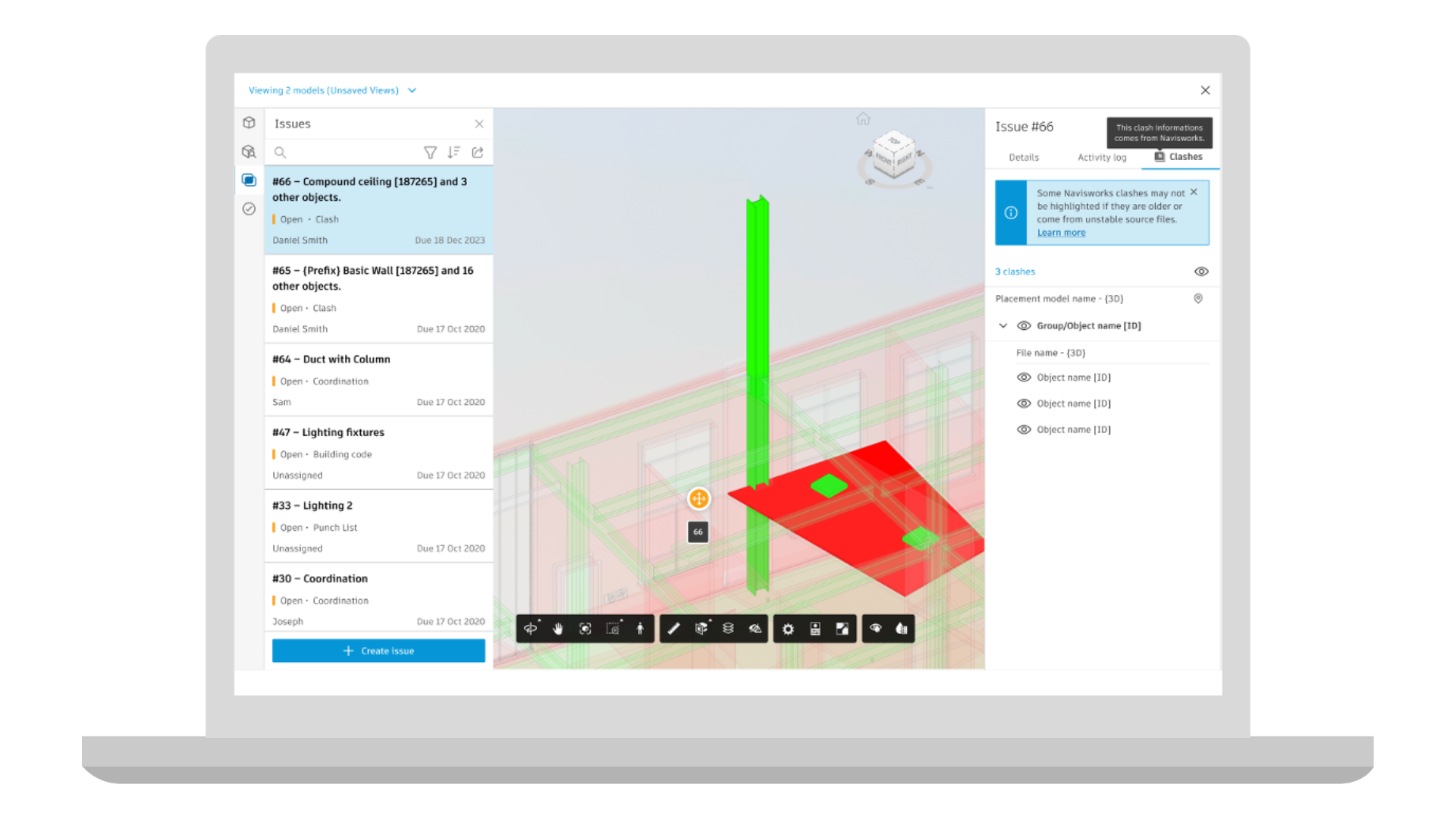
Coordination | Clash Checks Dashboard [Beta]
Clash Checks Dashboard introduces a new way to review clash checks outside the 3D viewer in Model Coordination. Instead of navigating through the model to understand coordination issues, teams can start with a summary view of clash checks and quickly see which ones need attention.
From the dashboard, users can identify clashes that require triage or follow-up and open the relevant clash context directly in the viewer for deeper investigation. Available in Open Beta, Clash Checks Dashboard gives teams earlier access to a more streamlined way to review and prioritize clash information. Coming to Model Coordination.
Coordination | Search Sets
Search Sets introduces a faster way to work with model data in Model Coordination workflows by letting teams save and reuse property-based queries. With this release, users can select matching objects in the model from a saved Search Set with a single click instead of rebuilding filters or searching through the model tree each time. Selected objects are also reflected in the object table, making it easier to confirm counts and review details during coordination. Coming to Model Coordination.
Coordination | Search Inside Clash Panel
Quickly find the clashes you need with a new search capability in the Clash Panel. Teams can now type keywords to locate specific clashes instead of manually scrolling through long results. This helps keep coordination reviews moving, especially during meetings, by reducing time spent navigating and making it easier to focus on resolving issues. Coming to Model Coordination.
Coordination | Navisworks Clash Highlighting in Model Coordination
Better understand clash issues from Navisworks directly in Model Coordination. When opening issues created from Navisworks clashes, the viewer will automatically highlight the clashing elements and reduce surrounding geometry, so the conflict is immediately clear. This removes the need to visually search for the issue in the model and helps teams review clashes more quickly and confidently when working across Navisworks and Autodesk Forma. Coming to Model Coordination.
Correspondence | Company-Wide Visibility Permission Level
A new viewing permission level allows project members to view all public correspondence involving anyone in their company, even when they are not a direct recipient. Admins can assign this view to members, roles, and companies, as well as set it as the default view for the entire project. Coming to Build, Design Collaboration, and Model Coordination.
Dashboards | Autodesk Model Analytics Essentials
Autodesk Model Analytics Essentials will be included with Forma Design Collaboration subscriptions. It provides visibility into Revit cloud model health and performance directly in Insight. Teams can track sync activity, model growth, version alignment, and model changes to better understand how models evolve over time and identify potential issues earlier in the project lifecycle. Coming to Design Collaboration.
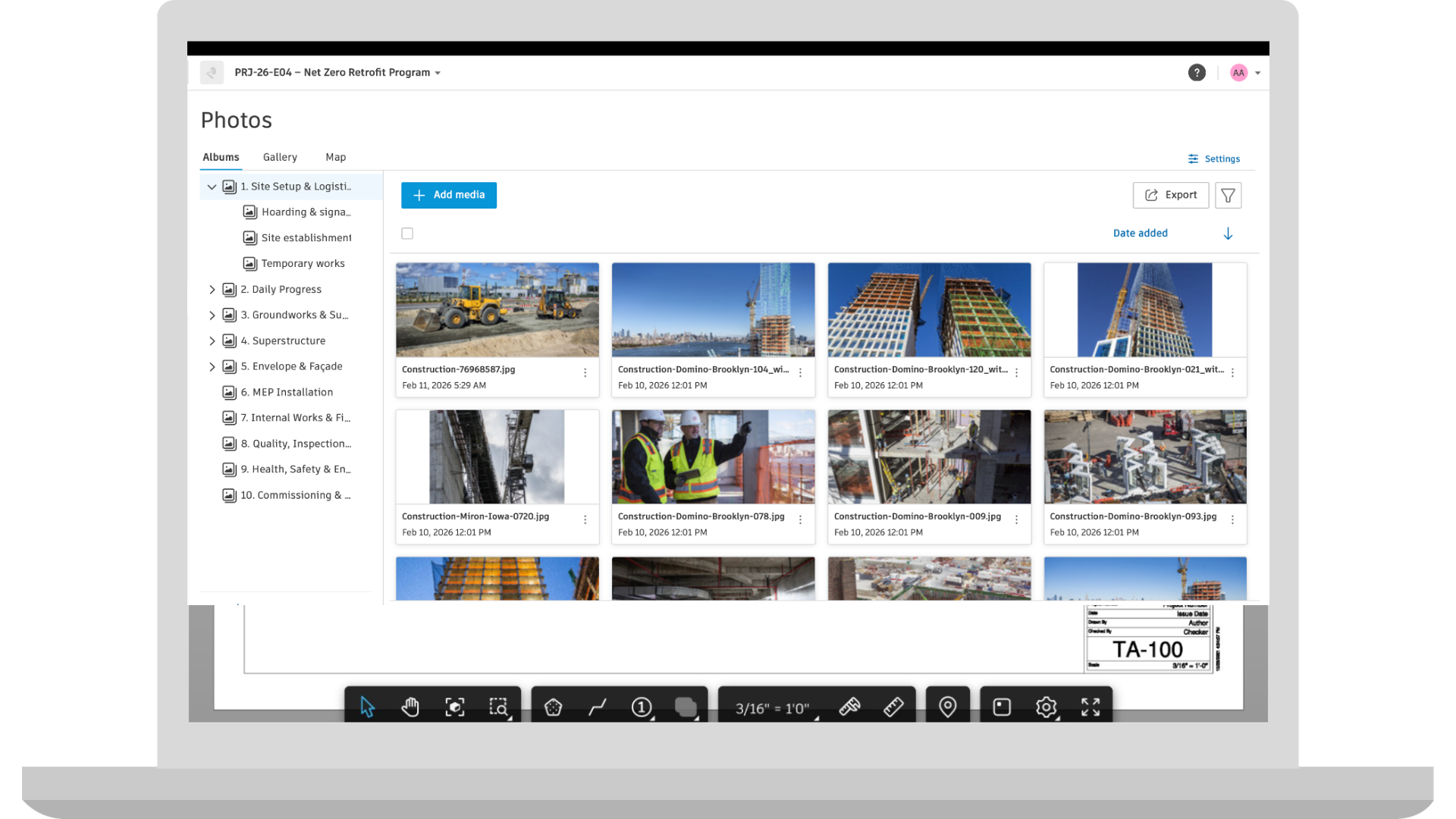
Forma Build Essentials
Introducing Forma Build Essentials: the core jobsite tools crews rely on together in one workspace helping teams to capture issues with permission-gated photos and root causes, access latest sheets and 3Dmodels, mark up drawings, and log daily work.
Assets | Exporting Asset Markups to PDF
Now, project teams can generate a PDF that includes asset markups directly from a sheet. During export, asset markups can be chosen alongside other issues, photos, and standard markups. Coming to Build.
Assets | System QR Codes
Automatically generate QR codes for asset systems. Project teams can print and place them on site, and scan them with a mobile device to open the asset system in app. Coming to Build.
Assets | Multi Select Model-Based Assets on Mobile
Project teams can on site can select multiple model-based assets in the viewer or via the list. These selected assets can bulk edit or update properties directly within the Forma mobile app. Coming to Build.
Cost Management | Add Forecast Option Columns to Budget Overview Table
Users can now view Calculated Final Budget and Calculated Final Cost directly in the Budget view, making it easier to track budget performance without opening each line item. These values automatically update based on the Date Range Resource schedule defined in project settings, and new base values have been added for use in custom calculated columns. Coming to Build.
Cost Management | Custom Attributes & Required Fields for Collaborators
Project Admins can now make custom attributes visible to collaborators. And when needed, require them to complete specific fields. Coming to Build.
Cost Management | Batch Apply Fields in Budget View
The new Batch edit fields button in the budget view allows teams to update fields across multiple budget line items at once, saving time by reducing clicks. Coming to Build.
Correspondence | Company-Wide Visibility Permission Level
A new viewing permission level allows project members to view all public correspondence involving anyone in their company, even when they are not a direct recipient. Admins can assign this view to members, roles, and companies, as well as set it as the default view for the entire project. Coming to Build, Model Coordination and Design Collaboration
Forms | Recover Deleted Forms
Recover Deleted Forms allows Project Admins to view and restore forms deleted within the past 60 days. Restored forms return with their attachments, and actions tracked in the activity log. Coming to Build and Build Essentials.
Forms | Sequential Assigned Sections
Sequentially Assigned Sections allow forms to be completed in a set order by project members, with one section activated at a time. Coming to Build and Build Essentials.
Forms | Custom Tables Basic Equations
Custom Tables Equations allow form builders to create simple calculations within custom table rows. Team members can add or multiply numerical fields or calculate the difference between two time fields. Coming to Build and Build Essentials.
RFIs | Quick Create RFI Enhancements
When using AI to generate an RFI form, AI will be able to populate the Location field and Custom Fields when relevant information is provided in the prompt. Additionally, improvements made to the AI engine will improve the quality and accuracy of generated RFIs. Coming to Build.
RFIs | Default Co-Reviewer in RFI Types
Admins can set default co-reviewers for RFI types to automatically assign co-reviewers whenever the type is applied to an RFI. Coming to Build.
Specifications | Submittal Log Generation in Build
Automatically generate construction submittal logs from CSI MasterFormat specs in the Specifications tool. Once submittals are generated, the items can be reviewed and refined in the context of the spec document and published directly to the Submittals tool with links between submittals and spec sections. Coming to Build within Forma for Construction Operation.
Specifications | Auto-Sectioning Improvements
Auto-sectioning improvements will deliver more accurate and reliable spec document structuring for non-CSI MasterFormat and non-English specifications. Coming to Build, Data Management, and Takeoff.
Specifications | Delete Spec Sections
Specifications will support deleting individual spec sections from a version set. This allows outdated and incorrect spec sections to be removed so that the version set accurately reflects the current project and maintain up-to-date documentation. Coming to Build, Data Management, and Takeoff.
Submittals | Custom Fields [Beta]
Submittals will support custom fields, allowing teams to customize submittal data collection while aligning with company wide standards. Admins can configure custom field names and response options, with support for multiple response types including text, numbers, dates, and multi select. Custom fields can be tailored for specific project needs, as well as shared across projects for company wide standardization cross-project data analysis. Coming to Build. Capability will become available over the coming weeks.
Workplan | Task Comments
Workplan will support task comments, allowing users to comment on tasks they have access to. Add comments to share updates or blockers, mention users, roles, and companies, and receive notifications for comments and mentions. Available on web, Android, and iOS, task comments help improve communication, traceability, and context sharing among project teams. Coming to Build.
Workplan | Plan Data in Data Connector
Plan data is now supported in the Data Connector export. Export information about individual work plans, tasks and task progress, commitments, handoff and task comments to be used to create BI dashboards on a project and company level. Coming to Build.
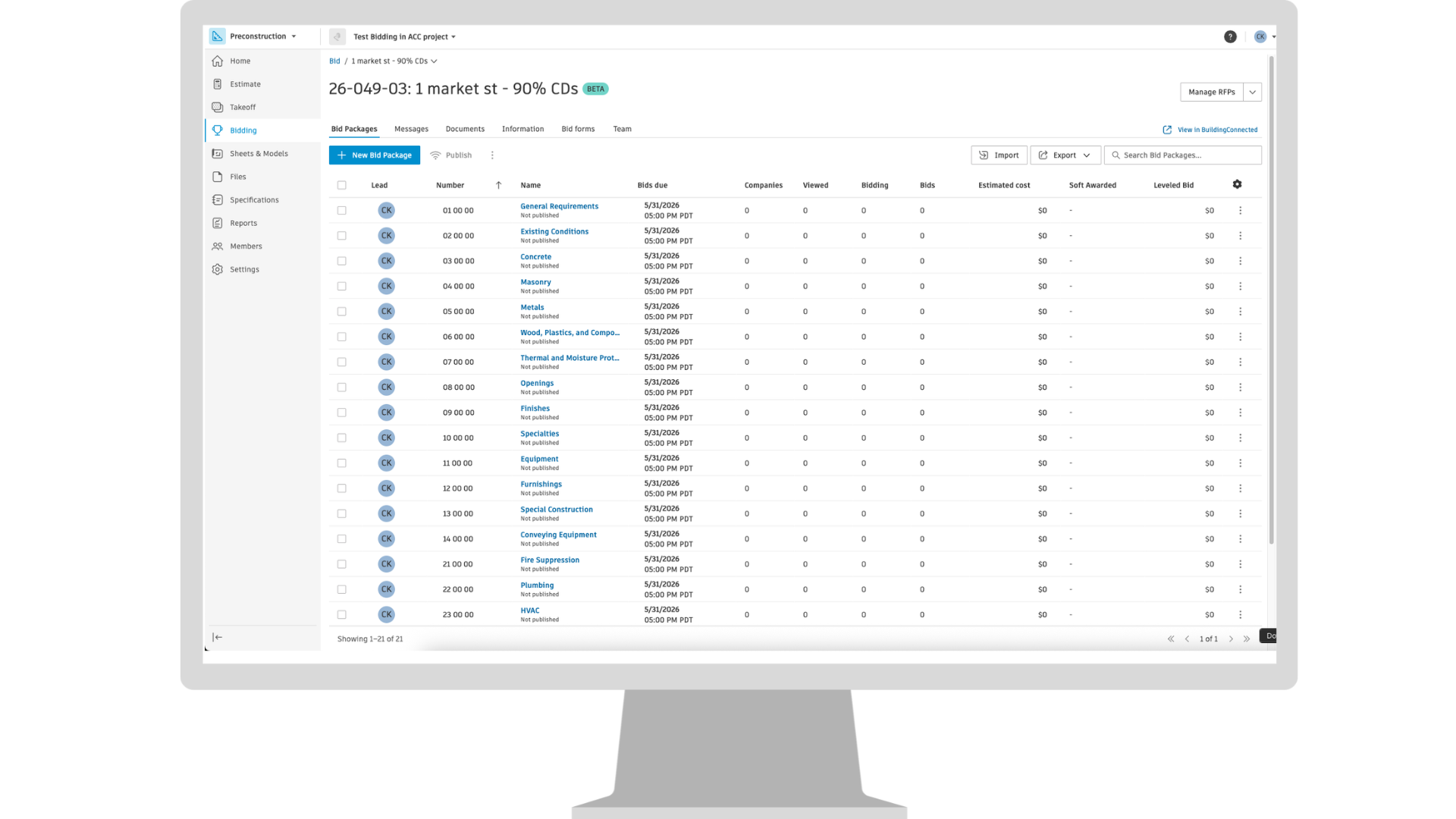
Bid Management | Bidding Tool [Beta]
The Bidding tool Beta brings proven bid management and prequalification workflows from BuildingConnected into Autodesk Forma industry cloud, enabling teams to more accurately send and manage bid invites and find qualified subcontractors using the most up‑to‑date network of construction professionals, all within a connected preconstruction experience. Public beta is limited to specific subscription types and only available on US server. Coming to Forma for Preconstruction.
Estimating | Copy and Bulk Edit Line Items
Forma Estimate now supports copying line items within the estimate table, making it easy to duplicate data for similar entries. In addition, users can select multiple line items and bulk edit them in a single action. These enhancements will streamline workflows and save time by reducing repetitive edits. Coming to Estimate.
Estimating | Export Cost Database in ProEst to Excel
ProEst users will be able to export their cost database to Excel, enabling them to use their cost library across other systems. By providing an easily transferable Excel version of their cost data, this feature helps empower teams to leverage their curated cost library wherever it’s needed. Coming to ProEst.
Estimating | Turn Estimate Tool On/Off at Project Level
For Forma for Preconstruction Bundle subscriptions, account administrators can turn the Estimate tool on or off at the project level. This setting is managed in Account Administration by navigating to Products & Tools, selecting a project, and updating the configuration for that project. The change must be applied individually to each existing and newly created project. When Estimate is turned off for a project, the experience reverts to the pre‑Preconstruction bundle workflow, and the Estimate tool is no longer available within that project. Coming to Estimate.
Insight Builder | Estimate Data in Insight Builder
Estimate data is now available in Insight Builder to help create custom dashboards and reports. A prebuilt Estimate dashboard template is included to help users quickly create powerful analytics for their estimates. The template includes pre-built visuals such as total cost of estimates across projects, average cost by project type, project totals by line item, number of takeoff packages, and other data points to help estimating teams quickly uncover cost implications and make informed decisions during preconstruction. Coming to Estimate.
Qualification | Company Name Management
Users can now manage their company name and choose how it shows to subcontractors upon invitation to qualify. Coming to TradeTapp.
Qualification | International Data Entry for Qualification Applications
Subcontractors will be able to enter international addresses, phone numbers, and currencies directly within the qualification forms. Office details will be automatically synchronized from their Builders Network profile, eliminating the need for manual data entry and reducing the risk of errors. Coming to TradeTapp.
Takeoff | Bulk Edit via Inventory
Takeoff will support bulk editing within the inventory panel, allowing users to select multiple items and update properties such as height and distance in one action. This enhancement streamlines workflows and saves time by eliminating repetitive edits. Coming to Takeoff.
Takeoff | Paste Enhancements
When using the Paste command, copied items appear next to the cursor in a halftone display, indicating a temporary state until placement is confirmed with the click. This helps users see exactly where items will be placed before clicking. For large selections (over 10 items), a bounding box appears instead of individual previews reducing screen clutter. Additionally, repeated pastes maintain a consistent offset from the original copy allowing quick, organized placement in any direction. Additionally, now you can also copy/paste takeoff to another sheet with a different scale. Coming to Takeoff.
We all know that AECO projects are incredibly complex: there are multiple disciplines, lots of stakeholders, immense amounts of data, and tight timelines. What’s more, collaboration and decision‑making now span the full lifecycle — from early design all the way to construction and operations.
Data, documents, and updates are constantly shared, and teams need a single source of truth that keeps everyone aligned and accountable.
Unfortunately, many of the systems used today simply can’t support how modern AECO teams work. Traditional file sharing tools and workflows aren’t designed for design-centric data, multidisciplinary coordination, and lifecycle‑wide information continuity.
As projects become more connected and data-driven, teams need a more consistent way to manage and access project information from the start—not just at handoff points between phases.
Enter Autodesk Forma Data Management (formerly Autodesk Docs), a centralized, cloud-based common data environment (CDE) that connects people, processes, and project information in one controlled workspace. Purpose-built for AECO projects, Forma Data Management paves the way for stronger collaboration between teams, so stakeholders can focus on keeping projects moving forward rather than chasing information.
File sharing, particularly in a digital context, seems easy enough because you can send files instantly via email or shared drives. However, this simple, link-based approach breaks down as projects scale.
When you’re using traditional file sharing methods — even when they’re cloud-based — you run into challenges like:
To move faster and deliver better outcomes, the industry must shift to a connected, structured data foundation. AECO teams must go beyond file storage; they need a true common data environment that enables real-time, cross-phase collaboration.
This is where Autodesk’s approach to data management comes in.
Forma Data Management and Forma Data Management Essentials represent Autodesk’s approach to organizing and connecting project information across the AECO lifecycle.
Together, they provide a scalable, cloud‑based foundation that supports teams as projects and organizations grow. Teams get a connected data environment that carries trusted project information from design through construction and into operations. That way, everyone works from the same source of truth, and project data stays connected across phases. The results are fewer surprises, faster decisions, and projects that stay on track.
Forma Data Management is a product family designed to let AECO firms scale. Whether you’re starting with a foundational CDE or managing complex, standards-driven workflows, the platform grows with you.
It supports everyday coordination while laying the groundwork for consistent governance, automation, and cross-project visibility as your portfolio expands.
The best way to achieve strong data management and sharing is to have a solid foundation. Forma Data Management Essentials provides just that, giving teams direct access to connected project data — organized files, version control, shared access, and cloud-based collaboration — within a centralized workspace powered by Autodesk Forma.
Because it is included with the design tools teams already use, project data can be created and stored directly from those applications. This makes that data immediately available in the cloud and ready for coordination across the rest of the project team.
As project requirements and coordination needs grow, teams can expand into more advanced workflows without starting, all within Autodesk Forma.
Included with standalone subscriptions of AutoCAD, Revit, and Civil 3D, Forma Data Management Essentials connects desktop design work directly to cloud-based project data.
Designers and engineers continue working in the tools they already use, where project data is accessible directly within those applications and is managed in the cloud. This reduces reliance on manual uploads and disconnected file sharing, helping teams stay aligned from kickoff through delivery and beyond.
Unlike generic file sharing solutions, Forma Data Management Essentials is tailored to AECO needs. It supports collaboration capabilities such as:
Forma Data Management builds on the foundation established by Forma Data Management Essentials with a fully cloud-native CDE built for complexity and scale.
It builds on the core structure of Essentials with advanced workflows, configurability, insights, integrations, and automation capabilities. It also enables workflows that leverage AI-powered capabilities, such as risk identification, information extraction, and specification analysis, as project data becomes more structured and connected.
Forma Data Management enables users to coordinate across disciplines and keep projects moving in fast-changing environments where coordination and handoffs are constant.
It connects data across key AECO phases: design, construction, handover, and operations. And because all teams work within the same governed environment, they reduce rework, make faster decisions, and stay aligned across every stage of the job.
As teams take on more complex coordination and delivery workflows, the way project information is managed begins to change.
Instead of relying only on files that need to be exchanged between tools, teams can work with project data generated and updated across connected workflows. This makes more detailed project information available directly in the project environment, reducing the need to transfer data between systems and helping teams keep information current as work progresses.
This approach is supported across both Forma Data Management Essentials and Forma Data Management, allowing teams to move beyond file-based workflows as they begin working with shared granular data.
Forma Data Management Essentials supports core collaboration workflows, while Forma Data Management extends this with more consistent, repeatable workflows, including:
The beauty of Forma Data Management is that teams can experience it in multiple ways. You can:
Regardless of the path, the goal is the same. With Forma Data Management, you’ll be well on your way to having connected, reliable project data across the AECO lifecycle.
AECO teams don’t need more tools — they need a more connected way to work. Forma Data Management and Forma Data Management Essentials provide exactly that by giving you:
As the shared data foundation for Autodesk Forma, Forma Data Management connects project data across teams and phases, so AECO teams can focus on delivering projects rather than managing disconnected information.
Learn how Forma Data Management can support your projects today.
Exciting momentum is happening in the earliest project phases: preconstruction is becoming a lot more predictable.
Thanks to predictive analytics, teams can shift from being in “reactive” mode to a more proactive approach, anticipating risk and making smarter decisions earlier in the process.
The technology isn’t new, but it’s rapidly getting smarter with the growth of AI and data platforms. Specifically, predictive analytics solutions are enabling teams to better anticipate costs, schedules, and risks before construction begins, so they can get ahead of issues sooner rather than later.
Here’s how.
Predictive analytics can benefit multiple phases of the project lifecycle, but it’s particularly advantageous in preconstruction because this is where the biggest financial and strategic decisions are made.
Decisions made early in the project have an outsized impact on downstream outcomes such as cost certainty, margins, and delivery risk. So, the better decision-making teams have at this stage, the fewer surprises they face later in the project.
Unfortunately, many preconstruction teams are pressured to make those decisions with incomplete or fragmented data. For example, budgets may be based on early assumptions while bids arrive with limited context around risk or volatility.
Predictive analytics helps close this gap by learning from historical project performance instead of relying solely on assumptions or static benchmarks.
Traditional estimates often rely on static data or broad industry averages. Predictive analytics adds another layer by learning from real project outcomes. Instead of showing one number, estimates can include likelihood ranges that reflect uncertainty and historical patterns.
These models analyze thousands of data points from past projects to identify trends that estimators may not immediately see. The result is a clearer understanding of where costs may move, where risks tend to appear, and how similar projects performed once construction began.
Models can analyze:
The result? Teams produce estimates that are informed by probability, not just totals.
Predictive models introduce probability into early budgets, so teams can understand the range of possible outcomes instead of relying on a single estimate. Consider the following:
You become much more well-informed when evaluating early project budgets, which ultimately leads to more realistic contingency planning and fewer surprises as projects progress.
Greater transparency into project assumptions also improves alignment among design, estimating, and construction teams, enabling everyone to make decisions using the same data.
Machine learning models can recognize patterns from past projects, surfacing risk factors earlier. Risks like market volatility, supply chain disruptions, labor issues, or weather and location-based constraints are identified early in preconstruction, so teams have a heads up before they impact the project plan.
This puts them in a much better position to proactively manage risk. So, whether they need to adjust design decisions, reallocate contingency budgets, or plan mitigation strategies, teams can act earlier while options are still flexible.
Because it’s so early in the project, there can be a lot of uncertainty in the preconstruction phase. Should you bid on a project? Are subcontractor bids reasonable? Where are you most likely to reduce margin?
The answers to these questions can make or break a contractor’s profitability on a project. If you make the right calls, you protect margins and reduce risk exposure. Conversely, misjudging project risk can erode profitability.
The good news is that you now have tools that can provide a clearer picture of potential outcomes. Predictive analytics enables teams to analyze prior job profitability, bid accuracy, and risk patterns, so they gain clearer insight before committing to a project.
During the bid solicitation process, predictive analytics can help teams approach bids with more clarity. Instead of relying purely on assumptions or rough comparisons, planners can validate project assumptions against real outcomes from similar projects.
Teams can identify delivery risks, flag unrealistic schedules, and spot scope gaps before vendor contracts are signed. This creates a more informed vendor selection process where risks are visible earlier, and conversations with owners and partners are grounded in data.
The result is stronger bids and fewer downstream surprises. When expectations are aligned earlier, projects are less likely to run into disputes, rework, or margin erosion later on.
All your previous projects offer a wealth of lessons. But given the sheer volume of project data across systems—not to mention how busy everyone is—teams often struggle to systematically apply those lessons.
Predictive analytics changes this by turning completed projects into a continuously improving data asset. Instead of sitting in archives or spreadsheets, past project data can be analyzed and applied to future decisions. Over time, the system becomes smarter as more projects are completed.
The beauty of this is that the benefits extend beyond individual projects.
When you analyze patterns across dozens or hundreds of past jobs, you can plan better for future bids and set more accurate benchmarks based on real outcomes.
And let’s not forget the workforce transition happening across the industry. As construction pros retire, institutional knowledge can easily walk out the door. If you’re using predictive analytics to preserve learnings and apply them, those insights remain accessible to the next generation of project teams.
Ultimately, predictive preconstruction, when implemented well, opens up tremendous benefits for teams. These include:
On the flip side, relying on outdated tools and static estimates increases your risks of falling behind. This is particularly true as predictability moves beyond being a “nice to have” to becoming a true differentiator.
Predictive preconstruction is all about combating uncertainty and seeing risks sooner. Teams today already have access to the tools they need to start building more predictable projects. They have historical data and human expertise to turn past performance into smarter planning.
Predictive construction, aided by technologies like machine learning, helps teams turn that information into actionable insights, so they can reduce risk, improve confidence, and outperform competitors in an increasingly complex construction landscape.
Discover how you can reap all the benefits of predictive preconstruction with Autodesk. Check out the Preconstruction Bundle, which gives you the key precon tools you need to plan with confidence.
This is a hard reality to face, but many areas in the United States are facing a housing crisis. And if we keep building the way we’ve always built, we’ll keep getting the same results: slower timelines, higher costs, and fewer people served.
The good news is that there are folks in the industry committed to addressing the country's housing issues.
In this episode of Digital Builder, I sat down with Edie Dillman of B.Public Prefab, and Vamsi Kumar Kotla of ReMo Homes, to tackle one of the biggest challenges facing our industry: housing. From wildfire rebuilds to workforce shortages, we unpacked what it really takes to deliver affordable, resilient, and scalable homes. This conversation gets honest about what’s broken—and what’s possible when innovation, collaboration, and a little joy come back into how we build.
We discuss:
When asked about the residential housing crisis, Vamsi didn’t hold back: “Housing is broken in multiple ways,” he says. Here are the main factors driving that reality.
Build costs are outpacing reality
Let’s start with the math.
“Build costs all over the world are outpacing inflation. Operational costs are definitely outpacing inflation,” Vamsi says, and highlights California as an example. “Back in the day, the cost per kilowatt hour used to be 20 cents. Now in some peak times, it’s 50 cents per kilowatt hour—and people’s income didn’t go up by 150%.”
Natural disasters are shrinking supply
Beyond the rise and rise of today’s living costs, natural disasters play a role in the housing crisis.
Vamsi points to the 2018 Camp Fire in Paradise, California. “Only a third of the homes got rebuilt—and half the population is gone.” Years later, recovery still lags.
A more recent example would be the Southern California fires in early 2025. “It happened in places like Altadena,” he recalls. Families are underinsured or uninsured. Some don’t know how to navigate the rebuilding process.
Prices have surged, and it’s the people with the fewest resources who have the fewest options.
We’re not thinking holistically
For her part, Edie emphasizes that the housing crisis cannot be traced to a single cause. It is layered, systemic, and years in the making.
“It's a deeply complex problem. There are a lot of things that we can point to that have driven us to this point where we're not building nearly enough to house the people that we need to.”
She adds that housing affordability isn’t just about the price per square foot; folks must also consider the costs of actually living in their home over the long term.
“We’re thinking about maintenance, utilities, and health.”
All this to say: we need a holistic lens. That means considering build and operating costs, long-term durability, and even workforce capacity.
Because here’s another reality: we’re facing a 20% drop in trades as workers age out. And this comes at a time when demand is higher than ever.
These are challenging times for sure, but there’s still some good news. More communities, builders, and policymakers are waking up to it. And they’re asking for smarter, faster, more resilient solutions.
If you ask most construction pros (or even end-users themselves) whether they can have affordability, sustainability, and scalability at the same time, the answer is usually some version of “pick two.”
Vamsi and Edie don’t buy that.
It doesn’t have to be a tradeoff
“I feel it’s a false choice,” Vamsi says, speaking specifically about volumetric modular. “You don’t need to have a tradeoff. We can have it all. Sustainability, affordability, scalability.”
That doesn’t mean it works everywhere. “Not all sites are suitable for volumetric modular,” he explains. And yes, there are limits to customization before you have to retool a factory.
But for a large percentage of projects, especially standard low-rise multifamily, the model works. “If the developer or homeowner has some flexibility in customization,” he says, “we can do it all.”
The real opportunity is in soft costs
“A big part of construction is soft costs and labor,” Vamsi continues. These include engineering fees, architecture, permitting, etc. While material prices are harder to compress without scale, soft costs can be reduced when you standardize and repeat.
There’s a rule of thumb in modular: if you can do something in a factory, it’s three times more efficient than doing it in the field. Why? Because “the men and women, materials, machinery, and methods are a lot easier to control and optimize.”
Expanding who gets to build
There’s another upside that often gets overlooked.
“When you simplify and standardize your design and production methods,” Vamsi says, “can we open these jobs to women?” Construction has one of the lowest percentages of women in the trades.
Modular opens new doors, thanks to controlled environments and training pathways.
It also creates opportunities for people reentering the workforce. “You can easily teach and train them and bring them back into society,” he says.
We need all of it
Edie takes a broad view. “It’s not a silver bullet,” she remarks. “This is a shotgun approach.”
Some projects will use full modular. Others will rely on panelization. Some will remain site built. “We absolutely need all of them.”
The scale of the problem demands multiple solutions. For example, are you building for urban or rural? Is the environment fire- or flood-prone? Different climates have different constraints.
The path forward is not about choosing one method. It’s about using the right tool for the right project, sharing what works, and pushing beyond minimum code to create resilient, durable homes.
Offsite construction has a perception problem. If you’ve been in this industry long enough, you’ve heard the grumbling. It didn’t fit. It didn’t show up on time. It doesn’t work in the real world.
Changing that mindset starts with giving people more clarity and making sure they feel seen.
Start with components, not disruption
For Edie, it’s all about reframing what prefab actually is.
“Panelization is really like Legos made out of wood and cellulose,” she explains. Eight feet wide, up to 26 feet long. Each panel is engineered, repeatable, and designed to work on site, just like a brick or a window.
“We’re creating usable materials that just happen to be preassembled.”
Offsite is not replacing the builder. It’s delivering a high-performance component that integrates into light-frame, code-compliant construction. You still specify performance levels. You still control the finishes. You still build.
“We’re just taking a portion of the build,” Edie says. “That’s why we talk about it as a transitional offsite solution.”
She adds, “Nothing is hidden except for the cellulose.” The air-tightness layer, the weather barrier, and the thermal performance. Those come built in. Everything else stays flexible.
Precision in the factory, flexibility in the field
When components are standardized, crews know exactly what they’re getting. Instead of assembling a wall piece by piece, you install a structural, insulated envelope that already delivers air tightness and thermal performance. The rest of the work continues as planned. So it’s not a messy Jenga stack. It’s precision.
Of course, precision does not mean rigidity.
Vamsi makes that point from a modular lens. A home is deeply personal. “The homeowner wants to have a say,” he says. You can standardize structure and still offer wide latitude in cladding, windows, appliances, and finishes.
At the same time, you cannot ignore compliance or logistics. “When we say yes to the homeowner, we’ve thought through compliance, supply chain, shipping, and installation.”
Treat builders as partners
You can’t build trust offsite by dismissing field experience.
“Our process and R&D includes direct comments from the field experience of our builders,” Edie says. Every new release incorporates feedback from the people installing the product.
That partnership extends to training. According to Edie, builders come to the shop for building science sessions. They also get hands-on instruction and go through OSHA crane safety training. “It’s the brass tacks,” she says. “You’ve got a beautiful design. Let’s make sure it goes up very well.”
That approach does two things. Not only does it reduce friction, but it signals respect.
Remember, the fastest way to alienate a superintendent is to imply their experience no longer matters. The companies that succeed offsite understand the opposite is true. Technology works best when it complements the craft, not when it tries to replace it.
Technology in housing isn’t just about smart thermostats and apps. It starts much earlier and should last much longer.
Design beyond the project cycle
Vamsi makes a strong point about how we traditionally approach design.
“Some of the brightest people in the world are architects and engineers,” he says. But too often, they are compensated to work project by project, hour by hour. He shares an example of a large airport project that consumed roughly one million hours of engineering time. “That is more engineering hours than building the tallest tower in the world.”
That effort, while impressive, can also be inefficient when repeated from scratch every time.
“At ReMo, we should not be starting the process when the customer gives you cash and ending it when the customer gets to see the home,” he explains. Instead, they invest tens of thousands of hours upfront, through material selection, typologies, regulatory pathways, and more.
Extending care beyond handover
Technology also changes what happens after the keys are handed over.
“Home is one of the biggest purchases a person makes in their life, if not the biggest,” Vamsi says. And yet many builders provide warranty cards and manuals, then disappear.
“That’s not cool.”
His vision looks more like the EV industry. When his electric vehicle had a charging issue, the company diagnosed it remotely in seconds. “Why don’t we expect the same with the home?”
The answer, at least in part, is digital twins. Not just as-designed models, but as-built virtual twins that show plumbing, electrical, mechanical systems, fire suppression, and insulation. If something fails, you do not have to cut open drywall to find the issue. You know where everything lives.
Building resilience into the structure itself
Edie offers a complementary perspective.
Yes, monitoring matters. But resilience shouldn’t depend on an app.
“We’re really focused on not requiring those things to know how your house is doing,” she says. For her team, technology often means better materials and smarter envelopes. “Our technology is really wood and insulation. That’s permanent. Physics isn’t going to break.”
That conservation-first mindset prioritizes passive performance. Airtight construction. Thermal control. Materials that can be repaired decades from now with basic tools.
Smart sensors can prevent costly damage, of course. That said, long-term resilience also comes from building systems that work even when the power is out and the WiFi is down.
Technology in housing is not a single path. It is a spectrum that can go from digital twins and data feedback loops to craftsmanship and building science fundamentals.
The best solutions blend both.
Digital Builder is hosted by me, Eric Thomas. Remember, new episodes of Digital Builder go live every week. Listen to the Digital Builder Podcast on:
or wherever you listen to podcasts.
Subcontractors must often shell out a significant amount of funds to make a project happen. Materials must be purchased, crews need to be paid, and equipment has to be secured to kick off the project properly.
Unfortunately, these subcontractors rarely get paid the moment work begins, and many wait 30 to 90 days or longer for client payments to arrive.
Subcontractor financing helps bridge these cash flow gaps so work can move forward without disruption.
In this guide, we’ll explain how subcontractor financing works, the different types available, their benefits and risks, and best practices subcontractors can use to fund projects while protecting their financial stability.
Table of contents:
Subcontractor financing refers to funding solutions that help subcontractors cover upfront project costs, manage cash flow gaps, and keep projects moving while waiting for client payments. It gives construction businesses access to capital for materials, labor, and equipment without draining their working capital.
Subscontractors often spend money long before they receive payment. Because many construction payments arrive 30 to 90 days later, financing helps subcontractors cover the costs while they wait to get paid. It provides short-term capital so they can keep projects moving without straining cash flow or delaying work.
Funds can be used for:
Construction projects follow a different financial rhythm, so subcontractors often need financing that matches how projects actually get paid. With traditional business loans, repayment schedules are fixed and based on predictable monthly revenue. Subcontractor financing is structured around project timelines and payment cycles. Consider the following:
Construction cash flow is rarely predictable. Subcontractors often pay for work long before the money comes in. Here’s why:
Subcontractors have several financing options. Each one solves different cash flow challenges depending on project size, timing, and risk tolerance.
What it is: A lump-sum loan that subcontractors receive upfront and repay in fixed installments over a set term.
Best for: Funding large projects, business expansion, major equipment purchases, or other significant investments.
Benefits:
Drawbacks:
What it is: A revolving credit line that subcontractors can draw from as needed and repay repeatedly.
Best for: Managing short-term cash flow gaps between project expenses and client payments.
Benefits:
Drawbacks:
What it is: Funding that advances a percentage of unpaid invoices so subcontractors can access cash before clients pay.
Best for: Subcontractors dealing with slow-paying clients or long payment cycles.
Benefits:
Drawbacks:
What it is: A loan used specifically to purchase machinery, vehicles, or construction tools.
Best for: Buying excavators, trucks, loaders, and other heavy equipment needed for construction work.
Benefits
Drawbacks
What it is: An advance repaid through a fixed percentage of daily credit card or debit card sales.
Best for: Subcontractors who need quick access to capital and may not qualify for traditional loans.
Benefits:
Drawbacks:
What it is: Government-backed loans issued by approved lenders and partially guaranteed by the U.S. Small Business Administration.
Best for: Subcontractors seeking lower-cost, long-term funding for business expansion, large equipment purchases, refinancing debt, or working capital with manageable monthly payments.
Benefits:
Drawbacks:
What it is: Funding tied to a specific contract or project.
Best for: Subcontractors taking on large projects that require significant upfront costs for materials, labor, and subcontractors before progress payments are received.
Benefits:
Drawbacks:
Not all financing options work the same. This quick comparison shows how common contractor financing options differ in speed, cost, and risk.
| Type | Speed | Best for | Cost | Risk level |
| Term Loan | Moderate | Expansion | Medium | Moderate |
| Line of Credit | Fast | Cash Flow | Medium | Low-Moderate |
| Invoice Financing | Fast | Unpaid Invoices | Medium-High | Low |
| Equipment Financing | Moderate | Equipment | Medium | Asset Risk |
| MCA | Very Fast | Emergencies | High | High |
| SBA Loan | Slow | Large Growth | Low | Low |
Financing can address short-term cash flow problems, but it also introduces financial risks that subcontractors must manage carefully.
This is particularly true for short-term lending and MCAs. Some short-term financing products carry extremely high effective APRs. The Federal Trade Commission warns that merchant cash advances can have annualized rates exceeding 100%.
For example, if a subcontractor takes a $50,000 advance with a factor rate of 1.3, they must repay $65,000. If that repayment happens within six months through daily withdrawals, the true cost of capital becomes very expensive and can quickly erode project profits.
Financing works best when repayment is tied to predictable cash inflows. Problems arise when subcontractors borrow without mapping payments to project revenue.
For example, a subcontractor may take a $75,000 loan to cover materials but underestimate payroll and subcontractor costs. If progress payments arrive later than expected, the contractor could struggle to make loan payments while still funding project expenses, creating a cash squeeze that slows work or forces additional borrowing.
Some subcontractors stack financing products to keep projects moving. A company might use a line of credit for materials, invoice financing for receivables, and a merchant cash advance for payroll. Each product may seem manageable on its own, but combined repayment obligations can quickly overwhelm incoming revenue.
Construction delays are common due to weather, permitting issues, or material shortages. When projects run late, progress payments may also be delayed while financing payments remain due.
Let’s say the contractor finances $120,000 in equipment and materials, expecting payments within 60 days. If the project gets delayed by three months, they may face loan payments before the client pays their invoice.
This is especially concerning for invoice financing, because it assumes that the client will ultimately pay the invoice. If disputes arise over project scope, workmanship, or change orders, payment may be delayed or withheld. In those cases, the contractor may still be responsible for repaying the financing provider.
Many financing products require collateral, such as vehicles, equipment, or other business assets. If the contractor defaults on payments, lenders may repossess those assets. For example, if a contractor finances a $90,000 excavator and falls behind on payments during a slow season, the lender may reclaim the equipment. Losing critical equipment can halt projects and create additional financial strain.
Not every financing option fits every project. The right choice depends on your cash flow, timeline, and how you plan to repay the funds.
Start by looking at the scope and timeline of the project you want to finance. Smaller, short-term projects may only require a line of credit or invoice financing. Larger projects with long timelines may require a term loan or project-specific financing. The key is to choose funding that aligns with how long the project will run and when you expect payments to arrive.
Before accepting financing, map out when the loan payments will begin and how they align with project revenue. If repayment begins before client payments arrive, you may face cash flow pressure. For example, a loan with weekly payments may work for steady revenue but could strain finances if your client pays invoices every 60 days.
Interest rates only tell part of the story. Subcontractors should review the full cost of financing, including fees, factor rates, and repayment terms. A loan that looks affordable upfront can become expensive once all fees are included. Always calculate the total repayment amount so you know exactly how much the financing will cost over time.
Your business and personal credit profile can affect the financing options available to you. Strong credit often qualifies subcontractors for lower interest rates and longer repayment terms. If your credit is still developing, you may have access to fewer options or higher-cost financing products.
Different financing products solve different problems. A line of credit works well for short-term cash flow gaps. Equipment financing is better for purchasing machinery. Invoice financing helps unlock cash tied up in receivables. Choosing financing that matches the specific expense helps avoid borrowing more than necessary.
Rates, fees, and terms can vary widely, so request quotes from multiple providers and review the repayment structure carefully. Some lenders offer faster funding but charge higher fees, while others provide lower rates but require a longer approval process.
Use the following step-by-step framework to determine which financing option fits your project timeline, cash flow needs, and risk tolerance.
Financing works best when it supports healthy cash flow rather than covering financial gaps that could have been planned for.
Forecast cash flow regularly so financing decisions are based on real numbers instead of guesswork. Map out expected income and expenses for the next several months, making sure to include payroll, materials, subcontractor payments, and loan obligations.
It also helps to build projections around project milestones, since progress payments often arrive after specific work phases are completed. When you understand when money will come in and when it will go out, it becomes easier to choose the right financing product and avoid unnecessary borrowing.
Financing has a cost, and that cost should be factored into project pricing. Be sure to consider those costs—including interest expenses, financing fees, and payment timing—when preparing construction bids.
For example, if materials must be financed for two months before the first progress payment arrives, that cost should be included in the bid. Some subcontractors also negotiate payment schedules that reduce the need for borrowing, such as larger upfront deposits or earlier milestone payments.
Faster invoicing often leads to faster payments. Subcontractors who streamline billing processes can reduce their reliance on financing.
Organized financial records make it easier to secure financing and negotiate better loan terms.
Strong business credit can unlock better financing options and lower interest rates. Subcontractors can build credit by opening business credit accounts, paying vendors on time, and maintaining responsible borrowing habits. Establishing trade lines with suppliers and reporting payments to credit bureaus can also strengthen your credit profile over time.
Short-term financing products can solve urgent problems, but they are rarely the best choice for long-term investments. Merchant cash advances or short-term loans may provide quick capital, but the higher costs can eat into project profits if used for extended periods. Subcontractors should reserve these options for short-term gaps and use lower-cost financing, such as term loans or equipment financing, for longer investments.
Relying on a single financing source can limit flexibility. Many subcontractors maintain access to multiple options, such as a line of credit for working capital, equipment financing for machinery, and invoice financing for slow-paying clients. Having several financing tools available makes it easier to adapt when project timelines shift or new opportunities arise.
People often use the terms contract financing and construction financing interchangeably, but they refer to different types of funding in the construction ecosystem.
Subcontractor financing refers to funding used by construction businesses to manage operations and project costs. Subcontractors use these funds to pay for materials, labor, equipment, and other expenses before client payments arrive. Examples include lines of credit, equipment financing, invoice financing, and specialty trade business loans.
Construction financing typically refers to loans used to fund the construction of a property itself. These loans are usually taken out by property owners, developers, or homebuilders to finance the building of residential or commercial projects. Funds are released in stages as construction progresses and are often converted into long-term mortgages after the project is complete.
Residential construction loans fund the development of a property, while contractor loans help construction companies operate their businesses and complete projects.
Owner financing occurs when a property seller finances the buyer directly instead of using a traditional lender. Subcontractor financing, by contrast, helps subcontractors cover project expenses and maintain working capital while completing jobs.
Looking to qualify for subcontractor financing? Here are the factors to keep in check.
Credit scores help lenders gauge how reliably you repay debt. Many traditional lenders prefer a credit score of 650 or higher, while SBA-backed loans often require even stronger credit. Some alternative lenders may approve financing with lower scores, but those products usually come with higher costs. Maintaining a good payment history and keeping debt levels manageable can improve your chances of approval.
Most lenders want to see steady business revenue before approving financing. Requirements vary, but many lenders expect subcontractors to generate at least $100,000 in annual revenue. Strong and consistent cash flow signals that your business can handle repayment obligations. Lenders may also look at recent bank statements to verify incoming payments from clients.
The longer your business has been operating, the more comfortable lenders tend to be. Traditional lenders often prefer subcontractors with two or more years in business, while some alternative lenders may work with companies that have been operating for six to twelve months. A longer track record helps demonstrate stability and project management experience.
Most lenders will ask for financial and business records during the application process. Common requirements include bank statements, tax returns, profit and loss statements, and details about outstanding invoices or contracts. Some lenders may also request project documentation, especially for larger financing requests tied to specific construction jobs.
Certain financing products require collateral to secure the loan. Subcontractors may pledge equipment, vehicles, or other business assets. Collateral reduces lenders' risk and can sometimes help borrowers qualify for larger loan amounts or better interest rates. However, it also means the lender may seize the asset if payments are not made.
Financing options for subcontractors are evolving quickly as technology changes how construction businesses access capital. Here are some of trends and developments to watch today and in the near future.
Fintech lenders are making financing faster and more accessible for subcontractors. Instead of lengthy applications and weeks of underwriting, many platforms now allow subcontractors to apply online and receive decisions within days. These lenders often use digital data such as bank transactions and revenue history to evaluate risk, which can open financing opportunities for smaller construction businesses that may not qualify through traditional banks.
Artificial intelligence is beginning to change how lenders assess contractor risk. AI-powered underwriting systems can analyze financial data, payment histories, and project performance much faster than manual reviews. This allows lenders to make quicker lending decisions while potentially reducing approval times for subcontractors. As these tools improve, subcontractors may see faster approvals and more customized financing offers.
Some construction platforms are starting to integrate financing directly into project management tools. Subcontractors may eventually be able to apply for financing directly within the software they already use to manage projects, invoices, and budgets. This approach can simplify funding decisions by linking financing options to real project data and cash flow forecasts.
Buy-now-pay-later models are expanding into construction supply chains. These programs allow subcontractors to purchase materials immediately and pay for them over time. For subcontractors dealing with tight project timelines, this can reduce the need for traditional loans while helping maintain cash flow during the early phases of construction projects.
Invoice factoring is becoming more streamlined through digital platforms. Subcontractors can now upload invoices online and receive funding quickly without extensive paperwork. Digital factoring services often automate verification and payment tracking, helping subcontractors convert receivables into working capital faster than traditional factoring methods.
Subcontractor financing refers to funding solutions that help construction businesses cover upfront costs before project payments arrive. Subcontractors often need to pay for materials, equipment, and labor weeks or months before clients pay their invoices. Financing helps bridge that gap so projects can move forward without putting strain on cash flow.
Subcontractors usually combine several financing tools depending on the size and structure of the project. Term loans and SBA loans can help fund major investments, while lines of credit, invoice financing, or project-specific construction financing help cover short-term costs tied to active jobs.
It depends on the lender and the type of financing. Traditional bank loans and SBA loans typically require strong credit, steady revenue, and at least a couple of years in business. Alternative options such as invoice financing or equipment financing are often easier to qualify for because approval may depend on client invoices or equipment value.
There is no single best option for every contractor. Lines of credit are useful for managing ongoing cash flow gaps, equipment financing works well for machinery purchases, and invoice financing helps subcontractors access cash tied up in unpaid invoices. The right choice depends on your project needs and repayment timeline.
Most traditional lenders look for a credit score of around 650 or higher. However, some alternative lenders may work with lower credit scores, especially if the contractor has steady revenue, valuable equipment, or strong client invoices.
Yes, although the available options may be more limited. New subcontractors often start with equipment financing, invoice factoring, or short-term funding products. As the business builds revenue and credit history, more financing options typically become available.
Financing can help keep projects moving, but it also carries risks. High interest costs, repayment pressure during project delays, and taking on too much debt can create financial strain. Some loans also require collateral, which means equipment or other assets could be seized if payments are missed.
Masonry construction remains one of the most trusted building methods in the industry. From structural walls to architectural facades – brick, stone, and concrete masonry units can deliver performance that lasts decades.
As with many other building systems, masonry construction comes with clear advantages, tradeoffs, and scenarios where it makes the most sense.
This guide covers everything you need to know about masonry construction – materials, best practices, and the tools that help teams build with confidence.
Table of Contents
Masonry construction is the process of building structures from individual units like brick, stone, or concrete block, set in mortar and arranged to create strong, durable walls and structural elements.
You’ll see masonry across commercial building shells, schools, hospitals, civic centers, and multifamily housing.
It’s also common in site walls, retaining walls, chimneys, piers, and decorative facades. Contractors rely on masonry when projects call for long-term durability, fire resistance, sound control, and low maintenance.
Masonry vs. framed walls (steel or wood) - Framed walls go up fast and are often more flexible when it comes to layout changes. They typically cost less upfront and make it easier to run MEP systems. Masonry takes more time and skilled labor, but it delivers superior durability, fire resistance, and sound control. If the project demands long-term performance and low maintenance, masonry often wins. If speed and adaptability are the priority, framed systems may make more sense.
There are a lot of areas where masonry shines, but it also has limitations. Consider the following.
Let’s take a closer look at the different masonry materials and their use cases
Clay brick is modular, durable, and consistent in size, which helps crews maintain alignment and bond patterns. It offers strong compressive strength and comes in a wide range of colors and textures. Designers can use running bond, stack bond, herringbone, and other patterns to shape the building’s look. You’ll often see clay brick in veneers, schools, multifamily housing, and civic buildings where long-term durability and architectural character matter.
CMUs come in standard sizes, typically 8-inch nominal blocks, though widths vary based on structural needs. Most are hollow, which allows crews to place reinforcement and grout in selected cells. CMU works well for load-bearing walls, foundations, and fire-rated assemblies. Bond beams and reinforced cells help improve lateral strength in seismic or high-wind regions.
Natural stone can serve as structural masonry, but it’s more commonly used as a veneer anchored to a backup wall. Common categories include:
Manufactured stone offers lighter weight and easier installation while mimicking natural textures. Proper anchorage and flashing matter, especially in exterior applications exposed to moisture. Stone performs well in high-visibility areas where aesthetics and durability are top priorities.
AAC is made by creating air pores in a cement/lime/sand slurry and curing it in a steam autoclave. It is lightweight compared to traditional masonry and offers built-in insulation due to its air pockets. Crews can cut and shape it easily on site, which speeds installation. It reduces structural loads but requires special fasteners and anchors because it’s less dense than standard concrete. AAC works well in projects focused on energy efficiency and faster enclosure.
| Mortar Type | Typical Use | Relative Strength |
| M | Foundations, retaining walls | Highest |
| S | Below-grade, structural | High |
| N | Above-grade, general use | Moderate |
| O | Interior, non-load-bearing | Low |
Mortar binds masonry units and affects overall wall performance. It helps distribute loads while sealing gaps against moisture paths. Type M offers the highest compressive strength and is used below grade or in heavy load conditions. Type S typically works well for structural walls. Type N balances strength and flexibility, making it common for above-grade walls. Type O is lower strength and suited for interior or non-load-bearing work.
Grout and steel reinforcement are added when walls need extra structural capacity. Reinforced masonry improves resistance to lateral loads from wind or seismic activity. Crews typically grout in lifts, following code limits on pour height, and use clean-outs at the base of walls to remove debris before placement. Proper consolidation ensures full contact around rebar and prevents voids that weaken performance.
Understanding how masonry comes together at the system level helps teams design smarter walls and avoid issues later.
Load-bearing masonry supports vertical and lateral loads directly through the wall system. It reduces the need for additional framing but requires careful structural design. Veneer systems, on the other hand, rely on a backup wall such as steel studs or CMU to carry the load. The masonry acts as a cladding layer tied back with anchors. There is often a cavity/drainage plane to manage water infiltration. Veneer offers more flexibility and lighter structural demands, while load-bearing systems can simplify the overall structure.
Reinforced masonry uses vertical and horizontal steel reinforcement within grouted cells. Vertical bars strengthen walls against uplift and lateral forces. Horizontal reinforcement, including bond beams, helps distribute loads and control cracking. Lintels span openings and support masonry above doors and windows. This approach increases structural capacity and improves performance in seismic or high-wind regions.
Cavity walls create a space between the exterior masonry wythe and the backup wall. Insulation typically sits against the backup wall, while an air and water barrier protects the building envelope. Flashing directs moisture out of the system, and weeps allow trapped water to drain. When detailed properly, cavity walls manage moisture effectively and improve energy performance.
Masonry expands and contracts with temperature and moisture changes. Control and expansion joints help manage movement and reduce cracking. Slip connections allow the structure to move independently from the masonry veneer. Anchors must accommodate expected movement while maintaining structural support.
In seismic and high-wind zones, masonry must resist lateral forces. Diaphragm anchorage connects walls to floors and roofs so the building acts as a unified system. Designers account for out-of-plane loads that push or pull on wall surfaces. Reinforcement, anchorage spacing, mortar selection, and connection detailing all play a role in maintaining stability under extreme conditions.
As with any project, contractors play a key role in bringing the structure to life. In the case of masonry construction, here’s what contractors are responsible for.
Strong masonry projects start with a clear understanding of structural requirements, material standards, energy codes, and the small detailing decisions that directly impact long-term performance.
Masonry design follows established codes and material standards. Key references include:
Contractors must manage:
If masonry fails early, it’s usually detailing — not the unit. Water management and movement details matter. Here’s what you should never overlook:
How do masonry jobs come to life? Here’s a look at the key phases in these projects.
It starts with a clear scope. Estimators quantify units, reinforcement, grout, and accessories, then review alternates that could shift cost or performance. They factor in access, scaffolding, equipment, and sequencing with other trades.
Before installation begins, contractors submit brick samples, mortar mix designs, anchors, and shop drawings for review. These documents confirm compliance with specs and codes. Shop drawings often detail reinforcement, bond beams, and connection points.
Mockups set expectations. They allow teams to confirm color blends, joint tooling, bond patterns, and overall workmanship before full production. This is also where testing plans align with project requirements, including mortar or grout verification.
QA plans typically define key inspection points such as ties, cavities, flashings, and reinforcement. They also address weather limitations and protection requirements, along with approved cleaning methods and products.
In the field, crews focus on layout, alignment, and sequencing. Walls are raised in controlled lifts to meet code requirements for grout placement and curing. Mortar needs proper curing time to reach strength. In colder climates, winter protection such as heated enclosures may be required. Tight coordination keeps progress steady.
As the project wraps up, teams address cracked joints, alignment issues, or incomplete sealants. Cleaning requires care. Harsh chemicals can damage masonry if misused. Contractors often provide operations and maintenance guidance so owners understand cleaning methods, sealant upkeep, and long-term care. Proper closeout protects both performance and appearance.
The right tools and field habits make the difference between a wall that looks good on day one and one that performs for decades.
Accurate layout sets the tone for the entire build. Teams rely on a mix of field tools and digital coordination to stay precise:
Mortar performance starts at the mixer. Crews follow specified mix designs and measure water carefully to maintain consistency. Retempering is allowed within limits, but once mortar begins to set, it should not be reworked. In hot weather, materials may need shading and shorter board times. In cold weather, heated water and protection help maintain proper curing conditions.
Joint profile affects both appearance and long-term performance. The right technique and timing make a noticeable difference:
Moisture management depends on proper flashing installation. Materials must be compatible with adjacent air and water barriers. Crews lap flashing correctly and seal transitions at corners and penetrations. Weeps are spaced to allow drainage at the base of walls and above openings.
Traditional frame scaffolding works for many projects, while mast climbers can improve speed on taller buildings. Proper scaffold loads and tie-ins maintain stability. Debris netting and containment keep the site clean and protect pedestrians. Clean platforms – free of tripping hazards and mortar buildup – protect workers. Good access planning reduces downtime and supports consistent workmanship.
Quality does not happen by accident. It takes testing, documentation, and consistent field oversight from start to finish.
Material testing confirms the wall performs as designed. Labs may conduct:
Many projects require special inspections under the building code, especially for reinforced masonry. Inspectors verify reinforcement placement, grout lifts, and anchor installation. Frequency depends on the jurisdiction and project type.
Inspectors and project teams look for measurable benchmarks. These include adequate bond strength, proper reinforcement placement, and alignment within allowable tolerances. Walls should be plumb, level, and true to layout. Joint consistency and surface appearance also factor into final acceptance.
Field observations should be documented with photos and clear notes. An issue log helps track open items, assign responsibility, and confirm resolution. Address problems early. Small corrections during construction are easier and less expensive than post-completion fixes.
Masonry work is hands-on and physically demanding. Strong construction safety programs protect crews and keep projects on track.
Masonry jobs carry predictable hazards that teams must manage every day:
Recognizing these risks upfront helps teams put the right controls in place.
Effective controls reduce exposure and prevent incidents:
Aside from having the right systems, ongoing training keeps safety top of mind. Topics often include:
Masonry can support long-term sustainability goals when teams design and detail it with performance in mind.
Masonry absorbs and releases heat slowly, which helps stabilize indoor temperatures. This thermal mass can reduce peak heating and cooling loads, especially in climates with wide temperature swings. Pair masonry with continuous insulation to meet modern energy codes and improve overall envelope performance.
Masonry buildings are built to last. Brick, block, and stone resist impact, fire, and weathering, which reduces the need for frequent repairs or replacement. Fewer replacements mean fewer materials consumed over the building’s life. That long service life plays a major role in lowering lifecycle environmental impact.
Many masonry products now come with Environmental Product Declarations that outline embodied carbon and material impacts. Teams can also specify low-carbon cements and supplementary cementitious materials to reduce emissions in grout and block. Clear data helps owners make informed material choices that align with sustainability targets.
Masonry materials can often be reused or recycled. Salvaged brick and stone can find new life in renovations or landscape features. CMU can be crushed and recycled as aggregate. Planning for reuse or recycling keeps materials out of landfills and supports circular construction practices.
Masonry costs depend on more than material price. Scope clarity, site conditions, and detailing choices all shape the final number.
Several factors influence masonry budgets:
Cost savings do not have to sacrifice durability. Consider:
Thoughtful adjustments can maintain performance while keeping budgets in check.
Even well-built masonry can run into problems if details are missed or maintenance falls behind.
Efflorescence shows up as a white powder on the surface of brick or block. It happens when water moves through masonry and leaves salts behind as it evaporates. Prevent it by managing moisture with proper flashing, weeps, and drainage. Store materials off the ground and protect walls during construction. If cleaning is needed, use manufacturer-approved cleaners and avoid aggressive methods that can damage the surface.
Not all cracks mean structural failure. Some result from shrinkage or normal movement. Others may point to load or foundation issues. The best defense is proper detailing. Install control joints where required and reinforce walls according to design. Coordinate with structural teams early to reduce stress points around openings and transitions.
Water problems usually trace back to missed flashing, poorly spaced weeps, or gaps at sealant joints. Cavity walls must allow water to drain freely. Pay close attention to shelf angles, penetrations, and window perimeters. Proper pointing and sealant installation at interfaces help keep moisture out and protect the assembly.
Overly harsh cleaning methods can cause permanent discoloration. Always choose cleaners that match the masonry type and mortar. Test cleaning solutions on a small, inconspicuous area first. Follow dilution guidelines and rinse thoroughly. High-pressure washing may drive water into the wall, so it should be avoided. Smart cleaning practices protect both the look and integrity of the wall.
Digital tools help masonry teams coordinate better, reduce rework, and document performance from design through closeout.
3D models and BIM improve clarity before crews mobilize. Teams use digital models to coordinate:
Early coordination reduces clashes between structure, enclosure, and masonry. When everyone builds from the same model, field surprises drop and material use is optimized.
Technology also supports day-to-day execution.
Connected platforms streamline tracking and accountability.
Digital records do not stop at handover. Owners benefit when teams link:
With Forma Build (formerly Autodesk Build), teams can connect project management, field execution, quality tracking, safety programs, and cost control in one platform. Create and manage RFIs, streamline submittals, track issues, standardize safety and quality forms, and close out projects faster with mobile punch lists and real-time reporting.
See how Forma Build can help you deliver masonry projects on time and on budget.
The right contractor can protect your schedule, budget, and long-term building performance. Here’s what to look for when selecting a masonry contractor.
Start with the basics. Confirm the contractor holds the proper license for your state and carries general liability and workers’ comp insurance. Review their safety record, including EMR and TRIR if available.
Look for projects similar in scale, climate, and wall system. A contractor who has built schools in your region or managed reinforced CMU in seismic zones brings practical insight. Ask for references and speak directly with past clients. Focus on schedule reliability, quality of workmanship, and how the team handled challenges.
Strong masonry partners engage early. They review drawings, flag constructability issues, and suggest practical adjustments before problems reach the field. Ask if they support mockups and proactive coordination meetings. A contractor willing to problem-solve upfront can prevent costly rework later.
Understand what the contractor stands behind. Clarify warranty terms for workmanship and materials. Ask whether they provide maintenance guidance after turnover, including repointing timelines or sealant upkeep. A reputable contractor thinks beyond install day.
When reviewing bids, look past the bottom line. Confirm scope clarity, unit quantities, reinforcement assumptions, and included accessories. Review allowances and alternates carefully. Make sure each proposal reflects the same details and performance requirements so you can compare fairly.
Thinking of becoming a masonry contractor? Here’s what you need to consider.
Many masons start as apprentices, learning the trade under experienced crews. From there, they move into journeyman roles, taking on more responsibility for layout and quality. Strong performers often step into foreman positions, leading teams in the field. With experience, some transition into estimator or project manager roles. Others launch their own contracting businesses and build crews of their own.
Most masons enter through formal apprenticeship programs offered by local unions or trade associations. These can include:
Success in masonry requires both technical skill and field awareness. Top performers bring:
It is physical work, but it also demands precision and problem-solving.
As for how much you can expect to earn, masonry construction jobs have a nationwide median salary of $55,866, with the highest earnings making $80,500, according to ZipRecruiter.
Masonry has stood the test of time because it delivers strength, durability, and character in one system. But great results do not happen by default. They come from smart design, tight coordination, skilled craftsmanship, and disciplined execution. Whether you are specifying a wall system, estimating a project, or building your career in the trade, understanding the fundamentals gives you an edge. Build it right, and masonry will perform for decades.
The dialogue around AI and sustainability has a bit of a tug-of-war feel to it.
On the one hand, there are very real concerns about AI’s environmental impact, given its electricity and water use, as well as the embodied carbon tied to the facilities that power AI technology. On the flip side, AI has the potential to help us design smarter, detect inefficiencies faster, and even cut carbon at the source.
In this latest Digital Builder episode, I sit down with Sara Neff, General Manager of Sustainability and ESG at Microsoft Cloud Operations and Innovation, to unpack one of the biggest tensions in the built world today: the AI boom and the explosive growth of data centers.
We discuss
AI is driving massive demand for data centers, and with that comes more energy use, more cooling, and more materials. It very much seems like these goals are at odds with each other, but according to Sara, growth does not mean backing off on climate goals.
“At Microsoft, we have not changed any of our climate commitments,” she says. “It’s not, ‘We’re growing data centers, so no more 2030 goals.’ Microsoft is still committed to being carbon negative, water positive, zero waste, and protecting more land than we use by 2030.”
In other words, scaling up means stepping up. “If we’re building more, we need to do more and we’re up to that challenge.”
That includes securing enough carbon-free energy to meet demand and pushing the market forward on materials. “We know we need more low embodied carbon concrete, which is why we are doing deals for low carbon concrete, same for low carbon steel. Everything. It’s just more of it.”
The balance, she explains, comes down to discipline. Keep the commitments. Plan carefully. Keep going.
There is also a less visible part of the story that does not get enough attention. “More than half of a typical data center’s embodied carbon is in its HVAC equipment, in the cooling equipment itself,” Sara says. That means decarbonizing data centers is not just about power sources. It is about rethinking cooling systems from the ground up.
Microsoft recently collaborated on a lifecycle assessment of HVAC equipment, and the conclusion was encouraging. “The equipment that most leads to energy efficiency is also, over its lifecycle, the lowest embodied carbon.”
It may not seem like the most thrilling use case for AI, but Sara is most excited about its ability to find practical, measurable reductions in carbon, water, and energy.
AI can monitor water consumption, spot when something is off, and flag leaks before they turn into major waste. It can adjust cooling set points in noncritical spaces like admin areas to cut unnecessary energy use.
She is especially excited about AI for concrete. By analyzing a ready-mix supplier’s historical mix designs, AI can identify the lowest-carbon option that still meets performance and schedule requirements. That means fewer emissions without slowing projects down.
“These are examples of AI saving tons of carbon, saving gallons of water, saving energy. It’s all happening right now,” she says.
Sara continues, “We're all good at AI for process efficiency, and that's really important because it frees up more time to help do regular efficiency work. But I really get really excited about AI tools now for finding those reductions.”
Here’s the reality: you can’t decarbonize in silos. Collaboration is critical to getting sustainable solutions adopted at scale.
Sara shares a great example of this in action: Microsoft signed a deal for steel with 95 percent reduced embodied carbon for a new facility in Sweden. But as she put it, “I’m Microsoft. I don’t buy steel. I buy general contracting services.”
That decision forced deeper collaboration across the supply chain. “Now we have to work down our supply chain radically. How do we work with suppliers making rebar? How do we work with our HVAC suppliers?” What started as a procurement deal quickly became a coordination effort that stretched five steps downstream.
Sara explains, “We did this amazing procurement deal, and now we're having to radically collaborate with places in our supply chain. To be able to really teach everybody how to get green steel and make more of it in the market… that to me is wonderful and transformational.”
Concrete is no different. “There’s us, the owner, then the general contractor, then the concrete subcontractor, then the ready-mix supplier, and then the cement manufacturer. And all of those teams need to be on board for it to work.”
When Sara looks ahead, she’s not just thinking about better data centers. She is thinking about an AI-fluent industry.
“What I’m really, really excited about is the idea that everybody throughout the AECO world, as well as all of our suppliers, gets high levels of AI fluency,” she says. “We’re just in the early days of knowing what AI can do for us.”
In her view, the future is not about a single innovation. It is about widespread capability. Designers, contractors, operators, and suppliers would all understand how to use AI in their own sphere, whether that is design optimization, operational efficiency, or preventative maintenance.
“I really see, and I don’t think it’s going to be that far away, where everybody who helps us site, build, design, operate, deconstruct, and decommission a data center knows how to do it with a clear focus on climate and with AI making it go faster.”
Digital Builder is hosted by me, Eric Thomas. Remember, new episodes of Digital Builder go live every week. Listen to the Digital Builder Podcast on:
or wherever you listen to podcasts.
Preconstruction has always been about managing risk. And while project risks certainly come in the form of price volatility and schedule pressures, one of the biggest, often overlooked risks today is data.
More specifically, it’s the way that data is scattered, duplicated, and disconnected across teams and tools.
Spreadsheets, PDFs, disconnected systems, and tribal knowledge still dominate preconstruction workflows, making it harder than ever to trust the information driving critical decisions. When data can’t be trusted, risk quietly enters the project long before construction begins.
Too often, teams today leverage multiple systems, send documents via email or shared drives, and generate endless versions of the same file, all of which result in confusion and diminished confidence in the numbers.
Consider the following:
Even with the most collaborative mindset between owners, designers, GCs, and subs, alignment will break when information lives in too many disconnected places.
All of those results in a story that we’ve all lived at some point: Teams spend hours reconciling files instead of moving the project forward. People double-check numbers that should already be trusted. No one is fully sure which version is current.
Bottom line: If you can’t trust your data, you can’t trust your decisions.
Fragmented data is insidious because, unlike obvious risks like material price spikes or labor shortages, data problems often go unnoticed until it’s too late.
When preconstruction data is fragmented, teams end up working with outdated or conflicting information. This leads to assumptions getting lost between handoffs and scope gaps being overlooked during construction. Not to mention, cost certainty erodes before ground is even broken.
These issues have a devastating, costly downstream impact on projects once construction begins. Teams that rely on scattered spreadsheets, files, and communication must then navigate rework, change orders, budget overruns, strained relationships, and lost confidence.
Much of that pain could have been avoided if the data had been connected and structured from the start.
Disconnected data doesn’t just create inconvenience. It directly drives risk, cost overruns, and missed opportunities. The first step to addressing data silos is to bring all your data, people, and workflows onto a single platform.
That way, you and your teams benefit from having:
Leveraging a unified platform for managing all aspects of your projects isn’t just about adopting a new tool or technology. It’s about creating a single source of truth that everyone can rely on.
When you have a true platform as the foundation for preconstruction, you unlock efficiencies, improve visibility, and de-risk the project.
Think about it: everyone can use the same documents and models throughout planning, estimating, and execution, so there’s no need to rework or reinterpret information at every phase.
A unified platform also enables tools like RFIs and Issues to begin in preconstruction and continue seamlessly through construction, preserving context and accountability across the lifecycle.
And because the platform is designed for openness, teams can integrate the tools they rely on without sacrificing continuity. They benefit from having other software, data sources, and workflows staying connected, rather than competing with each other.
Ultimately, this kind of foundation reduces rework, improves traceability, and ensures decisions are made with full context.
When you have a solid, unified foundation for preconstruction data, you’re well on your way to creating the structure needed to support project continuity. From there, standardization becomes the multiplier.
At the database level, assigning common classifications—such as UniFormat, MasterFormat, and cost codes—allows estimates to transition smoothly into project execution. This enables:
Beyond smoother handoffs and tighter cost control, standardizing classifications and cost structures also unlocks capabilities such as historical analysis and validation, side-by-side estimate comparisons, and more consistent, repeatable outcomes.
Unlocking rich 3D data in preconstruction can be a turning point for teams that want higher-quality, more trusted information. But for many estimators, models have felt out of reach. The tools were too complex or the learning curve too steep.
It doesn’t have to be that way.
Preconstruction teams should be able to leverage both 2D drawings and 3D models within the same workflow. One solution. No tool hopping. Quantities are pulled directly from drawings or models and fed straight into cost calculations.
When takeoffs are simple and intuitive, model-based estimating becomes more practical. Teams can move faster, reduce manual measurement errors, and build estimates on richer, more reliable data.
That’s how 3D data shifts from a design asset to a preconstruction advantage.
Teams that unify their preconstruction portfolio see immense benefits across the board. When documents, models, takeoffs, estimates, and classifications all live in one solution, teams can actually experience true collaboration where they:
The struggle with data won’t disappear overnight, but a unified platform makes everything manageable, measurable, and solvable.
We just shared what happens when fragmented data runs the show and what’s possible when you build on a connected foundation.
If you’re looking to put all of this information to work in your preconstruction workflows, the following action steps will go a long way in helping fix the data issues you’re facing today:
Preconstruction success starts with trust. Trust in your numbers. Trust in your assumptions. Trust in the decisions you make before ground is ever broken.
Solving the data problem is not about adding more tools. It is about building a connected foundation that keeps teams aligned, reduces risk, and supports better outcomes from day one.
Explore the Preconstruction Bundle and start building on a foundation you can trust.
Construction teams do their best to plan in advance with detailed critical path method (CPM) schedules and milestone targets. Nevertheless, even the best master schedules can unravel in the field; crews arrive before work is ready, materials aren’t where they need to be, and trade coordination breaks down. All of that leads to wasted time, wasted labor, and lower margins.
This is where Workplan in Autodesk Forma (formerly Autodesk Construction Cloud) comes in.
In our recent webinar, Autodesk experts unpacked how short‑term planning using Workplan can help teams reduce waste, improve reliability, and turn strategic schedules into predictable execution. Let’s explore some of the key takeaways from the event that you can take into your next project.
Watch the webinar on demand: Build with Confidence: Smarter Short‑Term Planning with Workplan
Construction waste isn’t just about materials. It’s also time, labor, and momentum that slip through the cracks when plans don’t translate to the field. When any of these components fall out of sync, teams risk missed handoffs, rework, and lower margins.
Due to unique nature of construction, projects tend to create more waste than other industries. Consider the manufacturing industry. Construction sees nearly double the waste, compared to manufacturing, with over half of work spent on non‑productive activities.
As Chris Chiros, Technical Solutions Executive at Autodesk, points out, “There’s a big problem in construction today, and that’s waste. Material to labor resources tend to fall through the cracks, which is all revenue being left behind.”
He adds that construction doesn’t benefit from the same controlled environment as manufacturing. “There’s so much noise, and you want to make sure that you can get ahead of this as best as you can.”
Short-term planning helps teams get in front of those issues instead of reacting to them. It brings clarity to who’s doing what, when, and with what resources. And when teams apply lean principles consistently, they experience payoffs like higher quality work and more projects delivered ahead of schedule and under budget.
Lean construction is an excellent model for reducing waste and improving predictability. That being said, lean principles succeed when teams consistently make work ready, lock commitments, and learn from missed promises. Without structure and data, those conversations become subjective and repetitive.
“A lot of our customers are doing short-term planning, and we really want to highlight the benefit of these lean construction principles,” remarks Chris.
The challenge is that many teams still manage weekly work plans in spreadsheets or from master plan printouts. So, the intent is there, but the execution is not always connected.
When lean short-term planning is applied consistently, the results speak for themselves. Autodesk has seen customers achieve higher quality work, better safety, and greater productivity.
In fact, companies using these lean methods have completed 45% of their projects earlier and delivered 70% under budget.
CPM schedules are great for tracking milestones, but they’re not built for managing daily crew-level commitments. Relying on the master schedule for short term task planning can cause confusion and limit effective trade coordination.
Teams must understand the difference between the Schedule and Workplan. Emmet Smith, also a Technical Solutions at Autodesk, breaks it down really well.
“When we talk about schedules in Forma Build (formerly Autodesk Build), we’re talking about the strategic backbone of the project,” Emmett explains. The schedule is the long-term, CPM-based master timeline. It captures project-level logic, the critical path, and milestone structure. It’s built in tools like Primavera P6 or Microsoft Project, then surfaced in ACC, so everyone sees the same baseline.
More importantly, the schedule is meant to be read and understood by the team, not rewritten day to day. That protects the baseline and keeps forecasts clean. As Emmett puts it, “The schedule gives you the what and when at scale, but not the crew roster or daily promises.”
That’s where Workplan comes in — it helps you manage the tactical layer of the project execution. Workplan enables you to define what the team will actually attempt in the near term. Foremen set crew sizes, assign responsibility, and commit to dates. If something slips, a reason gets recorded. Roadblocks are logged and tracked. Percent plan complete and root cause analytics turn gut feel into measurable performance.
In short, the schedule tells you what should happen. Workplan shows what will happen and whether it did.
The schedule and workplan must stay connected — but serve different purposes.
When commitments are verbal or undocumented, missed promises turn into finger‑pointing instead of improvement opportunities.
Workplan in ACC introduces formal commitment tracking and promotes accountability. According to Emmett, work plans show “what will happen in the short term, who owns it, what’s blocking it, and whether commitments were kept.”
Commitments are documented. As Emmett explains, the weekly work plan is where teams “lock commitments, set crew sizes, and confirm responsibility for the next week.”
If something changes, it is not quietly adjusted. It is replanned and recorded. That creates a clear record of what was promised and what actually happened.
The goal is not to catch someone slipping. It is to replace opinion with facts. When commitments are visible, accountability becomes shared. Teams can see patterns, address recurring issues, and have better conversations about performance.
Most delays are visible weeks in advance, but only if teams have a place to log, assign, and act on them.
Too often, roadblocks get mentioned in a meeting and then disappear into someone’s notebook. By the time they resurface, crews are already standing around waiting.
Workplan changes that dynamic. “Workplan brings constraints and roadblocks into the workflow, where they can be acted on,” says Emmett. Instead of talking about a problem and moving on, teams record the issue with photos or files, assign accountability, and escalate it to an Issue or RFI when appropriate. Then they track it through resolution.
It moves planning out of reactive mode. “Planning stays ahead of problems and not chasing them,” Emmett says.
In practice, this happens during the look-ahead window. Teams break the work into phases and run a three- to six-week look ahead to identify and remove roadblocks before crews mobilize. Work gets made ready. Risks get surfaced early.
The key takeaway is simple. When constraints live inside the plan, they are far less likely to derail the schedule when boots hit the ground.
When teams aren’t tracking the right metrics or KPIs, they’re bound to repeat the same planning mistakes. The best way to improve week over week is to look at the data, understand what missed, and adjust accordingly.
That’s where performance metrics come in.
Emmett says that the best practice is to “create your work plans and, as you get to the end, assess what went well and what didn’t. Look at the data in the metrics dashboard, and then replan for the next three to six weeks.”
Workplan automatically tracks percent plan complete, or PPC. It shows week over week how many committed items were actually completed.
Emmett shares a hypothetical example: “Last two weeks, we crushed it at 100%. Prior to that, we had a lot of shifts and changes on site. We can see a summary of averages over the last six weeks, where it was sitting about 60%.”
Root-cause analysis adds another layer. Teams can see why the work was replanned. Was it materials? Design? Labor? Coordination? The point is not to call someone out. It is to coach performance.
Short‑term planning often breaks down when it lives on sticky notes or in disconnected spreadsheets that require constant manual updates.
Chris puts it plainly: “You don’t have to go into the trailer anymore to take a look at the sticky notes.”
With Workplan, teams can build and adjust plans in a shared digital space. Multiple people can import, create, or copy activities and start building out the weekly plan together, even if they are not in the same room. That shared access matters. “You don’t have to be in the same trailer to come in here and collaborate,” Chris explains.
Teams can see who is in the plan, who is working on it, and update tasks in real time. Workplan keeps familiar planning methods intact. The swim lane view mirrors the whiteboard approach many supers already use. The list view offers a structured way to manage tasks and details. Field teams can update progress from mobile devices, so the plan reflects what is actually happening on site.
The result? More alignment, fewer side conversations, and one plan everyone can see and trust.
Short‑term planning is where strategy meets reality. By connecting CPM schedules to collaborative Workplans, teams can reduce waste, improve reliability, and build confidence — not just in the plan, but in execution itself. Forma Build’s Workplan helps teams move beyond spreadsheets and sticky notes to create accountable, data‑driven planning cycles that get better every week.
A lot of the time, decarbonization is discussed in abstract terms, like “net zero targets” or “long-term climate commitments.”
These are all incredibly important. But when decarbonization is framed this way, it’s hard to take action because the work feels distant and disconnected from day-to-day decisions.
If we want to build more sustainably, we need to demystify decarbonization and tie it back to the real choices teams make every day. Here to help us do that is Jack Rusk, Co-founder of C.Scale, a platform that helps architects and builders make data-driven design decisions to reduce project costs and carbon emissions.
Jack breaks down the notion of decarbonization in practical terms and shows what it means for the built environment.
We discuss:
Jack starts off by stating that decarbonization can mean different things across industries. Sectors like agriculture and transportation view decarbonization through their own lenses and priorities.
In the AEC industry, decarbonization centers on how buildings move energy, materials, and labor through a global system. “Every building is like this node in a global network,” Jack explains.
When teams design and construct buildings using cleaner materials and cleaner energy, they can influence change well beyond the jobsite. That is really the core of decarbonization in AEC.
This shows up in a few practical ways.
Building with less
The first and most essential step is simple in theory and hard in practice: use less. That often means adaptive reuse. Instead of starting from scratch, teams find ways to make better use of what already exists. This lowers material demand and avoids unnecessary emissions tied to new construction.
Preservation of cultural stories
Adaptive reuse is not just a climate strategy. It is also a preservation of cultural stories. “We aren’t just decarbonizing buildings because we care about climate change,” Jack says. “We also care about culture and people.” Reworking existing spaces can create better experiences and living environments without erasing history.
Looking upstream (the supply chain)
Decarbonization also requires looking upstream. Buildings rely on hundreds of materials, all sourced, manufactured, and transported to different places.
“All those materials come from somewhere. When we get serious about where they come from and how they're produced, we can take these positive impacts we have on the building site. And then we multiply those positive benefits upstream where the materials are manufactured.”
All together, decarbonization becomes a lens that connects healthier buildings to healthier systems overall.
Decarbonization starts long before a project makes it to the job site. In fact, it can happen in ways that feel abstract or even theoretical, especially when tackled in the design stage.
As Jack puts it, designers work at “various degrees of abstraction.”
“Maybe they'll plan a whole neighborhood or district, and they're planning it just with rectangles drawn on a map.”
It doesn’t feel concrete, but within a few years or so, those shapes will turn into real buildings made of real materials.
“An architect will draw a wall section, and the way that wall section is drawn determines the labor that puts it together and the material supply chains that are mobilized to make it work,” Jack says. Gypsum comes from somewhere. Wood comes from trees. Steel comes from either primary materials or recycled ones. Small decisions stack up.
This is why embedding carbon thinking into design matters. It helps teams understand how early choices can have a significant carbon impact.
Jack says it best: "Designing with intention really is the name of the game."
Decarbonization isn't without its challenges. One big hurdle, says Jack, is a lack of data. And there’s the fact that teams are expected to reduce carbon while still delivering on cost, schedule, and design outcomes.
Traditional workflows also pose a challenge.
Jack notes that “legacy processes for doing carbon assessment require the project to be complete.”
And while there’s definitely something to be said about looking back at your decisions, that approach leaves very little room to change the outcome.
“Ultimately, we want to focus on moving decisions earlier in the design process and allowing people to make tactical, directionally accurate decisions early in the game.”
When it comes to tracking a project or a building's carbon emissions, Jack points to two factors: the building materials and the sources of those materials.
“Lifecycle assessment requires comprehensive tracking of materials and processes. That's always the first layer—it’s just tracking what goes into the building. And then the second question is, well, where did that stuff come from?”
“This starts to give you a couple of different levers to play with in reducing the environmental impact of a building,” he adds.
Those levers include using fewer materials and then using better materials.
From there, teams can start connecting design intent to real supply chain data. The first pass at quantity surveying typically happens inside digital design tools like Revit. Once those quantities are known, environmental product declarations help fill in the gaps. As Jack explains, these declarations “take a lot of the complexity of supply chain impacts and roll it into simple documents that you can reference.”
This helps teams make more sustainable decisions. For example, if steel from one manufacturer carries a certain carbon impact, teams can explore alternatives. Could the structure be designed to use less steel? Would sourcing steel from another manufacturer help?
Whatever the case, having clear data early allows teams to ask better questions and make informed tradeoffs before decisions are locked in.
AI is starting to influence decarbonization in very practical ways, especially in how teams design and make decisions earlier in the process. Jack sees its impact in two key places: at the bottom of the AEC tech stack and at the top.
Those that leverage AI at the bottom of the tech stack are all about using things like statistical models and machine learning to make more sustainable decisions at the design stage.
Over at the top, Jack says the focus is on changing how people interact with carbon data and models in their day-to-day workflows.
“We have our classic SaaS product. We just released to a beta group, an MCP that allows people to interact with our carbon models through a chat interface embedded in whatever their sort of LLM of choice.”
Concerns about AI and sustainability
There are, of course, valid concerns about AI’s environmental footprint. Jack acknowledges these things and frames them in terms of leverage.
“Let’s say the impact of AI and data centers is a little less than 1% of global emissions, and the built environment is closer to 40%. If we can achieve massive reductions in built environment emissions, leveraging data center emissions, I think we have the potential to do a lot of good in the world.”
In other words, if AI helps drive meaningful reductions in the built environment, the net positive impact can be significant.
For teams trying to figure out where to begin, Jack’s advice is to start with data.
“Start doing some analysis. We work with Autodesk Forma, and it’s great if you're in the larger Autodesk Construction Cloud, as you have access to those tools.”
Beyond that, he emphasizes the importance of learning and engaging with industry peers.
“Join communities of practice. So much of the knowledge that lives in the construction industry lives in people.”
Digital Builder is hosted by me, Eric Thomas. Remember, new episodes of Digital Builder go live every week. Listen to the Digital Builder Podcast on:
or wherever you listen to podcasts.
