 Fnane Berhane

As BIM content libraries grow, keeping everything organized and accessible becomes more challenging. Content often ends up scattered across folders, projects, and teams, making it difficult to locate approved files, manage versions, and give everyone access to the content they need. This can lead to time spent searching for files, recreating existing content, or working with outdated versions.
Autodesk Content Catalog helps address these challenges by giving AEC teams a central place to store, organize, and reuse BIM content across projects.
Now, we’re making that experience even better. The new Autodesk Content Catalog experience is officially available as a public tech preview, introducing faster content browsing, improved discovery, greater visibility into content uploads, more flexible permissions, and personalized search capabilities to help teams find, manage, and reuse content more efficiently.
Building on feedback from customers who participated in our private tech preview, this next milestone opens the new experience to a broader audience.
What’s new in the Content Catalog experience?
Find the content you need with improved discovery
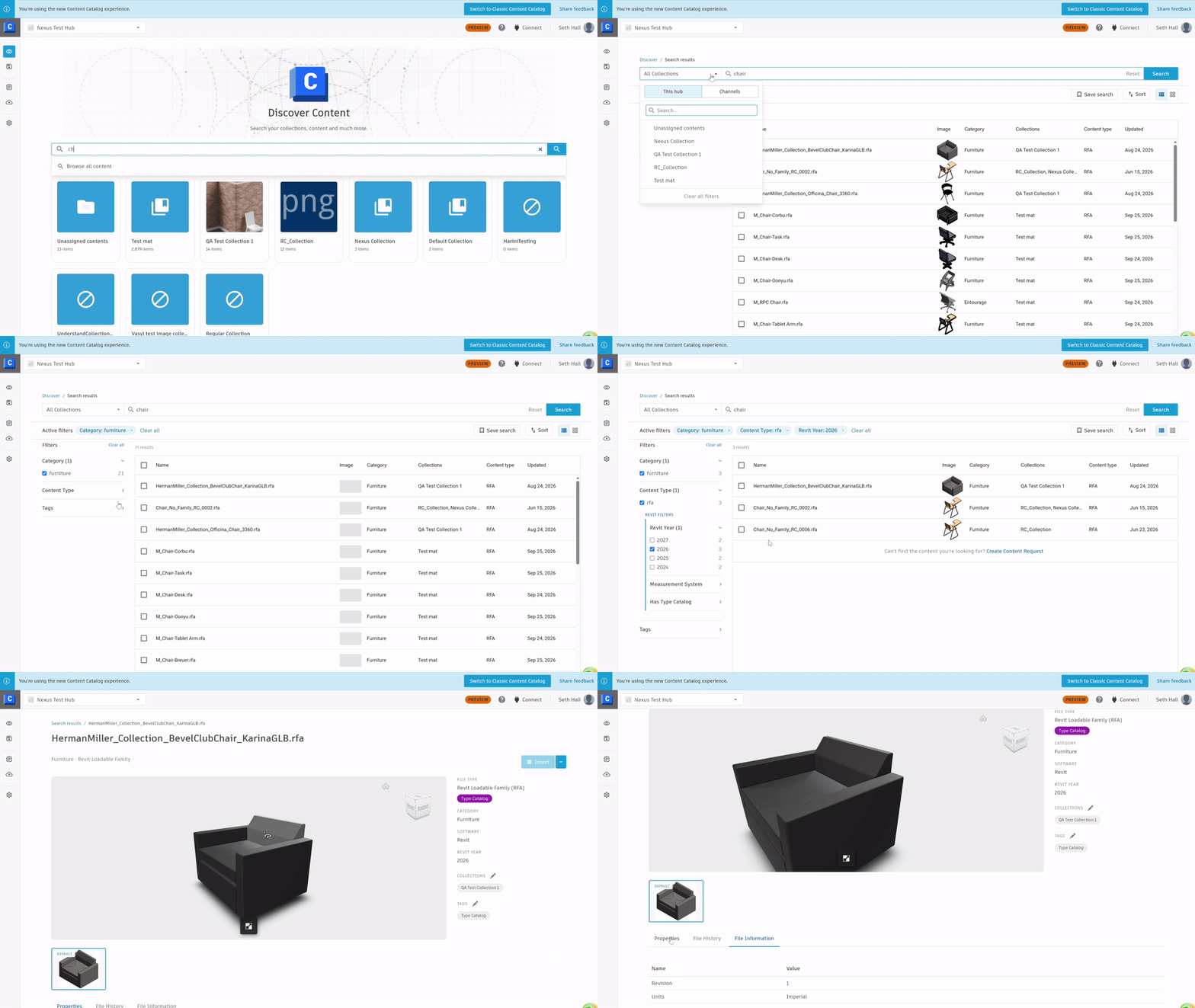
Browsing available content and searching for specific components are often part of the same workflow. But switching between separate experiences can add unnecessary steps and make content discovery more complicated than it needs to be.
The content discovery page in the new Content Catalog experience brings browsing and search together into one unified discovery experience, making it easier to explore available content and find what you need.
Powered by cloud search technology, this consolidated approach offers a cleaner, simpler way to discover content while establishing a more scalable foundation for future search enhancements.
For BIM managers and project teams, that means less time navigating content libraries and more time putting existing content to work.
Simplify content access with more flexible permissions
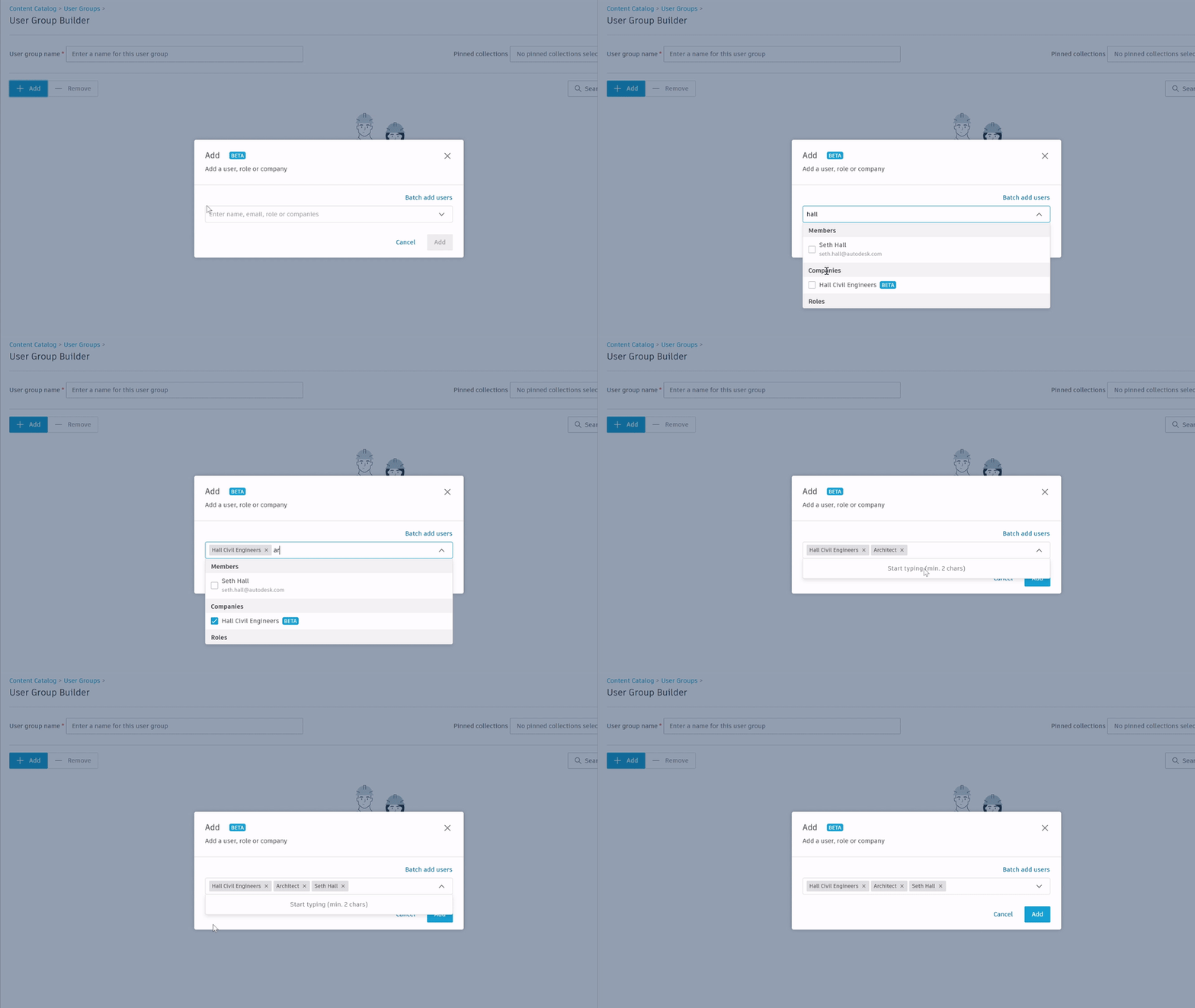
As teams grow and change, managing access to shared content can become an ongoing administrative task. Adding or removing permissions one user at a time takes time, especially across larger organizations.
With the new experience, Content Catalog administrators can assign permissions using existing Forma Data Management Roles or Companies, rather than managing every user’s access individually.
This makes it easier to:
- Reduce administrative work by managing permissions through existing roles and company memberships.
- Keep access aligned as teams change without needing to update every user’s permissions individually.
- Support more scalable content management as organizations and their libraries grow.
The result is a more manageable approach to content governance that helps you maintain appropriate access to shared content.
Save time with personal saved searches
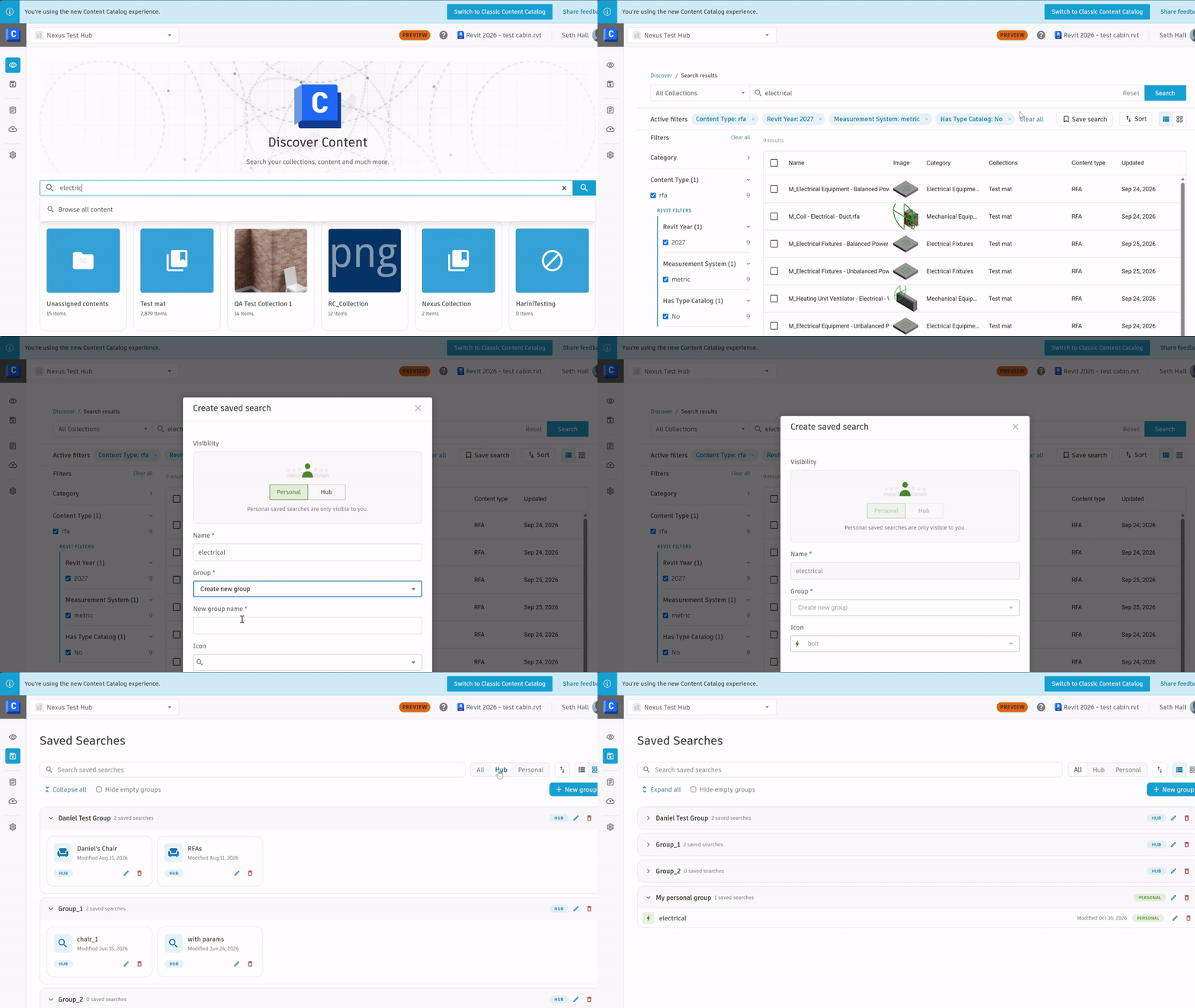
Many AEC professionals return to the same types of content throughout their work. Whether searching for specific components or frequently used collections, rebuilding the same search criteria over and over adds unnecessary steps.
The new Personal Saved Searches capability lets users save their own searches and quickly search the content most relevant to their work. Users can organize saved searches into groups and return to them with their search filters already applied, making it easier to pick up where they left off.
These searches are private to each individual user, while administrators can continue creating Hub-wide Saved Searches for broader team needs. The updated experience also makes it easier to distinguish between personal and Hub-wide searches, with clear labels and filtering options to help users find and manage their saved searches.
This gives users a more personalized way to navigate their content libraries, reducing repetitive searching and making frequently used content easier to access.
Explore the new Content Catalog experience
Ready to see what’s new?
The public tech preview gives you an opportunity to explore these improvements while continuing to use the classic Content Catalog experience.
Here’s how to get started:
1.) Enable: Your Content Catalog Hub administrator must first enable the new experience through the Forma Data Management Library.
a.) Hub administrators can enable the preview by navigating to Forma > Library > Content Catalog and selecting Enable Tech Preview from the banner.
2.) Access: Once enabled and your Hub’s content is ready, all users can open Content Catalog and select the new experience.
3.) Explore: During the tech preview, users can switch between the classic and new Content Catalog experiences as they become familiar with the updates. Content will sync between the classic and new experiences, so you won’t lose anything by switching.
Help shape the future of Content Catalog
Managing BIM content effectively takes more than a central library. Teams need to be able to find the right content, manage access, and reuse trusted assets without adding unnecessary complexity to their workflows.
The new Content Catalog experience is another step toward making that easier.
As we continue refining the experience, your feedback will help shape what comes next. Explore the public tech preview, see how the updates work for your team, and share your feedback with us.