 Cesar Escalante

Revit 2027.3 and 2027.4 pack in new enhancements and capabilities that remove friction from everyday work and improve your design outcomes. Revit now brings more site context and performance analysis into the model, so decisions about daylight, carbon, and the surrounding site happen while the design is still flexible. Automation no longer depends on the one person on your team who can script because Autodesk Assistant is now powered by DynamoMCP helping you build or debug a graph from your prompt. Everyday documentation and coordination tasks also take fewer steps, from adjusting annotation in crowded views to checking clashes across teams. Let’s take a look.
Note: Tags show where each update ships: (.3) Revit 2027.3, (.4) Revit 2027.4, or (cloud) for services on their own schedule.
Automation you direct in plain language
Autodesk Assistant updates
Autodesk Assistant innovation in Revit is no longer tied to Revit point releases. Since 2027.2, targeted updates have been delivered automatically as soon as they’re ready, with extended management controls planned. Recent highlights:
- Schedule editing: Remove schedule filters, grouping, and sorting with a single request.
- Graphics and visibility: Change element graphic overrides and show, hide, or adjust view detail in natural language.
- Clearer guidance: Get an explanation and next steps when a request can’t be completed, in a palette with timestamped responses and a table of contents for conversations.
- Safer edits: Coloring, tagging, and schedule filtering behave more consistently, and checks prevent unintended model-wide family changes.
- Traceability: Runs are logged in the Revit journal, AI-driven changes are labeled in the Undo menu, and a Stop button lets you interrupt a request.
Revit and Dynamo Public MCP Servers (.3 and .4)
Revit Public MCP Server add-ons, available as a Technical Preview, connect AI clients such as Claude Desktop or Cursor to Revit, with Read, Write, and Experimental extensions for querying, reporting on, and modifying your model. In Revit 2027.3, Dynamo 4.2.1 adds the DynamoMCP Tech Preview, a built-in MCP server that lets one conversation in the Assistant panel cover both your model and your Dynamo graph.
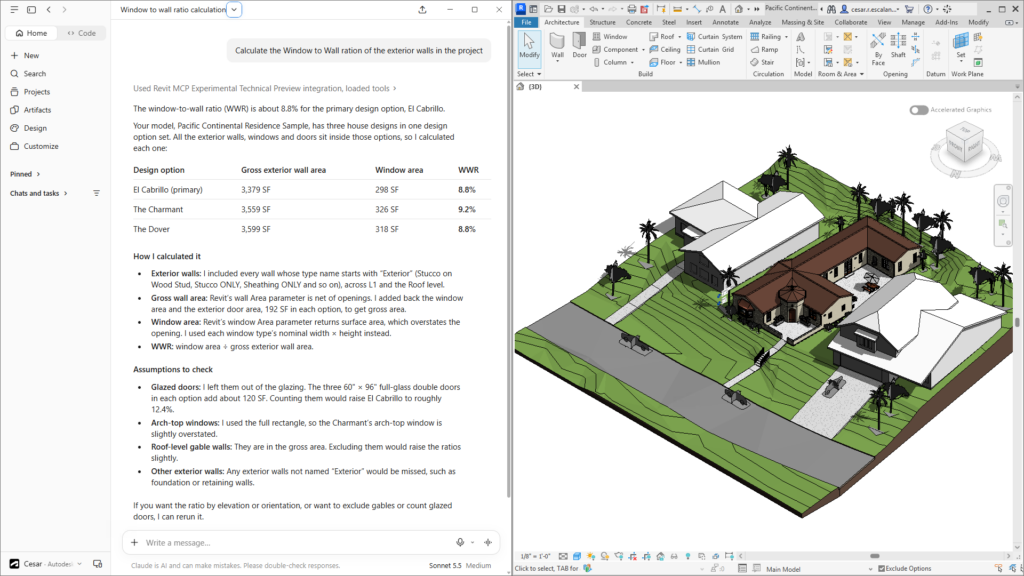
Launch Dynamo, ask for something like “Create a Dynamo graph that finds every door without a fire rating and list them by level,” and the Assistant panel in Revit searches for the right nodes, places and wires them, runs the graph, and groups the result under a sensible name. Learn more about DynamoMCP in the Dynamo Primer.
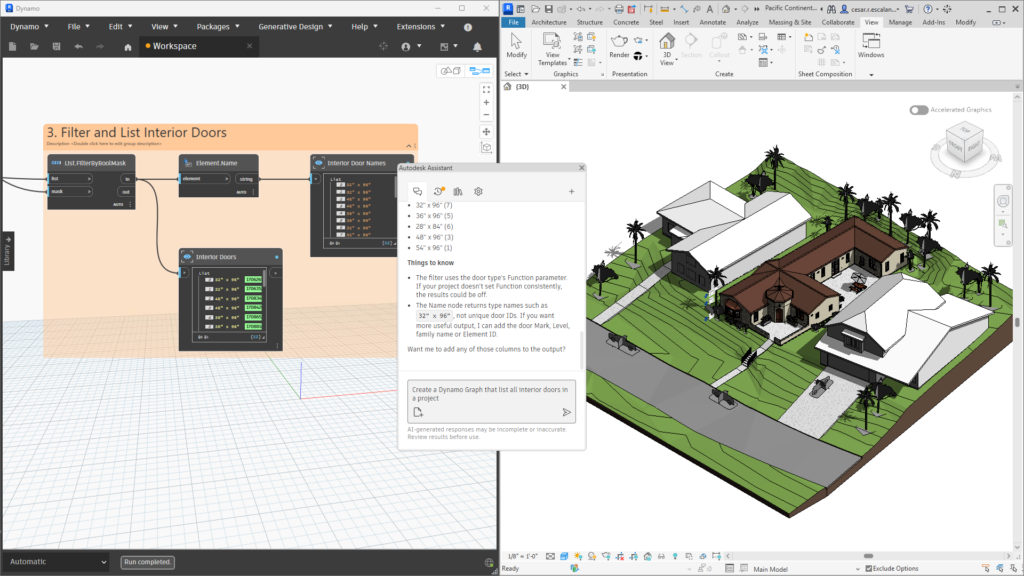
Revit 2027.4 brings Dynamo 4.2.2 (Release Notes), which speeds up graph building in Assistant by running the graph once per batch of edits instead of once per edit. New DynamoMCP tools let Assistant read node values, switch run modes, export screenshots, find nodes, group and collapse nodes, cancel runs, and read Dynamo log lines. Graphs saved through Assistant now keep their node positions, groups, notes, and renamed nodes.
Revit as Forma Connected Client Updates (Tech Preview)
Introduced at global launch this year, Revit 2027 became the first Forma Connected Client (Tech Preview), integrating desktop applications with Forma cloud workflows. Connect your cloud model to a Forma to access contextual data, run Forma environmental analyses, and move data between Revit and Forma design tools without exporting files. Latest highlights:
Improved Draft Geolocation (.3)
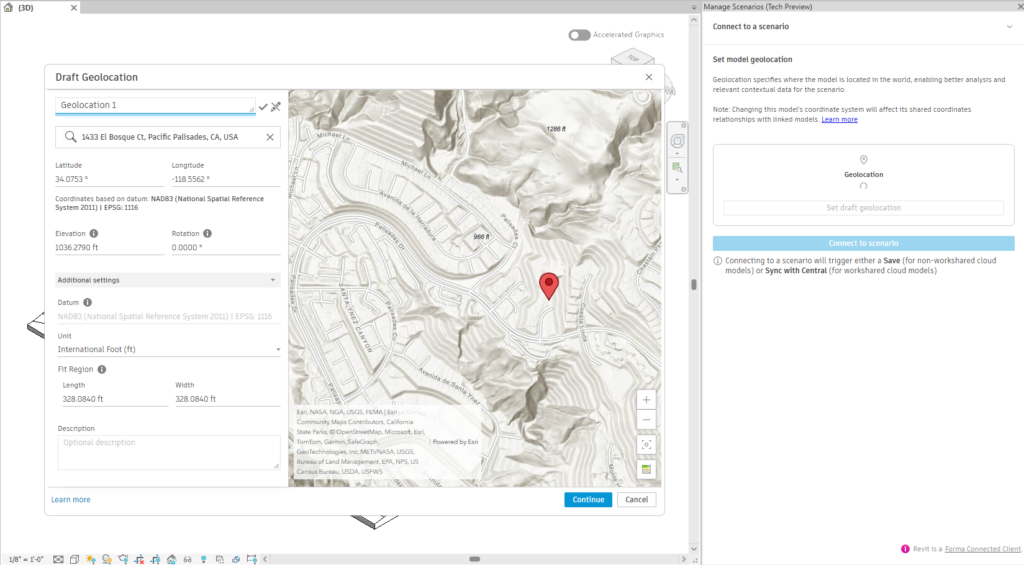
No matter which tool a project starts in, its location should travel with the model, not get retranslated at every handoff. When you create a new Forma site in Revit without advanced surveyed data, Draft Geolocation is the first step. Enter an address or pick a point on the map, and Revit creates a custom coordinate reference system that becomes the model’s shared coordinates, saving the point’s latitude, longitude, and elevation to the Survey Point.
Forma Roads in Revit (.3)
Roads join the list of contextual data you can order from the Forma Data Marketplace. Road lines load in Revit as a coordination model that follows the topography, giving you a real-world reference for setbacks, frontage, access, and circulation.
Create Elements from Forma contextual data (.4)
Until now, converting contextual data meant importing an entire scenario dataset, and nobody needs four city blocks of editable terrain to design one lobby. Now you can bring in just the pieces your design needs. Select a terrain, building, parcel, or road coordination model, then use Sketch Area, Select Items, from the Create from Selection panel to convert only the items or areas you need. The rest stays visible as reference.
Forma Daylight Potential Analysis (.4)
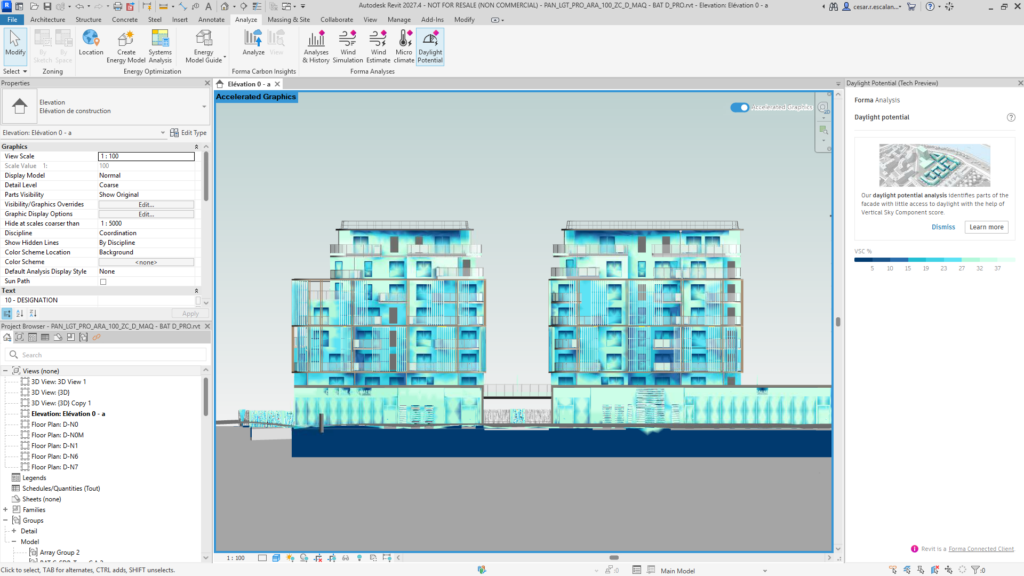
Daylight Potential analysis now runs in Revit alongside the wind and microclimate analyses, estimating how much diffuse skylight reaches each point of the façade. Results appear as a color-coded heatmap on the building shell. Update the analysis after each model change to see how it affects daylight on the façade.
Core enhancements
Coordination Models and Forma analysis in Accelerated Views (.3 and .4)
Accelerated Graphics, fully supported since Revit 2027, now displays local and cloud coordination models and Forma Connected Client geometry and analysis results. Microclimate Analysis, Daylight Potential, and Wind Estimate show up right in the Revit canvas as crisp colored heatmaps.
Isolate Annotations (.3)
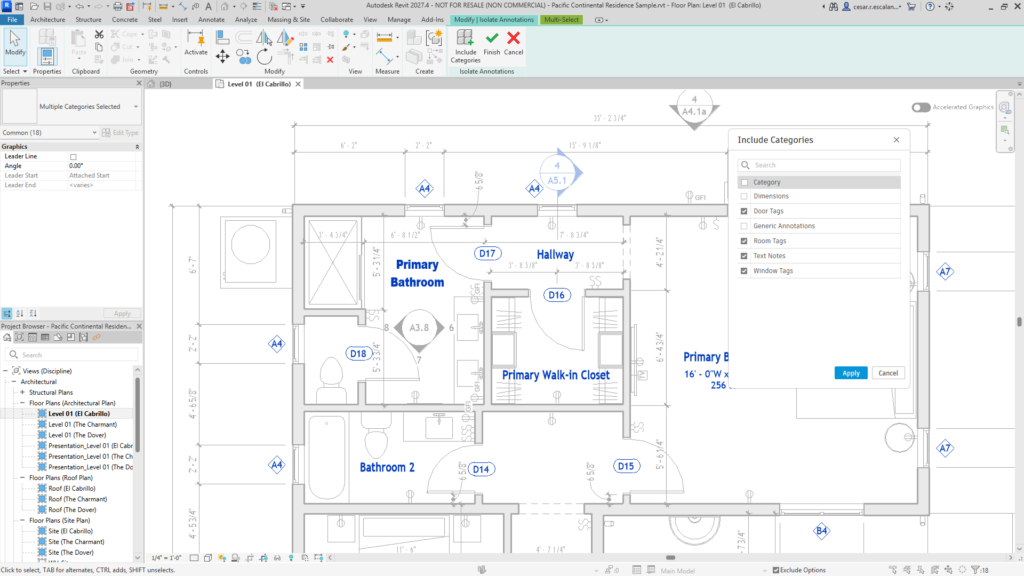
If you’ve ever tried to nudge a tag and grabbed the wall behind it, again, this community idea is for you. Following Tag by Example and View Title Snapping in 2027.2, Isolate Annotations on the Annotate tab brings annotation to the foreground, while model elements step back to halftone and stay out of your selection. You can isolate all annotations in the view or start with just a selection. Use Include Categories to choose which annotation categories you can edit.
Save as Cloud Model (.4)
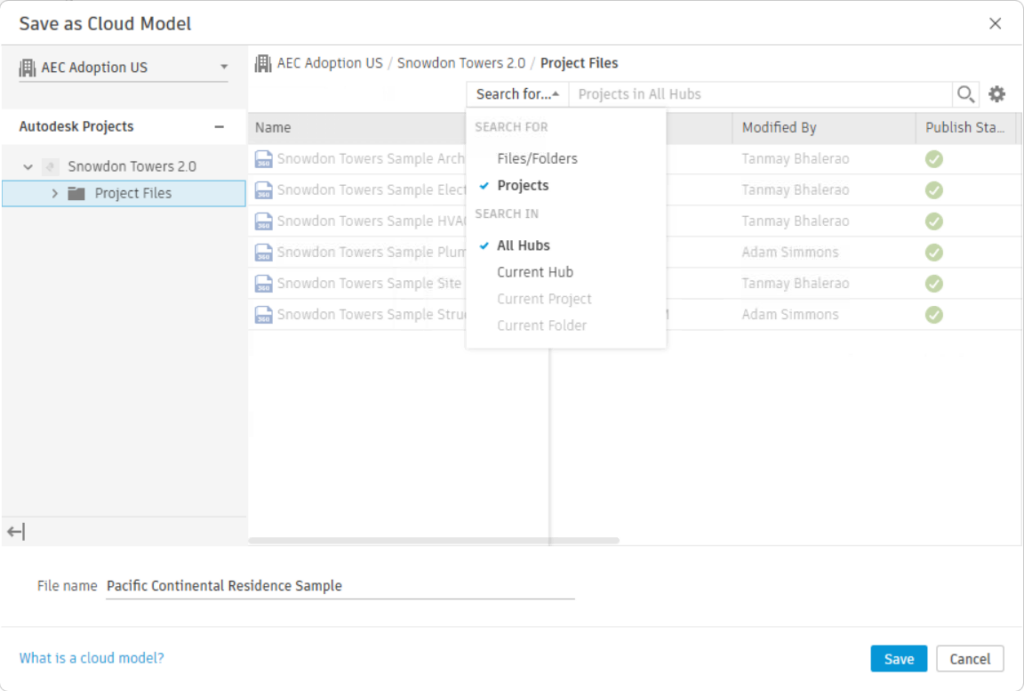
The Save as Cloud Model dialog opens faster, matches Revit Home, supports the dark theme, and remembers your last file path. Seach hubs, projects, and files.
Forma Carbon Insights updates (cloud)
Forma Carbon Insights shares an integrated carbon analysis service across Forma apps and Revit. The embodied carbon analysis in Revit now accounts for more Revit elements, including:
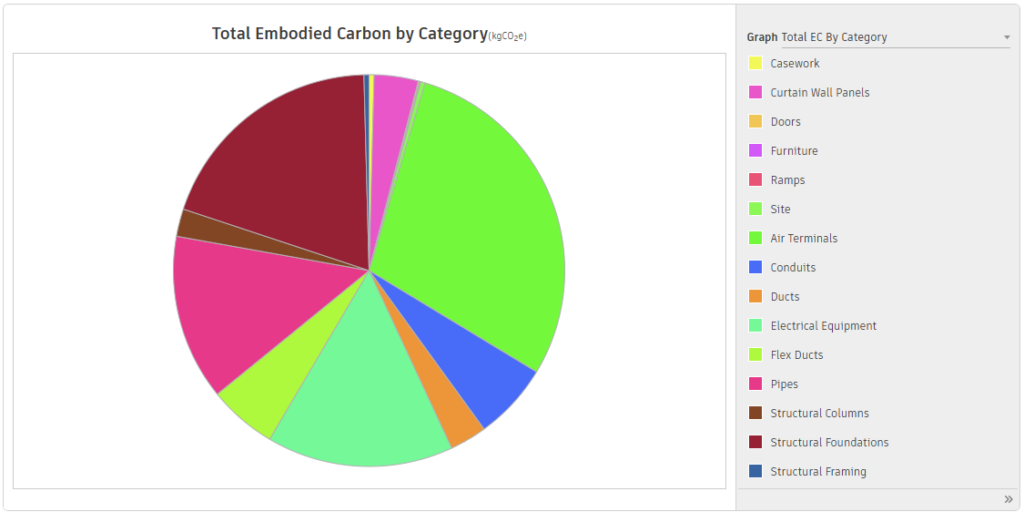
- Architectural categories such as curtain walls, windows, doors, stairs, railings, casework, furniture, topography, and planting, and more.
- MEP categories including mechanical equipment, ducts, pipes, cable trays, conduits, lighting fixtures, and sprinklers.
- HVAC and hot water system factors: Compare operational strategies without editing the Revit model, with new outputs for hot water energy use and water consumption.
- Expanded building lifespan factors: In addition to the existing values, choose from new 50-, 60-, and 100-year options.
- Improved analysis workflow for workshared projects: The enhanced workflow now reloads the latest changes, syncs with central, and regenerates the Energy Analytical Model, so the model you submit reflects the latest version.
Additional updates
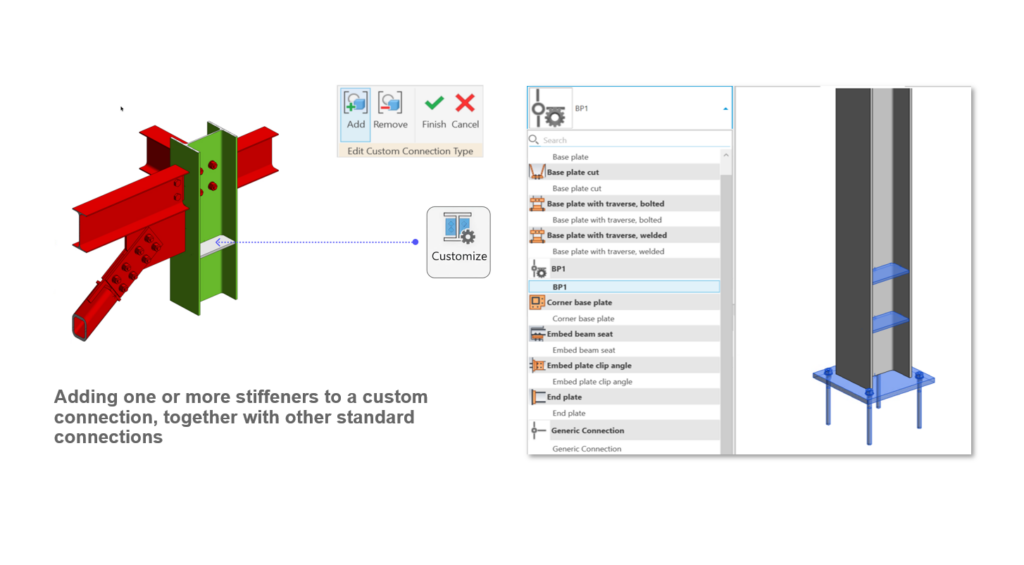
- Stiffeners in custom connections (.3): Add one or more stiffeners to a custom steel connection together with other standard connections, so the whole condition travels as a single reusable connection type.
- Data Exchanges in Model Coordination (cloud): Since August 2026, Model Coordination supports Data Exchanges, which carry granular geometry and properties fromRevit, Inventor, IFC, Tekla Structures, Rhino and moreinto 3D coordination workflows, alongside more than 50 file formats. Data Exchanges created from Revit and Inventor can be included in automatic clash detection, and clash issues keep their history as exchanges update.
- IFC Help updates (.4): Revit Help for IFC now consolidates guidance from Help topics, Product Support articles, and the Autodesk IFC manual in one place.
Get started
Check the links for full documentation on Revit 2027.3 and Revit 2027.4. To see what is coming next, visit the Autodesk AEC Public Roadmap.
Get started with Revit 2027 through the Autodesk Access application on your desktop or your Autodesk Account page.
Happy Revit-ing!