Pawel Piechnik
On a typical building project, each discipline-specific design team works in its own Revit model. Architects, structural engineers, and MEP teams all need to see each other’s work—but they rarely need to open or edit each other’s files. The hard part is staying aligned: knowing which version of another team’s model to trust, and spotting what has changed since last week.
Coordination Models are lightweight references tracking model changes and keeping multidisciplinary teams aligned while authoring
Revit-linked Cloud Coordination Models from Forma Data Management address that gap. A team publishes a named package to the cloud; other teams link it into Revit as read-only background. You reference the version published for coordination—not a work-in-progress model. You can navigate, measure, and check clearances against issued geometry without importing another firm’s full editable model.
The coordination problem
Projects fall out of sync for simple reasons. Teams work on different schedules. Files may get emailed, re-saved locally, or re-linked without a clear record of which version is current. Clash reviews and on-screen references can point at different packages—even when everyone thinks they are looking at the same issue.
Contracts also matter. Many firms cannot share editable native models across contracted boundaries. They coordinate from published handoffs instead—and those handoffs must be the same artifact loaded in Revit for coordination, not informal copies or screenshots.
A better way to reference other disciplines
A read-only cloud reference fits that reality: see another party’s issued geometry and coordination parameters without taking ownership of their model, families, or authoring know-how. The workflow described here is realizing coordination paradigms as defined by ISO19650 primarily for the “Shared” model states.
In Revit, a Cloud Coordination Model is read-only coordination geometry linked from content published on Forma Data Management. It is not a host link, and it does not grant edit access to another firm’s elements.
The workflow replaces disconnected copies and informal exchanges with a more controlled, connected coordination process enabled through Forma: one team shares or publishes a named package to the cloud; other teams link it into Revit as background reference. You reference the version issued for coordination—bringing trusted, current project information into your authoring environment without importing every trade’s full model. Supported sources and capabilities depend on your Revit release; check product documentation for your deployment.
What is a Cloud Coordination Model?
In Revit, a Cloud Coordination Model is read-only coordination geometry linked from most of the model content and data/file types in Forma Data Management. Key advantages include:
- Live referencing —Work in Revit while the link points to content shared for coordination in the cloud. When a newer package is published, your session matches the version issued for coordination.
- Named publishes — The Link targets what the transmittal names: the published coordination version—not informal local working copy.
- Fast and lightweight — Linked geometry visible in Revit for referencing is lightweight optimized for the purpose, displaying instantly.
- Versionless — No model upgrade required when linking—useful when contracts keep other firms and stakeholders on an older (or a newer!) version of Revit.
- Multi-format — Revit, IFC, Navisworks, DWG and more file and data formats —the same Manage Links habit, aligned with how other trades issue their work.
- Secure collaboration — Read-only reference to visible geometry and coordination parameters—not loaded families, templates, or authoring methodology. Helps protect IP boundaries and typical cross-firm contract limits.
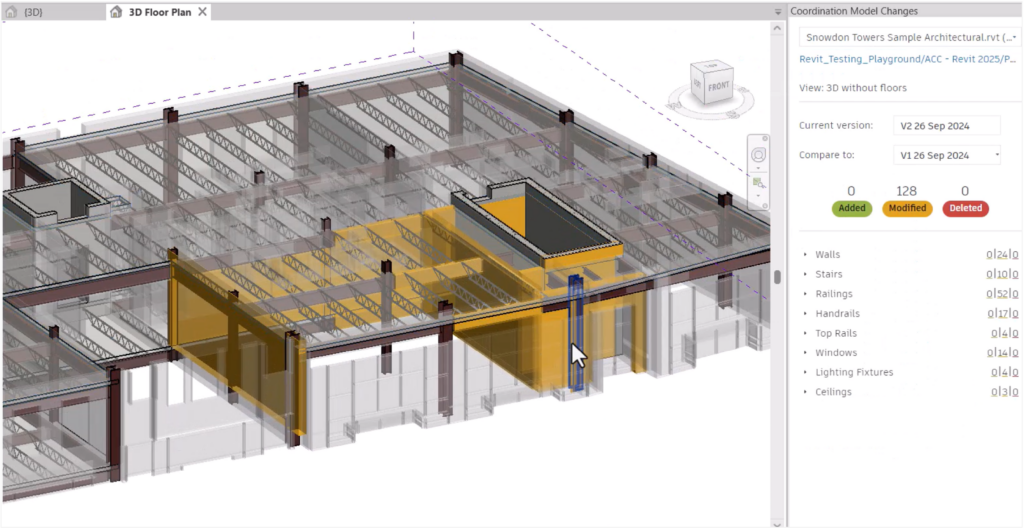
- Change awareness — Compare what other disciplines have changed for ultimate awareness supporting necessary design decisions to reconcile updates in reaction.
When to use each approach
Use a Cloud Coordination Model when you need published context as read-only background: clearance checks, alignment, on-screen reference, and coordination against the issued package.
Use a conventional host link when you must edit, schedule, or document on another trade’s native Revit elements—and when contracts and standards allow that depth of access.
How it works
Publish: One discipline publishes to Forma Data Management with a name on the transmittal—the coordination version other trades should reference. In case of Revit projects, Selected 3D Views will determine the scope of the model information shared.
Reference: In Revit, other project collaborators (another discipline, another project phase) link that publish as a Cloud Coordination Model when they need background for clearance and alignment. The link stays read-only. Manage it through Manage Links; use Visibility/Graphics and view templates so background geometry reads clearly in plans, sections, and 3D.
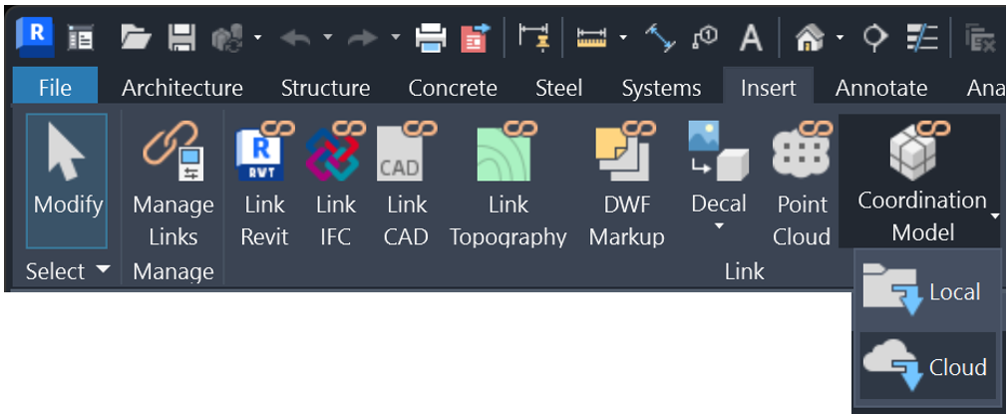
Review changes: When a newer version of the published model is created, compare tools surface what changed against the version you already reference. Review differences before your next coordination pass; report issues from Revit with the Forma Issues integration directly available in Revit 2027, or through the Forma Issues Add-In for previous Revit versions.
Update: Reload or refresh when you need updated geometry in session. Architects reference engineers’ structure or MEP; engineers reference architectural publishes in return. The same habit applies across phases: when coordinating designs with Structural Steel, Precast, or MEP fabrication trade partners and contractors.
Coordinate with Confidence
Cloud Coordination Models give Revit teams a lightweight way to reference trusted, published project information, understand changes, and stay aligned across disciplines.
Learn more about Forma Data Management, Cloud Models in Revit, and Detailed Changes for Coordination Models.