 Paola Alvarez
Construction projects generate plenty of information about equipment, materials, systems, and components. Models, drawings, forms, photos, spreadsheets, and submittals all contain details teams need as work moves through procurement, installation, quality checks, and handover. With that information spread across different sources, finding an asset’s location, status, or supporting documentation can mean searching through multiple places and piecing together the details.
That fragmentation becomes evident at the handoff from design to construction. Information created upstream can lose context before it reaches the people responsible for installing and verifying the work. A superintendent, for example, may know what equipment needs to be installed but still needs to understand where it belongs, status, and any other documentation connected to it.
The Assets tool in Forma Build helps close the gap by giving teams a connected record for each asset, bringing together the design and construction context needed to move forward. As part of Forma Build, the Assets tool helps centralize asset data tracking and visualization throughout the project lifecycle. It connects models, spreadsheets, PDFs, and field information to the assets teams are managing, helping streamline the workflow from design through construction and final handover.
What is an asset?
Simply put, an asset is an important object that needs to be tracked and managed throughout its lifecycle. Depending on the project, that could mean a motor, fan, section of ductwork, door, piece of mechanical equipment, or a larger building system. What makes it an asset is not the object type itself, but the need to track information about it as the project progresses.
For an owner, that might mean a piece of equipment they will be responsible for maintaining after handover. They need to define the equipment, systems, and components for which they need complete data, so that on day one of operations, they can begin managing those assets with confidence.
For a general contractor, an asset might need to be tracked through procurement, delivery, installation, quality checks, and turnover. Contractors need visibility into where work stands, what is complete, what is blocked, and what information is still missing.
Assets as the central container
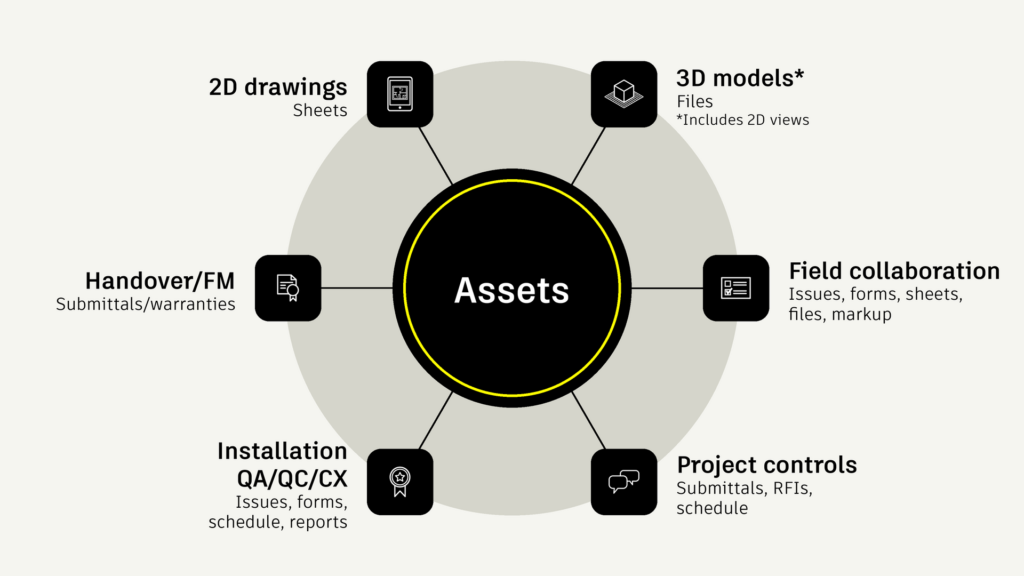
On a given project, the same asset may appear in a 3D model, 2D drawing, a progress report, a photo, an issue, a submittal, or RFIs. Superintendents and other field teams may need its installation status; commissioning teams may need inspection and verification records; owners ultimately need complete information for handover and operations.
The asset provides the persistent record that connects those different sources and workflows. A model object is not the asset. The sheet is not the asset. The spreadsheet row is not the asset. They are different representations of, or sources of information about, the same asset.
The Assets tool consolidates information so that each asset can link to models, sheets, files, and photos while existing independently of any single representation. This helps keep asset data consistent and reliable, even if model objects or record documents change, providing a lasting source of truth throughout the project.
Connecting design and construction: from model data to field action
Asset information is the data and context a team needs to understand and act on an asset. What it is, where, the current status, and everything else associated with it.
That information can be connected to models and sheets during the design phase, so teams can understand what needs to be tracked and where it lives in the project. During construction, this information moves to the field, where teams can update statuses, connect assets to forms and issues, review markups, and track progress as work is installed and verified. When the project begins commissioning and handover, the asset data collected through the project is already organized, so that owners can operate and maintain the built environment as soon as construction is complete.
The asset lifecycle is a way to keep critical information connected as the project moves from planning to building to operations.
However, it’s easy to lose or disconnect critical information when design moves to construction. Design data may exist and originate from a spreadsheet, model or drawing, but as responsibility changes, teams need to act and respond to changes quickly. They need to know what an asset is, where it is, its status, what documentation is associated with it, and what needs to happen next.
For example, a team may start with asset information connected to a model during design or coordination. During construction, field teams may need to locate that asset in the model, update its status, connect it to a form, capture photos, or flag an issue. Later, that same asset record may support commissioning and handover documentation. Data that was originally in the design model will change as the project evolves. Teams need the latest info, and need to trust they’re looking in the right spot.
The Assets tool in Forma Build bridges workflows by linking asset information in record documents and spreadsheets to where teams already work. That includes monitoring or validating information on the web, as well as field data collection and mobile field tools. Asset tracking spans the lifecycle, from requirements into operations.
However, a connected asset strategy only works if the people closest to the work can use it. For example, a superintendent is often under time pressure and does not have time to search across multiple systems, reconcile spreadsheets, or manually enter the same update in several places. For asset workflows to succeed, the field experience needs to be fast, accessible, and actionable.
The challenges in the field are why mobile access is a foundational pillar for the Assets tool. While configuration, imports, and advanced setup happen on desktop, status updates, field verification, and progress tracking comes from the people on-site. Giving field teams easy access to asset data on mobile helps connect design information and model-based workflows directly to construction execution.
That same superintendent can walk the job site and scan a QR code on a piece of equipment, open its asset record, confirm its installation status, review or complete a related form, add a photo, or flag an issue. All while staying connected to the model and sheet context behind the asset.
All these capabilities come together to make the design-to-construction bridge a reality. It is not only about connecting data in the background, but it’s about making that connected data usable in the field that helps teams move smoothly from design intent to construction execution and, ultimately, to a more complete handover.
Updates that turn asset data into action
The Assets tool continues to evolve around clear customer needs: make asset information easier to access, update, and share across project teams.
These recent updates help address everyday friction for teams already managing asset centric workflows.
Faster field updates
Field teams rarely update assets one at a time. They may be working across multiple doors, pieces of equipment, systems, or components in the same area. Previously, updating assets one by one could slow progress and lead to repetitive work.
Multi-select assets on mobile is designed to make that process faster. On a mobile device, teams can select multiple assets in the asset list or the model. They can update several assets with a single edit and connect multiple assets to the same information at once. This capability is available from the Assets list and assets in the model.
This leads to fewer repetitive updates, faster field reporting, and a more efficient way to keep asset status current as work progresses.
Easier navigation from physical work to digital records
Asset and Systems QR Codes connect what is happening in the physical environment to the digital asset record.
Teams can automatically generate, print, and scan QR codes for assets and systems. This allows quick navigation from the asset to the digital representation. Anyone in the field can scan a code to go directly to the relevant asset or system for installation, quality, and handover.
Better review and communication
Asset information often needs to be shared outside of the live project environment. Teams may need to review status during meetings, communicate with stakeholders, or provide documentation in a familiar format.
Export Asset Markups to PDF helps support that need. Teams can take asset markups on sheets and export them to a PDF for review. The exported PDF shows asset statuses, lets teams navigate to assets, and includes issue and markup context.
For customers, this makes asset information easier to communicate in a format many project stakeholders already use. It also helps preserve important context from sheets, markups, and issues during review workflows.
The road ahead
As projects generate more information across models, documents, field updates, and handover deliverables, asset management needs to become more intelligent and less dependent on manual configuration. Assets in Forma will continue to evolve toward more guided experiences that help teams establish, connect, understand, and act on asset information with less manual effort. Over time, these workflows can help teams use asset data not only to document work, but to improve project planning and make handover a more natural output of the work already completed.
AI-supported workflows can help shift asset management from a configuration and manual tracking exercise toward a more guided, outcome-driven way of working. As with any roadmap discussion, planned development should be treated as directional and subject to change. The goal is to continue making asset data more connected, more accessible, and more actionable for the teams that rely on it.
From disconnected data to connected work
For the superintendent, that means the asset record that began in design can follow equipment through installation, inspection, commissioning, and handover. Its latest status and supporting information stay connected, so teams don’t have to piece everything together again.
Connecting the asset lifecycle goes beyond moving data downstream. Teams need information they can find, trust, and act on throughout the project. The Assets tool in Forma Build helps keep that information connected to the people and work that depend on it.
Explore how Assets in Forma helps teams connect asset data from design through construction and handover.
Managing more complex asset information requirements? Learn how Autodesk Datum helps teams stay in control of asset data across multiple stakeholders, standards, and changing project requirements.