 Tim Yarris
 John Sayre
 Shiyamdev Sritharan
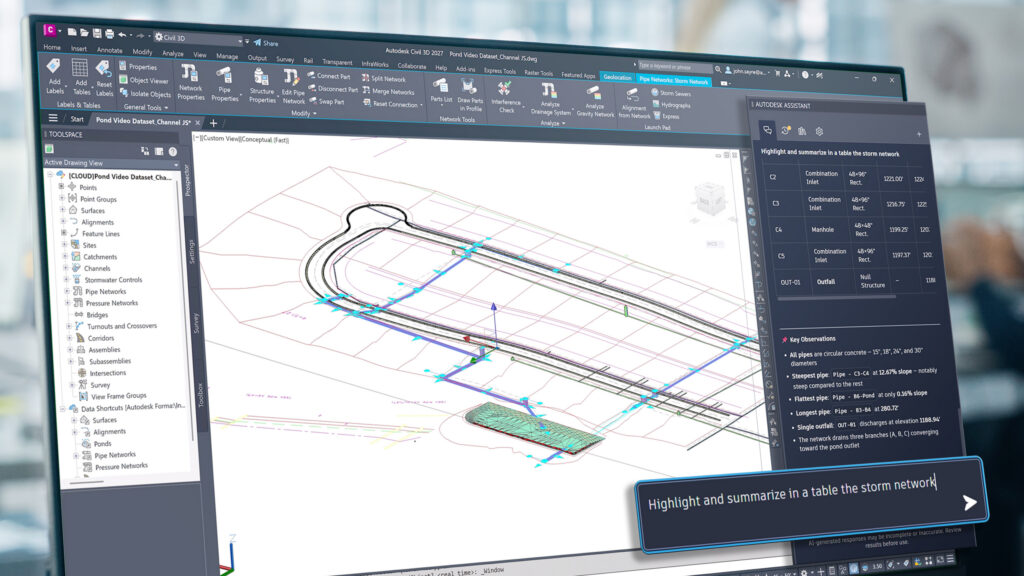
Autodesk Civil 3D 2027.1 introduces new and improved updates designed to help you work more efficiently with your design and project data. This release expands the Autodesk Assistant, extends Connected References for Data Shortcuts for teams using Forma Design Collaboration, adds new capabilities for drainage analysis, and more.
Autodesk Assistant
Introduced in Civil 3D 2027, the Autodesk Assistant continues to expand how you can use natural-language prompts to interact with and query your drawings.
With the Civil 3D 2027.1 update, Assistant is now open by default and features an introductory video with updated starter prompts. Assistant provides you with personalized insights and learning content based on your actions in Civil 3D.
Improvements also include how Assistant counts and analyzes objects in your drawing. You can reliably query a wider range of object types which now include drainage objects (such as catchments, channels, ponds, underground storage), profile and section views, block attributes, along with layer properties and settings. And with added ability to use selections to define context in your prompts, Assistant can provide focused, selection-aware analysis results when generating responses.
A common workflow with Autodesk Assistant is to generate reports within the conversational interface to review and summarize drawing information without leaving Civil 3D. With the 2027.1 update, Assistant-generated report values now include explicit, context-aware units that align with your source data, making results easier to interpret and verify.
For more information, see Autodesk Assistant (What’s New in 2027).
Keep data shortcut references connected
With the release of Civil 3D 2027, the External References palette introduced a new way to quickly identify and resolve missing external drawing references (xrefs) when working in Forma Data Management and Forma Data Management Essentials. With Civil 3D 2027.1, we’ve extended this workflow to Data Shortcut references (drefs), giving teams using Forma Design Collaboration a streamlined way to work with and share Civil 3D design data.
With connected references, data shortcut relationships are maintained through Forma Data Management rather than relying on local file paths. Teams can continue using familiar data shortcut workflows in Civil 3D while more consistently accessing shared project data, with less need to manage file paths to resolve disconnected references.
Expanded drainage analysis workflows
Civil 3D 2027 expanded integrated drainage design and analysis workflows, including enhancements for catchments, channels, gravity pipes, ponds, and underground storage. With Civil 3D 2027.1, drainage analysis adds support for known flows and greater control over tailwater conditions for each rainfall event being analyzed. You can also define and store elevation curves for outfall tailwater conditions and use them in your analysis.
Additional updates improve reporting, Rainfall Manager, and workflows for exporting analysis data. For more details, see Autodesk Drainage Tools for Civil 3D (What’s New in 2027)
Additional updates for Civil 3D
- API: Expanded API support for profiles, feature lines, ponds, underground storage, pressure pipes, gravity pipes, and alignments.
- Dynamo: Added new nodes for alignment types and pond mesh geometry, along with updates to Dynamo Core and Dynamo Player.
- Gravity Pipes: Added support for structure template content stored outside local ProgramData, including Forma Data Management.
- Horizontal Regression: Added quick access to Help from the Horizontal Regression Analysis tool window.
- Performance: Additional performance improvements including improved feature line selection when working with multiple GSF viewports.
Watch the webinar
See the new updates in action in our recent webinar to see firsthand how some of these new capabilities can be applied to your civil infrastructure projects.
Get started
To learn about the updates in Civil 3D 2027 and recent releases, visit:
To access the latest features, open Autodesk Access on your desktop or visit the Autodesk Account center. If you’re not yet a subscriber, you can explore Civil 3D with a free trial.