 Irvin Hayes Jr.
Every Autodesk Vault release is about helping engineering teams do their best work, but Vault 2027 takes a meaningful step forward.
Optimize Data Management with Autodesk Vault
Secure, organize, and manage your engineering data efficiently.
This release focuses on one clear goal: removing friction from everyday engineering data management while keeping Vault as the trusted system of record. The result is a product that feels more intelligent, more connected, and more enterprise-ready without asking teams to rethink how they already work.
Autodesk Vault 2027 is built around three core themes that consistently appear across the release: Workflow Efficiency, Collaboration, and Connectivity. Let’s take a closer look at what’s new and why it matters.
Autodesk Vault 2027 highlights
Workflow efficiency: Less overhead, more momentum
Engineering teams spend too much time searching for information, answering routine questions, and performing repetitive tasks. Vault 2027 directly targets that overhead, starting with one of the most significant additions to the platform yet.
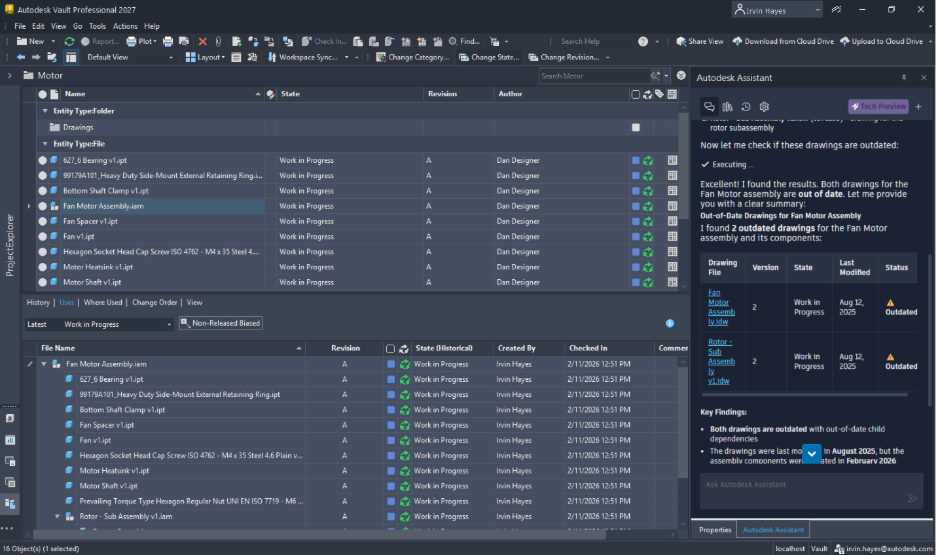
Meet Autodesk Assistant in Vault
One of the biggest highlights of Vault 2027 is Autodesk Assistant in Vault, an AI-powered assistant within the Vault experience. It brings natural language interaction to data management so users can search, get help, automate tasks, and gain insights without leaving Vault.
Instead of navigating complex menus or external documentation, users can simply ask questions like:
- “How do I use Copy Design in Vault?”
- “What are the steps to a lifecycle state change?”
- “How do I manage user permissions?”
Autodesk Assistant delivers in-context guidance, reducing training time, speeding up onboarding, and helping users confidently take advantage of Vault’s full capabilities.
Faster search and deeper data insight using natural language
Autodesk Assistant also transforms how users find and understand their data. Users can ask natural language questions such as:
- “Show me outdated drawings in the Current Projects folder.”
- “Are there any drawings that need to be updated?”
For advanced scenarios, Vault supports complex queries using regular expressions (RegEx), enabling teams to quickly identify data compliance issues and generate detailed reports without writing scripts or building filters. This dramatically speeds up discovery, especially in large vaults.
Automating everyday tasks with Autodesk Assistant
Beyond search and help, Autodesk Assistant can automate common tasks without manual UI steps. Users can issue commands like:
- “Update all outdated drawings in this project.”
- “Create Items for this assembly and associated files.”
- “Synchronize the Motor assembly Item to Fusion Manage.”
By reducing repetitive clicks and manual workflows, Vault 2027 with Autodesk Assistant saves time and helps minimize errors, especially in high-volume environments.
Autodesk Assistant in Vault is currently available as a technology preview. Capabilities will continue to evolve over time based on user feedback and ongoing development.
For more information, see Autodesk Assistant in Vault
Core workflow improvements that add up
AI may be the headline, but Autodesk Vault 2027 also delivers a long list of practical workflow enhancements that improve day-to-day productivity.
Smarter copy design
Copy Design is a foundational workflow, and Vault 2027 improves it by enabling users to edit specific properties during the process. Multiple properties can be updated at once, including copyandpaste from Excel, ensuring new designs start clean and accurate from the beginning.
Automatic PDF attachment to items
Vault now automatically attaches Vault-generated PDFs during the Assign or Update Item process, just like DWG and IDW files. This removes manual steps, prevents missing documentation, and ensures downstream teams always receive a complete data package.
Better visibility and faster navigation
Autodesk Vault 2027 introduces several usability enhancements that reduce clicks and improve clarity:
- Higherresolution, resizable thumbnails make it easier to distinguish similar models without opening each file.
- Copy and paste property values now copies only selected values—no headers or labels, making data sharing cleaner and faster.
- Multi-select open allows users to open multiple files at once, even with different extensions, using a single action.
- Keyboard navigation enhancements, including a new Ctrl+Shift+F shortcut, help power users move quickly through large data sets.
Collaboration: Making Vault easier for everyone
Vault is used by more than just CAD authors, and Vault 2027 continues to improve collaboration across roles.
In the Thin Client, the Property panel is now resizable and persistent, making it easier to review long values without hovering and ensuring the interface remembers user preferences. Combined with improved caching, reviewing data is faster and less frustrating.
Vault Viewer also gets a boost, with improved navigation for multi-sheet drawings. Users can navigate sheets quickly during reviews, reducing repetitive clicks and improving productivity.
Connectivity: Strengthening the digital thread
Autodesk Vault 2027 continues to strengthen connectivity between on-premises PDM and cloud product lifecycle management (PLM).
Vault Connector enhancements
The Vault Connector bridges Vault Professional PDM with Autodesk Fusion Manage PLM without third-party middleware. It supports automated Item and BOM synchronization, attachment handling, and property mapping, keeping engineering data connected across systems.
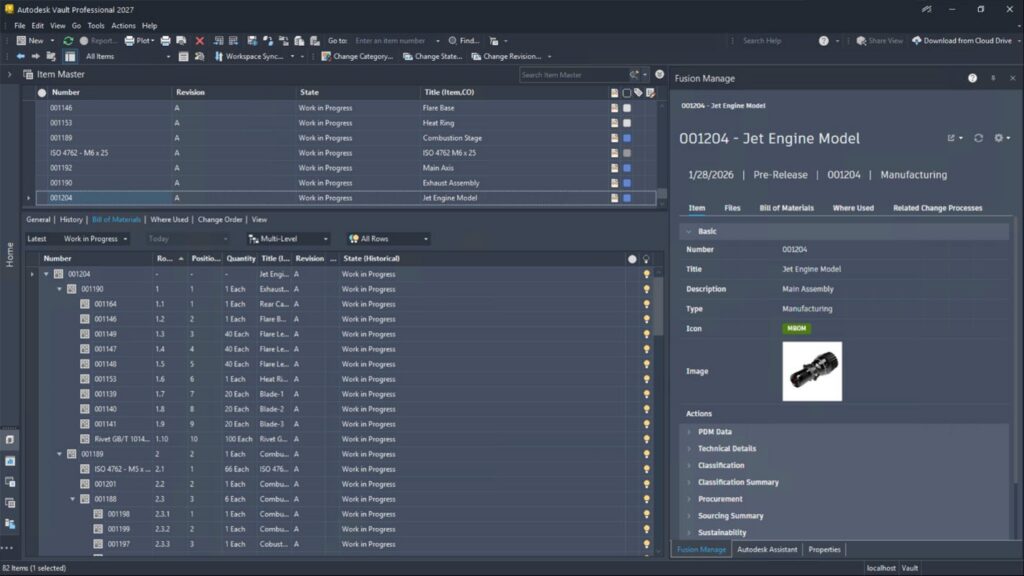
New capabilities include:
- Viewing synced Item and Change details directly in Vault
- Syncing lifecycle state updates from Fusion Manage back to Vault
- Configuring which file types are synced as attachments
- Mapping primary file properties for richer Item data in Fusion Manage
Enterprise ready security
Vault 2027 also delivers important security enhancements for regulated and security-conscious organizations, including:
- Support for FIPS 1402 mode
- Encrypted SQL communication
- Encryption of data at rest in SQL Server databases
Built with the community
Autodesk Vault continues to evolve with direct user input. Through Vault Ideas, the Vault Forum, and feedback programs, customer voices directly influence the product roadmap. Vault 2027 reflects essential customer collaboration and much more.
Ready to Explore Autodesk Vault 2027?
Whether you’re new to Vault or a long-time customer, Vault 2027 is designed to help you work faster, collaborate more effectively, and stay confident that your data is secure and connected—without changing the workflows you rely on every day.
For more information, see What’s New in Vault 2027