 markuscueva
Fusion Operations introduces a Customizable User Roles feature to enhance control over data access and editing permissions, aligning system access with organizational roles and workflows.
If you’re already using Fusion Operations to track and schedule your production processes, you know the value it adds to your daily operations. That means a lot of data, often more than a single user needs to see in their specific role. The new Customizable User Roles feature is ideal for providing that extra control to adjust what data each user can see and edit.
With this new enhancement, you can tailor which data each user has access to so they have exactly what they need. Whether it’s edit, view, or none, you have the power to set permissions that fit your organizational needs and ensure the right people have the appropriate level of access.
This capability also makes the system match with your actual workflows, giving you the ability to create the different job titles you have in your company and associate them with your users (along with corresponding permissions). The ability to customize roles will also increase confidence in your data, since users will be unable to accidentally change something that could impact a different part of the system.
Start using this feature today to maximize productivity and security within your team!
How can I use this feature in Fusion Operations?
Under Users, you can now find a new “Roles” menu, in which you can both create a new role in your company, or edit an existing one.
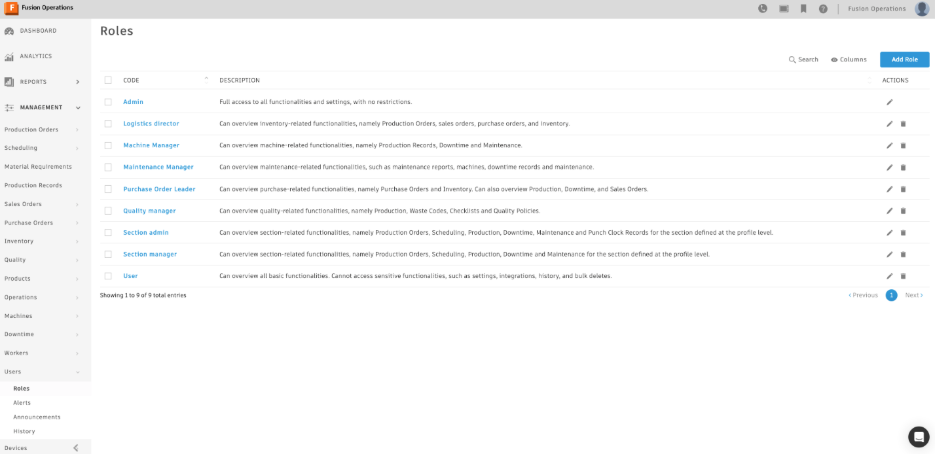
After clicking “Add Role”, you are prompted with a table in which you can set the level of permissions for each category:
- None: the user has no view or edit access to the entity
- View: the user has read-only access to view entities and cannot make any changes or create new ones
- Edit: the user has access to edit the entity, and can edit and delete them, as well as create new ones.
- Authenticate: only applicable to devices, this permission gives users access to the authentication flow for new devices, as well as access to create, edit and delete them.
- Approve: only applicable to Purchase Orders and Maintenance Orders, this permission gives users permission to approve these entities, as well as access to create, edit, and delete them.
After defining the permissions for that specific user, you can save the role and assign it to the users for which those permissions should apply.
The navigation and options they see will respect the permissions defined for their role:
What else is new in Fusion Operations?
In addition to Customizable User Roles, here’s are some other recent updates in Fusion Operations:
- New filters pinning and unpinning, to ensure those always stay exposed and therefore save your time searching and selecting them.
- New recommended actions screen, designed to promote better management of the Production Orders you have visible for workers in the mobile app.
- New operations cycle times and quantity ratios API endpoints, to ensure you can create new expected durations for your operations without affecting historical data.
- New option to associate an existing worker to a user, which will be associated to your Admin licenses instead of Shop Floor.
Take advantage of Customizable User Roles to put the right tools in the right hands and keep your manufacturing processes running smoothly and securely.